
When I install anything on portainer it shows as if it is running but when I go to the url it does not open this is on windows but when I was using ubuntu this wasnt the case, can anyone help me?
Which WSL distro did you install?
How did you install Docker?
How did you install Portainer?
What's a specific example of a container that you can't access?
Why do you keep creating new usernames on this forum?
well I installed wsl by running wsl --install
I installed docker by downloading and installing docker desktop from here https://www.docker.com/products/docker-desktop/
I installed portainer by following these steps Install Portainer CE with Docker on WSL / Docker Desktop | Portainer Documentation
An example of a container that I cant access is the fubo vlc bridge container, when I install it through the cmd I can access it but when I install it through portainer because I have more than one fubo source that I want to use I cannot access it but again it applies for every container that I install in portainer
Im sorry about creating new user names I just really needed the help
When you install multiple versions of the same container there are a number of values you need to change. Are the projects you're trying to spin-up through Portainer deploying without error? Can you post a Portainer screenshot the shows the vlc-bridge-fubo container running?
When I did it on ubuntu with the same values it worked but with windows it doesnt I basically changed everything except the name of the image.
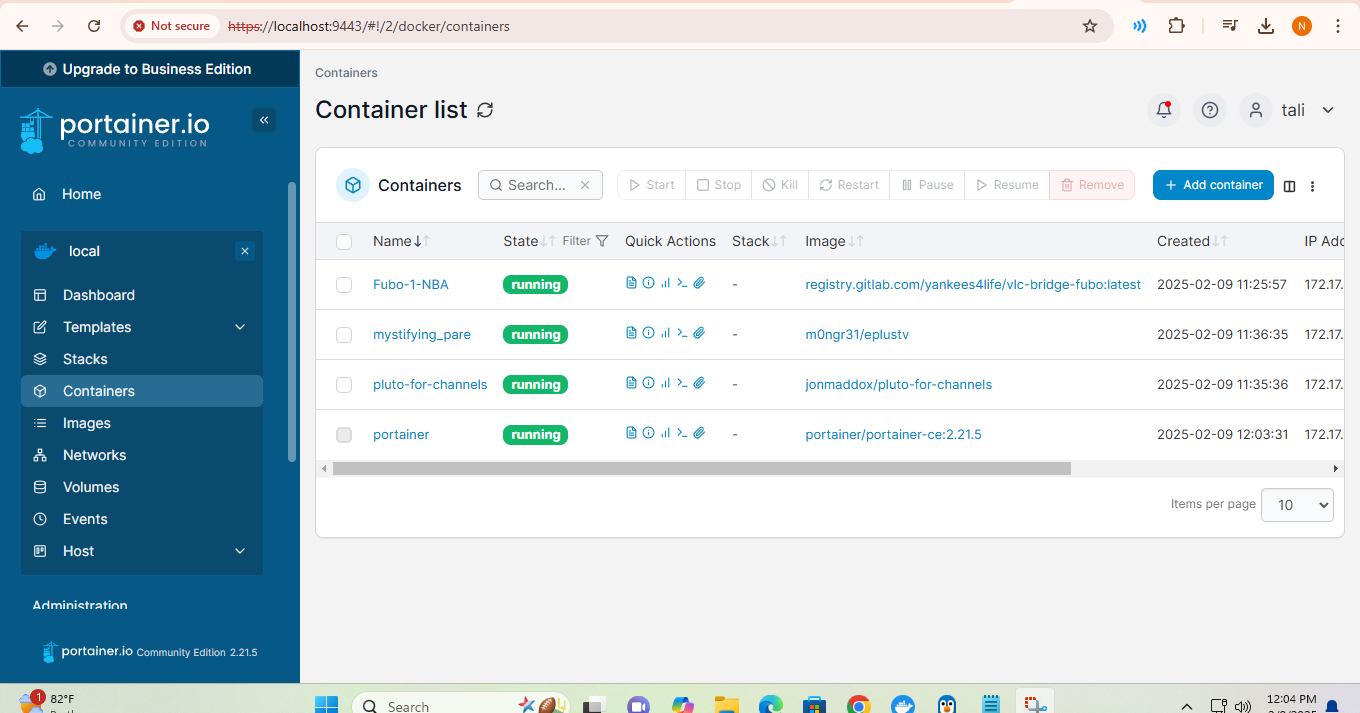
1 Like
Though the Docker Composes posted here generally don't need to be modified, other than the env vars -- when you want to deploy multiple containers based on the same project you do. In the case of vlc-bridge-fubo, append a "2" to the container name:
For example:
version: '3.9'
services:
  vlc-bridge-fubo:
    image: registry.gitlab.com/yankees4life/vlc-bridge-fubo:${TAG}
    container_name: vlc-bridge-fubo2
    ports:
      - ${HOST_PORT}:7777 # Use the same port number the container is using, or optionally change it if the port is already in use on your host
    environment:
      - FUBO_USER=${FUBO_USER}
      - FUBO_PASS=${FUBO_PASS}
    volumes:
      - vlc-bridge-fubo:/app/Config
    restart: unless-stopped
volumes:
  vlc-bridge-fubo:
    name: ${HOST_VOLUME} # This project will store its data in /var/lib/docker/volumes/${HOST_VOLUME}. <project-name_config> is a good name choice.

  # Default Environment variables can be found below under stderr -- copy and paste into Portainer-Stacks Environment variables section in Advanced mode
And sample env vars, with HOST_PORT and HOST_VOLUME modified:
TAG=latest
HOST_PORT=7778
FUBO_USER=<yourfubousername>
FUBO_PASS=<yourfubopassword>
HOST_VOLUME=vlc-bridge-fubo_config2
Also, if you could scroll this list of containers over so I can see all the way to the right and post that screenshot.
Im going to try it, but can I ask you another question about a different topic?
If it's a different topic, it should go in the appropriate thread. We like to keep things organized, so that people are more likely to be successful when searching for specific info related to specific topics.
But what about through a personal message? because its a unique/personal issue
If it's something you don't think anyone else would ever care to know -- then sure, otherwise the idea is for this to be a knowledge base. That way, "the next guy" might find his/her answers through search.
ok i will message you the thing is I dont know how to post it on another topic and at the same time address it to you
Using someone's username with an @ in front makes sure that the user knows the message has something they should know about. Like @bnhf or @TaliandTony @tali1 @tali2. BTW, creating multiple usernames is frowned upon.
I sent it to you its under Chrome Capture for Channels
I input this into portainer but this is what i got

here is my environment variables
FUBO_PASS=
FUBO_USER=
PATH=/usr/local/bin:/usr/local/sbin:/usr/local/bin:/usr/sbin:/usr/bin:/sbin:/bin:/root/.local/bin
LANG=C.UTF-8
GPG_KEY=7169605F62C751356D054A26A821E680E5FA6305
PYTHON_VERSION=3.12.5
PYTHON_PIP_VERSION=24.2
PYTHON_GET_PIP_URL=https://github.com/pypa/get-pip/raw/66d8a0f637083e2c3ddffc0cb1e65ce126afb856/public/get-pip.py
PYTHON_GET_PIP_SHA256=6fb7b781206356f45ad79efbb19322caa6c2a5ad39092d0d44d0fec94117e118
PYTHONUNBUFFERED=1
You can't use 0.0.0.0 to access a locally hosted (or any) webpage, using the actual LAN IP address of the PC with the port number almost always works though.
I did but still the same thing
Is the container running? Also, you never posted the other Portainer screenshot I requested.
yes you see i go to the ip provided and it doesnt come up here is the ip and what other screenshot are you reffering to:

