
This is fixed in beta (2.0-Beta-20251111-1) and development (20251111-1). The rest api will now set a default value when there are tuners with no priority defined or channels with no number defined.
3 Likes
Can we add some links to the different pages of the webUI? For instance, I know about /channels.m3u, /up, and /configurations. Are there any more pages than this?
It would be nice if there were buttons on the main UI page so that we can easily jump to the other pages. And, buttons on those pages to jump back home to the main page.
Beta (2.0-Beta-20251111-2) and Development (20251111-2) builds were updated to include a navigation menu at the upper right.
I had avoided adding this in the past because I didn't want users to think they had to configure anything beyond what was on the main screen. I may hide this menu behind a "show advanced settings" flag before the next major release.
2 Likes
Navigation menu works great. Agree, not necessary, but handy as I regularly test custom configs.
Also, I seems your dedicated proxy and playback detection changes are making a difference. My Osprey boxes have never tuned so fast, from cold start to channel on an average of 8-10 seconds. Bravo!
1 Like
Small Update:
Beta (2.0-Beta-20251112-2), Development (20251112-2):
Fixed admin UI layout bugs in mobile/tablet sized windows.
Added inverted logo image and used default colors so light/dark mode switching works as expected.
Edit: Additional change:
Beta (2.0-Beta-20251112-3), Development (20251112-3):
Configuration editor now automatically switches to a dark theme when browser is in dark mode.
FYI for everyone. Don't upgrade to docker 29 if you are using portainer. See this post for more information;
Is anyone having their streams buffer on Android TV? I have a Shield, everything is wired and I get random buffering with both of my encoders. The only thing that has fixed is to force transcoding on the DVR server (I'm running in Docker on Unraid with Intel QuickSync).
What settings are you using on your encoder? Encoding type, FPS, GOP, etc? I recently had to reduce the GOP on mine from 60 to 5 to get smooth playback in Multiview on an ATV 4K 1st gen.
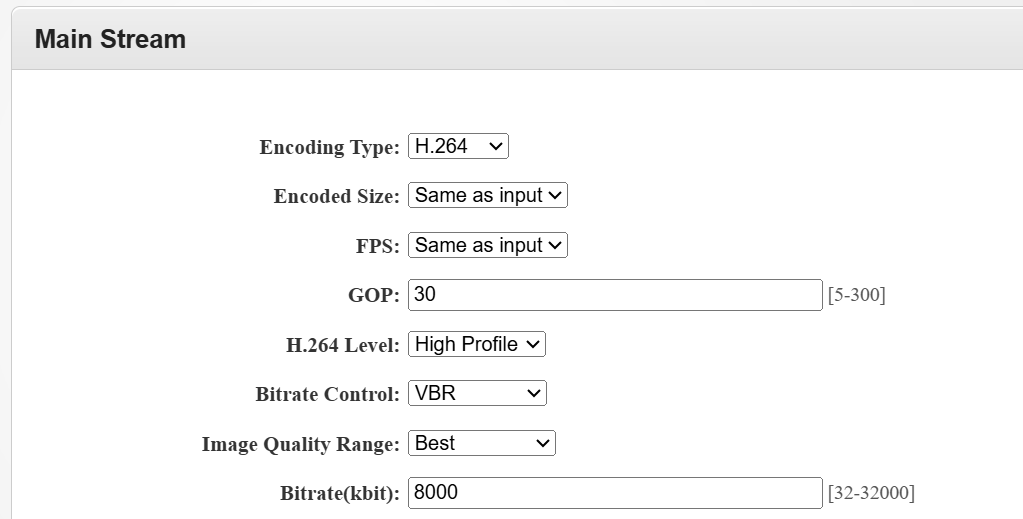
This is how I have both of my encoders set! I've been pulling my hair out trying to dial this in right! Thank you for responding
 !
!
I'd definitely try a GOP of 5, the theory being it reduces the decoding load on the client. You could also try CBR instead of VBR, and lower the Bitrate to 6000. Personally, I was surprised changing the GOP did the trick for me -- but it did, and makes no difference otherwise.
Keeping your bitrate and other settings high, and then turning around and transcoding to get things working right, is clearly not the answer. 
Oh I know it's not the answer!! I just could not figure out a solution. I'll test 5. Thanks so much!!!
1 Like
Setting the GOP to 5 looked terrible. But 15 and then forcing a high strong CBR seems to take the stress off the decoder while compensating for the lower GOP without creating too much blocking. So far I'm testing on my Pixel 9 Pro XL with no stutters. I would imaging streaming full res over Tailscale from work as if I were home would definitely cause hiccups.
Forgive my ignorance, what exactly is GOP? (NOT the political party...) The default GOP on the LinkPi is 2 sec. According to your discussion, does that seem too low? My settings are as follows:
Main Stream:
video size: 1080p
codec: H.264 High
rate control: VBR
bitrate(kb/s): 10000
framerate: 45
GOP(sec): 2
Sync: Close
In a nutshell (and from memory). Video is a series of pictures. Modern compression works by taking a full picture, key frame, and then only sends the changes to picture for follow up frames. The GOP tells the encoder how often to look at a full frame to continue comparing. Lower GOP has more full frames, is less compressed but has lower latency. Higher GOP will have better compression.
My streaming is local so my GOP is set to 1, works well for me.
1-2 seconds is usually the recommended GOP size for streaming.
Have you taken a look at the Channels DVR logs? Did they indicate any packet loss?
There should be lines like this for each stream:
Buffer statistics for <client> for <channel>: buf=0% drop=0%
As a second look at your settings, GOP is fine, but why 45 for frame rate? Ideally it would be 60.
I have six tuners on my LinkPi. Three Onn 4k for ADBTuner, and three Roku 4k streaming sticks for Roku Tuner Bridge. When I had the framerates set at 60 fps for all, video was stuttering as it seemed to be maxing out the LinkPi's encoding capability. It was down to either lowering bitrate or frame rate. I did a lot of fiddling with both, and found that these settings allowed smooth video from all of the input sources.
I don't know if it's the right setup at all, since it was just derived by trial and error. From what I understand, "common frame rates include 30 fps for television broadcasts and 60 fps or higher for sports, video games, and slow-motion effects". I chose to split the difference between the two.
Interesting. I have five devices on my LinkPi, but can’t say I have that many consecutive stream. I’m impressed by your commitment to streaming!
I do use CBR instead of variable, which I believe is less burdensome to the encoder. Have you tried this?
What brand of encoder are we talking about here?