ADBTuner: A "channel tuning" application for networked Google TV / Android TV devices

Development build 20251228-2 includes some bug fixes and some better logging around text matches.

Example:

stream - [Tune xxx] Text match result: Text to match: ["who's watching", 'choose an account', 'edit profiles']. Matches found: ["who's watching", 'edit profiles'].
lib.adb - [Tune xxxt] ADB: input keyevent KEYCODE_DPAD_CENTER
stream - [Tune xxx] Text match result: Text to match: ['watch live']. Matches found: ['watch live'].
lib.adb - [Tune xxx] ADB: input keyevent KEYCODE_DPAD_CENTER

To provide some extra clarification, these matches aren't necessarily processed in sequence and may be processed more than once. For example. if the "who's watching" text is detected multiple times it will be matched each time and the linked commands will be executed (ex. KEYCODE_DPAD_CENTER).

As a result, if the commands to be executed are always the same (ex. KEYCODE_DPAD_CENTER) one could just add extra text strings to match in one list.

For example, this alone might be sufficient for this specific use case:

"tune_match_text_commands": [
    {
        "match_text": [
            "who's watching",
            "choose an account",
            "edit profiles",
            "watch live"
        ],
        "commands": [
            "input keyevent KEYCODE_DPAD_CENTER"
        ],
        "start_checking_after_seconds": 5
    }
]

It will trigger when "who's watching" appears and then trigger again when "watch live" appears.

Let me know if this implementation causes any issues. It made sense yesterday morning at 6am, it most certainly might not be the best way to handle this.

I'm thinking about adding a way to optionally specify that all of the supplied strings should match. If we can match multiple UI elements it could help avoid false positives.

No issues so far. 5+ perfect tunes in a row, using FruitDeepLinks with Paramount+. Nicely done.

I've really been enjoying the Opsrey boxes with ADBTuner.

But just a word of caution to anyone looking to purchase:

Auto sign in is a major issue with these on eBay. This is when you buy a box and it's tied to someone else's DirecTV account. Resetting the box, just logs it back into their account. Usually, the seller of the box isn't the original owner, and only the original owner can unlink it from their online account. Calling DirecTV is no use, they won't help.

I had this happen with two boxes. One, I was able to contact the original owner after the seller refunded me and I was able to get the box unlinked. There is an email address belonging to the owner in the about menu. The seller didn't give me a return shipping label so I kept the box. The seller then proceeded to send abusive messages to me on eBay to the point where I had to report them and block them, but that's a whole different story. They believed that I could simply use the box and sign out and thought I was scamming them. Just by chance I happened to find a way of contacting the person besides the out-of-date Aol email address that was in the system menus. I managed to find a cell phone number and name online based on their email address. This individual was actually very grateful that I reached out to them and let them know. It turns out they dropped their box off at a thrift shop and didn't know that this was a thing. It was just an older person that must not have been super tech savvy. It had active service and DVR recordings so I didn't want to simply chuck it and have someone malicious gain access and I had the eBay seller threaten to get the box himself if I lived nearby while calling me some strange names essentially. :joy:

The other box I got that had auto sign in enabled on it, the seller was great and took back right away no problem and even apologized. So, it's hit or miss, it does happen, just something to be aware of with these Osprey boxes.

There is actually a workaround where you cut off internet access at the right point after a factory reset.

Essentially what you do is reset the device from the system menu. Then, right after it connects to the internet, cut internet access and it will let you sign in. But this has to be done any time you log out or get signed out by DirecTV for some reason. It's an extremely tedious process and can be easily messed up so it's almost not worth it unless you were to get a box for free because the seller refunded it and didn't want to resell it.

I ended up with 6, 60233 4GB Osprey's in the end and 3 LinkPi ENC1 V3's with an Elgato Cam Link 4K capture cards (one was a great eBay deal!!)! Tuning has been super reliable and really really fast. 1080p 60fps on every output too!

I appreciate the heads-up about this potential problem.

Is it safe to assume that the auto sign-in issue could happen with any pre-owned model of Osprey or Gemini box? 60164, 60233, or Black Label?

I have a pile too, but don't remember running into this kind of problem. I know I had one with an account, even an active netflix or something, but doing the regular hard-reset with the button worked as advertised.

the only black label I got had been flashed with the satellite firmware, and there's currently no known way to go back to streaming. any of the the 3 you listed can have this issue, but it is more likely with a black label as those were what was sent to satellite customers with a gemini dvr.

I also have a couple old c71kw-200. one works, albeit slow. the other one is stuck on the original firmware that's looking for a remote that only shipped with the first beta shipment. I've not located one. apparently once past that screen and a firmware update, the newer remotes work. the problem lies in not being able to bypass the connect remote screen (even with keyboard) in that particular firmware.

This very discussion is all over Reddit. Osprey's are tricky if from a private seller. You may get an old box that won't take a firmware update (AT&T old), a box that is tied to an account or under contract, or one that is running Satellite Firmware. But there are many reputable sellers, you just need to find them.

The link I posted a week or so back lists the vendor I used, recommended and no issues. Only the 2GB/xx164 model though.

More Info: https://www.reddit.com/r/DirectvStream

2 Likes

Yeah, I learned this after the fact. Private sellers are tricky. I knew about the firmware, but I didn't know about the auto-login issue. I understand why people want to buy from bulk buyers, but then it's hard to get the 60233 models.

In my case, I just got really lucky, I guess. So it's sort of a toss-up if you want just an easy transaction buy from a bulk seller. The company selling from Walmart is actually pretty solid, although the remotes they sell are really gross sometimes. So I would recommend buying brand new remotes off of Amazon if you go that route. Amazon has new third generation remotes that are like $15 each. They're really, really nice. Most of my boxes came without remotes so I had to buy those.

If you want to hunt for the 60233 models you're going to potentially run into issues. eBay is very good at protecting buyers though from sellers that don't do their due diligence and sell something that's not as advertised.

In my case with the abusive seller I was dealing with, they actually removed some false negative feedback that they left on my page claiming that I was scamming them and calling me some interesting things as well when they truly didn't understand how these boxes worked. When you're a buyer in a tricky situation, eBay will go to bat for you.

I seriously want to thank you though for turning me on to these. I really appreciate the recommendation and I'm really, really enjoying the setup. The picture quality is also slightly better on these compared to the stock Android TV app.

I actually have a Sofabaton U2 coming today so I can start tuning by channel number directly. I'm not a huge fan of the Apple TV remote since I had to give up my SHIELD since Android TV/SHIELD didn't play nicely with Channels.

1 Like

@Shaggylive https://www.reddit.com/r/DirectvStream/comments/1pzrawb/comment/nwsz8qv/
When I posted on Reddit, someone actually gave me a tip to force the box to sign in with my credentials. It's a bit of a pain, but the same tip can also be used for the satellite boxes to force them over to streaming, evidently.

last time i looked there seemed to be sombody dead set on it so i'm not supprised. I'll give it a shot again this weekend. maybe get my unused pile sorted and offer what I don't need to fellow channelers

i bought a few bulk untested lots box only, cuz i really only needed 1 remote for setup. I installed dtv back in the day so I had a bunch of power supplies and IR remotes collecting dust. :slight_smile:
I think it was only the 2 out of a dozen didn't work the 200 and black lable.

It's worth a shot. I think you have to do it every time you factory reset, but it might get it working instead of collecting dust!

Anyone successfully added the new NBCSports network (not the 4K one) to a YTTV JSON? Been a while since i did this, and it seems to be misbehaving.

    {
        "provider_name": "YoutubeTV",
        "number": 1085,
        "name": "NBCSN",
        "url": "https://tv.youtube.com/watch/VQXP9IVYS4g",
        "package_name": "com.google.android.youtube.tvunplugged",
        "alternate_package_name": "com.amazon.firetv.youtube.tv",
        "tvc_guide_stationid": "194412",
        "guide_offset_hours": "",
        "configuration_uuid": "8ec77d65-30d6-46a3-8045-282571cff8d8"
    },

I no longer have YouTube TV, but I believe this is what you need.

2 Likes

I have a question for our DirecTV experts. I am away from my LinkPi / ADBTuner equipment stack and am viewing Channels DVR remotely. I fouled up my login a few times and had to reset my password. Attempting to play results in an error due to the old password. Now, the onn 4k devices which I use as ADBTuners are needing the new password to sign in. Is there any way to remotely control the onn devices to launch the DTV app and input the new password?

I am able to remotely view the LinkPi screens, and successfully used the Roku app to get my Roku 4k sticks running. Unfortunately, I don't think that there is an equivalent remote control app for the onn 4k boxes...

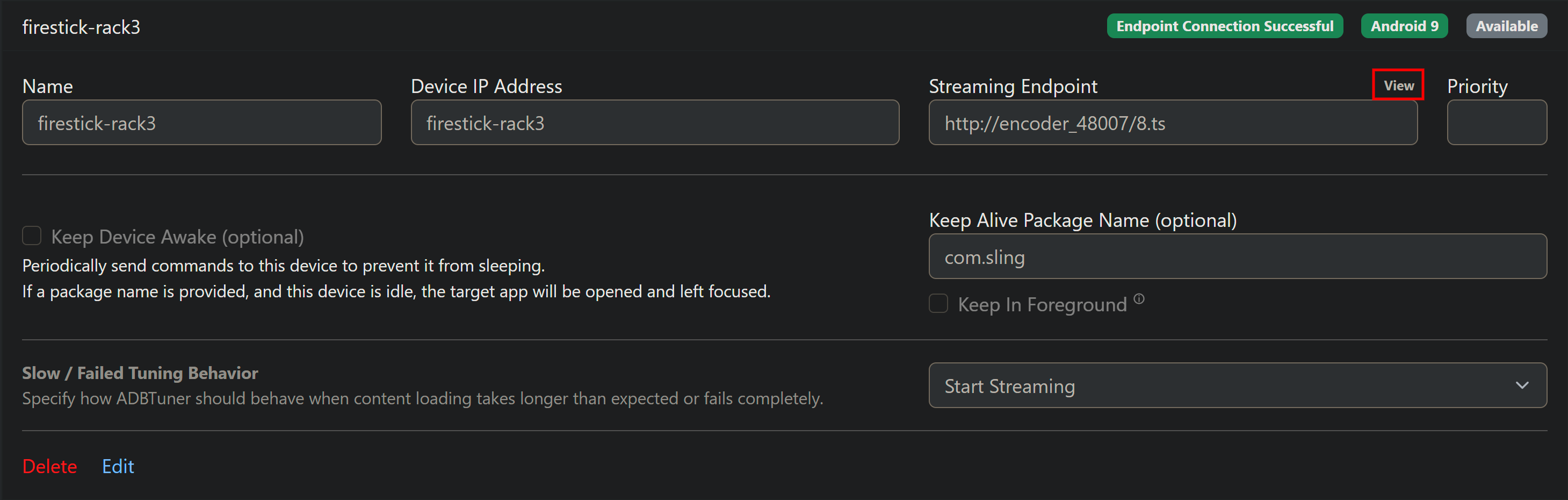
From the ADBTuner WebUI, click the small "View" hyperlink. In the View window, there are some basic remote control keys you can use to login to the DTV app. Repeat for each virtual tuner's streaming stick:

4 Likes

That was AWESOME! Thanks! I'll say it again, I may not know much...but, I learn something new each day.:slightly_smiling_face:

1 Like

Oh my god, I had the same thing happen to me today and I did not know about this. Thank you. I'll use this in the future. I had just happened to have an ADB connection to my devices, so I scripted everything. This would have been way easier if I knew it was a feature.

3 Likes

I used the on-screen remote commands to navigate the DTV app to the login screen with the qr code, which I was able to scan with my phone from my Chromebook screen. Easy-peasy! I also had no idea that this was a feature of ADBTuner. @turtletank , this program is amazing! @bnhf , thank you for educating me.

3 Likes