Looks like the same config I'm using. Everything appears to be identical with the exception of the uuid.
"uuid": "eeadcfd5-0b2c-4f9a-858b-05073ba918b2",

Looks like the same config I'm using. Everything appears to be identical with the exception of the uuid.
"uuid": "eeadcfd5-0b2c-4f9a-858b-05073ba918b2",
There's a lot of talk on this thread about YTTV changing their app back in June/July time frame.
Did that ever get worked out? Does YTTV and other apps still work with ADBTuner?
I use it...and it still works
If anyone gets past your router firewall, you're hosed. If they got into your server with malware or whatever, you're hosed. Launching a local adb command script from a docker container on your LAN has nothing to do with whether you're hosed.
I get that you want this to be easy for new folks, but the security argument against scripts is specious. Just say hey, I don't want to confuse new folks and leave it at that.
Tl;dr the container is not a sandbox.
I respect turtletank's hard work, and I don't think anything needs to be a gateway drug to ah4c. If you're already running HDMI encoders and building out a home DVR setup with Docker, you're capable of keeping malware off your own network. I'd rather see users trusted with their own hardware than protected from it.
To me the greater risk is that no one can independently audit ADBTuner. As it stands it's a closed tool with no formal license beyond All Rights Reserved. There could be an RCE bug in it right now and nobody would know, because only one pair of eyes has ever been on the source. Closed-source free software sits in an awkward spot: there's no revenue to fund a formal audit like paid software, and no ability for the community to review it like OSS.
This isn't hypothetical for me. I just found and fixed two serious XSS bugs in ah4c during my frontend redesign prompted by this debate. Bugs that sat there for years because nobody looked. (taking a moment to subtly plug my ah4c facelift... it looks noice). And that's an open tool. The only reason they're fixed today is that the source was there to read. If ADBTuner has equivalent bugs in its web UI or API, they're unfindable by anyone but one person. That's what shifted my thinking on this whole debate.
In a community where nearly everything is open except the one commercial product it's all built around, I think source availability matters more than restricting what configs can do. I also completely get the pain of maintaining open source. Users are demanding, and my two favorite words are "fork it." My stuff is MIT; if someone doesn't like it, fork it and maintain your own build.
Trust in this community cuts both ways: we trust the devs, and I'd like to see users trusted too. So I'm genuinely glad an open source release is in the works. I'd encourage prioritizing it. Independent eyes are the best security feature any of us can ship.
It really doesn't seem fair to push for me to intentionally add security flaws because I should "trust the users" while at the same time suggesting that ADBTuner is insecure.
ADBTuner's source code has never been obfuscated. it's sitting right there in the container. Many people have reviewed it. It can easily be audited from both inside of and outside of the container it runs in. An open source license and a public Github project does not inherently mean that something is more secure or more trustworthy.
I have accepted some security risk to make things more convenient for the users. I added a REST API so people can easily automate most of what ADBTuner does. I added "configurations" so people can customize the commands that run on linked Android devices.
I know it's just a stupid app that like 8 people use that sits quietly on a local network 99.999% of the time. I know it's not the most secure piece of software ever written. I just drew a line at letting any networked device run any shell code it wants in the container.
I'm honestly surprised that this is even slightly controversial. If anyone actually cared about this project, something like this would result in a CVE with a CVSS score of 10 popping up the next day. Containers are not considered to be a security boundary and it could be used as a path to execute code on the host machine itself.
I can't assume that every user is going to bolt on their own security, most people will just run it without giving it another thought.
I don't really have anything else to say on the topic. I don't think it needs to be re-litigated on a weekly basis. I don't pop into threads for other projects to criticize the project and the author while promoting my own alternatives. I would appreciate the same. Thank you.
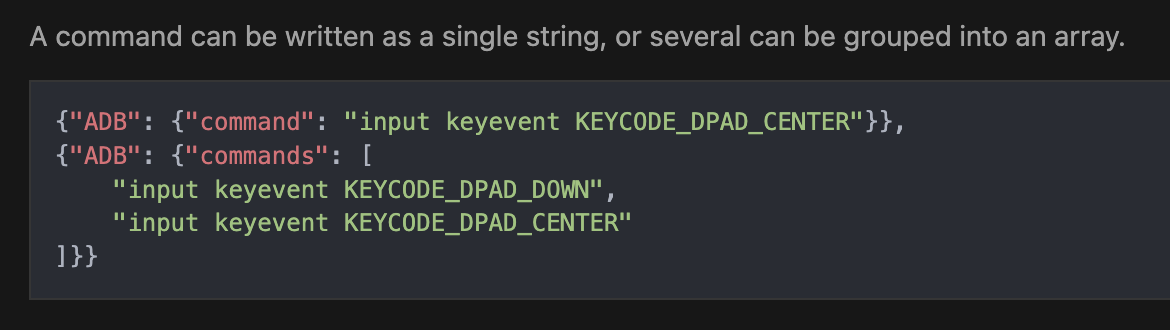
I pushed a new development build 20260815-1 this morning. It adds support for ordered command arrays within configurations. @babsonnexus
As I am not a coder and just an enthusiast who enjoys tinkering with all the wonderful solutions on this forum, I will say I appreciate and support everyone who wants to maximize the capabilities of all these projects as the tinkerer in me is never satisfied with the status quo and always wants more.
I also recognize that except for the Channels Dev team, everyone on here who is contributing is doing this at no cost to us users. Do I make suggestions to the contributors. Absolutely, I suspect they appreciate other peoples perspectives as they truly want to continue to improve their project. But I also believe that, because I don't pay for the projects I am enjoying, that after giving my suggestions, I have to step back and respect the contributors decision to incorporate, ignore, or shelve for later my suggestion.
Truly, I wish I had the skills to build my own project, but I'm too old and the wife won't let me sit in front of the computer enough to try and learn all I would need to do something like that. 
That's all fair, and I appreciate you taking the time to write it out. A few things I want to own:
You're right that the source is sitting un-obfuscated in the container and can be audited. I didn't fully realize that, now I do.
The ah4c plug was tone deaf in your thread and I apologize for that. I contribute to that project so I'm not a neutral party here, and I should have been more conscious of how that reads. It wasn't meant as "use this instead," but I get why it landed that way.
I never intended to push you to add anything you consider a security flaw. You drew a line on scripting, you explained your reasoning clearly, and it's your project. I said before that I respect that and I meant it.
Consider the topic closed from my end. Thank you for ADBTuner and for engaging with all of this as patiently as you have. 
I'm not criticizing you or the project, I'm simply saying that you cannot use security as an argument against scripts.
Confirmed in both positive and negative testing, thanks!
@Bobby_Vaughn, please be aware of these changes and functions for import.
@turtletank, I loaded the developer version 20260808 about a week ago. Compared to the previous stable version, this is a major improvement on the user interface... much more structured and clean...thank you!!! It's great.
I haven't played with the script commands yet... planning to do that soon... excited to see if that handles all that I'm trying to do... I think it will.
I noticed on the older stable version that putting any non-integer delays showed up as an error in the logs... that's why I've just been using the integer delays. I noticed in your example you used 0.25 seconds... may I assume you don't see any errors in the logs when using non-integer delays?
I noticed today that you dropped another revision 20260815. Are these just fixes, or additional features? [EDIT] Never mind... I saw you answered this question in another post... new script features... awesome...thanks.
Thanks so much for building the ADBTuner app...it definitely expands the capability of channels.
Good eye. I fixed that a few weeks ago. The intention was to support decimal values there, but I accidentally converted them to integers.
I set everything up from scratch yesterday:
Endpoint and Android connections both show Successful in ADBTuner.
However when I try to preview the main ESPN station in ADBtuner I have a problem. Watching on the LinkPi I see:
Confirmed working manually: signed into ESPN via Xfinity and ESPN directly on the Onn, and the live feed plays fine — first item on the ESPN home screen.
Is this consistent with a wrong package name or launch command, rather than a navigation/button-sequence issue? How can I confirm what's actually being sent to launch the app?
Thanks for any guidance and for the great app.
Whose configurations & stations did you import?
NAS info?
How did you install ADBTuner?
Did you try to view in Channels?
I'm really hoping you used Project One Click to install.
docker-compose.yml:
version: '2'
services:
  adbtuner:
    image: turtletank99/adbtuner:stable
    restart: always
    init: true
    volumes:
      - /volume1/docker/adbtuner/config:/app/.config
    ports:
      - "5592:5592"
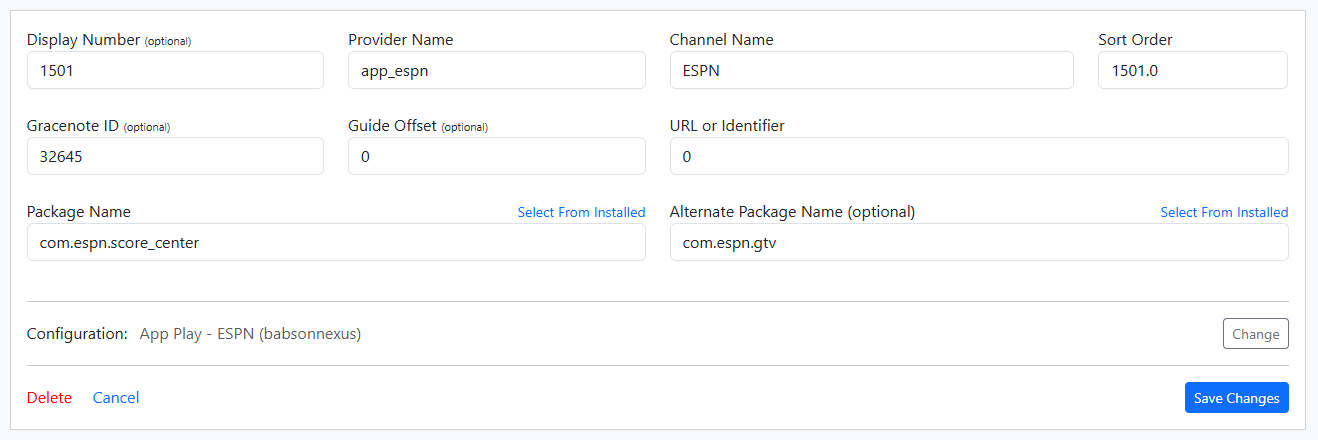
Here's a screenshot of my ESPN channel. I suspect you have the wrong package selected. That was my issue when originally set up. You can use the Status Page (json) on the advanced dropdown on the ADBTuner to see all the package names on your devices. It takes about 50 seconds for all the commands to go thru.
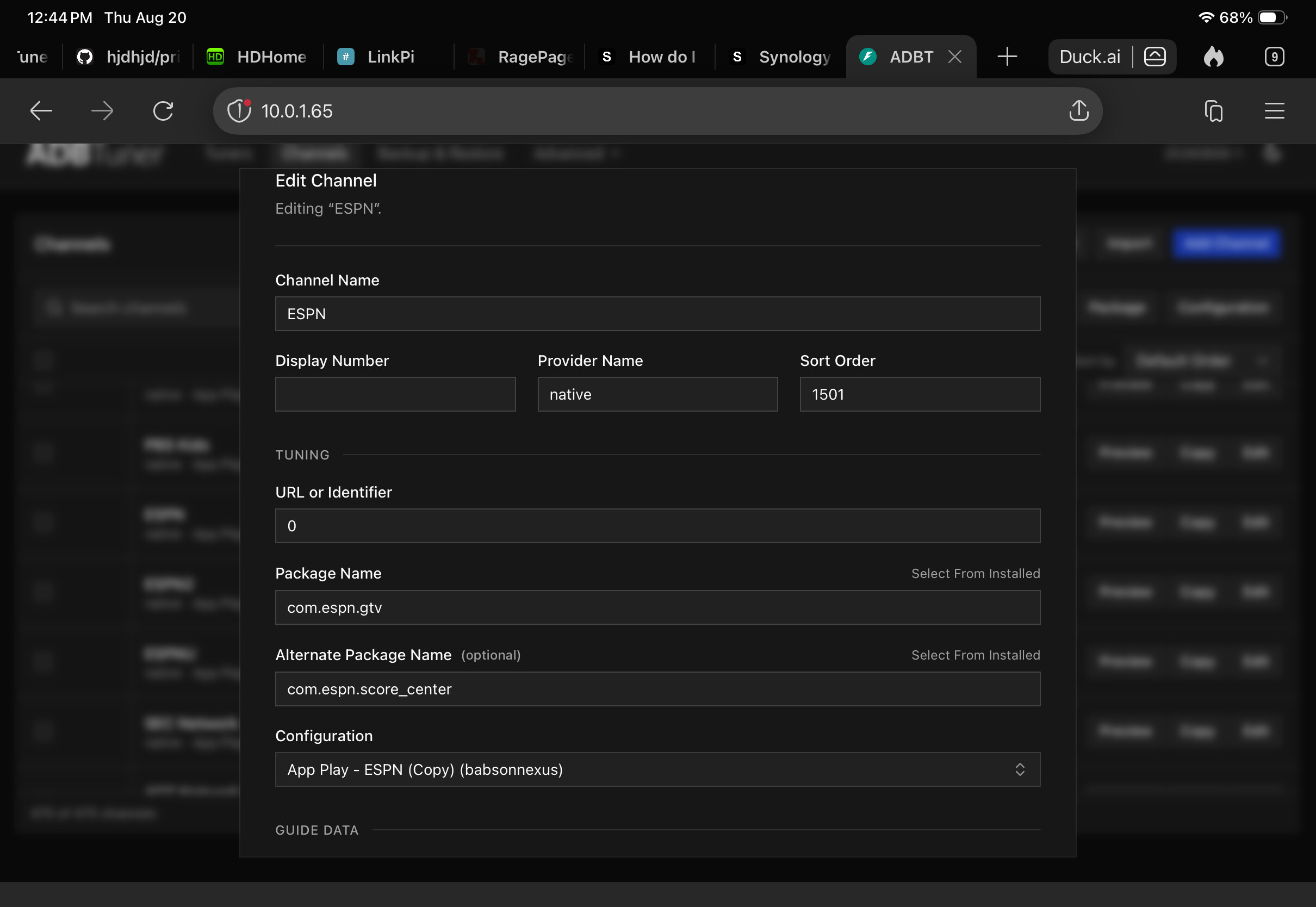
Thanks. Here's my station settting. Looks similar to yours but with the order of package names reversed. In the Status Page I see com.espn.score_center but no com.espn.gtv - do you see the same?
ESPN packages:
ONN: com.espn.score_center
firestick: com.espn.gtv
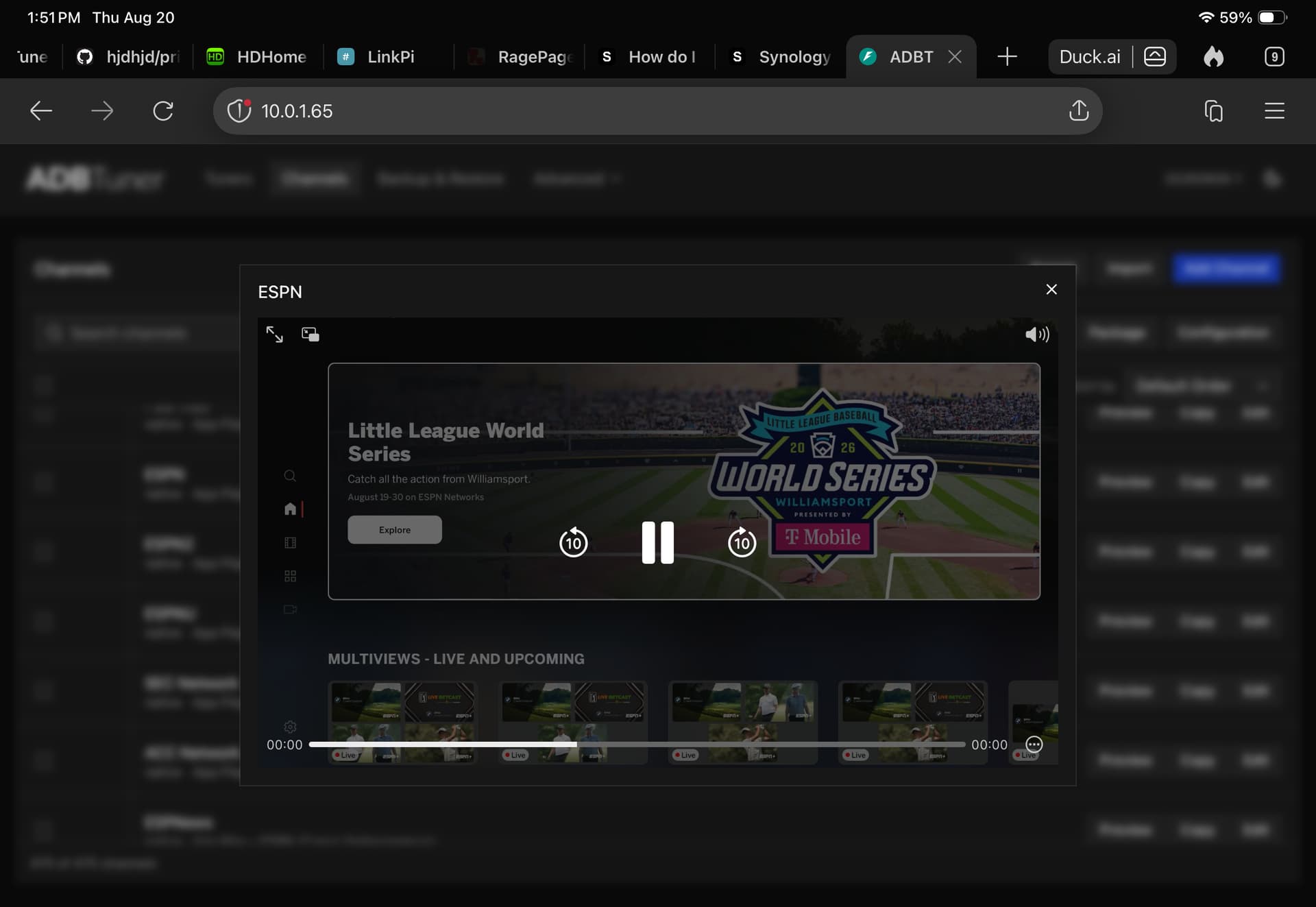
On the channels page, select preview on the channel and it will show you what it's doing. You don’t have to look at the Link Pi viewer as it shows you what it's doing.
Here's a screenshot (wish I could video for you)
Edit. If you go to configurations, you can view the espn config and see all the steps to open espn. There are 50 step downs to get to bottom of the app where all the espn linear stations are. Using the default config, it'll take over a minute to open so it's doing something but you can’t see it. I’ve cloned that config and adjusted for times and steps for my setup.
My provider name is 'native' not 'app.espn'
I’m not sure if that makes a difference but change it and try.
My setup was done with Project One Click