
- Okay, I can do that.
- That error is from the CDVR log.
Actually, as I said, it's (highly) recommended to have the port # in that variable, rather than hard code it in the M3U.
Are you trying to use the Windows Android ADB project to feed ah4c?
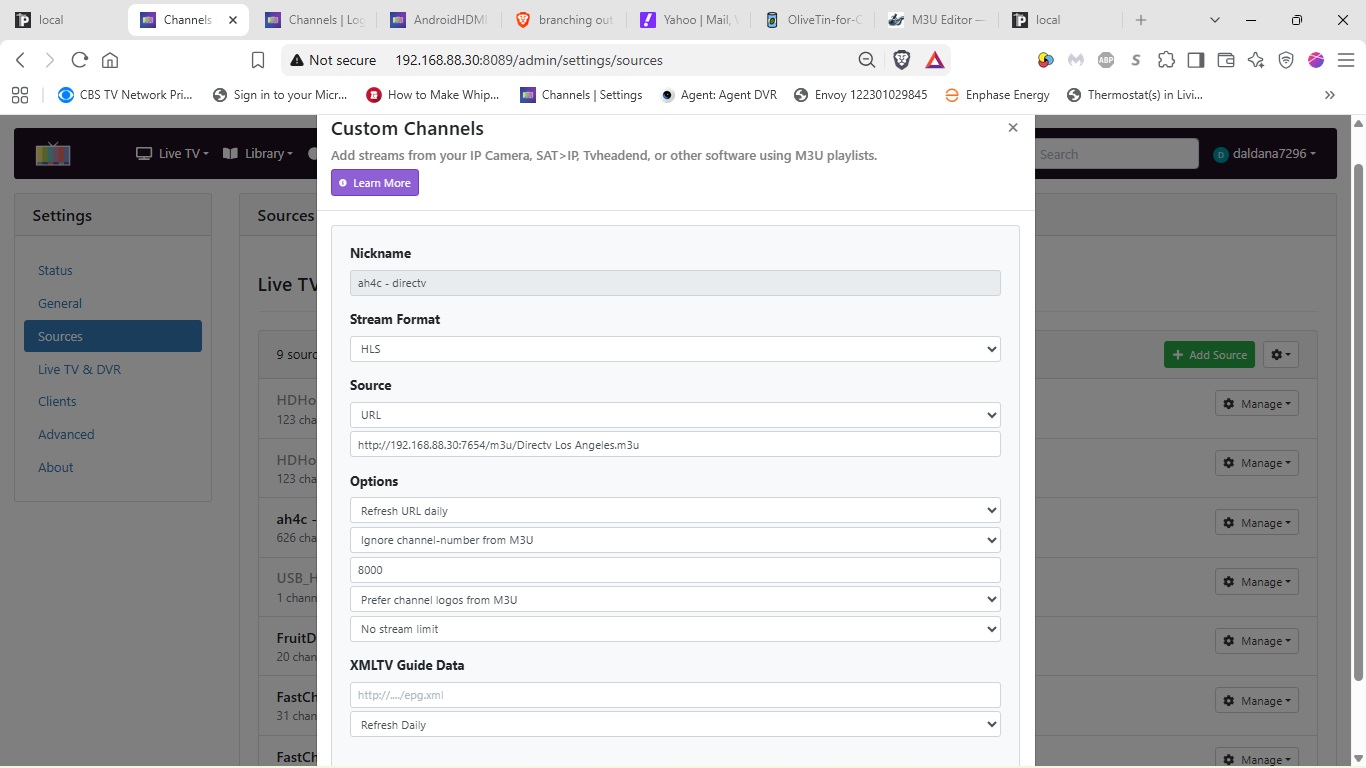
Can you post a screenshot of your CDVR Custom Channels Source settings?
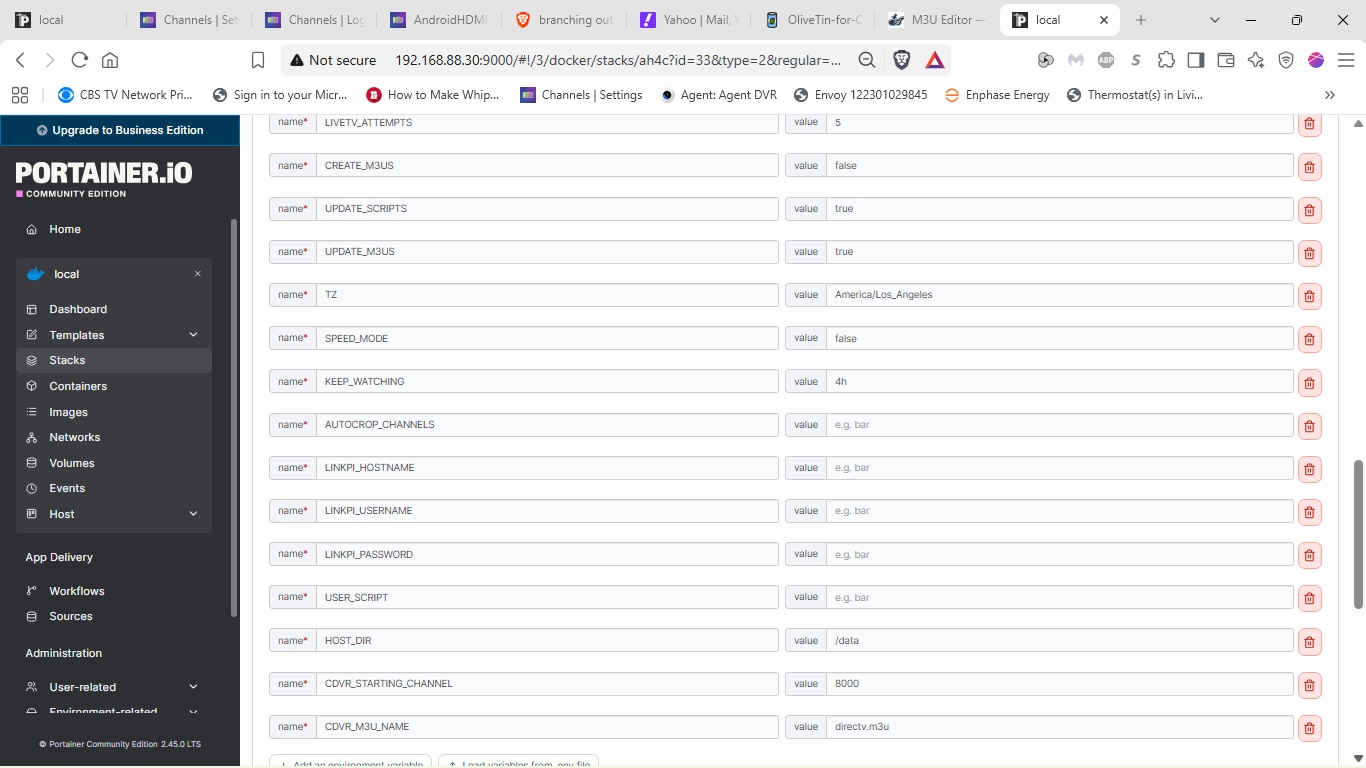
Also, your ah4c env vars might be helpful...
Now that I've added the correct M3U, I'm not getting the error anymore, but I need to work through some things.
To answer your question, I'm not trying to use the other project to feed ah4c. Below are the screenshors.
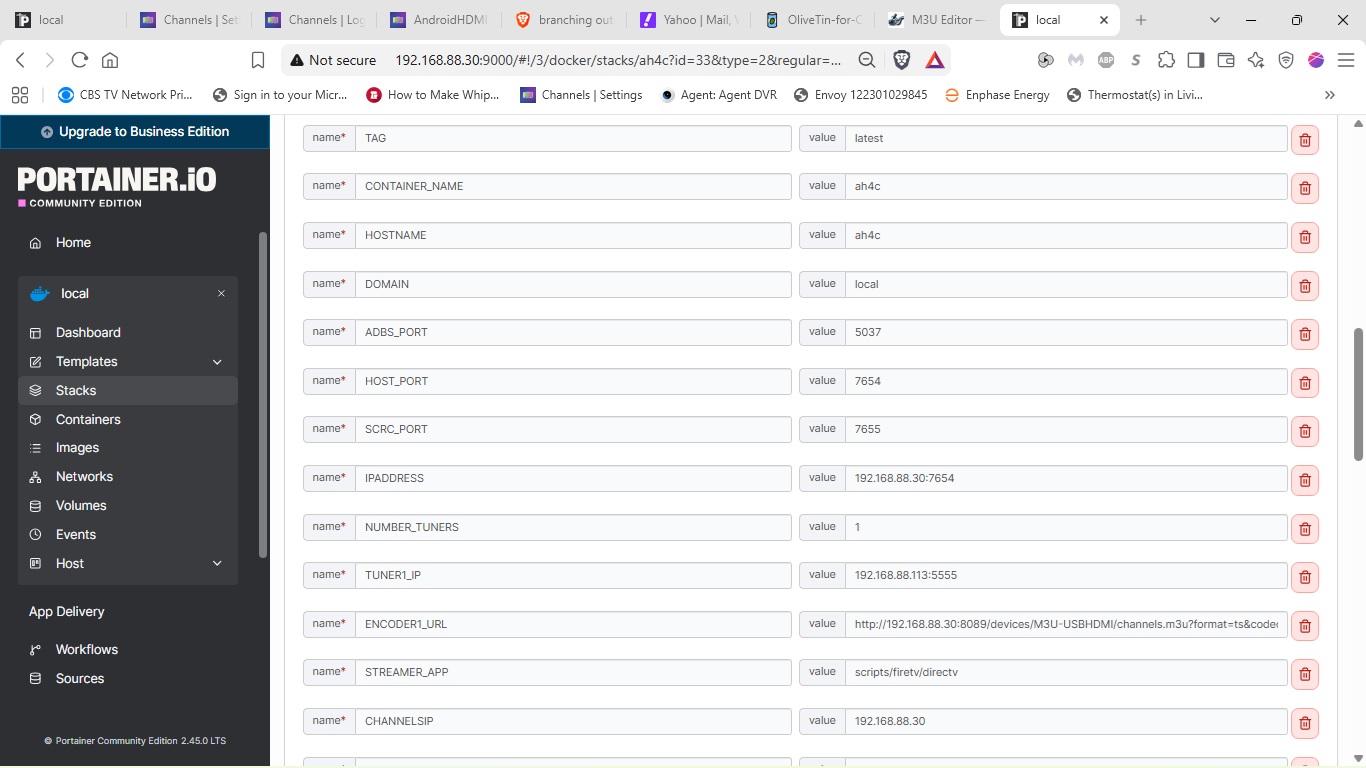
What does your ENCODER1_URL value represent? What's the device behind that?
In the USB HDMI thread, @tmm1 gave directions on how to use a single capture card (like the one for the Windows Android ADB project) with ah4c.
tmm1Channels Developer
To use this with AH4C or ADBTuner, you can use a dual source strategy:
- Capture source
- create custom Text source with configuration for your capture device
- set the source to disabled
- copy the channel stream url and use it instead of a linkpi url
- (for example,
http://x.x.x.x:8089/devices/M3U-Capture/channels/9550/stream.mpg?format=ts&codec=copy)
- (for example,
- AH4C/ADBTuner source
- use the M3U from AH4C/ADBTuner to create a second source which is enabled and used for recording/watching
OK I get it, you're using a capture card with your Channels DVR as the encoder. I'm not as clear on how this gives you a second source. A second source for ah4c? What's the upside vs just viewing this stream directly in Channels?
It's not really as much of a second source as it would be something to compare. I've been curious about ah4c for a while and wanted to see how it would work with a capture card and a fire stick.
I get it now, ah4c gives you the channel changing and tuner management just like always, and the combination of the capture card and the Channels transcoder gives you a virtual encoder.
EDIT: And, the second source refers to the second source you need to to create in Channels DVR (since the first is "disabled") for ordinary use as an ah4c source.
I'll call issues out as I see them:
The first is that your M3U URL can't have spaces in the name. Think Linux, not Windows.
The second is that your env vars tell me you're likely not using the latest Docker Compose. Upgrade to that, and modify your env vars accordingly. You can either do that in Portainer, or delete the ah4c stack and reinstall with the latest version of Project One-Click (published yesterday).
it was on this screen all day until i got home and hit OK. typing in a channel #(re-tune) would have also cleared this screen. ah4c was detecting NO audio that whole time.
ah4c could try to retune if no audio exists for X-min and retry for X-times and if still no audio it could just cancel the tune, and wait for cdvr to try to record the next scheduled show. it could maybe also check for internet connectivity and only retune if internet is back
I realize this was a glitch on their end but it acted just like if my internet went out for more than a few minutes. after a while the osprey gives up trying to reconnect and just shows a message screen and only a user command tells the osprey to retry
I'm going to argue there's nothing for ah4c to do about this. There was a service outage. That's just my opinion. Attempting to retune and detecting audio—that's a lot of weight to pull.
I just think that's outside the scope of this project. That's just my opinion, though. It's up to @bnhf but honestly, I wouldn't go writing something like that myself.
Also, the point is you weren't going to record anything anyway because DirecTV was down.
was it down 9 hours? when they fixed their end, my osprey did not know, or retry automatically.
this is really mainly a problem on channels that get recorded all day and unless you leave a padding gap ah4c only tunes once at the start of the day.
I guess I don't really see how it's a heavy lift if ah4c is already watching the stream for audio, having it loop back to bmitune should be fairly simple.
ok I attempted to look back at the logs again but it's past 24hr so i'm glad i copied at least the 1 line. so it's CC that's listening to the audio, so... it would be tied into that and I can see how that could complicate things.
these days there are many of us that primarily got into encoders for news channels, which we always want recorded so we can skip commercials. unfortunately a failure early in the day continues to effect all day until something tells the osprey to tune something again.
Ok, I've made both of those changes, but I think I've got some work to do on the virtual encoder. I'm getting this error in the ah4c logs.
++ ffmpeg -t 1 -i 'http://192.168.88.30:8089/devices/M3U-USBHDMI/channels.m3u?format=ts&codec=copy' -filter:a ebur128 -map 0:a -f null -hide_banner -
++ awk '/I: /{print $2}'
- checkLoudness=
++ date +%s
- (( 1788042130 - 1788042089 > 42 ))
++ echo ' > -50'
++ bc -l
(standard_in) 1: syntax error
-
(( ))
-
echo 'Active audio stream not yet detected -- loudness is LUF. Continuing...'
-
sleep 1
-
true
-
sleep 0
Change your STREAMER_APP value to scripts/firetv/dtvstreamdeeplinks.
I don't mean to sound like I'm being argumentative, but the whole point of this outage wasn't what you saw that it was on a blank screen. For many people, it was repeating the same commercial over and over again. In some cases, it was like playing only part of a TV show from hours earlier and repeating it. Like, DirecTV was totally broken. This is like a complete edge case. And I personally am not going to write the code to implement this sort of functionality. It's not worth my energy. I'm already a little burnt out from the last two big pushes. Also, for some people, some channels did work. Such as locals.
What I did do, which might help, is I threw a button on the activity page to power cycle every single box in your fleet, which is actually, I think, very useful. Just one click reboot. So that would have freed everything up once Direct TV came back.
I'm also in the process of migrating from Claude Code to Hermes, backed up by ChatGPT Pro.
But I'm using a self-hosted instance of Hermes as the harness. So, hopefully, my code quality either improves, but hopefully, it doesn't decline. Regardless, Hermes is pretty incredible.
What's weird now is that it can't find the m3u. It shows up on the Channels M3Us page, but when I click on it I get this error message;
Error opening file: open ./m3u/Directv_Los_Angeles.m3u: no such file or directory
This is very simple. It goes in the bind mount. ah4c/m3u/yourfile.m3u.
In channels your IP_ADDRESS:7654/m3u/yourm3u.m3u