
What are you seeing when you visually monitor the tuning process? Does the stick wake-up? Does the DTV app launch?
I believe that's just a label in the dashboard, meant to match-up with the env var numbering. But the internals of ah4c still start with tuner 0. Probably something we should get fully lined-up, but I don't think that makes a difference here.
The stick doesn't go to sleep at all, so it was on the homescreen. When I try to tune a channel, the screen goes black, but the DTV app doesn't start at all.
Sorry, I didn't realize you were using a Fire TV. I would say this is probably due to just using one tuner. Based on the logging I'm seeing, at least, it looks like the tuner's tied up.
He's using a FireStick with a USB Capture Card, so this is all very experimental with ah4c. The Capture Card + the Channels DVR transcoder creates a virtual encoder of sorts.
That virtual encoder can be used with ah4c (theoretically), with ah4c handling the channel changes and tuner management. From there, it should be just like any other streaming stick and encoder combo.
Why do I feel like there's another project out there that's purpose built for this?
I gather you haven't been following the posts about this. @daldana7296 has used the other project, and is now wanting to compare it to ah4c, using this same virtual encoder source. I'm curious if it'll work myself.
1 Like
Oh, sorry. You know, I've been so busy. I missed that. I apologize.
Another interesting thing is that when I'm on the tuner control page there is no display, but I can interact with the stick (seeing it through vnc in the Windows setting page for camera) using the buttons on that page.
I'm trying this myself now, I'll get back to you shortly (hopefully). 
Wait, so you're saying the tuner control menu that I built actually works outside of what it was intended for? If that's the case, that's awesome.
@daldana7296 So it definitely works -- I'm watching the NFL Network using this setup right now. My best guess is that you have something wrong in your configuration.
Can you post your settings screens for both the "second source", i.e. the CDVR Custom Channels Source you're actually using for viewing -- and the "first source", i.e. the CDVR Custom Channels Source you're using to create the virtual encoder.
It's definitely awesome that it works, though I think it would be fair to say that this is no different than any other setup. You have an Android-based streaming stick ip:port and an encoder URL.
The main difference is that the virtualized hardware encoder requires a bit of setup outside of ah4c. Also, I'm not sure yet if this virtual encoder can accept multiple simultaneous connections. I'm testing that next.
No problem, so "View & control" and monitoring via VLC while streaming work fine. Another tool in the box!
EDIT: Video quality is only fair, nowhere near what we get off the LinkPi encoders. But what can one expect from a $10 capture card? Looking at what's available on Amazon, the quality capture cards are nearly the same price as the encoders (or more), and then re-encoding is still required.
That's what I was thinking when I built it, just in case you needed another way of accessing things.
Like sometimes I mix up HDMI cables, so I want to know that I have the right encoder port linked up to the right box.
2 Likes
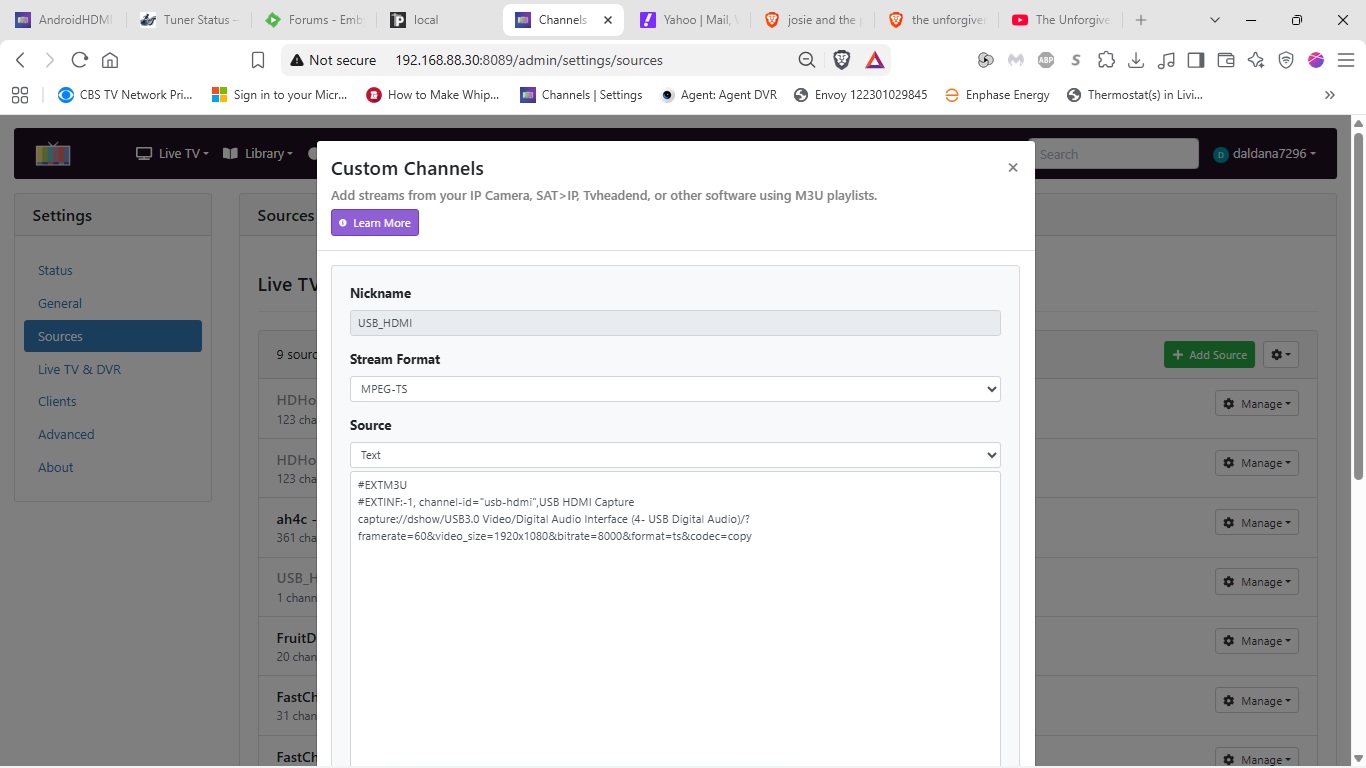
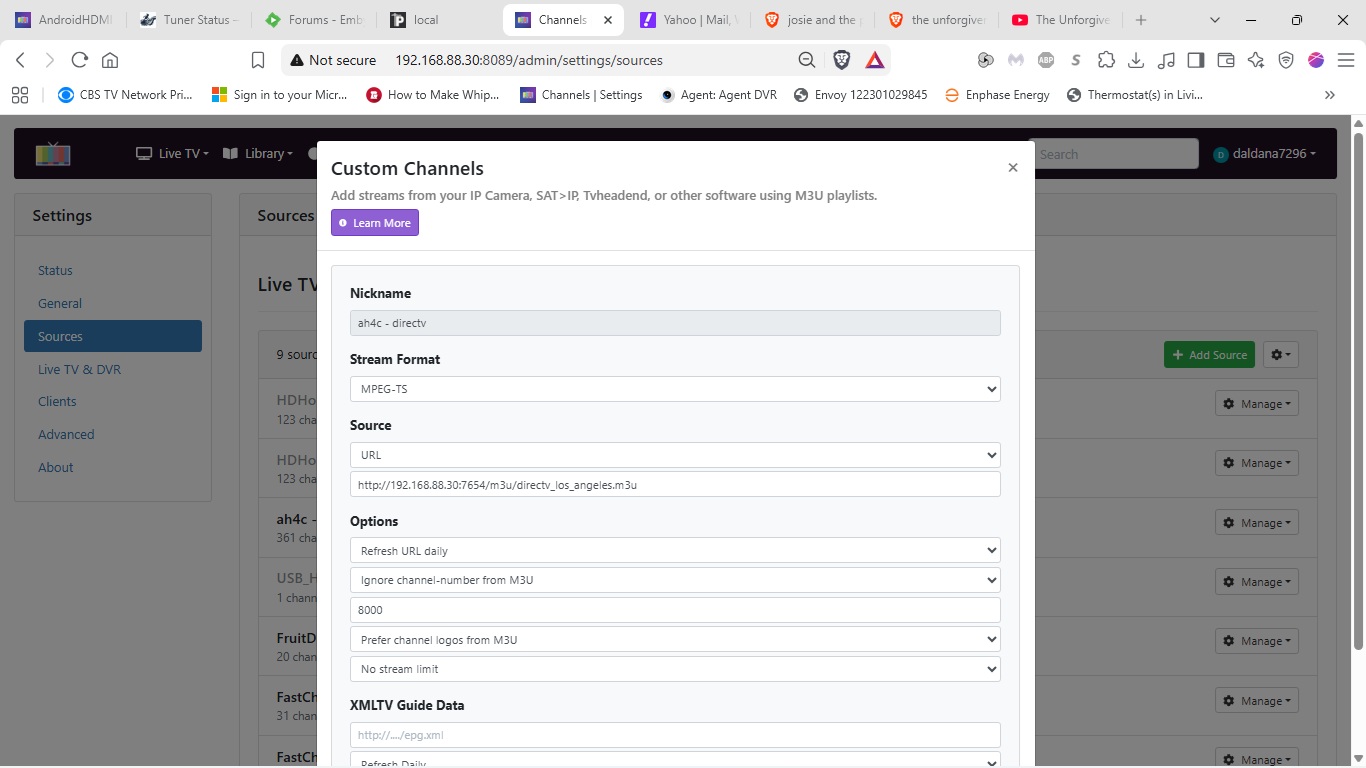
The first thing that jumps out at me, is the URL in your USB_HDMI M3U. You can't have spaces in something like that, it needs to be URL encoded. Mine looks like this:
capture://dshow/USB%20Video/Digital%20Audio%20Interface%20%28USB%20Digital%20Audio%29/?framerate=60
EDIT: Also, you should be able to view the stream right from the "first source" in something like VLC -- to confirm your virtual encoder is functioning. Mine looks like this:
http://convertible-pc3:8089/devices/M3U-Capture/channels/9550/stream.mpg?format=ts&codec=copy
Funny, in the whole USB HDMI Capture thread, that never came up. I made those changes, but still no go in VLC. Using OBS, I can see the firestick home page.
When I try to watch the USB HDMI channel in CDVR, the error message is that it can't find the audio device. I used the directions in the other thread to find the device names, so I thought it was right. Maybe not...
OK, so that tells us that this has nothing to do with ah4c...
My guess is the problem now has to do with what you're using as your virtual encoder URL. Looking at the ENCODER1_URL you used (from one of your original screenshots), there's no "channel number" in the URL.
The more recent screenshot you posted cuts off any channel number you may have assigned. If you didn't assign one (I used 9550 as in the tmm1 example), I'd suggest you do -- otherwise you'll need to figure out what channel Channels assigned, to use in the virtual encoder URL:
http://convertible-pc3:8089/devices/M3U-Capture/channels/9550/stream.mpg?format=ts&codec=copy
It's certainly possible I'm doing something here-or-there that's not required, however one can't really argue with success. I had the whole thing up-and-running in maybe 20 minutes.
Well, I'll keep plugging away and, as always, thanks for your help!
If nothing else, at least we now know that it does work with a capture card and a firestick!