
I'm glad it's working well. And yeah the TDT option should be better for your hardware.
A couple of questions for you:
The remote provider I use, Xfinity, takes longer to tune -- such that Channels gives up and tries the next tuner when I have PLAYBACK_DETECTION=true. In this situation, should I set NULL_FRAME_INSERTION=true, and would you expect that to keep CDVR from giving up on the stream so quickly?
The other question I have is, if there's a way to force Closed Captions on -- such that they could be used with Channels Multiview? If so, it seems like it could be a superior approach to turning on captions locally on the source streaming device.
I haven't tried that with a null-frame insertion, but it's worth a shot.
It's generally when the encoder's not sending a stream, not when the tuner's not sending a stream to the encoder.
Maybe we can cook something up for providers that take a really long time to tune using the same mechanism.
When I get a chance, I'll take a look and see if I can get my robot to do something for that.
Also, closed captions are turned on through the channels client, so it's whatever the client supports.
Like when I turn closed captions on, I go into the top shade and options and then turn captioning on.
So if channels doesn't support closed captions in multi-view, I don't see how we could.
Haven’t updated yet but was curious if I need to create any new folders on my Synology NAS.
What's the average tune time you guys are seeing with this approach? I assume some delay opening an app and capturing its output.
It depends on the streaming device, and the app used. I'm at about 8-10 seconds tuning DTV on aFireStick 4K Max (Gen2), but you can double those numbers for the Xfinity app. Both of these apps have to be launched for every tune, or they're not reliable -- which definitely slows the roll.
You'll need a captions folder alongside adb, m3u and scripts.
I've always thought it would be really cool if we could send some sort of pre-roll right away. Animated would be awesome, but static would certainly work.
That would work.
If we can just send blank packets or let the user upload their own video.
I'll hit you up to test something... Since I have all the DRM (Widevine) license server for most of the DRM sources on FastChannels already (that's how the built-in Shaka player works), I've been playing with a Kodi-bridge with Firesticks. FC proxies all the license server stuff to Kodi, then Kodi decodes it through a legal EME environment then I capture the stream with a cheap HDMI encoder.
But, Kodi kinda sucks. So, I made an extremely lightweight app wrapper for Android/Firestick that accepts my stream and plays it with the default built-in ExoPlayer. It's been extremely stable so far and wicked fast tune time.
I think this could help you guys-- if I figured out the sources you like, you could bypass their apps and just use mine (with whatever hdmi encoder you prefer). For example, I have it working with DirecTV, Roku, Amazon...
4 Likes
Here, I'm running two ah4c tuners remotely with Closed Captions enabled on both. This is on a 9th Gen i5 with an iGPU. Everything's running virtualized on Proxmox 9:
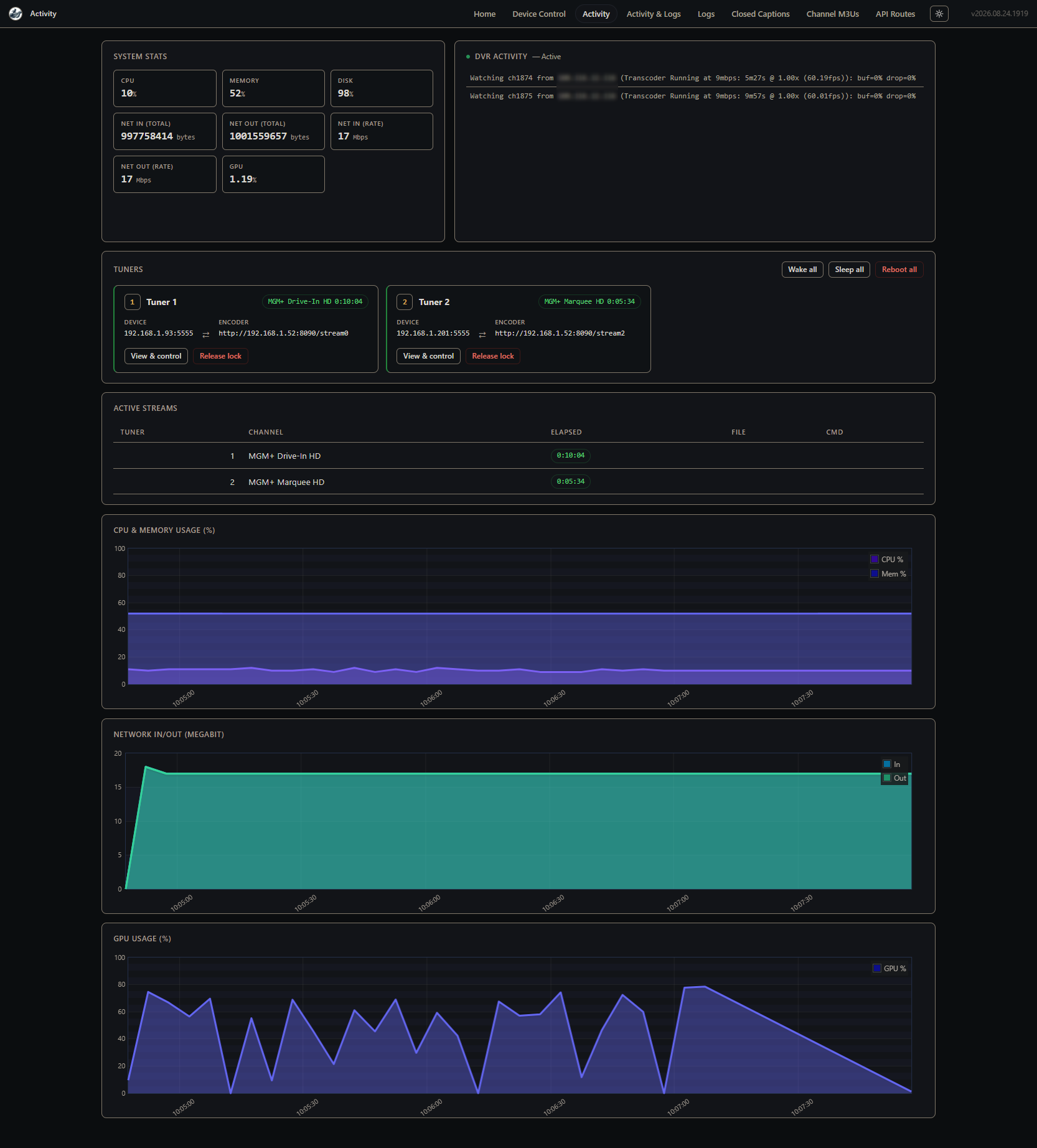
Oh, and both are transcoding to 9Mbps too:
intel-gpu-top: Intel Coffeelake (Gen9) @ /dev/dri/card1 - 1108/1108 MHz;   3% RC6; 11.30/30.22 W;     2474 irqs/s

      IMC reads:     5813 MiB/s
     IMC writes:     2574 MiB/s

         ENGINES     BUSY                                                                                                          MI_SEMA MI_WAIT
       Render/3D   95.69% |█████████████████████████████████████████████████████████████████████████████████████████████████▋    |      0%      0%
         Blitter    3.50% |███▋                                                                                                  |      0%      0%
           Video   30.17% |██████████████████████████████▉                                                                       |      0%      0%
    VideoEnhance    0.00% |                                                                                                      |      0%      0%

    PID      MEM      RSS          Render/3D                    Blitter                      Video                    VideoEnhance         NAME
2123881  558580K  558516K |███████████████▉          ||                          ||                          ||                          | ah4c
2134408   90724K   88140K |█████▍                    ||▋                         ||████▊                     ||                          | ffmpeg
2132751   76956K   72912K |███                       ||▍                         ||██▊                       ||                          | ffmpeg
Isn't that DMCA issue?
nope, no decryption happening outside the secure EME. I don't supply any decryption whatsoever-- I simply proxy the same exact headers that the apps use. In fact, a lot of apps use the exact same player I use. Therefore, it still requires HDMI-encoders to view the stream outside the EME.
I am on Unraid. My source is Xfinity via 2 Firetv's. My server has an Nvidia card and I cannot seem to get the docker to use the card. CPU CC creation works OK, but I'd rather use the GPU.
Here is the log from the docker startup

Here is the log from tuning and playing a channel. The video was playing during the last two "retrying" messages.
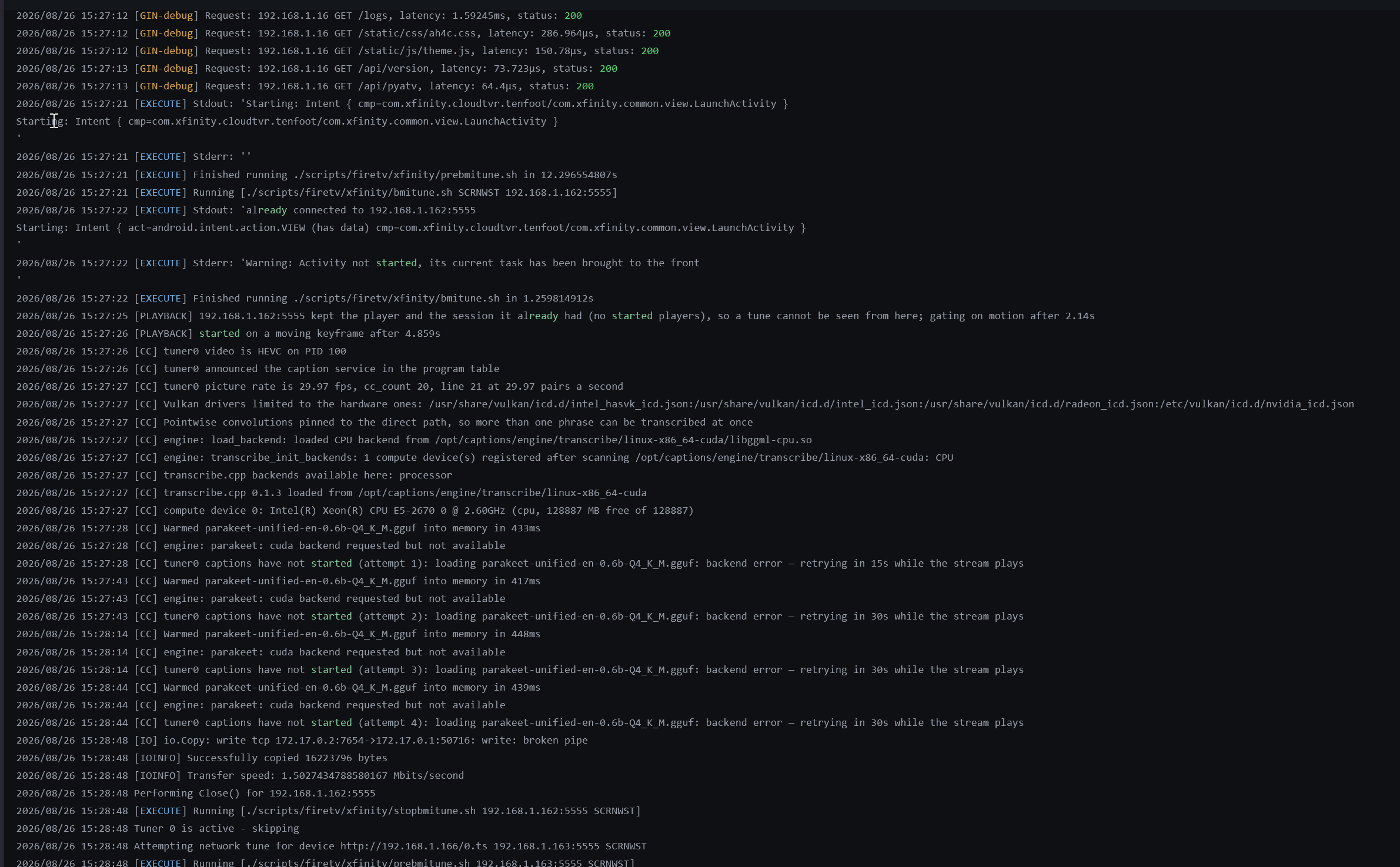
Here is the docker run command. This one is close to vanilla. I have tried quite a few alternatives on the various docker variables. Anything I try generates the same results.
docker run
  -d
  --name='ah4c'
  --net='bridge'
  --pids-limit 2048
  -e TZ="America/New_York"
  -e HOST_OS="Unraid"
  -e HOST_HOSTNAME="Truncheon"
  -e HOST_CONTAINERNAME="ah4c"
  -e 'Community_Applications_Conversion'='true'
  -e 'IPADDRESS'='truncheon:7654'
  -e 'NUMBER_TUNERS'='2'
  -e 'TUNER1_IP'='192.168.1.162:5555'
  -e 'ENCODER1_URL'='http://192.168.1.164/1.ts'
  -e 'STREAMER_APP'='scripts/firetv/xfinity'
  -e 'CHANNELSIP'='truncheon'
  -e 'TUNER2_IP'='192.168.1.163:5555'
  -e 'ENCODER2_URL'='http://192.168.1.166/0.ts'
  -e 'NVIDIA_VISIBLE_DEVICES'='GPU-e18cef66-0826-86b0-b47c-XXXXXXXXXXXX'
  -e 'NVIDIA_DRIVER_CAPABILITIES'='all'
  -e 'KEEP_WATCHING'='230m'
  -e 'DOMAIN'='local'
  -e 'GPU_DEVICE'='/dev/dri'
  -e 'NULL_FRAME_INSERTION'='true'
  -e 'PLAYBACK_DELAY'='20'
  -e 'PLAYBACK_DETECTION'='true'
  -l net.unraid.docker.managed=dockerman
  -l net.unraid.docker.webui='http://[IP]:[PORT:7654]'
  -p '7654:7654/tcp'
  -p '8000:8000/tcp'
  -p '5037:5037/tcp'
  -v '/mnt/cache/appdata/ah4c':'/opt/scripts':'rw'
  -v '/mnt/cache/appdata/ah4c/m3u':'/opt/m3u':'rw'
  -v '/mnt/cache/appdata/ah4c/adb':'/root/.android':'rw'
  -v '/mnt/user/appdata/ah4c/captions/':'/opt/captions':'rw'
  --runtime=nvidia 'bnhf/ah4c'

626a4fc8b3579e3df568222e3507e6bb923b5c5eb918e1c1944b0dad66f529c2

The command finished successfully!
I am wondering. I can open the console of the docker when it's running. What can I do to triage what is going on? Is there anything else I need to include? The config option I used here is "GPU via Cuda." If I let it choose, it uses Vulkan.
Vulkan gives the same results as "cuda" but my thinking is to start simple, and try vulkan if cuda can work.
Where are you passing the GPU into the container? The GPU_DEVICE env var is meant to be used with the published Docker Compose. It looks to me like you need a :--device= to pass your GPU using a docker run command
services:
  # 2026.08.20
  # GitHub home for this project with setup instructions: https://github.com/sullrich/ah4c
  # Docker Hub home for this project: https://hub.docker.com/repository/docker/bnhf/ah4c
  ah4c:
    image: bnhf/ah4c:${TAG:-latest}
    container_name: ah4c
    hostname: ah4c
    dns_search: ${DOMAIN:-localdomain} # Specify the name of your LAN's domain, usually local or localdomain
    runtime: ${DOCKER_RUNTIME:-runc} # Closed captions only. Set DOCKER_RUNTIME=nvidia for an NVIDIA GPU with the CUDA engine build. Requires the NVIDIA container toolkit
    devices:
      - ${GPU_DEVICE:-/dev/null} # Closed captions only. Set GPU_DEVICE=/dev/dri to let the Vulkan engine build use an Intel or AMD GPU. Left at the default it passes /dev/null, which always exists and does nothing
    ports:
      - ${HOST_PORT:-7654}:7654 # Port used by this ah4c proxy
    environment:
      - IPADDRESS=${IPADDRESS} # Hostname or IP address of this ah4c extension to be used in M3U file (also add port number if not in M3U)
      - NUMBER_TUNERS=${NUMBER_TUNERS} # Number of tuners you'd like defined - add a matching TUNERn_IP and ENCODERn_URL line below for each beyond 9
      - TUNER1_IP=${TUNER1_IP} # Streaming device #1 with adb port in the form hostname:port or ip:port
      - TUNER2_IP=${TUNER2_IP} # Streaming device #2 with adb port in the form hostname:port or ip:port
      - TUNER3_IP=${TUNER3_IP} # Streaming device #3 with adb port in the form hostname:port or ip:port
      - TUNER4_IP=${TUNER4_IP} # Streaming device #4 with adb port in the form hostname:port or ip:port
      - TUNER5_IP=${TUNER5_IP} # Streaming device #5 with adb port in the form hostname:port or ip:port
      - TUNER6_IP=${TUNER6_IP} # Streaming device #6 with adb port in the form hostname:port or ip:port
      - TUNER7_IP=${TUNER7_IP} # Streaming device #7 with adb port in the form hostname:port or ip:port
      - TUNER8_IP=${TUNER8_IP} # Streaming device #8 with adb port in the form hostname:port or ip:port
      - TUNER9_IP=${TUNER9_IP} # Streaming device #9 with adb port in the form hostname:port or ip:port
      - ENCODER1_URL=${ENCODER1_URL} # Full URL for tuner #1 in the form http://hostname/stream or http://ip/stream
      - ENCODER2_URL=${ENCODER2_URL} # Full URL for tuner #2 in the form http://hostname/stream or http://ip/stream
      - ENCODER3_URL=${ENCODER3_URL} # Full URL for tuner #3 in the form http://hostname/stream or http://ip/stream
      - ENCODER4_URL=${ENCODER4_URL} # Full URL for tuner #4 in the form http://hostname/stream or http://ip/stream
      - ENCODER5_URL=${ENCODER5_URL} # Full URL for tuner #5 in the form http://hostname/stream or http://ip/stream
      - ENCODER6_URL=${ENCODER6_URL} # Full URL for tuner #6 in the form http://hostname/stream or http://ip/stream
      - ENCODER7_URL=${ENCODER7_URL} # Full URL for tuner #7 in the form http://hostname/stream or http://ip/stream
      - ENCODER8_URL=${ENCODER8_URL} # Full URL for tuner #8 in the form http://hostname/stream or http://ip/stream
      - ENCODER9_URL=${ENCODER9_URL} # Full URL for tuner #9 in the form http://hostname/stream or http://ip/stream
      - STREAMER_APP=${STREAMER_APP} # Streaming device name and streaming app you're using in the form scripts/streamer/app (use lowercase with slashes between as shown)
      - PYATV=${PYATV:-false} # Set to TRUE to run docker-start-pyatv.sh at container start for Apple TV tuners via pyatv, instead of the default docker-start.sh used for adb-based tuners. Case-insensitive; anything else runs the default.
      - CHANNELSIP=${CHANNELSIP} # Hostname or IP address of the Channels DVR server itself
      - ALERT_SMTP_SERVER=${ALERT_SMTP_SERVER} # The domainname:port of the SMTP server you'll be using like smtp.gmail.com:587. This is for sending ah4c alerts if tuning fails.
      - ALERT_AUTH_SERVER=${ALERT_AUTH_SERVER} # The auth server for the e-mail you'll be using like smtp.gmail.com
      - ALERT_EMAIL_FROM=${ALERT_EMAIL_FROM} # The e-mail address you'd like your ah4c failure alert e-mails to show as being from.
      - ALERT_EMAIL_PASS=${ALERT_EMAIL_PASS} # Gmail and Yahoo both support the creation of app-specific e-mail passwords, and this is the way to go! It's NOT recommended to use your everyday e-mail password.
      - ALERT_EMAIL_TO=${ALERT_EMAIL_TO} # The e-mail address you'd like your alert e-mails sent to.
      - ALERT_WEBHOOK_URL=${ALERT_WEBHOOK_URL} # URL to GET when an alert fires (same failures that trigger the e-mail); put $reason in the URL and it's replaced with the URL-encoded message. Blank disables it.
      - LIVETV_ATTEMPTS=${LIVETV_ATTEMPTS} # For FireTV Live Guide tuning only, set maximum number of attempts at finding the desired channel
      - CREATE_M3US=${CREATE_M3US:-false} # Set to true to create device-specific M3Us for use with Amazon Prime Premium channels -- requires a FireTV device
      - UPDATE_SCRIPTS=${UPDATE_SCRIPTS:-true} # Set to true if you'd like the sample scripts and STREAMER_APP scripts updated whether they exist or not
      - UPDATE_M3US=${UPDATE_M3US:-true} # Set to true if you'd like the sample m3us updated whether they exist or not
      - TZ=${TZ} # Your local timezone in Linux "tz" format
      - SPEED_MODE=${SPEED_MODE:-false} # Set to false if you'd like the target streaming app to be closed after each tuning cycle (limited script support).
      - KEEP_WATCHING=${KEEP_WATCHING} # In supported scripts, set the delay before resending a tuning deeplink to prevent "Are you still watching?" type messages. Examples: Use 4h for 4 hours or 240m for 240 minutes.
      - AUTOCROP_CHANNELS=${AUTOCROP_CHANNELS} # Space separated list of channels (by number) with black borders on 4 sides to autocrop while maintaining aspect ratio. Requires LinkPi Encoder!
      - LINKPI_HOSTNAME=${LINKPI_HOSTNAME} # Hostname or IP of the LinkPi Encoder's web API. Required for AUTOCROP_CHANNELS.
      - LINKPI_USERNAME=${LINKPI_USERNAME} # Username for the LinkPi Encoder's web API. Required for AUTOCROP_CHANNELS.
      - LINKPI_PASSWORD=${LINKPI_PASSWORD} # Password for the LinkPi Encoder's web API. Required for AUTOCROP_CHANNELS; not currently read by the bundled scripts, which log in with the LinkPi default password instead.
      - USER_SCRIPT=${USER_SCRIPT} # Path to a custom script to run alongside ah4c at container startup. Blank runs nothing extra.
      - NULL_FRAME_INSERTION=${NULL_FRAME_INSERTION:-false} # Set to TRUE to fill encoder stalls with MPEG-TS NULL packets (PID 0x1FFF) so the DVR never sees a zero-byte gap mid-recording. Case-insensitive (true/True/TRUE all work); anything else, including 1/yes, leaves the feature off.
      - PLAYBACK_DETECTION=${PLAYBACK_DETECTION:-false} # Set to TRUE to hold the stream until the device reports media audio playing and the picture is actually moving, then start on a keyframe, so a recording begins on the program rather than on the app's loading screen. Requires adb access to the tuner; network tuners only. Case-insensitive (true/True/TRUE all work); anything else, including 1/yes, leaves the feature off.
      - PLAYBACK_DELAY=${PLAYBACK_DELAY} # Set to a whole number of seconds to skip the start of each tune, so a recording begins on the program rather than on the app's loading screen. Piped through the bundled ffmpeg with -ss and stream copy; no re-encoding, and the skip starts on the next keyframe so it can run slightly past the configured value. The value is the total tune time, scripts included. Supported range is 2 to 30, since the DVR allows a tune about 30 seconds; values outside the range are clamped and logged. Ignored when PLAYBACK_DETECTION is TRUE; network tuners only. 0 or unset leaves the feature off.
      - PLAYBACK_STATIC_TIMEOUT=${PLAYBACK_STATIC_TIMEOUT} # Only used with PLAYBACK_DETECTION=TRUE. How many seconds the box may keep the exact player and media session it already had before the check stops watching adb and gates on motion alone. The default is 2, which suits Ospreys; apps that hold one player across channel changes, like the DirecTV app, need more. 0 or unset uses the default.
      - HEARTBEAT_INTERVAL=${HEARTBEAT_INTERVAL:-0} # In supported scripts (currently osprey), seconds between keepalive keyevents sent during playback to stop the app's UI inactivity timer from resetting the stream. Set to 0 to disable.
      - NVIDIA_VISIBLE_DEVICES=${NVIDIA_VISIBLE_DEVICES} # Closed captions only. Set to all alongside DOCKER_RUNTIME=nvidia to expose an NVIDIA GPU. Empty means no GPU and is the default
      - NVIDIA_DRIVER_CAPABILITIES=${NVIDIA_DRIVER_CAPABILITIES} # Closed captions only. Set to compute,utility when using an NVIDIA GPU, so the driver the CUDA engine build needs is passed in
    volumes:
      - ${HOST_DIR}/ah4c/scripts:/opt/scripts # pre/stop/bmitune.sh scripts will be stored in this bound host directory under streamer/app
      - ${HOST_DIR}/ah4c/m3u:/opt/m3u # m3u files will be stored here and hosted at http://<hostname or ip>:7654/m3u for use in Channels DVR - Custom Channels settings
      - ${HOST_DIR}/ah4c/adb:/root/.android # Persistent data directory for adb keys
      - ${HOST_DIR}/ah4c/captions:/opt/captions # Closed caption settings, and the speech model, engine and any GPU driver downloaded from the Closed Captions page. Stays empty unless you turn captions on
    restart: unless-stopped
And sample set of env var overrides (Portainer-ready):
TAG=latest
CONTAINER_NAME=ah4c
HOSTNAME=ah4c
DOMAIN=localdomain tailxxxxx.ts.net
DOCKER_RUNTIME=runc
GPU_DEVICE=/dev/dri
HOST_PORT=7654
IPADDRESS=docker6:7654
NUMBER_TUNERS=5
TUNER1_IP=firestick-desk1:5555
ENCODER1_URL=http://linkpi-encoder2:8090/stream0
TUNER2_IP=firestick-desk2:5555
ENCODER2_URL=http://linkpi-encoder2:8090/stream1
TUNER3_IP=firestick-desk3:5555
ENCODER3_URL=http://linkpi-encoder2:8090/stream2
TUNER4_IP=firestick-desk4:5555
ENCODER4_URL=http://linkpi-encoder2:8090/stream3
TUNER5_IP=firestick-desk5:5555
ENCODER5_URL=http://linkpi-encoder2:8090/stream4
STREAMER_APP=scripts/firetv/dtvstreamdeeplinks
PYATV=false
CHANNELSIP=media-server10
ALERT_SMTP_SERVER=smtp.gmail.com:587
ALERT_AUTH_SERVER=smtp.gmail.com
[email protected]
ALERT_EMAIL_PASS=xxxxxxxxxxxxxxxx
[email protected]
ALERT_WEBHOOK_URL=
LIVETV_ATTEMPTS=
CREATE_M3US=false
UPDATE_SCRIPTS=true
UPDATE_M3US=true
TZ=America/Denver
SPEED_MODE=false
KEEP_WATCHING=235m
AUTOCROP_CHANNELS=
LINKPI_HOSTNAME=
LINKPI_USERNAME=
LINKPI_PASSWORD=
USER_SCRIPT=
NULL_FRAME_INSERTION=false
PLAYBACK_DETECTION=true
PLAYBACK_STATIC_TIMEOUT=12
PLAYBACK_DELAY=
HEARTBEAT_INTERVAL=
NVIDIA_VISIBLE_DEVICES=
NVIDIA_DRIVER_CAPABILITIES=
HOST_DIR=/data
EDIT: Try swapping-out --runtime=nvidia with --gpus all in your case.
1 Like
I haven't had an opportunity to test NVIDIA CUDA support. I just don't particularly have the hardware, so if anyone wants to play with that, please do let me know.
Oh, hello fellow Unraid user.
I would recommend using Compose Manager Plus rather than Dockerman for this on Unraid. Use the Docker Compose directly and use the Compose Manager Plus plugin, unless you want to use Portainer and Project OneClick. To use Portainer. Just download the Portainer CE Docker from Community Applications.
The advantage on Unraid of using the Compose Manager Plus plugin is you get automatic updates, and it just works really well with the Unraid UI, similar to Dockerman, but you get full Docker Compose support, and everything here will work like it's supposed to.
The advantage to using Portainer would be you get all of @bnhf's wonderful scripted actions, all fully supported and working. It just doesn't integrate as natively into Unraid.
That could be why you're running into trouble as you're trying to fit this into dockerman when it really is meant to work with Docker Compose. It's very easy to get a parameter wrong and break everything, honestly with Dockerman.
At some point I have to get a proper community applications template together for ah4c.
1 Like
Generally true, but I haven't yet updated the Project One-Click Action for these recent changes to ah4c. It'll be soon-ish for that, but of course the recommended Docker Compose is available in the meantime. 
1 Like
Just happened to notice they were using Unraid's Dockerman and a pre-generated template from Unraid's community applications.
Those pre-generated templates tend to get really, really mangled, which is why they're probably having issues.
That was why I suggested installing the Compose Manager Plus plugin. You just drop in the docker compose and then the ENV and you're done.
2 Likes
Using Composer Manager seems like a reasonable path. It should give different results. I will try that.