AndroidHDMI for Channels (ah4c): A virtual channel tuner using HDMI Encoder(s) + streaming stick(s)

I installed the docker using Compose Manager Plus. I took the opportunity to use the tuning shell scripts as supplied instead of the versions I had been using (my own code). On a like-to-like comparison, I can see that it seems to tune faster and be more stable. Some configuration tuning was required, as I am on FireTV devices with Xfinity as the source (slow tuning is always a concern).

At this point I tried turning CC's on. I was able to generate captions using CPU-only as before. When I tried using the GPU, I got the same messages as with the original docker, "cuda backend requested but not available."

I have tried referencing the Nvidia card directly, as well as trying the "--gpus=all." and get the same results either way. The container also goes into a state where no captions are generated, not even via CPU. The CC config screen then tells me to restart the container, and that starts the cycle again. For now, CC are turned off. CPU-generated CC are too resource intensive.

So, back to my original question, What can I do to triage what is going on, if I open the console while the container is running? I am familiar with the "nvidia-smi", but that does not really tell me anything that I don't already know, i.e. the container is not using the gpu.
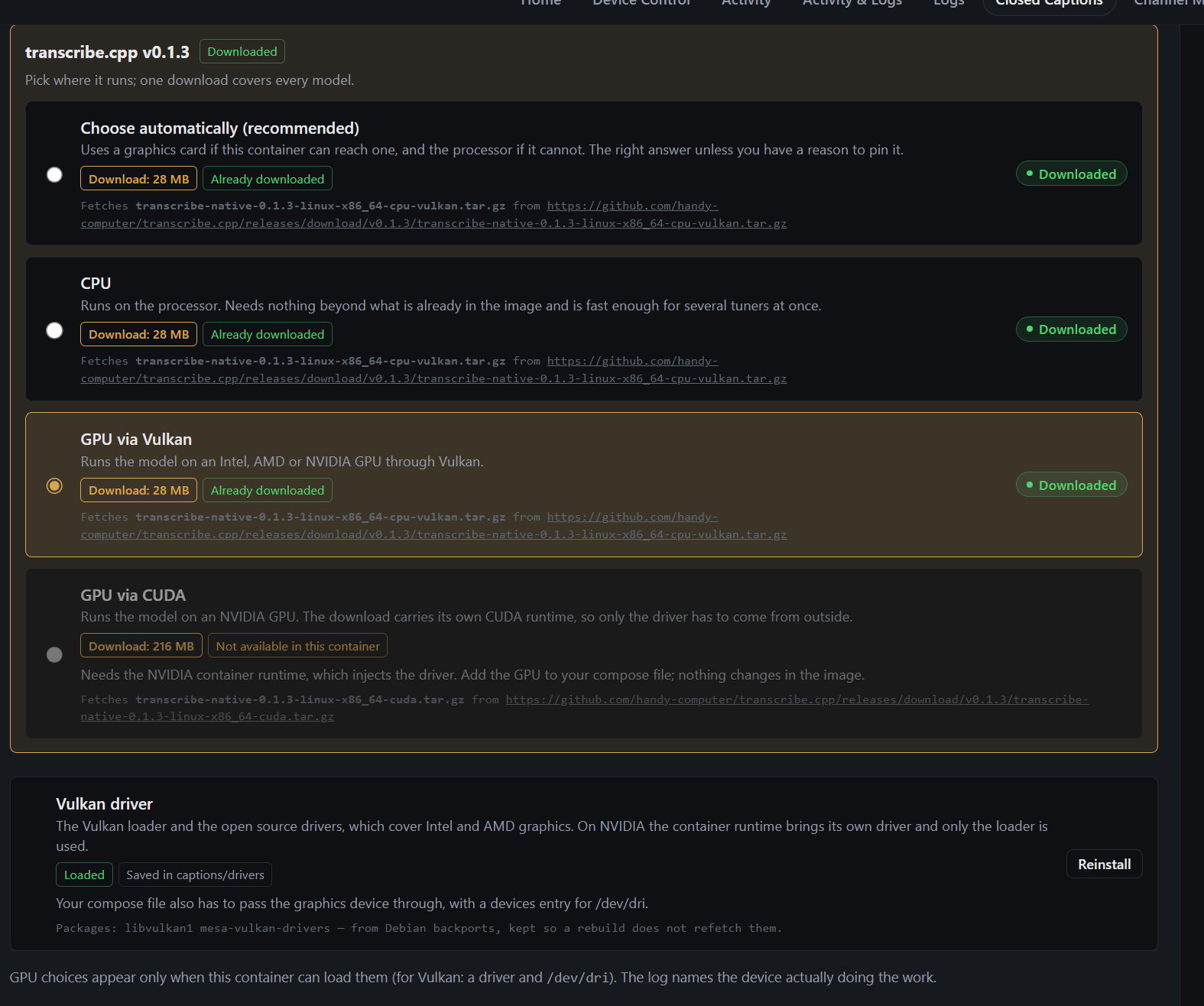
Share your compose and env in full. Also screenshot

edit: try this obviously tweak to your setup

services:
  ah4c:
    image: bnhf/ah4c:${TAG:-latest}
    container_name: ${CONTAINER_NAME:-ah4c}
    hostname: ${HOSTNAME:-ah4c}
    dns_search: ${DOMAIN:-localdomain}

    runtime: ${DOCKER_RUNTIME:-nvidia}

    ports:
      - ${HOST_PORT:-7654}:7654

    environment:
      - IPADDRESS=${IPADDRESS}
      - NUMBER_TUNERS=${NUMBER_TUNERS}

      - TUNER1_IP=${TUNER1_IP}
      - ENCODER1_URL=${ENCODER1_URL}
      - TUNER2_IP=${TUNER2_IP}
      - ENCODER2_URL=${ENCODER2_URL}
      - TUNER3_IP=${TUNER3_IP}
      - ENCODER3_URL=${ENCODER3_URL}
      - TUNER4_IP=${TUNER4_IP}
      - ENCODER4_URL=${ENCODER4_URL}
      - TUNER5_IP=${TUNER5_IP}
      - ENCODER5_URL=${ENCODER5_URL}

      - STREAMER_APP=${STREAMER_APP}
      - PYATV=${PYATV:-false}
      - CHANNELSIP=${CHANNELSIP}

      - ALERT_SMTP_SERVER=${ALERT_SMTP_SERVER}
      - ALERT_AUTH_SERVER=${ALER...VER}
      - ALERT_EMAIL_FROM=${ALERT_EMAIL_FROM}
      - ALERT_EMAIL_PASS=${ALER...ASS}
      - ALERT_EMAIL_TO=${ALERT_EMAIL_TO}
      - ALERT_WEBHOOK_URL=${ALERT_WEBHOOK_URL}

      - LIVETV_ATTEMPTS=${LIVETV_ATTEMPTS}
      - CREATE_M3US=${CREATE_M3US:-false}
      - UPDATE_SCRIPTS=${UPDATE_SCRIPTS:-true}
      - UPDATE_M3US=${UPDATE_M3US:-true}
      - TZ=${TZ}
      - SPEED_MODE=${SPEED_MODE:-false}
      - KEEP_WATCHING=${KEEP_WATCHING}

      - AUTOCROP_CHANNELS=${AUTOCROP_CHANNELS}
      - LINKPI_HOSTNAME=${LINKPI_HOSTNAME}
      - LINKPI_USERNAME=${LINKPI_USERNAME}
      - LINKPI_PASSWORD=${LINK...ORD}
      - USER_SCRIPT=${USER_SCRIPT}

      - NULL_FRAME_INSERTION=${NULL_FRAME_INSERTION:-false}
      - PLAYBACK_DETECTION=${PLAYBACK_DETECTION:-false}
      - PLAYBACK_STATIC_TIMEOUT=${PLAYBACK_STATIC_TIMEOUT}
      - PLAYBACK_DELAY=${PLAYBACK_DELAY}
      - ENCODER_CODEC=${ENCODER_CODEC:-h264}
      - HEARTBEAT_INTERVAL=${HEARTBEAT_INTERVAL:-0}

      - NVIDIA_VISIBLE_DEVICES=${NVIDIA_VISIBLE_DEVICES:-all}
      - NVIDIA_DRIVER_CAPABILITIES=${NVIDIA_DRIVER_CAPABILITIES:-compute,utility}

    volumes:
      - ${HOST_DIR}/ah4c/scripts:/opt/scripts
      - ${HOST_DIR}/ah4c/m3u:/opt/m3u
      - ${HOST_DIR}/ah4c/adb:/root/.android
      - ${HOST_DIR}/ah4c/captions:/opt/captions
      - ${PREROLL_FILE:-${HOST_DIR}/ah4c/preroll}:/opt/preroll

    restart: unless-stopped
TAG=latest
CONTAINER_NAME=ah4c
HOSTNAME=ah4c
DOMAIN=localdomain

DOCKER_RUNTIME=nvidia
NVIDIA_VISIBLE_DEVICES=all
NVIDIA_DRIVER_CAPABILITIES=compute,utility

HOST_PORT=7654
IPADDRESS=docker6:7654

NUMBER_TUNERS=5

TUNER1_IP=firestick-desk1:5555
ENCODER1_URL=http://linkpi-encoder2:8090/stream0

TUNER2_IP=firestick-desk2:5555
ENCODER2_URL=http://linkpi-encoder2:8090/stream1

TUNER3_IP=firestick-desk3:5555
ENCODER3_URL=http://linkpi-encoder2:8090/stream2

TUNER4_IP=firestick-desk4:5555
ENCODER4_URL=http://linkpi-encoder2:8090/stream3

TUNER5_IP=firestick-desk5:5555
ENCODER5_URL=http://linkpi-encoder2:8090/stream4

STREAMER_APP=scripts/firetv/dtvstreamdeeplinks
PYATV=false
CHANNELSIP=media-server10

ALERT_SMTP_SERVER=
ALERT_AUTH_SERVER=***
ALERT_EMAIL_PASS=***
ALERT_WEBHOOK_URL=

LIVETV_ATTEMPTS=
CREATE_M3US=false
UPDATE_SCRIPTS=true
UPDATE_M3US=true

TZ=America/Denver
SPEED_MODE=false
KEEP_WATCHING=235m

AUTOCROP_CHANNELS=
LINKPI_HOSTNAME=
LINKPI_USERNAME=
LINKPI_PASSWORD=***

NULL_FRAME_INSERTION=false
PLAYBACK_DETECTION=true
PLAYBACK_STATIC_TIMEOUT=12
PLAYBACK_DELAY=
PREROLL_FILE=
ENCODER_CODEC=h264
HEARTBEAT_INTERVAL=

HOST_DIR=/mnt/user/appdata

if this works we need a separate recommended nvidia compose. I'm pretty sure you can't have any mention of /dev/dri when using CUDA.

I had my agent look at everything, see if this works @DetroitTV. 100% untested.
prebimitune.sh

#!/bin/bash
# prebmitune.sh for firetv/youtubetv

set -euo pipefail

if (( $# < 1 )) || [[ -z "$1" ]]; then
  echo "Missing ah4c TUNERn_IP argument" >&2
  exit 2
fi

# ah4c passes the selected TUNERn_IP as $1 and the channel ID as $2.
streamerIP="$1"
adbTarget=(adb -s "$streamerIP")

adb connect "$streamerIP" >/dev/null
"${adbTarget[@]}" shell input keyevent KEYCODE_WAKEUP

bmitune.sh

#!/bin/bash
# bmitune.sh for firetv/youtubetv

set -euo pipefail

if (( $# < 2 )) || [[ -z "$1" ]] || [[ -z "$2" ]]; then
  echo "Missing ah4c channel ID or TUNERn_IP argument" >&2
  exit 2
fi

# ah4c passes the channel ID as $1 and the selected TUNERn_IP as $2.
channelID="$1"
streamerIP="$2"
packageName="com.amazon.firetv.youtube.tv"
adbTarget=(adb -s "$streamerIP")

# YouTube TV content IDs are URL-safe Base64-style identifiers.
if [[ "$channelID" == *[!A-Za-z0-9_-]* ]]; then
  echo "Invalid YouTube TV channel ID: $channelID" >&2
  exit 2
fi

contentURL="https://tv.youtube.com/watch/$channelID"

"${adbTarget[@]}" shell input keyevent KEYCODE_MEDIA_STOP
"${adbTarget[@]}" shell am start -W \
  -a android.intent.action.VIEW \
  -d "$contentURL" \
  "$packageName"

stopbmitune.sh

#!/bin/bash
# stopbmitune.sh for firetv/youtubetv

set -euo pipefail

if (( $# < 1 )) || [[ -z "$1" ]]; then
  echo "Missing ah4c TUNERn_IP argument" >&2
  exit 2
fi

# ah4c passes the selected TUNERn_IP as $1 and the channel ID as $2.
streamerIP="$1"
adbTarget=(adb -s "$streamerIP")

"${adbTarget[@]}" shell input keyevent KEYCODE_MEDIA_STOP
"${adbTarget[@]}" shell input keyevent KEYCODE_MEDIA_PAUSE
"${adbTarget[@]}" shell input keyevent KEYCODE_HOME

Again totally untested, may be a springboard.

Edit: sorry wrong user. I got mixed up in this thread. :rofl:

hey - appreciate the reply but tried adbtuner as you suggested and got it working. if it doesnt work out i'll try yours again. as a longtime user of channels dvr who relied on tv everywhere i've been lost. what you are doing is amazing!

I don't believe that's true. The standard compose with the correct overrides will handle it. In fact that's the whole idea with this type of compose.

In fact your suggested overrides, with the standard compose, should be fine as-is.

Oh I've found (at least with my custom CDVR container I built for Unraid) you must remove /dev/dri before adding runtime nvidia. I could be wrong but I tested that briefly.

1 Like

If you look at the standard compose we pass /dev/null as the default, which is never an issue. /dev/dri is an override and should only be used when supported, which in this case you wouldn't use.

2 Likes

Ah you're right. Then I really have no idea on this one.

Actually, I think what you proposed is very much worth trying -- but no need to change the standard compose.

@gellee00 try these env var overrides (adjusted as needed for your setup) with the standard compose:

TAG=latest
CONTAINER_NAME=ah4c
HOSTNAME=ah4c
DOMAIN=localdomain tailxxxxx.ts.net
DOCKER_RUNTIME=nvidia
GPU_DEVICE=/dev/null
HOST_PORT=7654
IPADDRESS=docker6:7654
NUMBER_TUNERS=5
TUNER1_IP=firestick-desk1:5555
ENCODER1_URL=http://linkpi-encoder2:8090/stream0
TUNER2_IP=firestick-desk2:5555
ENCODER2_URL=http://linkpi-encoder2:8090/stream1
TUNER3_IP=firestick-desk3:5555
ENCODER3_URL=http://linkpi-encoder2:8090/stream2
TUNER4_IP=firestick-desk4:5555
ENCODER4_URL=http://linkpi-encoder2:8090/stream3
TUNER5_IP=firestick-desk5:5555
ENCODER5_URL=http://linkpi-encoder2:8090/stream4
TUNER6_IP=
ENCODER6_URL=
TUNER7_IP=
ENCODER7_URL=
TUNER8_IP=
ENCODER8_URL=
TUNER9_IP=
ENCODER9_URL=
STREAMER_APP=scripts/firetv/dtvstreamdeeplinks
PYATV=false
CHANNELSIP=media-server10
ALERT_SMTP_SERVER=smtp.gmail.com:587
ALERT_AUTH_SERVER=smtp.gmail.com
[email protected]
ALERT_EMAIL_PASS=xxxxxxxxxxxxxxxx
[email protected]
ALERT_WEBHOOK_URL=
LIVETV_ATTEMPTS=
CREATE_M3US=false
UPDATE_SCRIPTS=true
UPDATE_M3US=true
TZ=America/Denver
SPEED_MODE=false
KEEP_WATCHING=235m
AUTOCROP_CHANNELS=
LINKPI_HOSTNAME=
LINKPI_USERNAME=
LINKPI_PASSWORD=
USER_SCRIPT=
NULL_FRAME_INSERTION=false
PLAYBACK_DETECTION=false
PLAYBACK_STATIC_TIMEOUT=12
PLAYBACK_DELAY=
PREROLL_FILE=
ENCODER_CODEC=h264
HEARTBEAT_INTERVAL=
NVIDIA_VISIBLE_DEVICES=all
NVIDIA_DRIVER_CAPABILITIES=compute,utility
HOST_DIR=/data

EDIT: If that doesn't work, change this one line, and try again:

NVIDIA_DRIVER_CAPABILITIES: compute,compat32,graphics,utility,video,display
1 Like

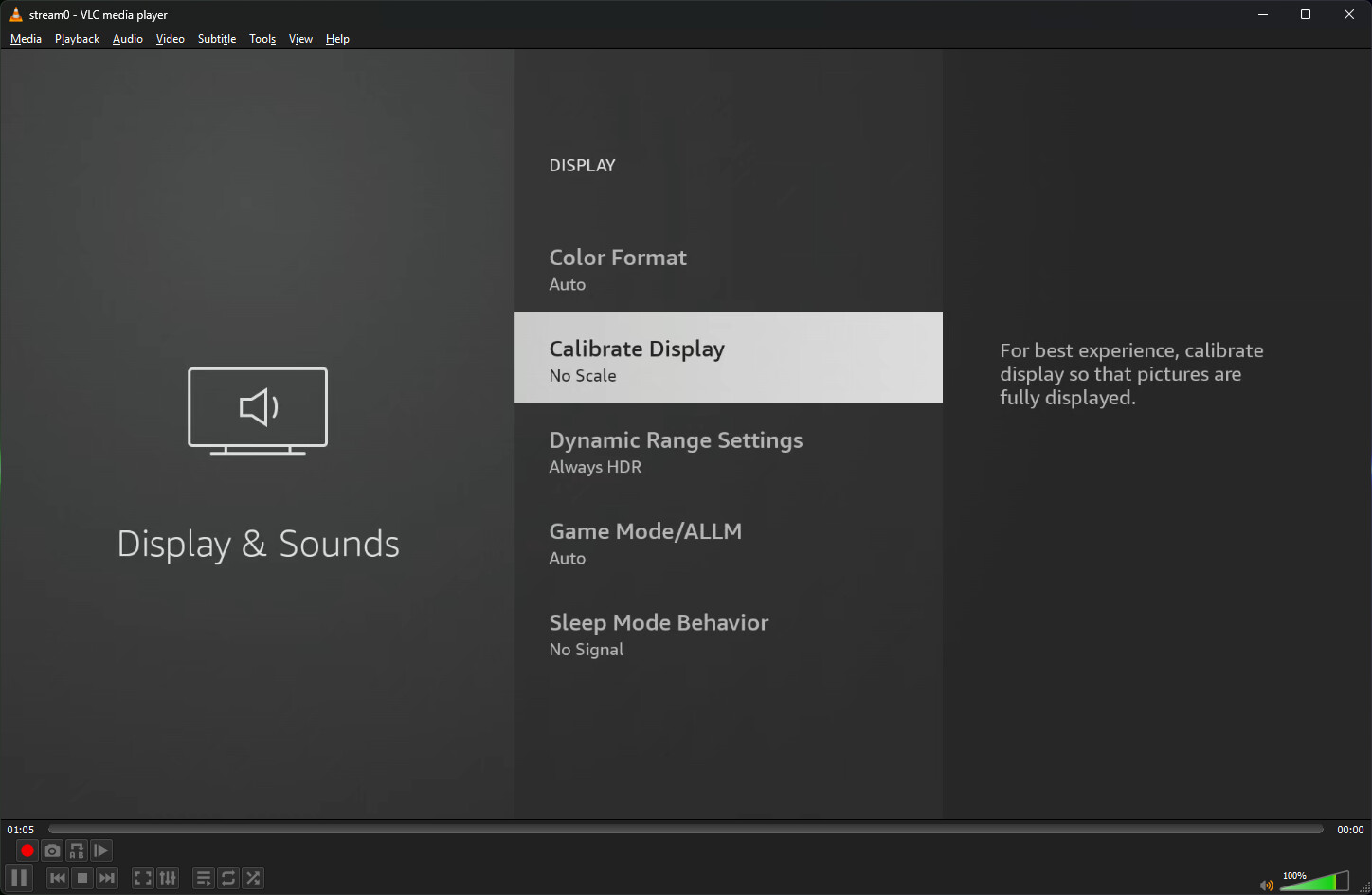
I've noticed that I don't get video in fullscreen. Is there something I need to check?

When you use your virtual encoder URL in VLC does it look the same?

Just checked and yes it does look the same.

So that tells us the virtual encoder is delivering the stream this way. Maybe the capture card has some settings that can be adjusted, or modifiers added/removed from the URLs you're using in the setup?

EDIT: Is it close to full screen? If so, the FireStick itself has some adjustments that may be able to deal with this:

I changed my display resolution to more than 1920x1080 and calibrated the firestick, now it looks better.