
I believe the exploit has been patched. However, I wonder where we would need to go in the pipeline to get that build, and how bleeding edge would it be?
OK, it looks like we may be good by moving to a Debian Trixie base, and then using the repo version of ffmpeg -- as apparently it's been backported.
I was planning that move soon anyway, so I'll see if I can make that happen tomorrow. It shouldn't be a big deal, but occasionally something unanticipated pops-up when changing container bases.
Once you do that, let me know. I'll pull in your changes and see if I can get that transcoding working.
It's done. Only minor issues encountered. Base image is now Debian 13 Slim, and ffmpeg is from the mainline repo, which incorporates a backported patch for the MagicYUV exploit.
I'll take a look at that after work today and see if I can get something working. I mean it should be trivial. We already have a path for H264, so it's just looking at that environment variable and doing conversion for 265.
I notice that after stopping a channel, ah4c sends a sleep command to the device (in my case, a firestick). I had to disable the sleep mode via adblink to be able to use the Windows ADB project because the stick didn't wake up consistently. I've kind of seen the same behavior in ah4c, so my question is, does this command actually put the stick to sleep and override my disabling? If so, does the command need to be there for ah4c to work properly?
Please post an updated yaml for me so I don't have to repair my zinwells and I will test. thanks.
If you're willing to test, that'd be great, but you'll need to reorganize your bound directories slightly. These are the hard coded values you've been using:
Our "no edit" one-size-fits-all Docker Compose, uses this approach:
    volumes:
      - ${HOST_DIR}/ah4c/scripts:/opt/scripts # pre/stop/bmitune.sh scripts will be stored in this bound host directory under streamer/app
      - ${HOST_DIR}/ah4c/m3u:/opt/m3u # m3u files will be stored here and hosted at http://<hostname or ip>:7654/m3u for use in Channels DVR - Custom Channels settings
      - ${HOST_DIR}/ah4c/adb:/root/.android # Persistent data directory for adb keys
      - ${HOST_DIR}/ah4c/captions:/opt/captions # Closed caption settings, and the speech model, engine and any GPU driver downloaded from the Closed Captions page. Stays empty unless you turn captions on
      - ${PREROLL_FILE:-${HOST_DIR}/ah4c/preroll}:/opt/preroll # A video or still image shown to the DVR instead of NULL packets, during a PLAYBACK_DELAY/PLAYBACK_DETECTION hold or a NULL_FRAME_INSERTION stall. Set PREROLL_FILE to a host path, or drop the file into this directory. Anything ffmpeg reads; prepared once at startup, loops until the real stream is ready
So, if you were willing to use /data as common parent (which is what HOST_DIR is currently set to in the env var overrides), you'd need to move the contents (including hidden files) of:
/ah4c/scripts/ah4c/scripts to /data/ah4c/scripts
/ah4c/m3u/ah4c/m3u to /data/ah4c/m3u
/ah4c/adb/ah4c/adb to /data/ah4c/adb.
If you're willing to make those changes, then the Docker Compose and env var overrides I posted earlier, should work with the latest ah4c container:
I don't really know how it all interacts if you've disabled sleep. I can tell you that I currently have 12 FireSticks deployed across multiple encoders, and have had zero problems with waking them up. It's a very fast process, and it keeps my encoders from having to stream/encode home screens and other nonsense 24x7.
ah4c doesn't care if the sticks are sleeping or not, so you can certainly modify the scripts to keep that from happening, if you feel like that would work better for you.
I have retested and tried, using different options, as you've suggested, but I still get the same response regardless of what options I set. I see "cuda backend requested but not available" in the log.
For now, I have CC's turned off. Otherwise the container is performing brilliantly. I confirmed that the KeepWatching works, when my DVR decided to record 6 episodes of a show back-to-back over 5.5 hours.
I have researched the issue on the Unraid forum, but I do not have anything concrete to contribute yet. Others, not using Unraid, resolved certain issues changing the Nvidia configuration. I hope not to have to do that, as this is the only container with which I have issues.
Here is a log from a test of generating CC using GPU only:
ty2026/08/31 23:22:08 [START] ah4c v2026.08.28.1306 is starting
2026/08/31 23:22:08 [ENV] Not loading env
2026/08/31 23:22:08 [ENV] IPADDRESS 192.168.1.40:7654
2026/08/31 23:22:08 [ENV] ALERT_SMTP_SERVER
2026/08/31 23:22:08 [ENV] ALERT_AUTH_SERVER
2026/08/31 23:22:08 [ENV] ALERT_EMAIL_FROM
2026/08/31 23:22:08 [ENV] ALERT_EMAIL_PASS
2026/08/31 23:22:08 [ENV] ALERT_EMAIL_TO
2026/08/31 23:22:08 [ENV] ALERT_WEBHOOK_URL
2026/08/31 23:22:08 [ENV] ALLOW_DEBUG_VIDEO_PREVIEW
2026/08/31 23:22:08 [ENV] NULL_FRAME_INSERTION false
2026/08/31 23:22:08 [ENV] PLAYBACK_DETECTION false
2026/08/31 23:22:08 [ENV] PLAYBACK_DELAY
2026/08/31 23:22:08 [ENV] PLAYBACK_STATIC_TIMEOUT 12
2026/08/31 23:22:08 [ENV] Creating tuner 1
2026/08/31 23:22:08 [ENV] ENCODER1_URL http://192.168.1.164/1.ts
2026/08/31 23:22:08 [ENV] TUNER1_IP 192.168.1.162:5555
2026/08/31 23:22:08 [ENV] CMD1
2026/08/31 23:22:08 [ENV] TEECMD1
2026/08/31 23:22:08 [ENV] PRE SCRIPT ./scripts/firetv/xfinity/prebmitune.sh
2026/08/31 23:22:08 [ENV] START SCRIPT ./scripts/firetv/xfinity/bmitune.sh
2026/08/31 23:22:08 [ENV] STOP SCRIPT ./scripts/firetv/xfinity/stopbmitune.sh
2026/08/31 23:22:08 [ENV] REBOOT SCRIPT ./scripts/firetv/xfinity/reboot.sh
2026/08/31 23:22:08 [ENV] Creating tuner 2
2026/08/31 23:22:08 [ENV] ENCODER2_URL http://192.168.1.166/0.ts
2026/08/31 23:22:08 [ENV] TUNER2_IP 192.168.1.163:5555
2026/08/31 23:22:08 [ENV] CMD2
2026/08/31 23:22:08 [ENV] TEECMD2
2026/08/31 23:22:08 [ENV] PRE SCRIPT ./scripts/firetv/xfinity/prebmitune.sh
2026/08/31 23:22:08 [ENV] START SCRIPT ./scripts/firetv/xfinity/bmitune.sh
2026/08/31 23:22:08 [ENV] STOP SCRIPT ./scripts/firetv/xfinity/stopbmitune.sh
2026/08/31 23:22:08 [ENV] REBOOT SCRIPT ./scripts/firetv/xfinity/reboot.sh
2026/08/31 23:22:08 [BLACKFRAMES] made 500ms of black, 12 KB, to go in front of the picture at the hand-off
2026/08/31 23:22:08 [CC] Loaded config: enabled=true model=parakeet-unified language=en style=box2
2026/08/31 23:22:08 [START] Putting the saved graphics driver back before the port is bound. Nothing can be tuning yet, which is the whole reason it happens here — but ah4c is not answering on 7654 until it is done, so anything asking meanwhile gets connection refused rather than a slow reply.
2026/08/31 23:22:08 [CC] Vulkan driver is saved but not loaded, restoring it from captions/drivers/vulkan
2026/08/31 23:22:08 [CC] Installing all 37 saved packages for Vulkan driver at once
2026/08/31 23:23:16 [CC] Vulkan driver: 37 of 37 packages in
2026/08/31 23:23:16 [CC] Vulkan driver restored
2026/08/31 23:23:16 [START] The graphics driver held the door shut for 1m8s. ah4c is binding 7654 now.
2026/08/31 23:23:16 [START] ah4c is ready
2026/08/31 23:23:19 [GIN-debug] Request: 192.168.1.16 GET /captions, latency: 8.470441ms, status: 200
2026/08/31 23:23:19 [GIN-debug] Request: 192.168.1.16 GET /static/js/theme.js, latency: 4.233724ms, status: 200
2026/08/31 23:23:19 [GIN-debug] Request: 192.168.1.16 GET /static/css/ah4c.css, latency: 5.006405ms, status: 200
2026/08/31 23:23:19 [GIN-debug] Request: 192.168.1.16 GET /static/logos/androidhdmi-for-channels.jpeg, latency: 525.73µs, status: 200
2026/08/31 23:23:19 [GIN-debug] Request: 192.168.1.16 GET /api/version, latency: 459.438µs, status: 200
2026/08/31 23:23:19 [GIN-debug] Request: 192.168.1.16 GET /api/pyatv, latency: 101.477µs, status: 200
2026/08/31 23:24:23 Attempting network tune for device http://192.168.1.164/1.ts 192.168.1.162:5555 HBOSH-5232923399725817105
2026/08/31 23:24:23 [EXECUTE] Running [./scripts/firetv/xfinity/prebmitune.sh 192.168.1.162:5555 HBOSH-5232923399725817105]
2026/08/31 23:24:25 [EXECUTE] Stdout: 'already connected to 192.168.1.162:5555
prebmitune.sh is exiting for 192.168.1.162:5555 with exit code 0
'
2026/08/31 23:24:25 [EXECUTE] Stderr: '+ streamerIP=192.168.1.162:5555
+ streamerNoPort=192.168.1.162
+ adbTarget='adb -s 192.168.1.162:5555'
+ mkdir -p 192.168.1.162
+ trap finish EXIT
+ main
+ adbConnect
+ adb connect 192.168.1.162:5555
+ local -i adbMaxRetries=2
+ local -i adbCounter=0
+ true
+ adb -s 192.168.1.162:5555 shell input keyevent KEYCODE_WAKEUP
+ local adbEventSuccess=0
+ [[ 0 -eq 0 ]]
+ break
+ finish
+ echo 'prebmitune.sh is exiting for 192.168.1.162:5555 with exit code 0'
'
2026/08/31 23:24:25 [EXECUTE] Finished running ./scripts/firetv/xfinity/prebmitune.sh in 1.316414298s
2026/08/31 23:24:25 [EXECUTE] Running [./scripts/firetv/xfinity/bmitune.sh HBOSH-5232923399725817105 192.168.1.162:5555]
2026/08/31 23:24:25 [CC] tuner0 video is HEVC on PID 100
2026/08/31 23:24:25 [CC] tuner0 announced the caption service in the program table
2026/08/31 23:24:25 [CC] tuner0 picture rate is 29.97 fps, cc_count 20, line 21 at 29.97 pairs a second
2026/08/31 23:24:30 [CC] Vulkan drivers limited to the hardware ones: /usr/share/vulkan/icd.d/intel_hasvk_icd.json:/usr/share/vulkan/icd.d/intel_icd.json:/usr/share/vulkan/icd.d/radeon_icd.json:/etc/vulkan/icd.d/nvidia_icd.json
2026/08/31 23:24:30 [CC] Pointwise convolutions pinned to the direct path, so more than one phrase can be transcribed at once
2026/08/31 23:24:30 [CC] engine: load_backend: loaded CPU backend from /opt/captions/engine/transcribe/linux-x86_64-cuda/libggml-cpu.so
2026/08/31 23:24:30 [CC] transcribe.cpp backends available here: processor
2026/08/31 23:24:30 [CC] transcribe.cpp 0.1.3 loaded from /opt/captions/engine/transcribe/linux-x86_64-cuda
2026/08/31 23:24:30 [CC] compute device 0: Intel(R) Xeon(R) CPU E5-2670 0 @ 2.60GHz (cpu, 128887 MB free of 128887)
2026/08/31 23:24:30 [CC] engine: transcribe_init_backends: 1 compute device(s) registered after scanning /opt/captions/engine/transcribe/linux-x86_64-cuda: CPU
2026/08/31 23:24:30 [CC] Warmed parakeet-unified-en-0.6b-Q4_K_M.gguf into memory in 535ms
2026/08/31 23:24:30 [CC] engine: parakeet: cuda backend requested but not available
2026/08/31 23:24:30 [CC] tuner0 captions have not started (attempt 1): loading parakeet-unified-en-0.6b-Q4_K_M.gguf: backend error — retrying in 15s while the stream plays
2026/08/31 23:24:45 [CC] Warmed parakeet-unified-en-0.6b-Q4_K_M.gguf into memory in 211ms
2026/08/31 23:24:45 [CC] engine: parakeet: cuda backend requested but not available
2026/08/31 23:24:45 [CC] tuner0 captions have not started (attempt 2): loading parakeet-unified-en-0.6b-Q4_K_M.gguf: backend error — retrying in 30s while the stream plays
2026/08/31 23:25:16 [CC] Warmed parakeet-unified-en-0.6b-Q4_K_M.gguf into memory in 225ms
2026/08/31 23:25:16 [CC] engine: parakeet: cuda backend requested but not available
2026/08/31 23:25:16 [CC] tuner0 captions have not started (attempt 3): loading parakeet-unified-en-0.6b-Q4_K_M.gguf: backend error — retrying in 30s while the stream plays
2026/08/31 23:25:46 [CC] Warmed parakeet-unified-en-0.6b-Q4_K_M.gguf into memory in 228ms
2026/08/31 23:25:46 [CC] engine: parakeet: cuda backend requested but not available
2026/08/31 23:25:46 [CC] tuner0 captions have not started (attempt 4): loading parakeet-unified-en-0.6b-Q4_K_M.gguf: backend error — retrying in 30s while the stream plays
2026/08/31 23:26:16 [CC] Warmed parakeet-unified-en-0.6b-Q4_K_M.gguf into memory in 208ms
2026/08/31 23:26:16 [CC] engine: parakeet: cuda backend requested but not available
2026/08/31 23:26:16 [CC] tuner0 captions have not started (attempt 5): loading parakeet-unified-en-0.6b-Q4_K_M.gguf: backend error — retrying in 30s while the stream plays
2026/08/31 23:26:46 [CC] Warmed parakeet-unified-en-0.6b-Q4_K_M.gguf into memory in 257ms
2026/08/31 23:26:46 [CC] engine: parakeet: cuda backend requested but not available
2026/08/31 23:26:46 [CC] tuner0 captions have not started (attempt 6): loading parakeet-unified-en-0.6b-Q4_K_M.gguf: backend error — retrying in 30s while the stream plays
2026/08/31 23:27:17 [CC] Warmed parakeet-unified-en-0.6b-Q4_K_M.gguf into memory in 224ms
2026/08/31 23:27:17 [CC] engine: parakeet: cuda backend requested but not available
2026/08/31 23:27:17 [CC] tuner0 captions have not started (attempt 7): loading parakeet-unified-en-0.6b-Q4_K_M.gguf: backend error — retrying in 30s while the stream plays
2026/08/31 23:27:47 [CC] Warmed parakeet-unified-en-0.6b-Q4_K_M.gguf into memory in 243ms
2026/08/31 23:27:47 [CC] engine: parakeet: cuda backend requested but not available
2026/08/31 23:27:47 [CC] tuner0 captions have not started (attempt 8): loading parakeet-unified-en-0.6b-Q4_K_M.gguf: backend error — retrying in 30s while the stream plays
2026/08/31 23:28:17 [CC] Warmed parakeet-unified-en-0.6b-Q4_K_M.gguf into memory in 216ms
2026/08/31 23:28:17 [CC] engine: parakeet: cuda backend requested but not available
2026/08/31 23:28:17 [CC] tuner0 captions have not started (attempt 9): loading parakeet-unified-en-0.6b-Q4_K_M.gguf: backend error — retrying in 30s while the stream plays
2026/08/31 23:28:47 [CC] Warmed parakeet-unified-en-0.6b-Q4_K_M.gguf into memory in 204ms
2026/08/31 23:28:47 [CC] engine: parakeet: cuda backend requested but not available
2026/08/31 23:28:47 [CC] tuner0 captions have not started (attempt 10): loading parakeet-unified-en-0.6b-Q4_K_M.gguf: backend error — retrying in 30s while the stream plays
2026/08/31 23:29:18 [CC] Warmed parakeet-unified-en-0.6b-Q4_K_M.gguf into memory in 217ms
2026/08/31 23:29:18 [CC] engine: parakeet: cuda backend requested but not available
2026/08/31 23:29:18 [CC] tuner0 captions have not started (attempt 11): loading parakeet-unified-en-0.6b-Q4_K_M.gguf: backend error — retrying in 30s while the stream plays
2026/08/31 23:29:48 [CC] Warmed parakeet-unified-en-0.6b-Q4_K_M.gguf into memory in 219ms
2026/08/31 23:29:48 [CC] engine: parakeet: cuda backend requested but not available
2026/08/31 23:29:48 [CC] tuner0 captions have not started (attempt 12): loading parakeet-unified-en-0.6b-Q4_K_M.gguf: backend error — retrying in 30s while the stream plays
2026/08/31 23:30:15 [GIN-debug] Request: 192.168.1.16 GET /logs, latency: 3.353973ms, status: 200
2026/08/31 23:30:15 [GIN-debug] Request: 192.168.1.16 GET /static/css/ah4c.css, latency: 220.297µs, status: 200
2026/08/31 23:30:15 [GIN-debug] Request: 192.168.1.16 GET /static/js/theme.js, latency: 116.655µs, status: 200
2026/08/31 23:30:15 [GIN-debug] Request: 192.168.1.16 GET /static/logos/androidhdmi-for-channels.jpeg, latency: 326.48µs, status: 200
2026/08/31 23:30:15 [GIN-debug] Request: 192.168.1.16 GET /api/version, latency: 55.097µs, status: 200
2026/08/31 23:30:15 [GIN-debug] Request: 192.168.1.16 GET /api/pyatv, latency: 37.098µs, status: 200
2026/08/31 23:30:18 [CC] Warmed parakeet-unified-en-0.6b-Q4_K_M.gguf into memory in 220ms
2026/08/31 23:30:18 [CC] engine: parakeet: cuda backend requested but not available
2026/08/31 23:30:18 [CC] tuner0 captions have not started (attempt 13): loading parakeet-unified-en-0.6b-Q4_K_M.gguf: backend error — retrying in 30s while the stream plays
2026/08/31 23:30:48 [CC] Warmed parakeet-unified-en-0.6b-Q4_K_M.gguf into memory in 220ms
2026/08/31 23:30:48 [CC] engine: parakeet: cuda backend requested but not available
2026/08/31 23:30:48 [CC] tuner0 captions have not started (attempt 14): loading parakeet-unified-en-0.6b-Q4_K_M.gguf: backend error — retrying in 30s while the stream playspe or paste code here
Here is the compose:
services:
  # 2026.08.20
  # GitHub home for this project with setup instructions: https://github.com/sullrich/ah4c
  # Docker Hub home for this project: https://hub.docker.com/repository/docker/bnhf/ah4c
  ah4c:
    image: bnhf/ah4c:${TAG:-latest}
    container_name: ah4c
    hostname: ah4c
    dns_search: ${DOMAIN:-local} # Specify the name of your LAN's domain, usually local or localdomain
    runtime: ${DOCKER_RUNTIME:-runc} # Closed captions only. Set DOCKER_RUNTIME=nvidia for an NVIDIA GPU with the CUDA engine build. Requires the NVIDIA container toolkit
    devices:
      - ${GPU_DEVICE:-/dev/null} # Closed captions only. Set GPU_DEVICE=/dev/dri to let the Vulkan engine build use an Intel or AMD GPU. Left at the default it passes /dev/null, which always exists and does nothing
    ports:
      - ${HOST_PORT:-7654}:7654 # Port used by this ah4c proxy
    environment:
      - IPADDRESS=${IPADDRESS} # Hostname or IP address of this ah4c extension to be used in M3U file (also add port number if not in M3U)
      - NUMBER_TUNERS=${NUMBER_TUNERS} # Number of tuners you'd like defined - add a matching TUNERn_IP and ENCODERn_URL line below for each beyond 9
      - TUNER1_IP=${TUNER1_IP} # Streaming device #1 with adb port in the form hostname:port or ip:port
      - TUNER2_IP=${TUNER2_IP} # Streaming device #2 with adb port in the form hostname:port or ip:port
      - TUNER3_IP=${TUNER3_IP} # Streaming device #3 with adb port in the form hostname:port or ip:port
      - TUNER4_IP=${TUNER4_IP} # Streaming device #4 with adb port in the form hostname:port or ip:port
      - TUNER5_IP=${TUNER5_IP} # Streaming device #5 with adb port in the form hostname:port or ip:port
      - TUNER6_IP=${TUNER6_IP} # Streaming device #6 with adb port in the form hostname:port or ip:port
      - TUNER7_IP=${TUNER7_IP} # Streaming device #7 with adb port in the form hostname:port or ip:port
      - TUNER8_IP=${TUNER8_IP} # Streaming device #8 with adb port in the form hostname:port or ip:port
      - TUNER9_IP=${TUNER9_IP} # Streaming device #9 with adb port in the form hostname:port or ip:port
      - ENCODER1_URL=${ENCODER1_URL} # Full URL for tuner #1 in the form http://hostname/stream or http://ip/stream
      - ENCODER2_URL=${ENCODER2_URL} # Full URL for tuner #2 in the form http://hostname/stream or http://ip/stream
      - ENCODER3_URL=${ENCODER3_URL} # Full URL for tuner #3 in the form http://hostname/stream or http://ip/stream
      - ENCODER4_URL=${ENCODER4_URL} # Full URL for tuner #4 in the form http://hostname/stream or http://ip/stream
      - ENCODER5_URL=${ENCODER5_URL} # Full URL for tuner #5 in the form http://hostname/stream or http://ip/stream
      - ENCODER6_URL=${ENCODER6_URL} # Full URL for tuner #6 in the form http://hostname/stream or http://ip/stream
      - ENCODER7_URL=${ENCODER7_URL} # Full URL for tuner #7 in the form http://hostname/stream or http://ip/stream
      - ENCODER8_URL=${ENCODER8_URL} # Full URL for tuner #8 in the form http://hostname/stream or http://ip/stream
      - ENCODER9_URL=${ENCODER9_URL} # Full URL for tuner #9 in the form http://hostname/stream or http://ip/stream
      - STREAMER_APP=${STREAMER_APP} # Streaming device name and streaming app you're using in the form scripts/streamer/app (use lowercase with slashes between as shown)
      - PYATV=${PYATV:-false} # Set to TRUE to run docker-start-pyatv.sh at container start for Apple TV tuners via pyatv, instead of the default docker-start.sh used for adb-based tuners. Case-insensitive; anything else runs the default.
      - CHANNELSIP=${CHANNELSIP} # Hostname or IP address of the Channels DVR server itself
      - ALERT_SMTP_SERVER=${ALERT_SMTP_SERVER} # The domainname:port of the SMTP server you'll be using like smtp.gmail.com:587. This is for sending ah4c alerts if tuning fails.
      - ALERT_AUTH_SERVER=${ALERT_AUTH_SERVER} # The auth server for the e-mail you'll be using like smtp.gmail.com
      - ALERT_EMAIL_FROM=${ALERT_EMAIL_FROM} # The e-mail address you'd like your ah4c failure alert e-mails to show as being from.
      - ALERT_EMAIL_PASS=${ALERT_EMAIL_PASS} # Gmail and Yahoo both support the creation of app-specific e-mail passwords, and this is the way to go! It's NOT recommended to use your everyday e-mail password.
      - ALERT_EMAIL_TO=${ALERT_EMAIL_TO} # The e-mail address you'd like your alert e-mails sent to.
      - ALERT_WEBHOOK_URL=${ALERT_WEBHOOK_URL} # URL to GET when an alert fires (same failures that trigger the e-mail); put $reason in the URL and it's replaced with the URL-encoded message. Blank disables it.
      - LIVETV_ATTEMPTS=${LIVETV_ATTEMPTS} # For FireTV Live Guide tuning only, set maximum number of attempts at finding the desired channel
      - CREATE_M3US=${CREATE_M3US:-false} # Set to true to create device-specific M3Us for use with Amazon Prime Premium channels -- requires a FireTV device
      - UPDATE_SCRIPTS=${UPDATE_SCRIPTS:-true} # Set to true if you'd like the sample scripts and STREAMER_APP scripts updated whether they exist or not
      - UPDATE_M3US=${UPDATE_M3US:-true} # Set to true if you'd like the sample m3us updated whether they exist or not
      - TZ=${TZ} # Your local timezone in Linux "tz" format
      - SPEED_MODE=${SPEED_MODE:-false} # Set to false if you'd like the target streaming app to be closed after each tuning cycle (limited script support).
      - KEEP_WATCHING=${KEEP_WATCHING} # In supported scripts, set the delay before resending a tuning deeplink to prevent "Are you still watching?" type messages. Examples: Use 4h for 4 hours or 240m for 240 minutes.
      - AUTOCROP_CHANNELS=${AUTOCROP_CHANNELS} # Space separated list of channels (by number) with black borders on 4 sides to autocrop while maintaining aspect ratio. Requires LinkPi Encoder!
      - LINKPI_HOSTNAME=${LINKPI_HOSTNAME} # Hostname or IP of the LinkPi Encoder's web API. Required for AUTOCROP_CHANNELS.
      - LINKPI_USERNAME=${LINKPI_USERNAME} # Username for the LinkPi Encoder's web API. Required for AUTOCROP_CHANNELS.
      - LINKPI_PASSWORD=${LINKPI_PASSWORD} # Password for the LinkPi Encoder's web API. Required for AUTOCROP_CHANNELS; not currently read by the bundled scripts, which log in with the LinkPi default password instead.
      - USER_SCRIPT=${USER_SCRIPT} # Path to a custom script to run alongside ah4c at container startup. Blank runs nothing extra.
      - NULL_FRAME_INSERTION=${NULL_FRAME_INSERTION:-false} # Set to TRUE to fill encoder stalls with MPEG-TS NULL packets (PID 0x1FFF) so the DVR never sees a zero-byte gap mid-recording. Case-insensitive (true/True/TRUE all work); anything else, including 1/yes, leaves the feature off.
      - PLAYBACK_DETECTION=${PLAYBACK_DETECTION:-false} # Set to TRUE to hold the stream until the device reports media audio playing and the picture is actually moving, then start on a keyframe, so a recording begins on the program rather than on the app's loading screen. Requires adb access to the tuner; network tuners only. Case-insensitive (true/True/TRUE all work); anything else, including 1/yes, leaves the feature off.
      - PLAYBACK_DELAY=${PLAYBACK_DELAY} # Set to a whole number of seconds to skip the start of each tune, so a recording begins on the program rather than on the app's loading screen. Piped through the bundled ffmpeg with -ss and stream copy; no re-encoding, and the skip starts on the next keyframe so it can run slightly past the configured value. The value is the total tune time, scripts included. Supported range is 2 to 30, since the DVR allows a tune about 30 seconds; values outside the range are clamped and logged. Ignored when PLAYBACK_DETECTION is TRUE; network tuners only. 0 or unset leaves the feature off.
      - PLAYBACK_STATIC_TIMEOUT=${PLAYBACK_STATIC_TIMEOUT} # Only used with PLAYBACK_DETECTION=TRUE. How many seconds the box may keep the exact player and media session it already had before the check stops watching adb and gates on motion alone. The default is 2, which suits Ospreys; apps that hold one player across channel changes, like the DirecTV app, need more. 0 or unset uses the default.
      - HEARTBEAT_INTERVAL=${HEARTBEAT_INTERVAL:-0} # In supported scripts (currently osprey), seconds between keepalive keyevents sent during playback to stop the app's UI inactivity timer from resetting the stream. Set to 0 to disable.
      - NVIDIA_VISIBLE_DEVICES=${NVIDIA_VISIBLE_DEVICES} # Closed captions only. Set to all alongside DOCKER_RUNTIME=nvidia to expose an NVIDIA GPU. Empty means no GPU and is the default
      - NVIDIA_DRIVER_CAPABILITIES=${NVIDIA_DRIVER_CAPABILITIES} # Closed captions only. Set to compute,utility when using an NVIDIA GPU, so the driver the CUDA engine build needs is passed in
    volumes:
      - ${HOST_DIR}/ah4c/scripts:/opt/scripts # pre/stop/bmitune.sh scripts will be stored in this bound host directory under streamer/app
      - ${HOST_DIR}/ah4c/m3u:/opt/m3u # m3u files will be stored here and hosted at http://<hostname or ip>:7654/m3u for use in Channels DVR - Custom Channels settings
      - ${HOST_DIR}/ah4c/adb:/root/.android # Persistent data directory for adb keys
      - ${HOST_DIR}/ah4c/captions:/opt/captions # Closed caption settings, and the speech model, engine and any GPU driver downloaded from the Closed Captions page. Stays empty unless you turn captions on
    restart: unless-stopped
Here are the environment variables currently. Note I tried several options for NVIDIA_DRIVER_CAPABILITIES. All give the same results as noted above. Note that GPU_DEVICE=/dev/null seems to be correct for Nividia.
# .env file - define environment variables used by docker compose
# Variables defined here are automatically available in compose.yaml via ${VAR_NAME}
#
# Example:
# IMAGE_TAG=latest
# DATA_DIR=/mnt/user/appdata/ah4c
# PORT=7654
TAG=latest
DOMAIN=192.168.1.1
HOST_DIR=/mnt/cache/appdata
HOST_PORT=7654
GPU_DEVICE=/dev/null
DOCKER_RUNTIME=nvidia
IPADDRESS=192.168.1.40:7654
NUMBER_TUNERS=2
TUNER1_IP=192.168.1.162:5555
ENCODER1_URL=http://192.168.1.164/1.ts
TUNER2_IP=192.168.1.163:5555
ENCODER2_URL=http://192.168.1.166/0.ts
STREAMER_APP=scripts/firetv/xfinity
PYATV=false
CHANNELSIP=192.168.1.40
LIVETV_ATTEMPTS=45
CREATE_M3US=false
UPDATE_SCRIPTS=true
UPDATE_M3US=false
TZ=America/New_York
KEEP_WATCHING=230m
PLAYBACK_DELAY=
PLAYBACK_DETECTION=false
PLAYBACK_STATIC_TIMEOUT=12
NULL_FRAME_INSERTION=false
NVIDIA_VISIBLE_DEVICES=all
NVIDIA_DRIVER_CAPABILITIES=compute,compat32,graphics,utility,video,display
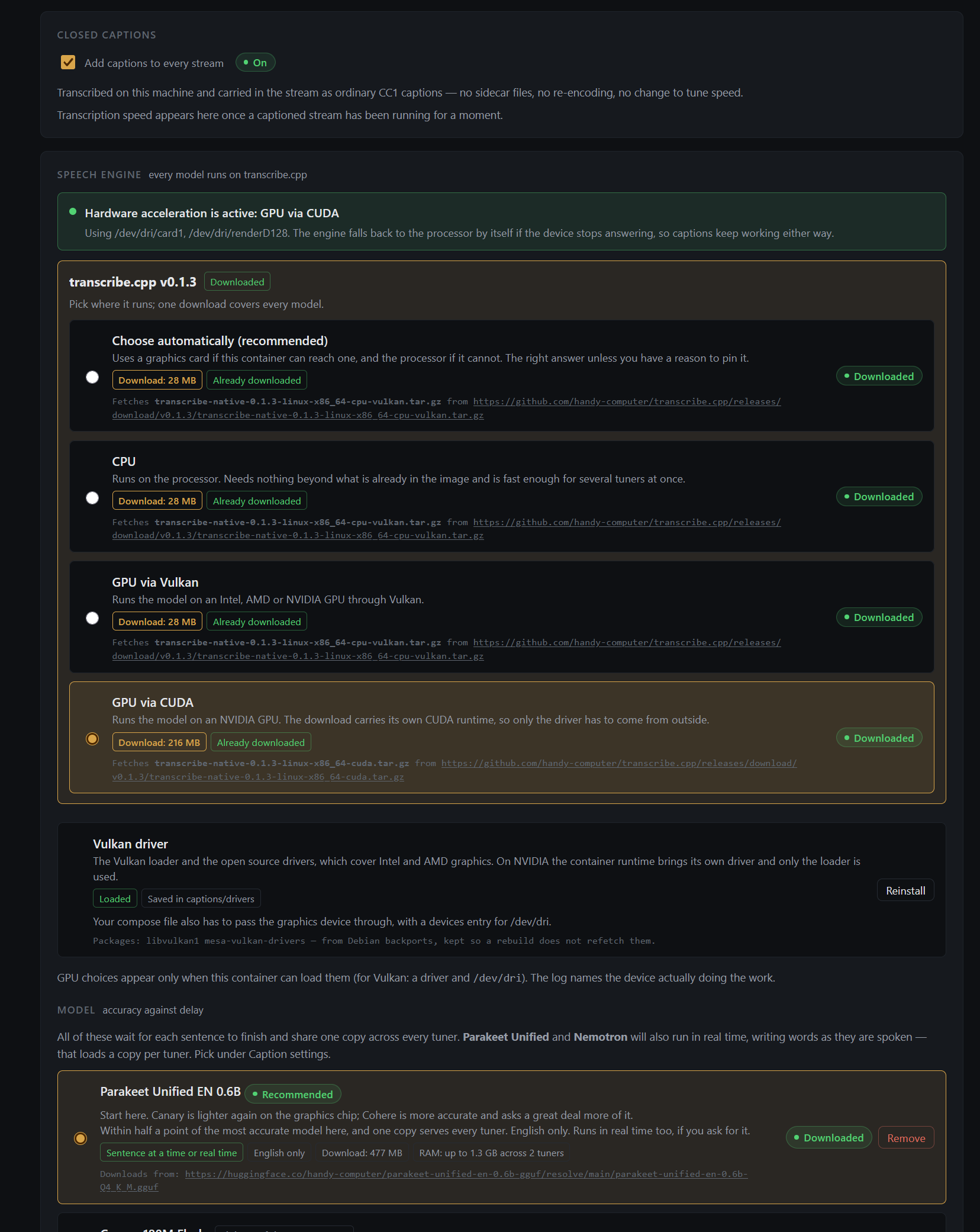
Here is a screenshot of the CC config before I start a test.
And here is what it becomes after a test that fails
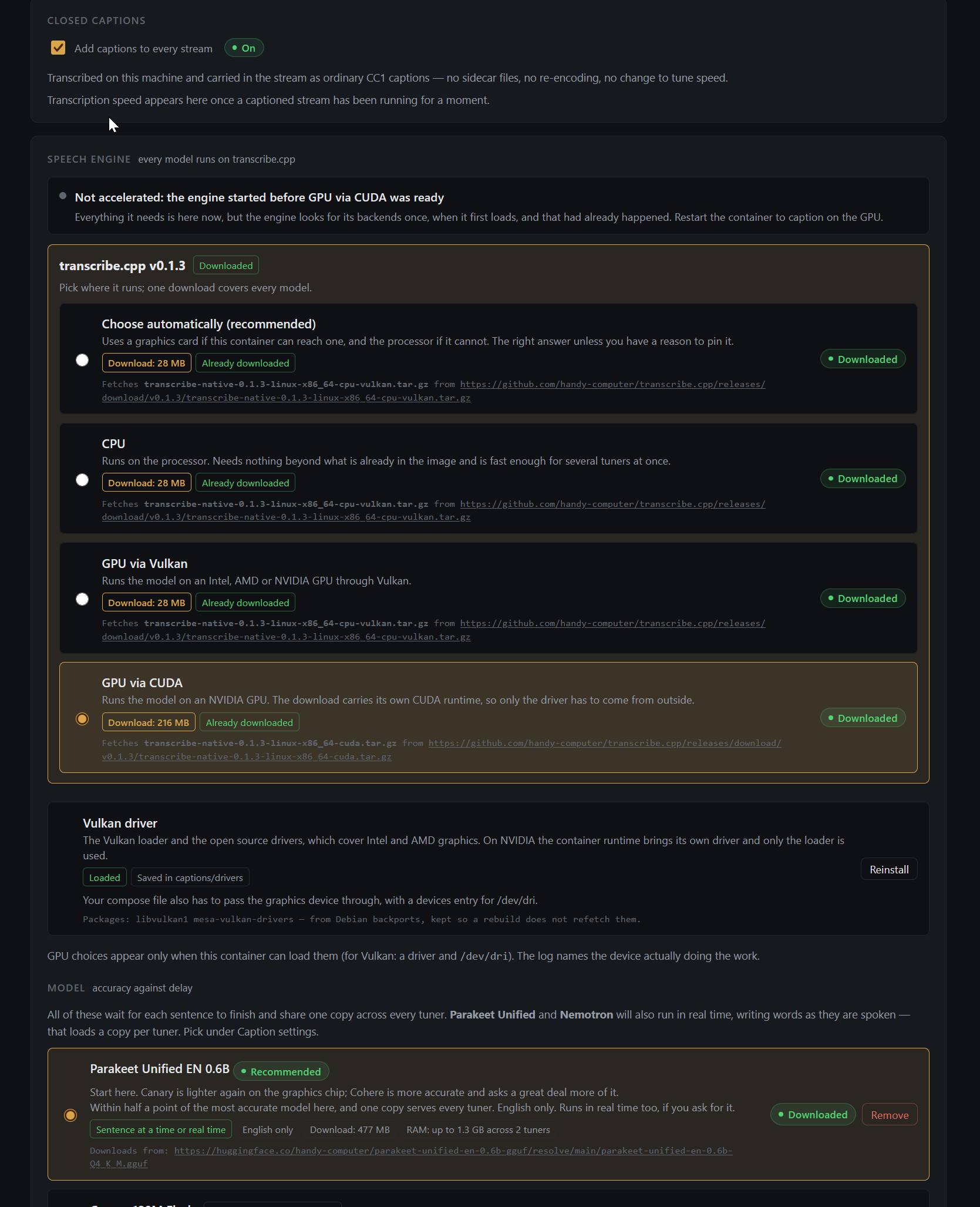
When I follow its instructions and restart the container, the results are the same.
Ooops, now I feel embarrassed. I had another app running that was locking up the capture card. Sorry about that!
@bnhf I may have found a bug with CUDA. I really have no good way of testing easily, but if I open a PR, could we try to merge it on a test container to see if it helps.
I just unpinned my 4060 and disconnected it from my VM, so I can test this. So I will be able to test this. It's just a pain in the butt.
@bnhf PR inbound to fix this.
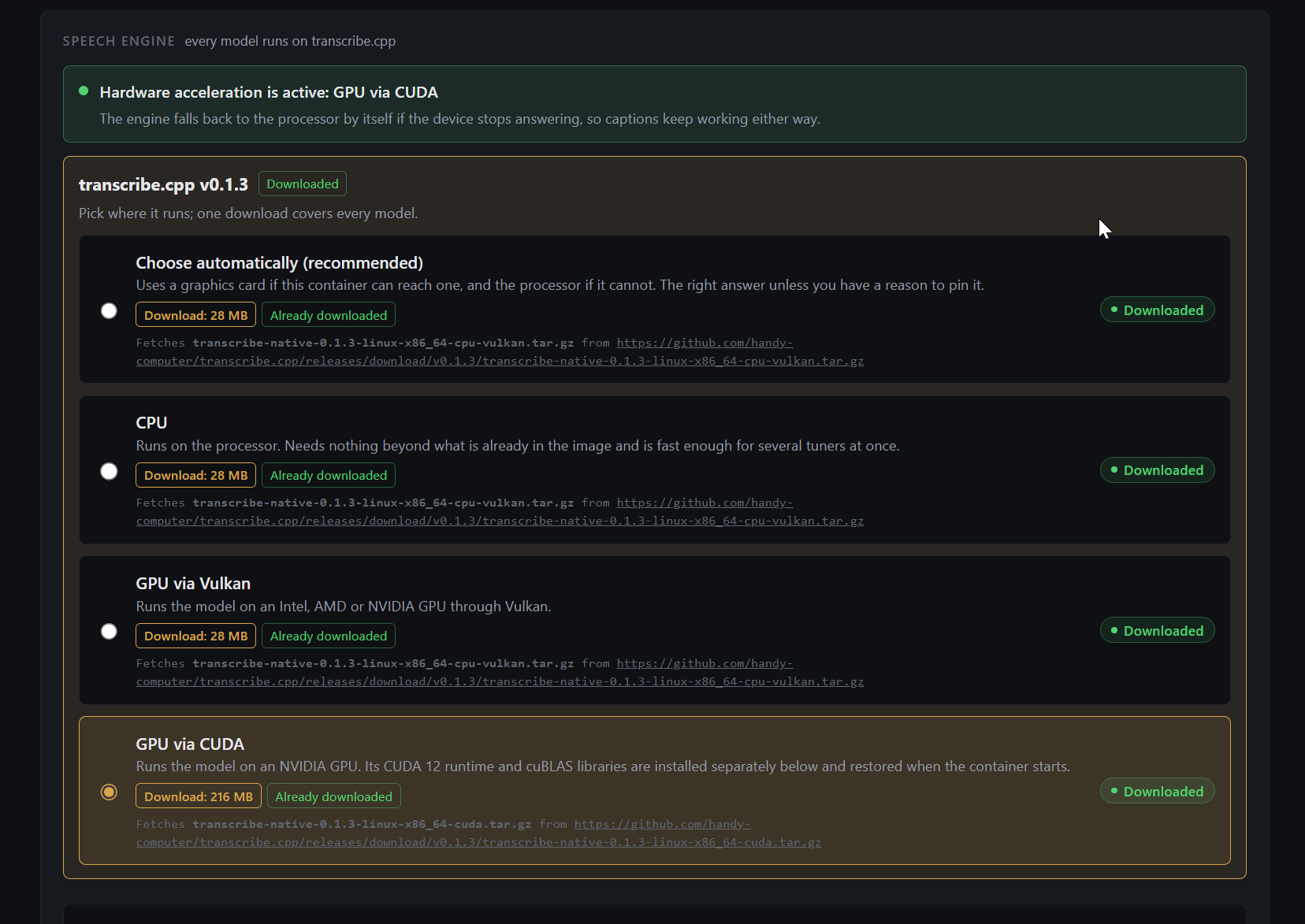
Edit: Trixie will require new Vulkan drivers as well. Handling this in the PR. Also built in h265 transcoding for preroll and confirmed working.
2 Likes
Done! Please reinstall your Vulkan drivers from the page to get Captions working again if needed. CUDA should now work. Please merge at your convenience @bnhf.
That's done too. bnhf/ah4c:latest pushed with CUDA fixes and updated Vulkan drivers. Make sure you're using the latest Docker Compose, and this latest container. Confirm with these two entries in your log:
2026/09/02 15:50:48 docker-start.sh: Docker Compose version 2026.09.01 confirmed as up to date
2026/09/02 15:50:48 docker-start.sh: Currently running bnhf/ah4c version v2026.09.02.2148
Just want to note here: you have to press the reinstall button on the closed captions page, or else your captions aren't going to work. It has to pull the new Vulkan drivers. It's just a one-time thing. And it just replaces them and that's all.
Also, for those with NVIDIA GPUs, these are now the confirmed settings to get hardware acceleration for Closed Captions (or custom ffmpeg stream processing via CMDx):
GPU_DEVICE=/dev/null
DOCKER_RUNTIME=nvidia
NVIDIA_VISIBLE_DEVICES=all
NVIDIA_DRIVER_CAPABILITIES=compute,utility
It works using the yaml you posted yesterday. Thanks.
Was it working for you as well?
I tested very briefly, and it was working.
My GPU is normally passed through to a VM, so I had to do some messing around with my server to free it up.
1 Like
It's now working for me. The GPU is being used.
1 Like