@eric one thing that may skew your stats is that if a show has a final segment of less than 30 seconds, I have to include enough commercials in front of it to total 30 seconds or the system won't skip over all the commercials before that.
@mjitkop I don't see any recent diagnostics from you, so I don't have a way to know what's going on there.
@Pokemon_Dad I'm not sure what you're describing here — we don't have any logic around 30 seconds. And yes, if you aren't properly annotating the start and end of commercials, it will skew our logic. Could you take a screenshot of the commercial editor in one of these situations and post it here so I have a better idea what you're referring to?
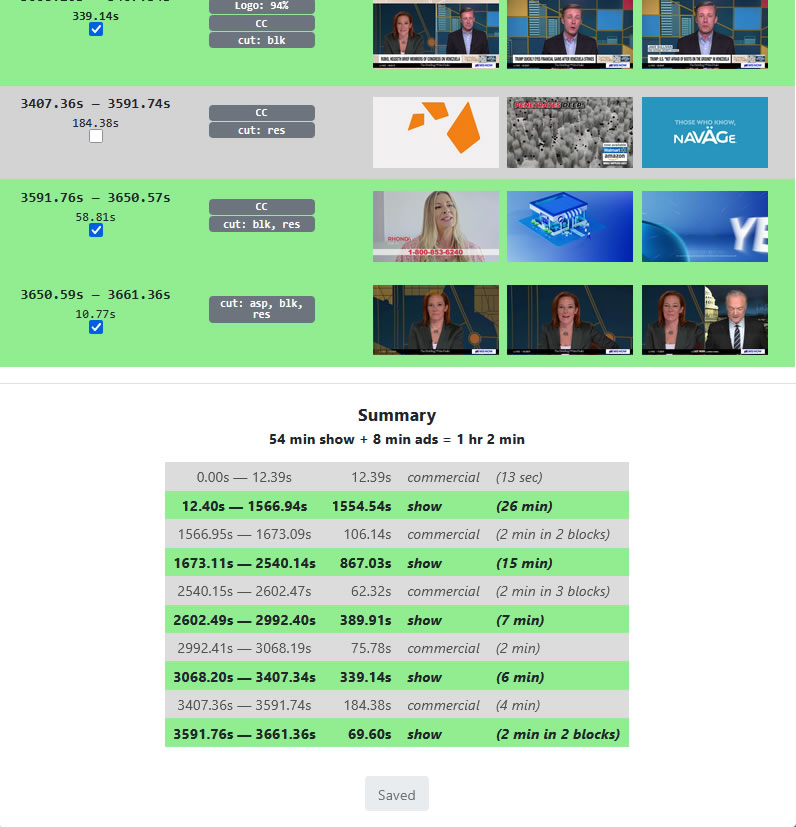
Sure, here you go. This is an extreme example, with a final show block of 10.77 seconds. Usually the last show block in many news shows and late night talk shows will be closer to, but just under, 30 seconds.
In this example, if I don't include that 58.81s last commercial block, none of the commercials before that last 10.77 seconds of the show will be skipped. The same thing will happen even if that last show block is 29.9999 seconds. Channels DVR will not skip to any show block that is less than 30 seconds.
Conversely, any commercials shorter than 30 seconds are also not skipped. I've only encountered this with PlayOn downloads, because they sometimes contain one or two commercials that are shorter than 30 seconds. Channels DVR sees the PlayOn indexing of those commercials, but doesn't skip them because they are 29 seconds or less.
Thirty seconds is a longstanding theme with comskip. I've regularly encountered this since installing Channels DVR in 2019.
@mjitkop I've responded to you privately. It looks like your DVR has gotten into a bad state and I'd like to figure out if there's a bug we can uncover here.
This doesn't line up with what I'm seeing in the code (or what I experience). One thing that may be happening is that the app behaves differently for recordings that have had commercials edited/verified vs recordings that haven't. If the recording hasn't been edited/verified, we don't trust the last commercial break being properly detected, so we do not automatically skip the last one. If it has been edited/verified, we trust what is there and skip it.
Additionally, we do not automatically skip detected commercials if the recording has not been edited/verified (because those have often been spurious as well).
Could you edit a recording to be correct, mark the recording as unwatched (this is important to do this for this test), and confirm if the app skips through all commercials properly?
Commercial skipping in Channels, sorry. I don't use comskip in anything else.
Aaaand now it's working. I tried that show and one another. Thank you! I know you folks also contribute to comskip. On one side or another, this is now fixed.
For much of the last six years, every time I forgot to edit a show as I described above, it would not skip the last commercial block. But this could have changed as long as two years ago, and I wouldn't have noticed. Very happy now.
This has not changed. Because we do not trust that comskip does a good job of detecting the end of a show, we do not automatically skip that last segment unless the commercials for that recording have been edited/verified. This behavior has not changed.
So to recap: Please mark your commercial edits that you are submitting as accurately as possible, not trying to work around behaviors in Channels, because the behaviors are different when you have edited commercials.
Huh. So what you're saying is, for over six years, whenever I saw that behavior it was because Channels DVR did such a good job indexing the rest of a show that I did not edit it. I wish I'd seen that documented somewhere, because I've been adding extra commercials to the end for years, lol. Thanks for explaining.
Yes, it does seem that way. If you review the commercials for a show and scroll down to the bottom and click the "Verify" button, that marks it as being reviewed and we will start respecting the commercial markers at the end, even if you haven't modified anything.
Thanks, will do. Seems to me it also refused to skip the last block if I edited while a show was playing, but I'm probably misremembering. Good to know.
The way the system is written is that it should be updating those commercial markers (and the verified field) on all clients the moment that it is updated and that should be reflected in the client behavior (but it's always possible we have or had a bug).
Thanks, if I see that happening I'll report it immediately. Then there's PlayOn downloads. I have not used that service since 2023, but PlayOn downloads I've retained seem to have automatically received "Verified" tags at some point. I did not edit them, and in 2023 I don't think we could edit them. At the time, if a PlayOn commercial break was under 30 seconds then it was not skipped. Perhaps the problem is now solved for us?
ETA: So now that we can edit them, problem solved. I think. If I use PlayOn again, I'll try that.
When I've tried to edit commercials in a show I'm currently watching, any attempted changes revert almost immediately. No opportunity to save any changes.
Yes I think that started a year or so ago, but I got very good at quickly scrolling down to the Save button after each change, lol. I think the problem is fixed in the latest pre-release, though I have still been rushing to hit Save just in case so I'm not sure. I'll try it this again next week.
I'm glad y'all are pursuing this because I can tell you for NFL games it's all over the map. For CBS and NBC comskip is generally spot-on, for Fox and ESPN it's terrible. And I don't understand why because when it wants to skip when it's not supposed to there are still logos on the screen that should make it not skip. If you compare how it handles those two pairs it would probably tell you what's wrong with sports.
I don't manually edit these because I chase watch them in progress.
Just record a Fox or ESPN NFL game now, you'll see the problem. I still run comskip because it sometimes works but broadly speaking it's a total crapshoot.