
So does the Enhanced part of commercial detection not happen until Video Processing? Meaning if the server is recording often (say a marathon), "enhanced" doesn't happen until it's done? Maybe that's why I don't often see the split function.
Eric I've been trying to edit commercials in some sports events to help out, but a common problem I'm seeing is that some commercial blocks get missed entirely and they're buried within a valid block. That's fine if I can split where I know where the commercials are, but I have no idea where they're at because the timeline doesn't show the absolute time for each segment. In other words when I'm watching an event and I see a block occurring at 1 hour and 7 minutes, I could go into the editor and split that out. But I can't do that now because I have no idea where I'm at in the timeline.
Can you please add the absolute timestamp for every segment so that we can split blocks while watching when we see that things are being detected incorrectly? In other words don't just show the number of seconds for each block, show the actual time where the block starts in the recording (as hh:mm:ss).
Ideally number of seconds in blocks should be in hour minute seconds format as well, too much math having to be done mentally. The new segmenter is working pretty well and the split is fairly accurate also, thanks for that.
Oops forgot to mention, this is for the mobile interface which is what I'm using while watching.
1 Like
Does that statement conflict with the setting to "Start live detection when watching in-progress recording."?
I have, thanks. That's exactly what I was looking for except that the blocks are still listed in seconds instead of hours minutes seconds.
But unfortunately I mostly use mobile because like I said I'm watching the events and then trying to edit commercials in them, a lot easier to do on the phone. I'm guessing that when you roll out the V2 update to the phone that these enhancements will be part of it.

You're right, I wasn't on the latest. Thank you for the update, this is awesome. Hope to see the rollouts to mobile in the near future.
Hi Eric,
Thanks for your help so far. edl's work as you described and I have modified scripts to incorporate them into my flow.
However consider the following two issues:
-
If I use the fancy new v2 commercial editor, is there a way to "push" the changes into the edl file? Nothing I tried actually updated the .edl
-
Consider the sequence of events below:
As humans it's pretty clear that there's a commercial around halfway through this segment.
It's also clear that the first split is not doing what we want, and the second split seems kinda in the right area, but also seems to have not deleted any commercial, and in fact to have lost the location of the commercial.

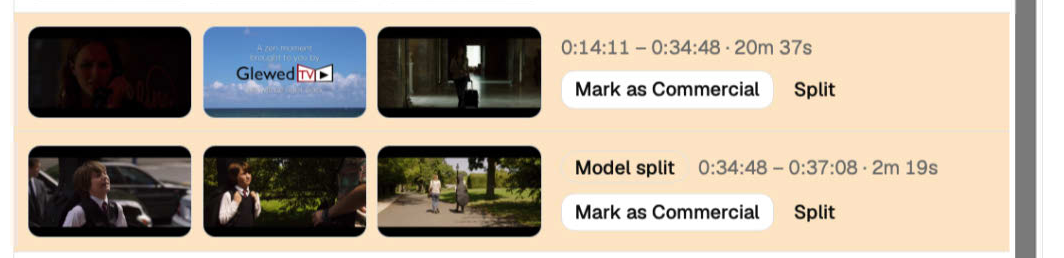
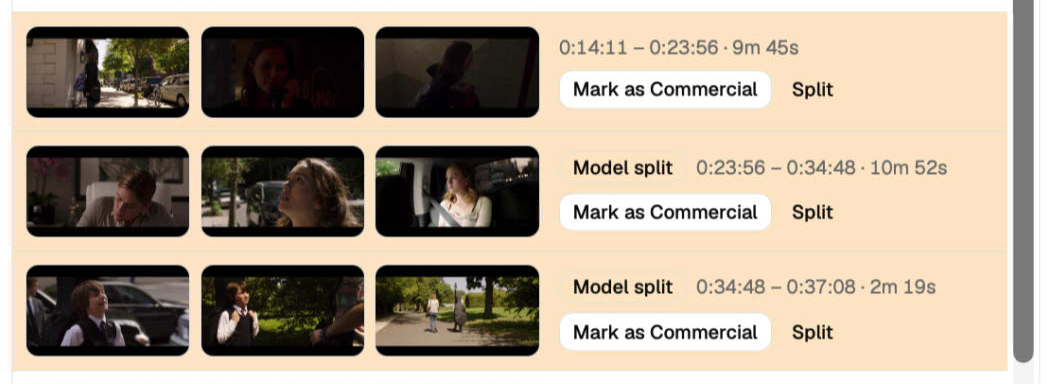
I think this sort of thing is driving the frustration and confusion seen in this thread.
I can't tell you what the answer is!
I have my own workflow for solving this. But my workflow (to run optimally) requires a starting edl as close to ideal as possible, which gets me back to my point 1...
This should happen automatically as soon as the editor is saved.
Keep hitting Split until you can find the place it stops having mixed content.
I’m not understanding what you mean by this.
OK, let's get to point 2 after I can get past point 1.
You say "This should happen automatically as soon as the editor is saved."
I don't know what this means.
I see no "saved" button on the web page popup, only a "Mark as Verified" button (which does not do what I need).
Do you mean the edl changes should be pushed to the file when the window popup is closed? Because I tried that and closing the web page popup simply "throws away" all changes.
- Open the Commercial Editor
- Scroll through the Commercial Editor
- Find places where the the decisions were wrong and tap Mark as Commercial or Mark as Content
- Find places where there are blocks that are mixed between Ad and Show and tap Split
- Now that the block is split, tap Mark as Commercial or Mark as Content for the block that is wrong
- Tap the Save button
The Mark as Verified button becomes a Save button as soon as you make any change.
Changes are thrown away unless you press Save.
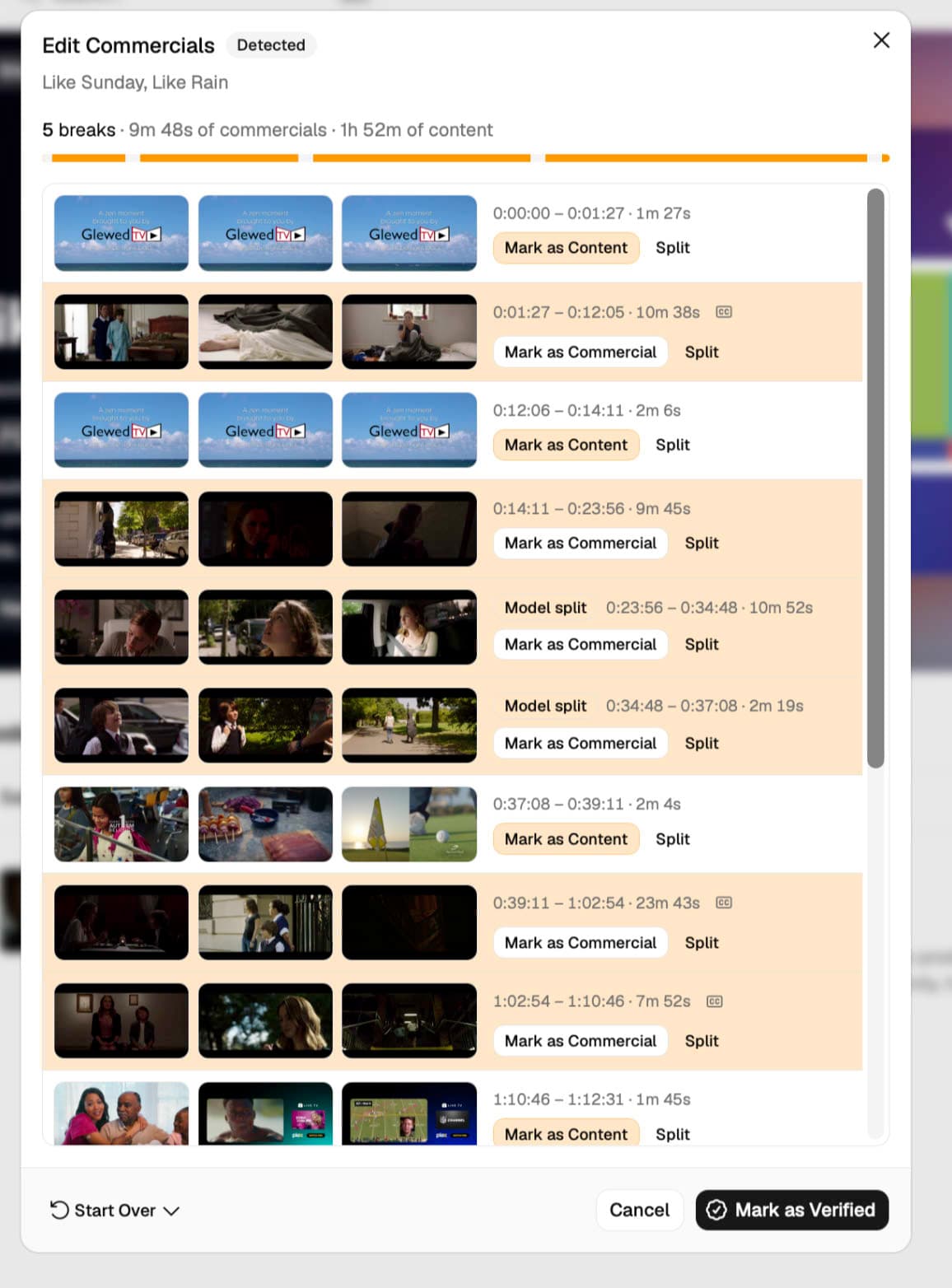
OK, so this is the same block as I just referenced in the previous post.
Clearly there is (at least one) commercial somewhere in the middle.
I hit split once, and a 2 min block at the end is peeled off. Not helpful.
I hit split again. Now the 20 min block splits somewhere in the middle.
At this point my assumption is that I can save the EDL and (through my manual process) find the commercial and kill it.
But note that there is no way to save to the EDL because I don't want to mark any of the "newly created" content as commercial. The commercial I want to kill is now invisible to channelsDVR.
Which is fine, I don't expect you (yet!) to be perfect at AI commercial detection. However what I would like is something that makes my manual task a whole lot easier, which is exporting the EDL that corresponds to the splits I have made, whether or not channelsDVR believes doing so corresponds to materially changing anything. At least by having the split-point timestamps in the EDL, I am working manually with smaller segments for which the commercial is nearer the beginning or end. (At least I assume I am! I can't validate this since I can't actually GET the modified EDL out of the system.)
(Yeah, comparing with my manual edits, I am correct. The first split, after 9:45 of content would in fact be just what I wanted, with 120 sec of commercial at very beginning of the next segment, from 23:56 to 34:48)
Does that all make sense?
It sounds like you’re trying to make your own commercial editor outside of ours, and we don’t have a public API to do that.
The EDL only outputs the transitions between ad and show content, so any Splits you create where the content type stays the same across multiple blocks will never be visible to the EDL.
Don’t give up now. Keep pressing Split.
Keep pressing Split. Finding those commercials, marking them, and Saving is the process that will make it better.
OK, I did your "keep splitting" and I could get it to work, in that I do then hit the (isolated) commercial, can mark it as a commercial, and get the "Save" button to appear.
Perhaps it's worth providing
- some sort of "degree of confidence" indicator, or
- some bars drawn on top of the "content strip" showing where tentative split points are, or
- selecting frames to be drawn from within a "tentative split point" region rather than the current "front/middle/end" scheme?
My point is, provide some sort of hint(s) that hitting split further makes sense. I kinda get the model you are using now, but it feels like it's not going to work well if you have to go on vibes as to whether or not it's worth splitting any given segment...
1 Like
I just want to say that I know it must feel like I (and people like me) do nothing but complain!
But overall the new commercial detection system does work a lot better, and makes my workflow quite a bit faster 
There's always scope for improvement, eg along the various lines I have suggested, but please don't think that the improvements so far have gone unnoticed and unappreciated.
4 Likes
I don't often see Split in the commercial editor. I have, but it's not frequent. Is there a reason for that?
I've been doing some ad removal from videos recorded with CDVR using good old VideoRedo. It occurs to me that if there were some way to import the cut list from VideoRedo into the CDVR Commercial Editor, I could contribute my fine-tuned edits to the enhanced commercial detection project. Any chance of adding the ability for the commercial editor to import an EDL file (or some other cut-list format)? Pasting the contents of the EDL file would work great.
My procedure is:
- Convert the CDVR video to MKV with the commercials detected by CDVR embedded as chapter marks.
- I usually reencode as AVC because VideoRedo seems to frequently choke on the converted video from CDVR.
- Use VideoRedo to cut the commercials as precisely as I can using the chapter marks as a guide.
- Save the edited video as an MKV. (I'll eventually import the edited video back into CDVR.)
I would add these steps between steps 3 and 4.
3a. Save my edits as a .vprj file.
5. Convert the cut list from the vprj file to an EDL file.
6. Import the EDL-format cut list into the CDVR commercial editor (working on the original video file).
7. Save the edits in the commercial editor so they are shared with the enhanced commercial detection process.
@TheDaveAbides I'm not sure about your particular setup, but it will only show for new recordings or if older recordings have Media Fingerprints (which you can reprocess with the button in Settings -> Recordings -> Commercial Detection).
1 Like
Right now I'm re-recording a show that was previously recorded (different channel, but those files were removed from the TV folder). For the most part, it's been going ok. But strangely over the last couple of days there's more than a handful of episodes that aren't detecting well, or often not even detecting (so those episodes are not listed as verified/unverified) and require manual re-detection. Either way, out of all of the episodes I've recorded lately, it's rare that I've seen the Split function, which would be very helpful on these latest recordings that aren't detecting well. Yes, I'm on the latest beta/model.