
Has anyone tried setting this up with the new Simpsons live channel on Disney+? It obviously works when navigating directly to the live stream, but the live stream URL doesn't seem static, therefore if I stop the channel, it takes me back to the shows main page, and not the live stream.
1 Like
Hi bnhf -- I know your instructional Proxmox LXC post has been locked (I would have replied there if it wasn't) but I tried this out and was pleasantly surprised to see that it works. Awesome work!
Wanted to pick your brain with why chrome wouldn't be leveraging using my ipgu that I've confirmed is being successfully passed through to the container. intel-gpu-top reads out at 0% usage across the board while i'm capturing and streaming content and I'd love to eek out some more performance out of this implementation if I can -- it's really close to being a viable solution!
This is essentially the same issue we've been battling with the Docker version of cc4c, regarding use of the iGPU. If you look at chrome://gpu, it seems like it should be functioning, but I've never seen it.
At least with the Proxmox LXC approach, if you have a high-end CPU, so you can allocate plenty of cores and RAM -- it seems to work pretty well.
Ah, got it — yeah, I’ve been toggling every option that seems like it could be vaguely related in chrome://flags with no luck either. Unfortunately my server is pretty humble so I can’t muscle my to better performance 
For what it’s worth, there seem to be some flags that we can send to chrome when the script starts it that I came across, but not sure how to include those in the script (I’ve been using the compiled version).
I was just wondering if anyone happened to notice that it seems the support built in to CC4C for Weatherscan no longer works. The link format that you were supposed to use when making your custom channel was chrome://127.0.0.1:5589/stream/weatherscan but my CC4C is no longer able to load the channel when using this format. So I went to https://weatherscan.net and interestingly enough they have two different links on this page for two different versions of Weatherscan. For me, version 2 seems to be the only one that works (version 1 will load but just play music and show the spinning IntelliStar logo). The direct link to version 2 is https://v2.weatherscan.net/
So what I did was, in my custom channel settings, I changed the link format to chrome://127.0.0.1:5589/stream?url=https://v2.weatherscan.net/ and wouldn't you know it, CC4C now loads Weatherscan again. The only thing that I don't get however is the music. If I go directly to a web browser however and pull up https://v2.weatherscan.net the music will play.
Just curious if anyone else has experienced this and knows how to get the music to play when loading Weatherscan through CC4C. Thanks!
I have the iGPU working. So, If you're willing, it'd be great if you could spin-up a similar LXC to verify.
Most of the original instructions are the same, but here are the differences:
This time, start with a Debian 12 template, and run these commands right from the first prompt:
sed -i 's/contrib$/contrib non-free non-free-firmware/' /etc/apt/sources.list

apt update

apt install intel-media-va-driver-non-free vainfo libva-drm2 libva-x11-2 mesa-va-drivers
After that, you should be able to follow the original instructions, starting with:
apt upgrade
and on from there...
Running the "Weatherscan" channel:
intel-gpu-top: Intel Raptorlake_s (Gen12) @ /dev/dri/card1 -  157/ 617 MHz;  52% RC6
    0.24/66.45 W;      186 irqs/s

         ENGINES     BUSY                                               MI_SEMA MI_WAIT
       Render/3D    6.65% |██▉                                       |      0%      0%
         Blitter    0.00% |                                           |      0%      0%
           Video    0.00% |                                           |      0%      0%
    VideoEnhance    0.00% |                                           |      0%      0%

   PID              NAME    Render/3D       Blitter         Video      VideoEnhance
292179            chrome |█            ||             ||             ||             |
I'm watching a free Sling channel right now, "T2", and it looks really good -- while using about 35-70% of 4 CPUs. The weird thing though, is that this channel is not using any iGPU, so maybe there's more tweaking to do. Interestingly, running the Weatherscan channel, I saw intel_gpu_top spike to 100% a few times.
But, as I said, we now know the iGPU is getting passed through and is working at some level. chrome://gpu still shows a couple of features using "software". Every Chrome/Puppeteer flag change I've tried so far, has disabled hardware somewhere, so I'm back to the current default flags.
No joy. The stream would start, but then pretty quickly freeze with that flag.
It’s working for me, including sound, with this:
#EXTINF:-1 channel-id="weatherscan", tvg-logo="https://(myprivateserver).com/images/tvlogos/weatherscan3.png",Weatherscan
chrome://192.168.7.180:5589/stream?url=https://v2.weatherscan.net
That's the format I'm using as well. But I think I figured it out. I was running CC4C headless with the custom node ncc-7-0 that you'll find digging around through this forum. I got rid of headless and the music plays. I'd prefer to run it in headless mode since this uses less resources, but if this is what I have to do to get the music to play, I'll keep it...I'm not using it that often. But just curious if anyone happens to know how to run it headless and still get the music to play.
To run headless you might want to try cheap HDMI/DP fob from Amazon. That solved all my issues with remote access to my headless server. The "fob" fakes the computer into thinking there is a 1920 display attached.
1 Like
Will need to look into that. Just wondering though if there is a simpler route to go by just editing or adding some code in the .js file.
I did see this line of code:
video style="width: 100%; height: 100%" onKeyPress="videoKeyPress(event)" onClick="videoClick(event)" src="/stream?waitForVideo=false&url=${encodeURIComponent(
req.query.url || 'https://google.com'
)}" autoplay muted />
Notice the autoplay muted line. Not sure if this has anything to do with it but is it possible to change this line to be unmuted? Not sure what you would type in there though to make that unmuted.
Once again figured it out with a little tinkering. After digging around in some forums from a google search, I discovered that if I add the following lines of code to the .js file, audio will play when running headless:
Under the args: [ section add the following code: '--autoplay-policy=no-user-gesture-required',
Under the ignoreDefaultArgs: [ section add the following code: '--mute-audio',
It works like a charm!
2 Likes
A couple of updates for those interested in a containerized version of chrome-capture-for-channels:
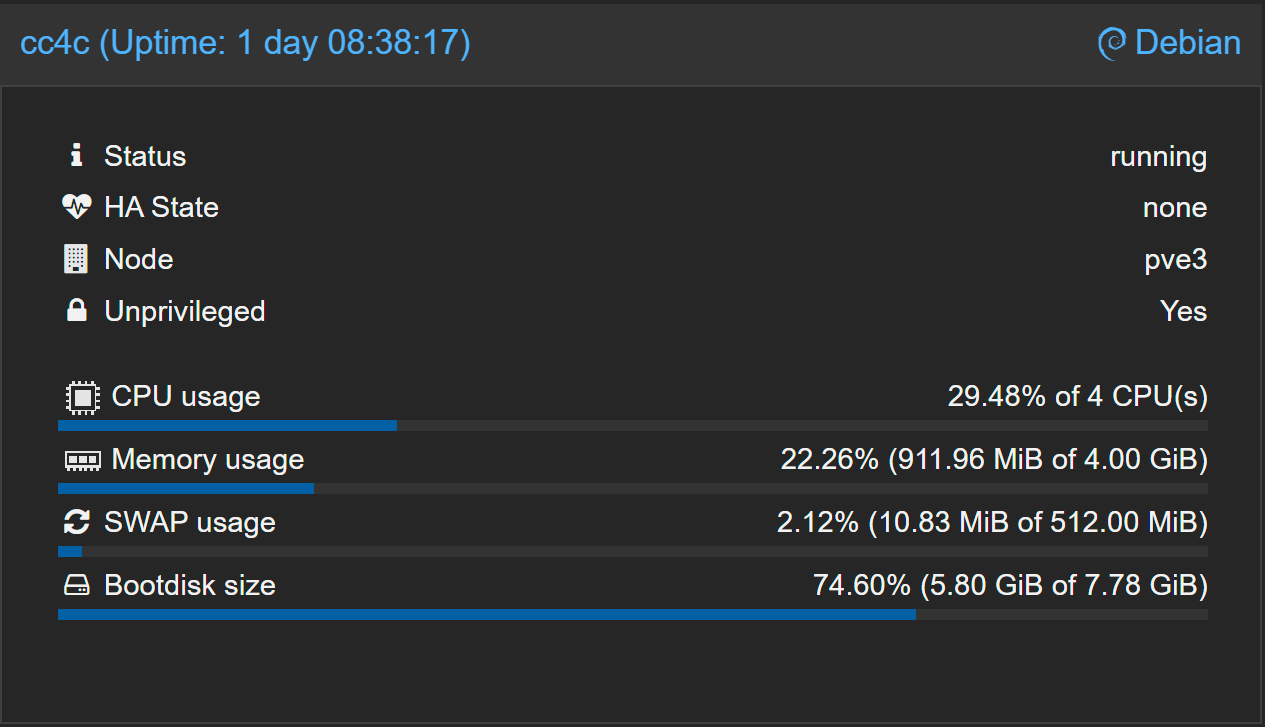
The first, which I reported a few posts ago, is that cc4c is running very nicely in a Proxmox LXC container with 4 vCPUs and 4GB of RAM allocated. Highly recommended for users with decent hardware running Proxmox.
The second, is that I built a new Docker container (amd64 only) based on the @dravenst cc4c repo, and that's also working very nicely. @dravenst appears to have really cleaned-up the cc4c code, with better error handling and improved performance. I'm testing this on a 10th generation i7, also with 4 vCPUs allocated and 4GB of RAM. Here's what resource usage looks like, including all overhead, with a single active stream:
I've circled back to cc4c many times since it was first released, and this is the first time I've liked the results enough to put it into "production". I'm using it with a Sling Starz/Encore package, which includes 15 premium movie channels for ~$11/mo.
The container is available as bnhf/cc4c:latest, and should be spun-up using the following Docker Compose in Portainer:
version: '3.9'
services:
  cc4c:
    image: bnhf/cc4c:${TAG:-latest}
    container_name: cc4c
    #devices:
      #- /dev/dri:/dev/dri # Uncomment for Intel Quick Sync (GPU) access
    ports:
      - ${HOST_PORT:-5589}:${CC4C_PORT:-5589} # cc4c proxy port
      - ${HOST_VNC_PORT:-5900}:5900 # VNC port for entering credentials
    environment:
      - VIDEO_BITRATE=${VIDEO_BITRATE:-6000000} # Video bitrate in bits per second  [number] [default: 6000000]
      - AUDIO_BITRATE=${AUDIO_BITRATE:-256000} # Audio bitrate in bits per second  [number] [default: 256000]
      - FRAMERATE=${FRAMERATE:-30} # Minimum frame rate  [number] [default: 30]
      - CC4C_PORT=${CC4C_PORT:-5589} # Port number for the server  [number] [default: 5589]
      - VIDEO_WIDTH=${VIDEO_WIDTH:-1920} # Video width in pixels (e.g., 1920 for 1080p)  [number] [default: 1920]
      - VIDEO_HEIGHT=${VIDEO_HEIGHT:-1080} # Video height in pixels (e.g., 1080 for 1080p)  [number] [default: 1080]
      - VIDEO_CODEC=${VIDEO_CODEC:-h264_nvenc} # Video codec (e.g., h264_nvenc, h264_qsv, h264_amf, h264_vaapi)  [string] [default: "h264_nvenc"]
      - AUDIO_CODEC=${AUDIO_CODEC:-aac} # Audio codec (e.g., aac, opus)  [string] [default: "aac"]
      - TZ=${TZ} # Add your timezone in the Environment variables section with "name" set to TZ and "value" to your local timezone
    volumes:
      - cc4c:/home/chrome/chromedata # Creates a persistent Docker Volume in /var/lib/docker/volumes for Chrome data.
    restart: unless-stopped
volumes:
  cc4c:
    name: ${HOST_VOLUME}
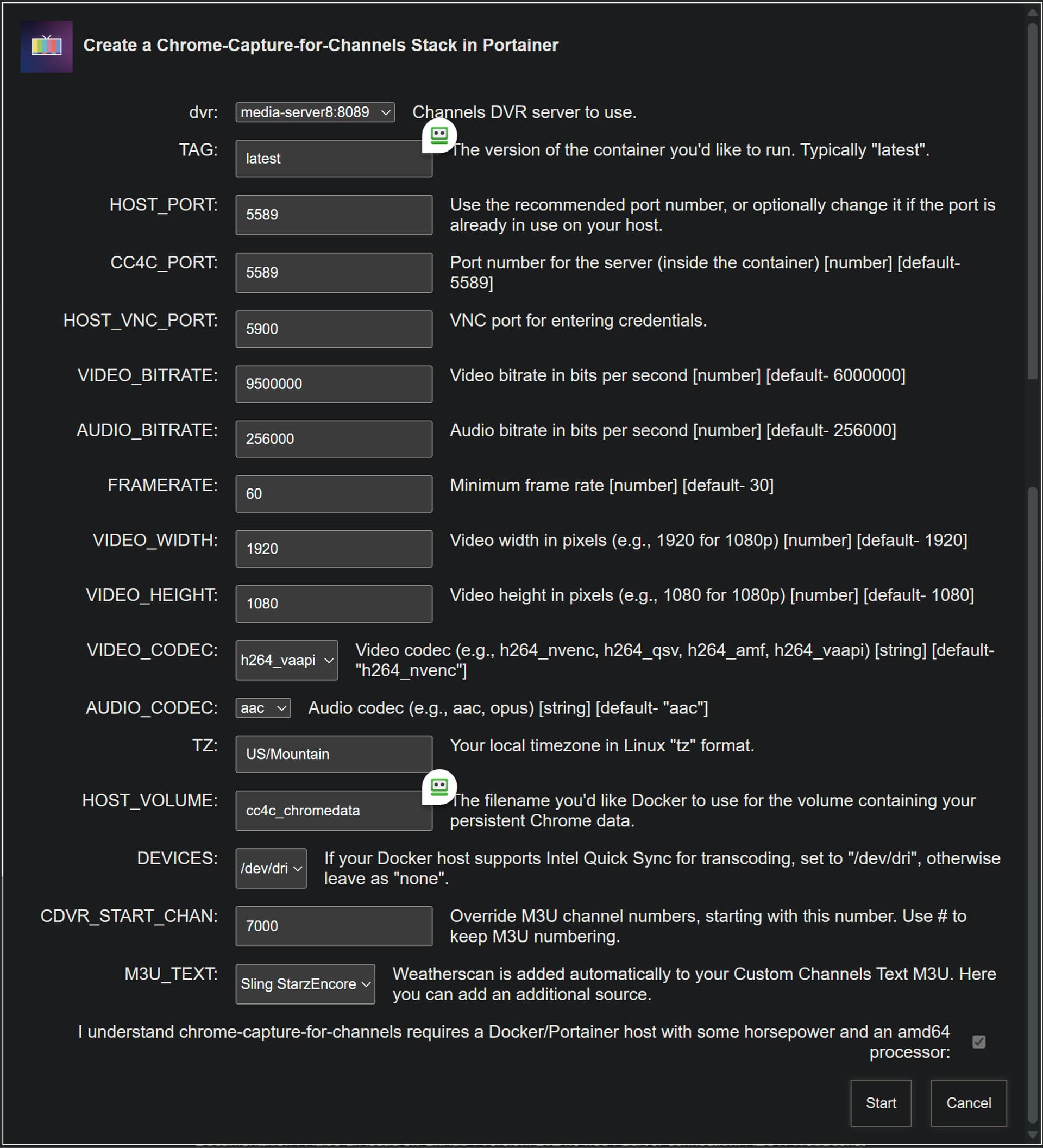
Here's a set of sample env vars, that you'll want to customize to your requirements:
TAG=latest
HOST_PORT=5589
CC4C_PORT=5589
HOST_VNC_PORT=5900
VIDEO_BITRATE=8500000
AUDIO_BITRATE=256000
FRAMERATE=60
VIDEO_WIDTH=1920
VIDEO_HEIGHT=1080
VIDEO_CODEC=h264_vaapi
AUDIO_CODEC=aac
TZ=US/Mountain
HOST_VOLUME=cc4c_chromedata
Use the compose as-is, and put the env vars (with your values) in the section of the Portainer-Stacks editor designed for that purpose (use Advanced mode to copy and paste this list).
This container is designed to use a VNC client for connecting to the Chrome instance to enter credentials and the like. I use TightVNC Viewer, but others will work. The VNC server is on the standard port 5900, unless you change it.
If you're interested in the Proxmox LXC approach, I've updated the step-by-step here to use the @dravenst repo:
1 Like
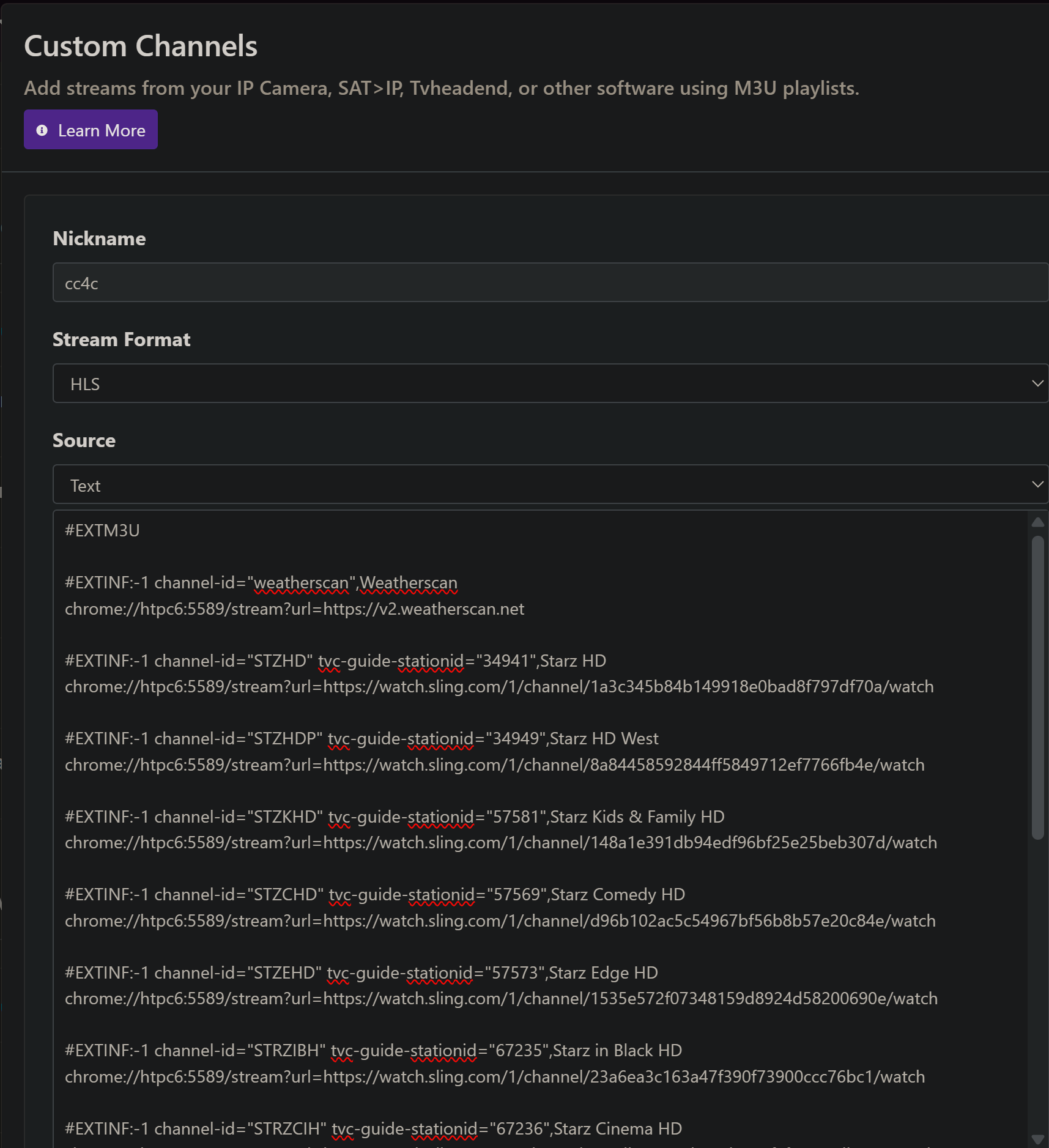
I've added Project One-Click support for the new cc4c Docker container based on the @dravenst repo. This includes spinning-up the container, and creating an initial CDVR Custom Channels wth the Weatherscan channel. As a bonus, if you have the Sling StarzEncore package, it'll add those 15 channels as well -- ready to use. Pushed this afternoon as bnhf/olivetin:latest (aka bnhf/olivetin:2025.04.13).
Tweak any values you need/want to change, and the Portainer Stack will be created for you:
And, as always with Project One-Click, the Custom Channels Source is created too:
If you don't have OliveTin-for-Channels or Portainer installed yet, it's very easy these days:
Not sure if I'm missing something, but I can't change the ip address for the dvr. It only has three items as a dropdown.
Also, where would the main.js file be located after this install? I've found that the ncc-7-0 would very well for me when I used the windows executable, so I'd like to swap those two for comparison after install. Thanks.
My fault -- I'll fix that. I'll post here shortly once there's a new build available.
This one we'll need to put out heads together on. From my perspective, the @dravenst code base is the first time I've found cc4c to be usable in container form. As a matter of fact I'm watching Dante's Peak on StarzEncore now. 
All of the previous fixes/enhancements I've tried have perhaps been fine for folks running the code non-containerized. But, even with a 14th generation i9 running Proxmox the container version would, at best, have audio and video out-of-sync.
Having said that, I would like to add support for Peacock un-muting (similar to the Sling volume control in this repo), and whatever else you find you appealing in the version you're using. My number one goal though, will be to keep the Docker/LXC versions humming like they are now.
Long way around to saying the main.js in not exposed in this version, and I'm not sure you could replace it on the fly anyway, since it's running from container start -- and killing it would kill the container. I'm hoping we can get one version that serves everyone's needs, but is also solid, and can be containerized.
@daldana7296 OK, hopefully all rock and no roll now. Please pull :latest again, and let me know if we're good.
Also, any chance you could give me a rundown on the features you have with the version you're using now, that you'd like to see in this version?
Another interesting point, that I forgot to mention before, is that the new codebase is almost double the number of lines of the old. That's not necessarily indicative of anything, as I prefer to write compact code myself. But in this case, it appears to be mostly to do with reliability, configurability, error-handling and a few Sling-specific things.
@daldana7296 Thinking about this for a few more minutes, you wouldn't be able to swap out the main.js anyway.
The new version incorporates flags that are used to make things configurable. I did a few of these way-back-when, but this new version makes all the key settings tweakable.
I don't think it'll be difficult to merge code bases though. I don't believe the version you're using ever made it to GitHub -- but we can make that happen.
Thanks, the new version does allow the ip change (in fact, it was pre-populated with the correct address, kudos!).
I use cc4c primarily for Spectrum channels that are not TVE and the ncc-7-0 did very well at pulling in the videos at a decent rate. So far, with this version I can't seem to pull anything at over 200-300kbps. Also the NFL channel would stay at fullscreen after I initially opened it up, but with this version I seem to have to press fullscreen every time I start the channel.
As for Peacock, @m0ngr31 and @doug8796 were collaborating on a project they called CCEPG which worked for Peacock and ABC (although on Android devices only). Maybe you could check with one of them.
1 Like