
I'm using NBC as well, but I don't have the border. Curious to what is causing that.
Have you compared it to the HDMI method? It's all relative of course, but here is what I'm seeing:
HDMI method - zero border
NBC and YTTV via Chrome Capture - alternates between tiny border and larger border, every time.
I'm guessing the difference will come down to the many other variables, like what platform the Chrome tab is playing on, what the TV is capable of, and also, tvOS vs. Android TV, etc.
2 Likes
this makes sense. the code will attempt to make the chrome window slightly bigger than 1920x1080, which would fail if the desktop is limited to that size.
I have two displays on my M1 Mac mini desktop / server:

Both are lower (default) resolutions though:


And yes, results are the same when I'm NOT screenharing the Main display to my MacBook Pro... I tested that too.
1 Like
I haven't tried the HDMI method. I have a spare machine I loaded Win 11 on for this software. I installed chrome so it should be the latest version. Nothing else is running on the machine as it's a new build. There is no monitor and I'm using RDP to access. Just no black border on the videos.
1 Like
No dice so far; it feels like the same issue as this:
The only way I can think to work around this is to add some macro movements, but then it is going to get complicated!
1 Like
I was thinking if I had an always on server with enough horsepower I might just leave maybe 4 chrome windows open all the time with my favorite stations tuned and signed in with Kox. Then pipe them over to channels.
Have you tried leaving the chrome window open for extended period. Do the credentials time out after a while?
I’ve had lots of issues with kox credentials expiring on the NBC app, especially on Apple TV.
1 Like
I’ve heard good things about “keyboard maestro” haven’t played with it, but I’ve heard it is exceptionally versatile.
2 Likes
Same here, it seems to only be able t go to a "show" not a channel.
I'm finding the same issue here on Philo.
If Amazon can launch a channel, we should be able to do it too.
I'm unsure on how to find the static link.
thanks
1 Like
Excellent catch @joagomez! I haven't needed to add a monitor to my server (Win11, i5 12th gen), so I never checked the display resolution. When I did and bumped it up to 1920x1080, the cropping on the Golf channel really reduced. I'll have to find one of those 4k HDMI dummy plugs and try that out too. Thank you!
1 Like
I think some of this might come down to TV calibration too. And not all TV’s handle it the same or even allow the user to adjust the geometry.
The test video above was on the 65” Sony in the bedroom. I just ran through the same tests on the older 78” Samsung in the living room and on that set, full screen works better. Only the alternating larger border via Chome Capture is noticeable. The tiny one I was seeing on those same channels as I alternated between them in the bedroom, isn’t displaying on this TV at all. 
3 Likes
Overall, though not perfect, this does show promise. The biggest issues for me, is the cropped picture and the occasional stutter in the motion especially noticeable in panning scenes or news tickers. Perhaps this will improve with time…
1 Like
Yeah, still getting it. Even after the git pull. Maybe Ubuntu is not the right environment for it.
1 Like
Ah my bad, try git pull now
2 Likes
This is what I bought recently - got for a ubuntu box I had, but fortunately with the 3 pack I had a couple extras for this project
I am running 2560x1440 and still have pretty large boarders. Not a big deal really for these particular channels and what I watch on them.
Can Channels wake up a machine from sleep? Anyone have any tricks to get out of sleep mode? I did set up a couple scheduled tasks to wake/sleep but looking for other tweeks.
4 Likes
Linux and Mac have the wakeonlan command (apt, brew, etc) that can wake up a machine over the network using its mac address. Might embed that into the node script with an execute command.
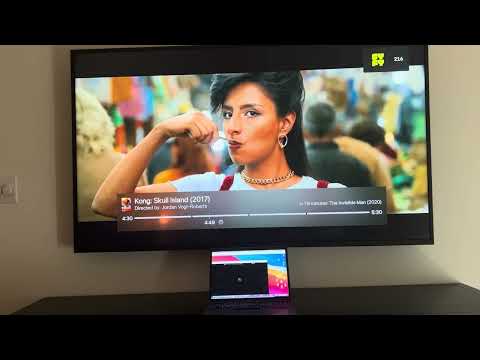
This question was the key, thank you! So I changed my Mac's display resolution, bumping it up one notch to 2560 x 1440. And now, Chrome Captured tabs play back in fullscreen in the Channels client, no borders at all, identical to the HDMI method, for all YTTV and NBC.com channels I've set up, just as they do for the same channels tuned into via the HDMI method. On both of my TV's! It's perfect! No need for a dedicated headless server for this after all...
In this demo I am channel surfing between all the same SyFy versions I set up earlier.
The only caveat for me now, as I see this from time to time, is when channel surfing quickly between them like this, the chrome-capture-for-channels-macos-arm64 executable crashes, and I have to manually relaunch it on the server to continue watching this way. Once I'm done experimenting I will spread these channels out in my guide, and I won't ever be channel surfing quite this quickly. So hopefully that will prevent the crashing.
In the meantime, here's a new video showing what this all looks and feels like right now, on day 3:
3 Likes