Connected to Internet but all browsers say I'm offline

I had a chance to talk to my younger brother tonight who has a computer repair business in CA. He says he sees the kind of issue I'm describing all the time and it's really tough to drill down to the root cause when equipment is being changed. He recommends I continue resetting the network once or twice a week if that's what it takes until after Comcast has completed the new cable installation. Once everything is in place I can power down and disconnect each connected device to dissipate any stored static electricity and then reconnect things before troubleshooting. It makes sense to me so I think I'll table this until after the outside work is completed.

Thanks for all the assistance and advice as I learned a lot and am pretty sure it will get resolved.
IANA was founded in 1988 and very much needed as the traditional and somewhat haphazard way of assigning IP networks was leading to problems as the many regional and/or government sponsored networks were starting to have challenges as they merged into what is today The Internet. Back then the networks were assigned class A address spaces and the networks gave out class B address spaces. Many things were done by tradition rather than RFC and Cisco, the de facto router standard called some of the shots. I connected a college of about 20,000 people to the internet back then using a Cisco router running IOS 1.03. When Cisco offered a class on routing I signed up and took the class and the 1.1.1.1 testing address was recommended. As a best practice when testing to 1.1.1.1, it was recommended to block 1.1.1.1 from exiting the network you had authority for.

When IANA came around, they started doling out addresses and that worked well till address space started to get tight. At this point IANA started to act as the Europeans that took of land from Indigenous people.

There is a bit of legacy left over from the pre IANA days and sometimes it winds up in court where a bunch of ordinary people including the judge and sometimes the attorney are rather clueless.

I full support IANA. I'd be suppressed if any of the early Cisco routers are still online yet I'm confident some of the early configurations have been migrated to modern equipment and this is why 1.1.1.1 concerns me.

2 Likes

The next time you have issues, try the following:

Ping your upstream router
If you can't, has the lease on your ISP router expired?
I think I saw you are running double NAT, so also check if the lease on your router expired.

If they are good, then:
ping google.com
If google.com is not translated, you have a DNS issue

traceroute 8.8.8.8
Does the traffic leave your network? Where does it stop?
Ping your upstream router

After doing this you will have a hint of where the problem is.

Also, how fast is your internet link? Do you ever oversubscribe your Internet link?

1 Like

I am using a separate router from the one in the ISP's gateway modem, but with the gateway in bridge mode is that still considered double NAT? I hadn't considered the modem and router as using two separate leases, but wouldn't they renew automatically in either case?

I haven't been documenting every incident, but most of the time when I've had the browsers say they were offline, I've been able to RDP into my home network unless I had WARP enabled. As far as pinging, I hadn't been doing that but when I did yesterday it seems that they always got a reply when there was no name translation involved and I always got a reply when the browser knew it was connected to the internet. When the browsers said I was offline, pings that needed name translation all got no reply. Those are DNS issues, but I don't know if other root causes could result in similar symptoms.

I haven't tried traceroute. I'm not sure what you mean by the last two questions, but I'm paying for 1.2 Gbit/sec speeds and with this new modem and getting about 900-1000 Mbit/sec speeds.

NO

YES, the DHCP leases auto renew

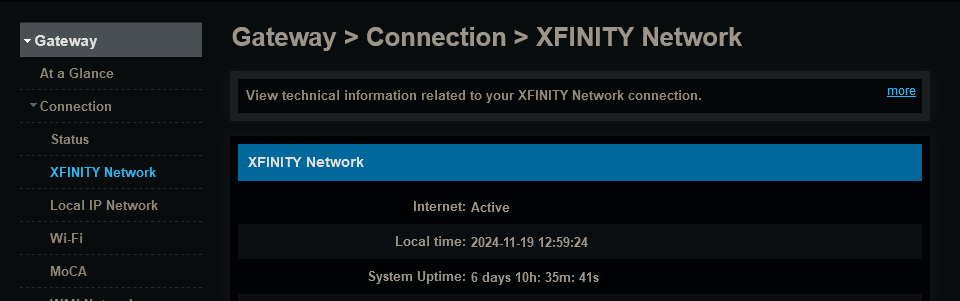
Check the System Uptime on your xFi Gateway to see when it last reset

The DHCP lease is supposed to renew at about 1/2 the lease time and will continue to attempt to renew if it fails till the lease expires. (not this is a simplification yet good enough for this discussion).

My question about over subscribing your internet link is about how busy the link is. If you have one client filling the link that's ok and even 2 or 3 will not cause problems. More than this can be an issue. Also, pear to pear software can overwhelm the router and cause issues.

To clarify, when you ping 1.1.1.1 or 8.8.8.8 when the problem is happening you get replies and no drops. During the problem, you are clear on no DNS.

I'm having the problem right now and I can ping 1.1.1.1 and 8.8.8.8 with normal replies and no drops. When I ping www.google.com I get "Ping request could not find host www.google.com. Please check the name and try again."

I just restarted the modem and the router about 20 hours ago and the problems have already resurfaced. With the old modem and outdoor wiring problems I was getting several days of uptime before this would occur.

This a huge problem and I may have no choice but to reinstall WARP in order to get ANY of my many TVE scheduled recordings. I have lost so many integral parts of series just because I can't get the browser to see the internet!

Let me describe what just happened.

I'm remoting into my home network and from there I'm remoting to the Channels host server. A show that was scheduled to record under the DVR tab was failing, so I deleted the error message and navigated to the TVE show in the guide and clicked on "Watch Now". After trying to connect for about 10 seconds it failed and I repeated the process. After repeating this for several minutes, on about the 10th attempt it locked onto the stream and began remuxing and then playing in the browser's player window and I chose to "Record Again". It began recording and I expect it to record about 5 or 10 minutes and then simply abort the recording (maybe due to inability to keep the stream alive and just giving up). This happens over and over again in my experience when I'm having issues, because I AM getting unpredictable spontaneous periods of connection even in the midst of the problem.

While I was typing the message the recording had already stopped and does not try to resume.

pinging IP addresses when you have the problem will show if it's a connectivity problem or DNS problem.

That definitely sounds like a DNS problem.
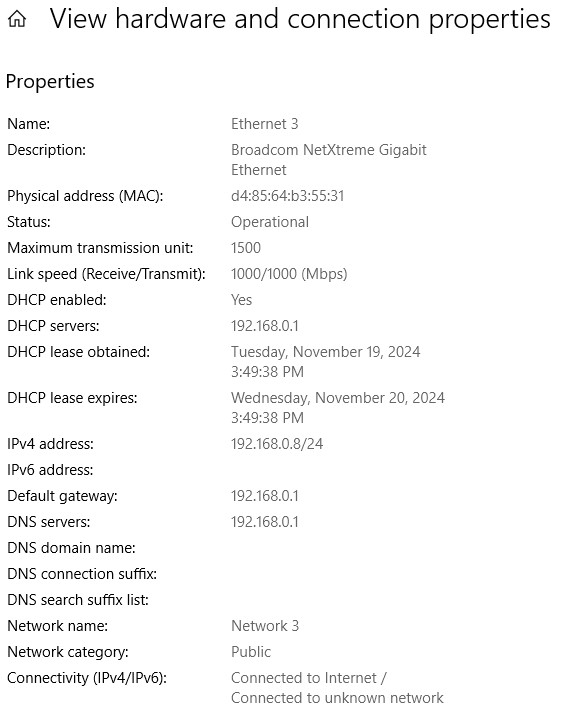
Is everything on your network using your Netgear router for a DHCP IP address and DNS server IP address?
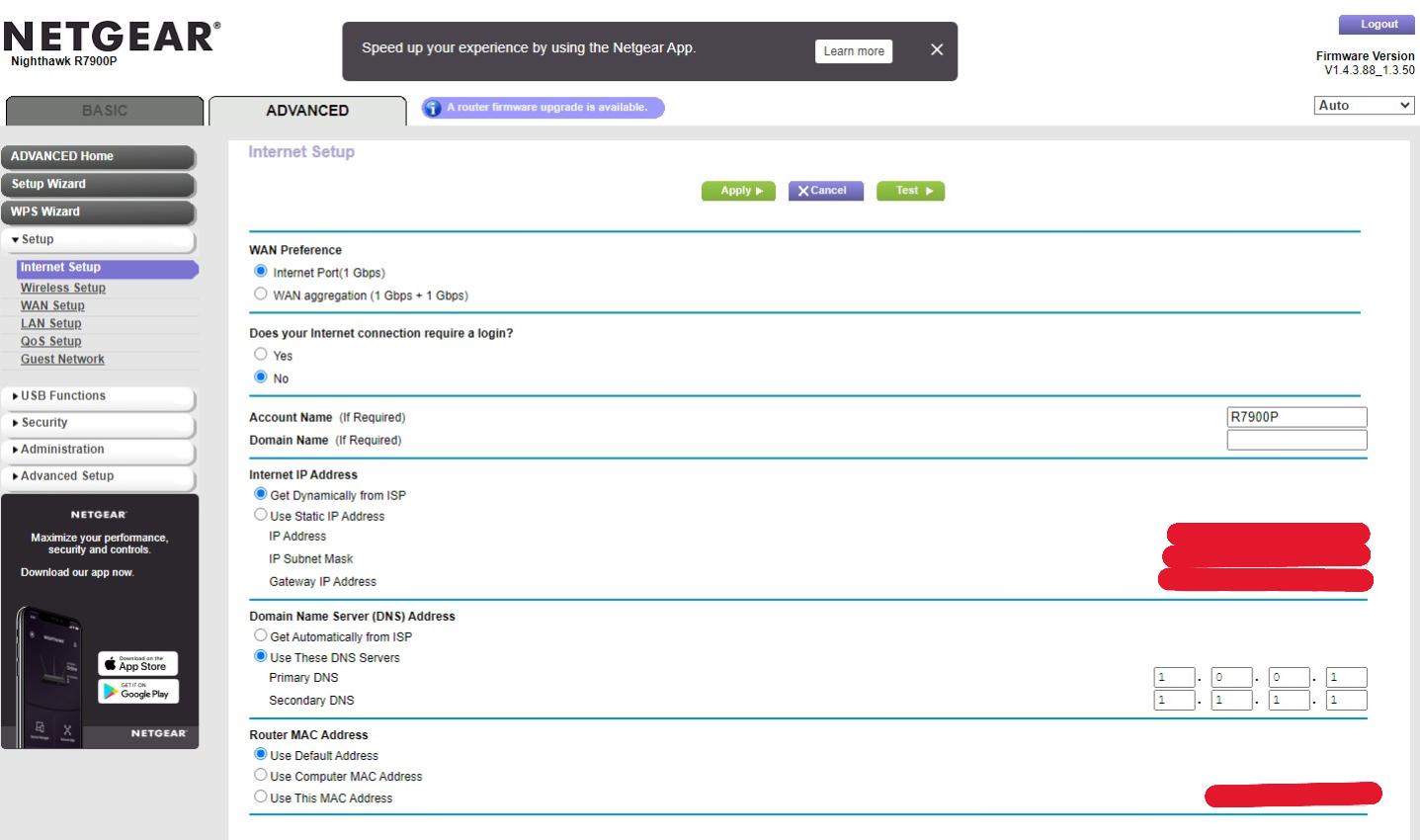
Make sure your DVR server PC is set to get a DHCP IP lease and DNS server IP's from your Netgear router and that your Netgear router is acting as the DNS server for your LAN and that the Netgear router is using the Internet DNS servers you want (1.0.0.1, 1.1.1.1).

Everything on my LAN uses this default gateway 192.168.1.1 and DNS server IP 192.168.1.1 which is my router.

Here's the Internet setup on my router (LAN setup doesn't show DNS) and the Network settings on the Channels Server (Windows 10)


Note that I swapped the primary and secondary DNS servers

192.168.0.1 is the LAN IP of the router.

They're promoting this concept of a "Bomb Cyclone" hitting the PNW and our Building had a very unconventional "power outage" at 3 so we sent everyone home. When I got home I shut down the Channels host PC, unplugged the router and the modem and then plugged them all back in after about 20 seconds. When the Channels PC came back up it immediately began recording the TVE program it had given up on (it wouldn't have done this without the power cycle) and all networking was functioning properly again.

Maybe I need to find a way to schedulte these kinds of "resets" so it can be handsfree...

Your setup looks fine.

Did you change the default IP address of the router from 192.168.1.1 to 192.168.0.1?

Noticed your Nighthawk firmware isn't up to date. The newest version for it was released two years ago. Since your router is exposed to the Internet, I would update the firmware to the latest version. If there are known security vulnerabilities it fixed two years ago, I'm sure they're being exploited in unpatched routers. R7900P Firmware Version 1.4.4.94 - NETGEAR Support

And if yours is a R7900P version V1, it's an end of service product and won't get any new firmware updates.

I'm wondering if you have two DHCP servers active on your network. The next time this happens, display the IP configuration of the computers having the issue. We need to see the following:

DHCP server that provided the lease
The IP address assigned
The gateway assigned
The network mask assigned
The DHCP server(s) assigned

Also tell us the IP of your router when this happens.

As your computers seem to be getting out over the router, you might want to manually assign the DNS server for your channels server and any other critical host. As you like Cloudflare, use 1.1.1.1 as primary and 1.0.0.1 as the secondary.

1 Like

I was thinking either that, or the apps NETGEAR ARMOR and CIRCLE SMART PARENTAL CONTROLS running on the router (not sure they can be disabled).

I had a D-Link DIR-825 router using that IP I was replacing and it was just easier to change the router's address to 192.168.0.1 than to go to all of our connected devices and change the gateway address on them.

When I switched over from pfSense running on a Linux PC to the router, I did a factory reset on the Netgear router and installed what was the current firmware at the time. In August 2023 I attempted to update to the latest firmware and the installation didn't complete, so I rolled it back to the one that was before it. Since then I haven't bothered to try again because I was very busy with other things I deemed more important.

I have a Netgear Arlo security setup that uses its own wireless router and is hard-wired into one of our home network's switches and given an address reservation at 192.168.0.101 by the gateway router. I imagine it connects to its wireless cameras using its own DHCP service but I'm not sure I can confirm that.

And I just remembered that I'm using the old D-Link router as a switch (in Access Point mode) in the master bedroom to service a TiVo and a Smart TV (so rarely used I actually forgot about them). Curiously, though, I don't see an attached device that looks like the D-Link but I do see the TiVo and TV that are plugged into it, so that tells me it is indeed acting as a switch.

This is an overly broad statement. It’s completely possible depending on the isp router for a router in bridge mode to cause a double nat. For example the bgw320 from AT&T causes a double nat. Even though the router is in bridge mode you are a hostage to the bgw320 ip tables as well.

To the OP have you tried testing with just the isp router without bridge mode, taking your nighthawk out of the equation?

I was talking about the Xfinity xFi Gateway specifically

That would be a great idea if I would discover the issue quickly, but the history has been that it often takes up to a week or more for the problem to show up. That would be overly disruptive to the interconnectedness of all the wired devices.on our LAN just to confirm what I'm already 95 percent sure of. With the modem having just been replaced and the old outdoor wiring being all new now, I think that my symptoms appear to be consistent at disparate physical locations on the network, it makes the ethernet cable from the modem to the router and the router itself the next mostly likely suspects.

I've considered just buying a newer version of a similar-type router, but I'm also debating the merits of going back to pfSense with a mini-PC or for simplicity a Netgate 1100 or 2100. pfSense was more complex to set up because of all the functionality it provides, but it was always rock solid the way we had it set up.