CPU Load high compared to what is reported by the host device

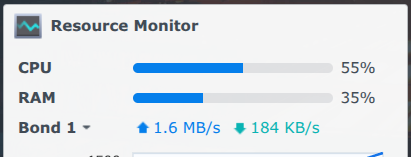
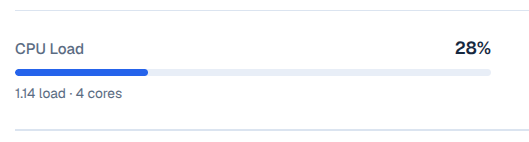
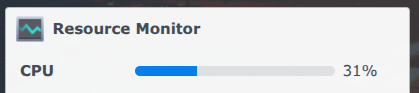
Description of issue: My CDVR CPU load often shows 100% when the load as shown on my Synology GUI shows much less usage

I expected: The CPU load as indicated on the CDVR interface to match what my host device says it is.

What actually happened: It isn't even close.
Note: I'm seeing this when remote streaming.

CDVR:

Synology:
Screenshot 2026-10-10 7.17.45 PM

The really strange thing is that CPU usage dropped dramatically when I paused the movie. They still don't match, but are much closer.

CDVR:
Screenshot 2026-10-10 7.26.33 PM

Synology:
Screenshot 2026-10-10 7.26.44 PM

It’s been like that from Day 1 of V2 and reported.

I thought that I had seen a previous post about it... a little more digging and I have found it.. It's yours!

Now I'm wondering if the v2 interface is actually pushing my processor too hard. It does seem to get sluggish when I see the CPU load is showing as high on the CDVR GUI.

My gut feeling is that commercial detection is part of the issue. I’ve noticed it mostly occurs after downloading a prerelease and while detecting commercials. Maybe just not calculating correctly on Synology.

Pre-releases are coming in quite frequently, which may explain why this is happening so often. I also have suspected that commercial detection is consuming my resources. So, I have turned off advanced commercial detection, limited detection to one thread and disabled "live detection while watching".

Maybe you should check this:

your mileage may be different, but performance cost to benefit ratio has most of us turning this off. hopefully enhanced detection will eventually benefit live detection. :crossed_fingers:

2 Likes

Just trying to add information here.
My Channels server is basically idling right now.
My Synology NAS is showing around 4% CPU usage
The Channels WebUI is showing between 27% and 38% CPU usage

The discrepancy is constantly existing. Almost looks like a calculation error?

I believe I figured this out.
The CPU % number the Channels server UI displays is not based on the system CPU %. It is a calculation of CPU load / number of cores * 100. Or in other words, the load represented as percentage.

The normal CPU % differs from load as it only reports active processing time, not other demands (like I/O waits).

The % value reported by the Channels UI is confusing because it uses that designation in a non-standard way. The calculation is correct, but the label is inappropriate.

This was resolved in the latest pre-release:

1 Like

Not resolved on my Synology.

I'm seeing that the 1, 5 and 15 minute averages match each other with the exception of a slight lag.

On the Channels GUI, the calculated CPU System Load looks to be the 1 minute average divided by the number of cores.

On the Synology GUI, the resource monitor charts and reports CPU utilization, rather than system load based upon load average. These two data sets are calculated differently. So, we can't expect to see the same number between GUI's. It appears that the Utilization (Synology) is always a little lower than the system load (CDVR).

I found the following explanation online:

Understanding Load Average vs. Utilization

Synology also displays a Load Average for 1, 5, and 15 minutes, which measures the run-queue length (the sum of actively running processes plus processes waiting for CPU time)

Why Load Average and Utilization Differ: Load average scales with the number of CPU threads/cores (e.g., a load of 4.0 on a 4-core system is 100% capacity), whereas Utilization strictly measures the active percentage of time the CPU cores are busy executing User or System instructions. High I/O Wait or processes waiting on storage can push the system load up while keeping active CPU utilization relatively low

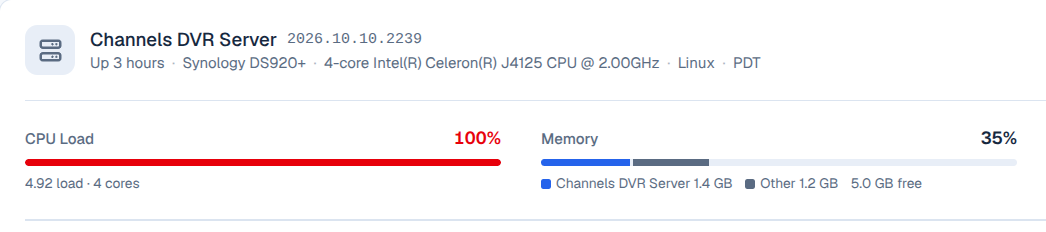
The bar is doing its best to just estimate. The load averages are below it. Channels DVR server isn’t a system monitor.

Understood. It is nice to be able to see how CDVR may be affecting system resources. Especially when we are experimenting with changes in beta software.