DeepLinks: ESPN+

@bnhf
Well, I pulled out the test encoder and got ah4c running with dtvstreamdeeplinks on my test server (Synology). You must have taught me right as I had very few issues getting it going in Portainer.

I plan on working with your ESPN+ in the next day or so but need to get my head wrapped around tailscale.

  1. Should I install tailscale on the synology or just check the box on Channels Web UI?

  2. Other than creating a tailscale account, is there anything else I need to learn about it or will the container just take care of all?

On a side note, it looks like my adb authorization from July 2024 was still working as I did not have to reauthorize (that's when we first started trying ah4c).

i havent been able to replicate that bug you're seeing with the stream failing yet, but def seeing the "start from beginning" default. its probably by design on their part but ill keep looking for an override.

ive been using this command fyi
adb shell am start -d 'sportscenter://x-callback-url/showWatchStream?playID=7264bc45-dbaa-4cff-b9b0-7e6820b59391'

humor me on your adb command that you send.. might be a deadend but worth a shot.

ah4c's current command:

adb -s firestick-rack1:5555 shell am start -n com.espn.gtv/com.espn.startup.presentation.StartupActivity sportscenter://x-callback-url/showWatchStream?playID=7264bc45-dbaa-4cff-b9b0-7e6820b59391

THE FIX

Corrected command with -d flag:

adb -s firestick-rack1:5555 shell am start -n com.espn.gtv/com.espn.startup.presentation.StartupActivity -d 'sportscenter://x-callback-url/showWatchStream?playID=7264bc45-dbaa-4cff-b9b0-7e6820b59391'

WHAT THE -d FLAG DOES

The -d flag stands for "data" and is part of the Android am start (Activity Manager) command syntax.

What it does:

  • Tells Android that what follows is a data URI for the intent
  • This URI becomes the intent's data field that the app can read to determine what content to load
  • Without -d, the shell treats the URI as random positional arguments, which may get ignored or misinterpreted (Could be the bug you're seeing?)

this worked 50 times in a row... i dont think there's a way to auto-start to live, but this script worked. (using powershell)

# Launch the ESPN stream
adb -s 192.168.86.37:5555 shell am start -n com.espn.gtv/com.espn.startup.presentation.StartupActivity -d 'sportscenter://x-callback-url/showWatchStream?playID=7264bc45-dbaa-4cff-b9b0-7e6820b59391'

# Wait for stream to load
Start-Sleep -Seconds 15

# Press DOWN to open controls
adb -s 192.168.86.37:5555 shell input keyevent KEYCODE_DPAD_DOWN
Start-Sleep -Milliseconds 500

# Press RIGHT to navigate to "Go Live"
adb -s 192.168.86.37:5555 shell input keyevent KEYCODE_DPAD_RIGHT
Start-Sleep -Milliseconds 500

# Press ENTER to activate "Go Live"
adb -s 192.168.86.37:5555 shell input keyevent KEYCODE_DPAD_CENTER

echo "Success"
1 Like

I did get my custom version up and working. Although I think I am going to go back and start with the ESPN4CC base as it looks like it schedules into time-slots similar to how EPlusTV did it vs. a channel per stream event. Not sure what will be better in the long run, but just experimenting.

thats my fav feature of ESPN4CC that it creates a mini-guide... it was a nightmare to get programmed and i still dont love the implementation. I'd love to re-create that with Stream Links, but snafu is CDVR won't allow redirects on a Streamlink. It's basically a send it and forget it.

only workaround i could fathom is to force cdvr to reload the m3u every minute with the "scheduled" program but that sounds clunky.

wish list would be is if CDVR supported some sort of Streamlink url inside the XML/EPG (as opposed to using the M3U url), or a way to auto-refresh a dynamic m3u whenever channel is called.

pretty niche request so not sure devs would be open to that.

1 Like

That would have been a nice easy fix -- but, no joy. What streaming stick were you using in your testing?

Tailscale is not a requirement, so unless you have a specific reason to use it, you can comment out those lines in the compose having to do with DNS search. You can use IP addresses without those values specified.

I split my time between various locations, in and out of the country, so Tailscale is baked into everything I do. With Tailscale and its MagicDNS, I can use simple hostnames everywhere that resolve equally well locally or remotely.

2 Likes

bummer.... i hammered it 50+ times and it fired consistently. not one failed stream. to be fair, i wasn't testing through your program - just direct ADB.

I was using a Fire TV Stick 4K (2nd Gen) .. you said you have a Max? I think I have one of those as well I can test tonight.

Just thinking through debugging... I know you said your program didn't show anything in the logs, but maybe there's more logging you could throw in there. perhaps consider a keycode_wakeup call and keycode_home to make sure firestick awake first, and a force-stop of com.espn.gtv then call the url? could u log the exact ADB commands it's sending too?

Just thinking aloud a bit on that topic...

I think if I could limit the events to only the things I want, there might be an advantage to the "flat" guide, particularly if specific teams/leagues could go on a specific channels.

The nice thing about the "tiled" guide is that it can pack many events into a reasonable channel space. At certain times of year, there are hundreds of different sports of events on at a given time, and perhaps thousands a day.

I am going to play around with both, and if you are interested in my thoughts on either or both, happy to report back. Either way, I really appreciate your work. Being able to get these to my HDMI tuners will produce a much more reliable stream and better picture. Ultimately I think this will be an upgrade over EPlusTV. BTW, it might be worth opening a thread specifically for ESPN4CC, as the CC4C thread is pretty full as is.

My biggest issue with just using the ESPN app is finding the particular event I want to watch. Despite telling it my favorite teams/leagues, etc. I still have to scroll through 300 random sporting events.

Channels is great, but it also does not have a favorite team/show concept. It does, have a DVR. So if I create a "season pass" I (mostly) get what I want.

For all of Apple TV+ faults, it does a fantastic job with favorite teams, regardless of where/what it is playing, Don't know or have to care that it is on ESPN, Youtube, Amazon or whatever. Problem is multiple TV's can't play in sync as each has its own stream, they are limited in what sports/leagues they cover, and they're over the top pushing their own content is at best extremely annoying.

1 Like

agreed-- I do tag the events with the sports category so automatic channels will filter:

image

But yes, once we get this running, i think some sort of flag to only grab the category/sport(s) you want would be relatively easy to pre-filter before generating m3u/xml.

It's looking like this issue may be limited to viewing through the CDVR WebUI. Today I've been using VLC and a CDVR client, with no failures so far. I've used the WebUI extensively with ah4c, and have never seen this -- but it does explain why the error showed up so quickly when attempting a virtual tune.

Sending three fast forwards in quick succession is getting me to the live point pretty quickly, but I'll experiment with the jump to live as well. I think FFs are probably the safest, as they serve no other purpose -- but I'll probably make the method and timing configurable, to allow for the different tuning speeds of various streaming sticks.

3 Likes

If you want to use the EPlusTV code base, that filter functionality is already there (as well as all the ESPN+ event grabbing). You'd just need to alter the generate_m3u file to spit out your sportscenter:// links rather than HLS ones.

@tmm1, perhaps related to the location redirect options you added recently, would it be possible for Channels DVR to receive and handle a deep link Stream Link URL (like "sportscenter://...") from a 302 location redirect?

So the initial request in the M3U would be a generic HTTP URL (like "http://localhost:8000/channels/12.m3u8" or leave off the m3u8 if it's too confusing!), and then the provider like EPlusTV could just hand off the correct Stream Link redirect based on its own internal event schedule.

Tricky to do this via a redirect, because by that point its already trying to load in our player instead of linking out.

The other idea of adding stream links into xmltv might work but requires some research. The system is not set up to store links as part of the guide database.

1 Like

Is that because it expects a stream over HTTP?

Could Channels implement an additional Stream Link protocol instead, say "redirect://", where it expects to fetch the final Stream Link? So our M3U could contain a generic line like "redirect://localhost:8000/channels/12", Channels would first hit "http://localhost:8000/channels/12", and our app's web server would simply respond with a specific active deep link "sportscenter://x-callback-url/showWatchStream?playID=" for Channels to load.

Hm yea that's interesting. I guess if we know the M3U type is set to STRMLNK, then http could also work. But since some apps use https urls, a new redirect:// like you suggest makes more sense.

Edit: I couldn’t find any of the espn scripts in my data file. Edited my Streamer App in the ah4c stack to scripts/firetv/espn. Now it opens and plays the game. I’ve watched a couple of minutes from several games and all played starting from the beginning.

@bnhf
Got everything set up. I've got guide data but when I select anything, it opens the DTV Stream app.
I've attached the Portainer log, the Compose, and my environment variables.
Firestick 4K
ESPN app loaded and signed in.

No hurry as I'm here to help where I can!!
Let me know if you need anything else.

Portainer Log:

2025-11-05T17:20:35-06:00] Initial scrape β†’ guide...

2025-11-05 17:20:37,603 - INFO - Current time (TZ=UTC): 2025-11-05 23:20:37.602967+00:00

2025-11-05 17:20:37,603 - INFO - ===========================================================

2025-11-05 17:20:37,603 - INFO - ESPN Watch Graph Scraper - Starting

2025-11-05 17:20:37,603 - INFO - ===========================================================

2025-11-05 17:20:37,604 - INFO - Fetching dates: 2025-11-04, 2025-11-05, 2025-11-06, 2025-11-07

2025-11-05 17:20:37,604 - INFO - Database directory: /app/out

2025-11-05 17:20:37,605 - INFO - Database path: /app/out/espn_schedule.db

2025-11-05 17:20:37,761 - INFO - Database initialized successfully

2025-11-05 17:20:37,761 - INFO - About to fetch days: ['2025-11-04', '2025-11-05', '2025-11-06', '2025-11-07']

2025-11-05 17:20:37,761 - INFO - Fetching day 1/4: 2025-11-04

2025-11-05 17:20:37,762 - INFO - Request URL: https://watch.graph.api.espn.com/api?apiKey=0dbf88e8-cc6d-41da-aa83-18b5c630bc5c&features=pbov7

2025-11-05 17:20:37,762 - INFO - Request payload keys: ['query', 'operationName', 'variables']

2025-11-05 17:20:37,762 - INFO - Variables: {'countryCode': 'US', 'deviceType': 'DESKTOP', 'tz': 'UTC', 'day': '2025-11-04', 'limit': 2000}

2025-11-05 17:20:38,858 - INFO - API request for 2025-11-04: status=200, duration_ms=1087, bytes=170217

2025-11-05 17:20:38,859 - INFO - Retrieved 373 airings for 2025-11-04

2025-11-05 17:20:38,859 - INFO - Sample packages from first 5 airings:

2025-11-05 17:20:38,859 - INFO -   Airing 1 '#18 Kentucky vs. Old Dominion': packages=['ESPN_PLUS']

2025-11-05 17:20:38,860 - INFO -   Airing 2 'North Carolina A&T vs. South Carolina': packages=[]

2025-11-05 17:20:38,860 - INFO -   Airing 3 'NJIT vs. Fordham': packages=['ESPN_PLUS']

2025-11-05 17:20:38,860 - INFO -   Airing 4 'Stony Brook vs. Syracuse': packages=[]

2025-11-05 17:20:38,860 - INFO -   Airing 5 'Alcorn State vs. Florida State': packages=[]

2025-11-05 17:20:38,861 - INFO - League data - name: 'NCAAM Soccer', abbrev: 'None', sport: 'Soccer'

2025-11-05 17:20:38,862 - INFO - League data - name: 'NCAAM', abbrev: 'None', sport: 'Basketball'

2025-11-05 17:20:38,862 - INFO - League data - name: 'NCAAM', abbrev: 'None', sport: 'Basketball'

2025-11-05 17:20:38,863 - INFO - League data - name: 'NHL', abbrev: 'None', sport: 'Hockey'

2025-11-05 17:20:38,863 - INFO - League data - name: 'NCAAW', abbrev: 'None', sport: 'Basketball'

2025-11-05 17:20:38,868 - INFO - Fetching day 2/4: 2025-11-05

2025-11-05 17:20:39,290 - INFO - API request for 2025-11-05: status=200, duration_ms=418, bytes=109912

2025-11-05 17:20:39,292 - INFO - Retrieved 247 airings for 2025-11-05

2025-11-05 17:20:39,295 - INFO - Fetching day 3/4: 2025-11-06

2025-11-05 17:20:39,722 - INFO - API request for 2025-11-06: status=200, duration_ms=423, bytes=133629

2025-11-05 17:20:39,723 - INFO - Retrieved 298 airings for 2025-11-06

2025-11-05 17:20:39,727 - INFO - Fetching day 4/4: 2025-11-07

2025-11-05 17:20:40,391 - INFO - API request for 2025-11-07: status=200, duration_ms=658, bytes=164560

2025-11-05 17:20:40,392 - INFO - Retrieved 358 airings for 2025-11-07

{

  "db": "/app/out/espn_schedule.db",

  "rows_inserted": 619,

  "live_now": 20,

  "window_72h": 423

}

ESPN+ M3U/XMLTV Generator

============================================================

Database: /app/out/espn_schedule.db

Time: 2025-11-05 23:20:40 UTC

Fetching live and upcoming events (next 3 hours)...

Found 68 events

Generating M3U playlist...

  Saved: /app/out/espn_plus.m3u

  Channels: 63

Generating XMLTV guide...

  Saved: /app/out/espn_plus.xml

Sample events:

------------------------------------------------------------

1. Freddie & Harry

2. Villanova vs. Penn

3. Idaho vs. Portland St

4. LIVE - UL Monroe vs. Old Dominion

5. LIVE - Georgetown vs. Villanova

... and 63 more

============================================================

Generation complete!

Files created:

  M3U:  /app/out/espn_plus.m3u

  XMLTV: /app/out/espn_plus.xml

[2025-11-05T17:20:40-06:00] Starting http server for espn_guide.xml...

[2025-11-05T17:20:40-06:00] Installing cron schedules...

[2025-11-05T17:20:40-06:00] Run initial hourly reload...

[2025-11-05 17:20:40] β†’ Running: python3 generate_guide.py

==================================

DeepLinks β€” /out HTTP server

==================================

Serving: /app/out

Listen : 0.0.0.0:7644

Open   : http://172.22.0.2:7644

Files  :

         http://172.22.0.2:7644/espn_plus.xml

         http://172.22.0.2:7644/espn_plus.m3u

==================================

ESPN+ M3U/XMLTV Generator

============================================================

Database: /app/out/espn_schedule.db

Time: 2025-11-05 23:20:41 UTC

Fetching live and upcoming events (next 3 hours)...

Found 68 events

Generating M3U playlist...

  Saved: /app/out/espn_plus.m3u

  Channels: 63

Generating XMLTV guide...

  Saved: /app/out/espn_plus.xml

Sample events:

------------------------------------------------------------

1. Freddie & Harry

2. Villanova vs. Penn

3. Idaho vs. Portland St

4. LIVE - UL Monroe vs. Old Dominion

5. LIVE - Georgetown vs. Villanova

... and 63 more

============================================================

Generation complete!

Files created:

  M3U:  /app/out/espn_plus.m3u

  XMLTV: /app/out/espn_plus.xml

[2025-11-05 17:20:41] β†’ Sleeping 20s

[2025-11-05 17:21:01] β†’ POST http://10.0.1.194:8089/providers/m3u/sources/streamlinks/refresh

  body: false[2025-11-05 17:21:01] βœ“ M3U refresh requested

[2025-11-05 17:21:01] β†’ Sleeping 20s

[2025-11-05 17:21:21] β†’ PUT http://10.0.1.194:8089/dvr/lineups/XMLTV-streamlinks

  body: true[2025-11-05 17:21:21] βœ“ XMLTV refresh requested

[2025-11-05 17:21:21] βœ… All steps completed.

[2025-11-05T17:21:21-06:00] Starting crond (background) and waiting on processes...

crond: crond (busybox 1.36.1) started, log level 8

crond: user root: parse error at 5****

crond: user root: parse error at /bin/sh

crond: user root: parse error at -lc

crond: user root: parse error at 'cd

crond: user root: parse error at /app

crond: user root: parse error at 3***

crond: user root: parse error at /bin/sh

crond: user root: parse error at -lc

crond: user root: parse error at 'cd

crond: user root: parse error at /app

crond: user root: parse error at 5****

crond: user root: parse error at /bin/sh

crond: user root: parse error at -lc

crond: user root: parse error at 'cd

crond: user root: parse error at /app

crond: user root: parse error at 3***

crond: user root: parse error at /bin/sh

crond: user root: parse error at -lc

crond: user root: parse error at 'cd

crond: user root: parse error at /app

[http] "GET /espn_plus.xml HTTP/1.1" 200 -

[http] "GET /espn_plus.xml HTTP/1.1" 200 -

[http] "GET /espn_plus.xml HTTP/1.1" 200 -

**strong text**

Compose:

services:
  eplustv-ah4c:
    image: bnhf/eplustv-ah4c:${TAG:-latest}
    container_name: eplustv-ah4c
    dns_search:
      - ${DOMAIN:-localdomain} # Change to the name of your LAN's domain, which is usually local or localdomain
      #- ${TAILNET} # Change to the name of your Tailnet, which is in the form tailxxxxx.ts.net
    dns_opt:
      - ndots:${NDOTS:-1} # Allows hostanme resolution on LAN and Tailnet domains in Alpine Linux-based containers
    ports: # Note that the M3U is hosted by ah4c (typically port 7654) and the XML is hosted by eplustv-ah4c (typically port 7644)
      - ${PORT:-7644}:${PORT:-7644} # The port espn_plus.xml will be hosted on, in the form http://<hostname or IP>:<PORT>/espn_plus.xml
    environment:
      - TZ=${TZ} # Your local timezone in a valid Linux format
      - HOST=${HOST} # Your Channels DVR host URL in the form http://<hostname or IP>:8089
      - CRON_HOURLY=${CRON_HOURLY:-5 * * * *} # Typically 5 * * * *
      - CRON_NIGHTLY=${CRON_NIGHTLY:-15 3 * * *} # Typically 15 3 * * *
      - PORT=${PORT:-7644} # The port espn_plus.xml will be hosted on, in the form http://<hostname or IP>:<PORT>/espn_plus.xml
      - AH4C=${AH4C:-true} # Set to true for the URL used in espn_plus.m3u to be in a valid ah4c format, typically hosted at http://<hostname or IP>:7654/m3u/espn_plus.m3u
    volumes:
      - ${HOST_DIR:-/data}/ah4c/m3u:/app/out # The parent directory, on your Docker host, under which your ah4c M3Us are stored 
    restart: unless-stopped

Environment Variables:

TAG=latest
DOMAIN=local
TZ=US/Central
HOST=http://10.0.1.194:8089
CRON_HOURLY=5****
CRON_NIGHTLY=3***
PORT=7644
AH4C=true
HOST_DIR=/volume1/data
1 Like

These values should look like:

CRON_HOURLY=5 * * * *
CRON_NIGHTLY=15 3 * * *

I.E., with the spaces, and correct number of values. Your hourly settings, have no spaces and your nightly settings are both missing spaces and the 5th value.

1 Like

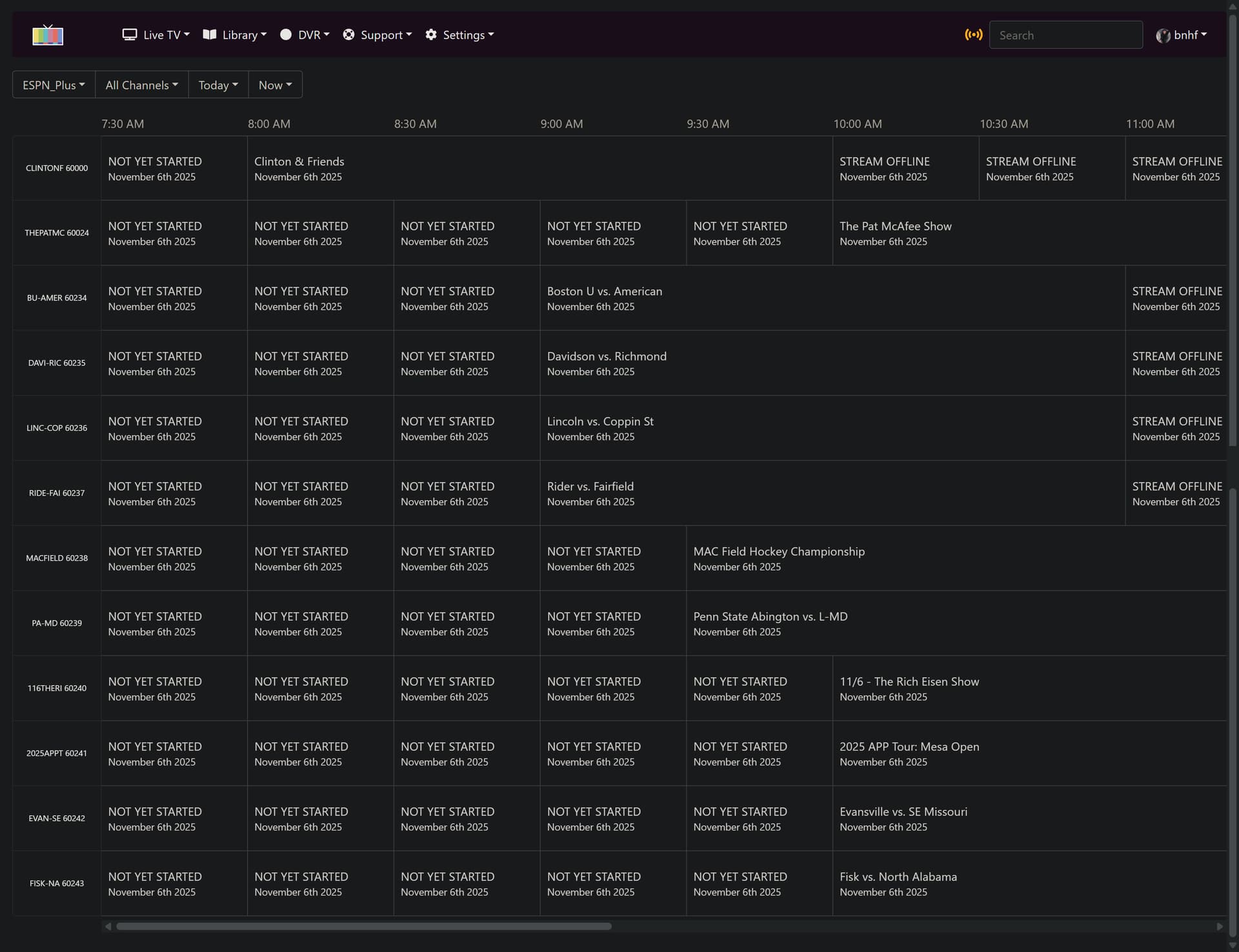
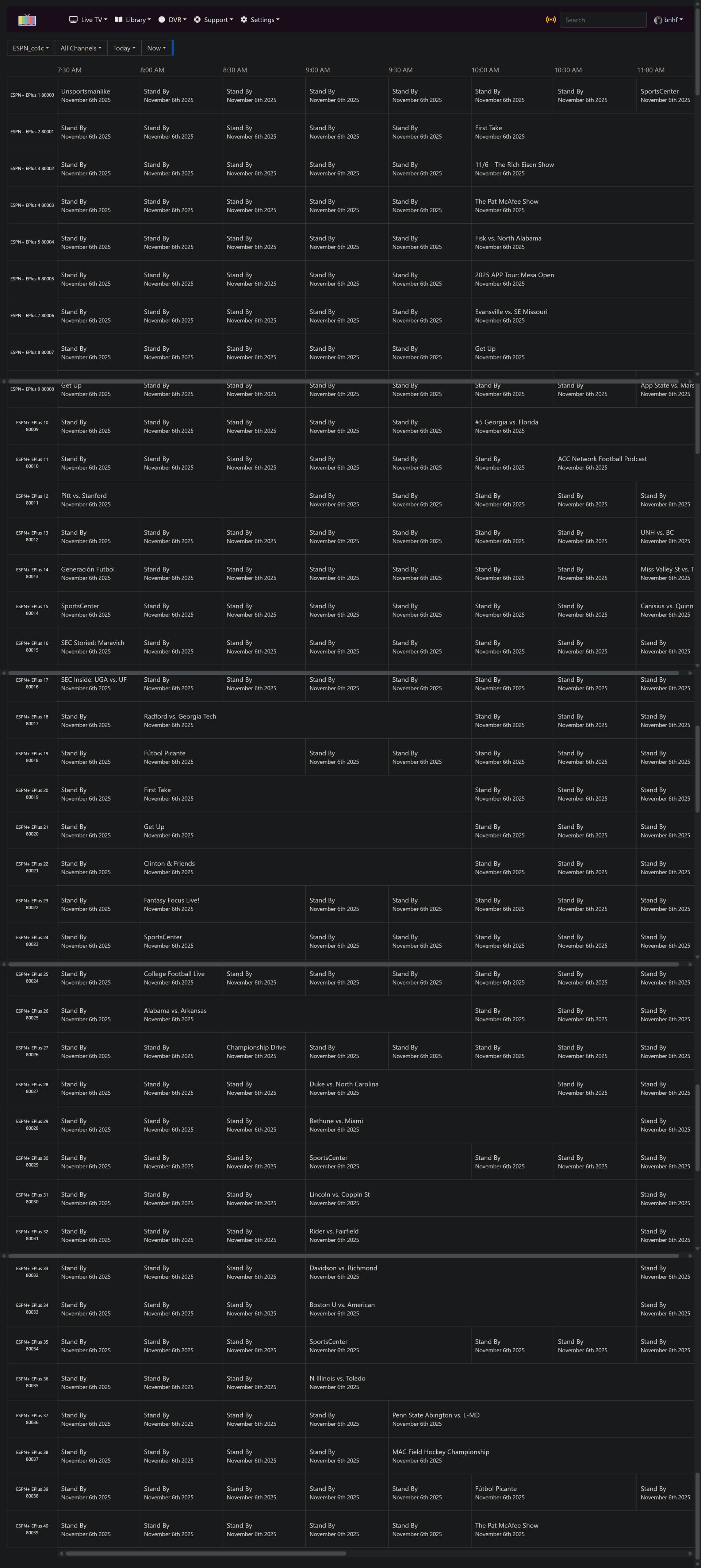
@KineticMan I have both the cc4c and ah4c versions of your projects running side-by-side now. What's populating in their respective guides doesn't match though. For example in the cc4c version, there are 8 or 9 events in the next hour, whereas in the ah4c version there's only one:

DeepLinks guide:

espn4cc guide: