
@techpro2004
its coming
1 Like
bug: changing resolution/quality in the web ui disables nvenc.
ok, fixing ill push when multitunner works thanks for testing
As of 12/2/25 5:30pm the latest pull fixed all of these issues.
Able to ad custom DTVS as source.
connected vnc :6080
Have settings setup (http://localhost:7070/) loged in. GUI all is green.
Got a working M3U & EPG (so menus and times all display correctly)
Any show i pick works fine in the browser but in Channels (AppleTV) every show i select throws an error of 503
(no idea if either of these is a big deal-duess is not)
http://localhost:5901/ says: ERR_INVALID_HTTP_RESPONSE
http://localhost:9222/ (debug) says: ERR_EMPTY_RESPONSE
LOG:
2025/12/02 17:58:35.061101 [HTTP] | 200 | 215.9262ms | 10.0.0.227 | GET "/devices/M3U-DTVStreamLocal/guide?time=1764720000&duration=28800"
2025/12/02 17:58:35.759659 [HTTP] | 200 | 22.5516ms | 10.0.0.227 | GET "/devices/M3U-DTVStreamLocal/guide?time=1764748800&duration=28800"
2025/12/02 17:58:38.668887 [ERR] Could not start stream for M3U-DTVStreamLocal ch18148 Great American Family: M3U: Detected MPEG-TS instead of HLS playlist
2025/12/02 17:58:38.668887 [HTTP] | 503 | 2.9736062s | 10.0.0.227 | GET "/devices/M3U-DTVStreamLocal/channels/18148/stream.mpg"
2025/12/02 17:58:38.716336 [HTTP] | 502 | 1.1631ms | 10.0.0.227 | GET "/imgcache/placeholder-blur-placard/?withTitle=A%20Christmas%20Blessing&_proto=com.getchannels.local-images"
2025/12/02 17:58:43.582204 [HTTP] | 200 | 43.5293ms | 127.0.0.1 | GET "/log"
http://localhost:7070/Health output
{
"status": "ok",
"tuners": {
"numTuners": 1,
"tuners": [
{
"id": 0,
"state": "streaming",
"channel": "326",
"clients": 1,
"lastActivity": 1764715930596,
"debugPort": 9222,
"stream": {
"isRunning": false,
"uptime": 1829216,
"uptimeFormatted": "30m 29s",
"bytesTransferred": 38848884,
"bytesFormatted": "37.05 MB",
"framesProcessed": 5144,
"avgBitrateMbps": "0.17",
"clientCount": 0,
"errors": [
{
"time": 1764714737547,
"message": ":1: Generic error in an external library"
}
],
"errorCount": 1,
"restarts": 0,
"lastActivity": 1764715962518,
"healthy": false,
"encoder": "libx264",
"hwAccel": "none",
"hwAccelFailed": false
}
}
]
}
}
Also of note: the docker container seems to run abnormally high ~256% when the other containers (pluto/tubi/plex/samsung) run at ~0.05% in total
yea, testing in channels to i get issues where slow stream buffering or 503 sometimes not sure why i will push this multi tunner image soon and see whats going on with channels later tonight need to make dinner 
pushing multitunner please provide feedback this will only be for nvidia gpu for now will work on intel next and then standard no gpus thanks everyone for testing and providing feedback
The nvidia-multi image now supports multiple simultaneous tuners with NVENC hardware encoding!
What's New
- Multi-Tuner Support - Run 3, 5, or more tuners from a single container
- User Settings Applied - Resolution/bitrate changes in the UI now actually work!
- Per-Tuner Audio Isolation - Each tuner has its own audio channel (no more mixed audio)
- Per-Tuner Controls - Login status indicators, reset buttons, and cache clear per tuner
- NVENC Hardware Encoding - All tuners share GPU encoding (RTX 3090 tested with 3 streams)
Quick Start
docker run -d \
 --name dvr-tuner \
 --gpus all \
 -p 7070:7070 \
 -p 6080-6084:6080-6084 \
 -v dvr-data:/data \
 -e DVR_NUM_TUNERS=3 \
 sunnyside1/directvtuner:nvidia-multi
How to Configure Multiple Tuners
Set DVR_NUM_TUNERS to your desired count:
| Tuners | Environment Variable |
|---|---|
| 3 tuners | -e DVR_NUM_TUNERS=3 |
| 5 tuners | -e DVR_NUM_TUNERS=5 |
| 8 tuners | -e DVR_NUM_TUNERS=8 |
 Important: Login Required Per Tuner
Each tuner runs its own Chrome browser and requires separate DirecTV login:
- Open the web UI at http://your-ip:7070
- Go to the Status tab
- For each tuner showing
 "Needs login":
- Click the VNC button to open that tuner's browser
- Complete the DirecTV login
- Close the VNC tab when done
VNC Ports by Tuner:
| Tuner | VNC URL |
|---|---|
| Tuner 0 | http://your-ip:6080 |
| Tuner 1 | http://your-ip:6081 |
| Tuner 2 | http://your-ip:6082 |
| Tuner 3 | http://your-ip:6083 |
| Tuner 4 | http://your-ip:6084 |
Make sure to expose the VNC ports for however many tuners you're running:
- 3 tuners: -p 6080-6082:6080-6082
- 5 tuners: -p 6080-6084:6080-6084
GPU Session Limits
Consumer NVIDIA GPUs have NVENC session limits:
- GTX 10/16 series: ~3 sessions
- RTX 20/30 series: ~5 sessions
- RTX 40 series: ~8 sessions
- Quadro/Tesla: Unlimited
If you hit the limit, the tuner will automatically fall back to CPU encoding.
Troubleshooting
"Streaming limit reached" error:
Click the  (trash) icon next to the tuner to clear its cache, then re-login.
Audio from wrong channel:
This is fixed in v1.4.0! Each tuner now has isolated audio.
Pull it now:
docker pull sunnyside1/directvtuner:nvidia-multi
Chrome loves CPU and memory
Going to see if I can do some docked improvements to fix the crashes and high CPu
DVR_NUM_TUNERS does not work, I am still limited to 1 tuner also status page is missing. I have tried deleting and recreating and pruning.
Let me make dinner and I'll troubleshoot with u
getting this error:
DirecTV Tuner Settings
Configure video quality and streaming options
Quick Presets
Filter:
Auto-scroll
00:17:08 error [cineby] Error fetching from API: Failed to fetch
00:17:08 error [server] Failed to save settings: ENOENT: no such file or directory, open '/app/data/settings.json'
Settings saved! Changes take effect on next stream.
What version does it show on gui
It does not show any version. thanks.
should settings.json be in /data not /app/data ?
found the issue and sorry my bad can you pull the latest sunnyside1/directvtuner:nvidia-multi
first channel plays fine, additional channels stutter
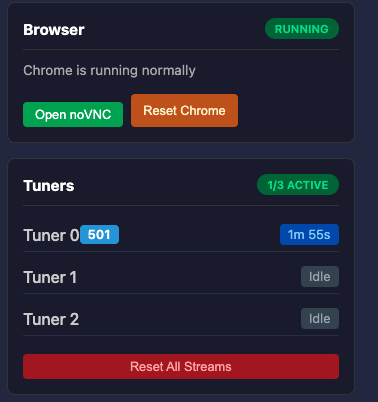
after clicking reset chrome I get the following error when trying to stream
v1.4.1 sunnyside1/directvtuner:latest Uptime: 4m
DirecTV Tuner Settings
Configure video quality and streaming options
✓ Ready
M3U Playlist:
EPG (XMLTV):
Quick Presets
Filter:
Auto-scroll
02:22:03 error [tuner-manager] Tuner 0 in ERROR state, attempting auto-recovery...
02:22:03 error [tuner-manager] Tuner 0 in ERROR state, attempting auto-recovery...
02:22:03 error [tuner-manager] Tuner 0 in ERROR state, attempting auto-recovery...
02:22:03 error [tuner-0] Failed to tune to 570: page.goto: Target page, context or browser has been closed
02:22:03 error [server] Error allocating tuner for 570: page.goto: Target page, context or browser has been closed
02:22:03 error [tuner-0] Failed to tune to 570: page.goto: Target page, context or browser has been closed
02:22:03 error [server] Error allocating tuner for 570: page.goto: Target page, context or browser has been closed
02:22:03 error [tuner-0] Failed to tune to 570: page.goto: Target page, context or browser has been closed
02:22:03 error [server] Error allocating tuner for 570: page.goto: Target page, context or browser has been closed
Chrome reset successfully. Browser is restarting...
1 Like
Also, the right side of the screen is cut off
edit: switching to 1080p fixes this.
can you take a screenshot