
I am getting auth failed and seeing [TVE] action=tvejs msg="directvLogin: no password". I can stream from nbc live so I don't think it's me but is anyone else seeing this?
Download the latest prerelease
Hi. I am on: 2026.03.27.2013 already unfortunately. I did see that and wondered if something got broke in whatever was changed.
1 Like
Submit diagnostic
Logs have been submitted as 38294b97-f54e-43de-acaf-7ef983319dd6.
Some of the channels (CNN) still authenticate, but most do not. I only rescanned a few channels. Did not try to redo password or remove/re-add source.
Any specific channels?
1 Like
These are the ones I tested and they do not authenticate. Using the latest server pre-release on a Windows 11.
A&E
History
FYI
WE
Science
Just tested all except FYI (not in package) and they all authenticated. Running native on Synology on 2026.03.27.2013
Did you run the troubleshooter?
On mine, troubleshooter shows all green. My login was working and I can access WatchNow just fine but channels dvr server gets stuck at the email login screen. The script doesn't get to the password screen. I started to lose channels and then tried to delete, re-add. Windows 10.
With Directv/Directv Stream, you should never try deleting it as a source. You can select either one as a source. It’s the same login and servers for both. If you need to reauthenicate a channel, go you manage sources and reauthenicate that channel.
You're at the mercy of the DTV servers, which are very finicky, Just keep trying every couple hours and it will eventually go thru. Also, try both Directv & DirectvStream.
Also seeing several "Discovery Channel" not working.
I specifically tested with Science Channel.
FWIW - I can go directly to Science Channel website login with my DirecTV credentials and watch the live feed.
I am on the latest pre-lease of CDVR.
The trouble shooter indicates login failure, which is also shown in the following log snipette.
2026/03/29 10:28:03.003433 [TVE] action=version product=Chrome/146.0.7680.165 jsVersion=14.6.202.26 protocol=1.3 revision=@4b989da09e15a7dc0de0785cb5ff232aadae3f0f
2026/03/29 10:28:03.005582 [TVE] action=page_ready chromeVersion=146
2026/03/29 10:28:03.006093 [TVE] action=navigate url=https://sp.auth.adobe.com/api/v1/authenticate?deviceType=html5&domain_name=adobe.com&mso_id=DTV&noflash=true&redirect_url=https%3A%2F%2Fsp.auth.adobe.com%2Fadobe-services%2FcompletePassiveAuthentication®_code=NO35YV6&requestor_id=discovery
2026/03/29 10:28:03.014429 [TVE] action=request type=Document method=GET url=https://sp.auth.adobe.com/api/v1/authenticate
2026/03/29 10:28:03.131016 [TVE] action=wait_for_page
2026/03/29 10:28:03.153518 [TVE] action=request type=Document method=POST url=https://idp.dtvce.com/dtv-idp-authn/authn/v2
2026/03/29 10:28:03.153518 [TVE] action=auth_domain domain=idp.dtvce.com
2026/03/29 10:28:03.185547 [TVE] action=response url=https://sp.auth.adobe.com/favicon.ico status=404 status_text=
2026/03/29 10:28:03.503149 [TVE] action=request type=Document method=GET url=https://identity.directv.com/weblogin/authorize redirected_from=https://idp.dtvce.com/dtv-idp-authn/authn/v2
2026/03/29 10:28:06.271640 [TVE] action=request type=Document method=GET url=https://identity.directv.com/weblogin/authenticate
2026/03/29 10:28:12.469738 [TVE] action=page_ready
2026/03/29 10:28:12.469738 [TVE] action=wait_for_page done=true reason=page_ready
2026/03/29 10:28:12.469738 [TVE] action=wait_for_auth timeout=12s
2026/03/29 10:28:12.469738 [TVE] action=fill_form u=username
2026/03/29 10:28:13.495720 [TVE] action=tvejs msg="directvLogin: no password"
2026/03/29 10:28:24.470499 [TVE] action=check_result
2026/03/29 10:28:24.478613 [TVE] action=auth_timed_out
2026/03/29 10:28:24.479130 [TVE] action=screenshot
2026/03/29 10:28:24.541323 [TVE] action=screenshot file=tve_error_screenshot.png size=43465
2026/03/29 10:28:24.542334 [TVE] action=capture_html
2026/03/29 10:28:24.544999 [TVE] action=capture_html file=tve_error_screenshot.html size=62238
2026/03/29 10:28:24.545718 [TVE] action=capture_html
2026/03/29 10:28:24.549044 [TVE] action=capture_html file=tve_error_screenshot.html size=62238
2026/03/29 10:28:24.945534 [WRN] discovery auth failed, trying again with sci: adobe auth reg code: Cable provider authentication failed
2026/03/29 10:28:25.946138 [TVE] action=version product=Chrome/146.0.7680.165 jsVersion=14.6.202.26 protocol=1.3 revision=@4b989da09e15a7dc0de0785cb5ff232aadae3f0f
2026/03/29 10:28:25.947926 [TVE] action=page_ready chromeVersion=146
2026/03/29 10:28:25.948469 [TVE] action=navigate url=https://sp.auth.adobe.com/api/v1/authenticate?deviceType=html5&domain_name=adobe.com&mso_id=DTV&noflash=true&redirect_url=https%3A%2F%2Fsp.auth.adobe.com%2Fadobe-services%2FcompletePassiveAuthentication®_code=NWU3X7J&requestor_id=discovery
2026/03/29 10:28:25.954733 [TVE] action=request type=Document method=GET url=https://sp.auth.adobe.com/api/v1/authenticate
2026/03/29 10:28:26.125524 [TVE] action=wait_for_page
2026/03/29 10:28:26.157769 [TVE] action=request type=Document method=POST url=https://idp.dtvce.com/dtv-idp-authn/authn/v2
2026/03/29 10:28:26.157769 [TVE] action=auth_domain domain=idp.dtvce.com
2026/03/29 10:28:26.191022 [TVE] action=response url=https://sp.auth.adobe.com/favicon.ico status=404 status_text=
2026/03/29 10:28:26.563606 [TVE] action=request type=Document method=GET url=https://identity.directv.com/weblogin/authorize redirected_from=https://idp.dtvce.com/dtv-idp-authn/authn/v2
2026/03/29 10:28:29.754178 [TVE] action=request type=Document method=GET url=https://identity.directv.com/weblogin/authenticate
2026/03/29 10:28:36.084269 [TVE] action=page_ready
2026/03/29 10:28:36.084269 [TVE] action=wait_for_page done=true reason=page_ready
2026/03/29 10:28:36.084269 [TVE] action=wait_for_auth timeout=12s
2026/03/29 10:28:36.084269 [TVE] action=fill_form u=username
2026/03/29 10:28:37.111357 [TVE] action=tvejs msg="directvLogin: no password"
2026/03/29 10:28:48.085430 [TVE] action=check_result
2026/03/29 10:28:48.093434 [TVE] action=auth_timed_out
2026/03/29 10:28:48.093434 [TVE] action=screenshot
2026/03/29 10:28:48.157482 [TVE] action=screenshot file=tve_error_screenshot.png size=43465
2026/03/29 10:28:48.157983 [TVE] action=capture_html
2026/03/29 10:28:48.161961 [TVE] action=capture_html file=tve_error_screenshot.html size=62621
2026/03/29 10:28:48.162623 [TVE] action=capture_html
2026/03/29 10:28:48.164031 [TVE] action=capture_html file=tve_error_screenshot.html size=62621
2026/03/29 10:28:48.786641 [ERR] Could not start stream for TVE-DTV ch6110 SCIENCE: TVE: adobe auth reg code: Cable provider authentication failed
Here’s the log snippet showing a successful Science Channel reauthorizing just a second ago.
This issue appears to be only affecting servers on specific OS, but that’s a guess. Are you on a windows system?
2026/03/29 09:47:23.605778 [TVE] action=page_ready chromeVersion=129
2026/03/29 09:47:23.606875 [TVE] action=navigate url=https://sp.auth.adobe.com/api/v1/authenticate?deviceType=html5&domain_name=adobe.com&mso_id=DTV&noflash=true&redirect_url=https%3A%2F%2Fsp.auth.adobe.com%2Fadobe-services%2FcompletePassiveAuthentication®_code=OFMC56B&requestor_id=discovery
2026/03/29 09:47:23.609236 [TVE] action=request type=Document method=GET url=https://sp.auth.adobe.com/api/v1/authenticate
2026/03/29 09:47:23.757644 [TVE] action=wait_for_page
2026/03/29 09:47:23.789322 [TVE] action=request type=Document method=POST url=https://idp.dtvce.com/dtv-idp-authn/authn/v2
2026/03/29 09:47:23.789411 [TVE] action=auth_domain domain=idp.dtvce.com
2026/03/29 09:47:24.175752 [TVE] action=request type=Document method=GET url=https://identity.directv.com/weblogin/authorize redirected_from=https://idp.dtvce.com/dtv-idp-authn/authn/v2
2026/03/29 09:47:30.560582 [TVE] action=request type=Document method=GET url=https://identity.directv.com/weblogin/authenticate
2026/03/29 09:47:38.398277 [TVE] action=page_ready
2026/03/29 09:47:38.398407 [TVE] action=wait_for_page done=true reason=page_ready
2026/03/29 09:47:38.398454 [TVE] action=wait_for_auth timeout=12s
2026/03/29 09:47:38.398503 [TVE] action=fill_form u=jagrim
2026/03/29 09:47:40.554695 [TVE] action=request type=Document method=POST url=https://sp.auth.adobe.com/sp/saml/SAMLAssertionConsumer
2026/03/29 09:47:40.699251 [TVE] action=request type=Document method=GET url=https://sp.auth.adobe.com/adobe-services/completePassiveAuthentication redirected_from=https://sp.auth.adobe.com/sp/saml/SAMLAssertionConsumer
2026/03/29 09:47:40.699322 [TVE] action=authed
2026/03/29 09:47:40.702231 [TVE] action=cookies num_domains=1 num_cookies=3
2026/03/29 09:47:42.650347 [TVE] Channel scan SCIENCE successful
I'm on Windows 11 (latest version).
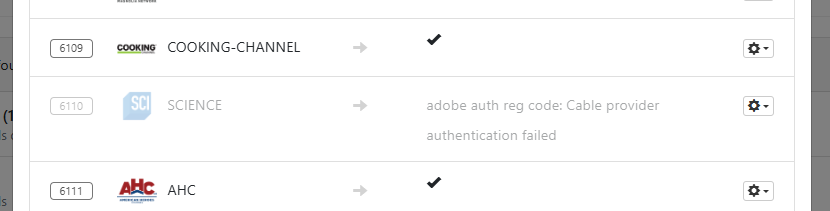
Since running the the Trouble Shooter, I no longer have the Science Channel in my CDVR line-up.
The following is what the trouble shooter sees:
I would submit diagnostics and repost back. Both you and the topic starter are both on Windows systems; I’m on a Synology.
From your snippet, it appears that your username is not being picked up (unless you’re using username as your login). I suspect that is the issue but I have very limited knowledge or expertise.
One thing that you might try is re-adding Directv or Directv Stream, without deleting you current source. If your current source is Directv, use Directv Stream or vice versa.
Good Luck!!
It does pickup the username, I changed my username on purpose to what you see. However it doesn't seem to pickup the password
2026/03/29 10:28:12.469738 [TVE] action=fill_form u=username <===(I changed this)
2026/03/29 10:28:13.495720 [TVE] action=tvejs msg="directvLogin: no password"
Did you try and reload the source using the opposite service that is in your current source.
I've done both stream and regular DirecTV. Like the other user, it won't input the password part. It opens a chrome preview window and you can see it doesn't go past username.
Although at first, I seemed to only be having issues with some of the "Discovery Channel" channels, that is no longer the case. I have not exhaustively tried every possible channel I have tried enough to believe all TVE channels are not working.
As of this morning I have submitted a diagnostic to Channels.
FWIW - I tried to revert to the latest stable release and it made no difference.
Just applied the new pre-release v2026.03.31.0051
several, if not all, the TVE channels for DirecTV (Windows) are now working again.
YMMV
All my DirecTV channels are back with latest release. A couple of channels I had to rescan several times before I got the check mark. I only use the Entertainment genre package.