
I'm subscribed to beIN Sports Connect through SlingTV. Most of these channels are offline until the start of the broadcast of soccer match. When I select the channel and the match has already started, it plays at the beginning of the broadcast and not live. I know in the Sling App, there is an option to start the match at the beginning or it defaults to live.
When I play these channels directly through PrismCast they go straight to the live match, but playing these channels through FastChannels plays at the beginning.
Is this something that I can change in my settings???
Thanks!!!
I had upgraded earlier in the week, but just upgraded after your message. All is working now.
Thanks!
Yo- you mind sharing the logs when you hit play? I’ll dig into it
here is my logs from prismcast, Could the time setting be wrong?? And why would the time in PrismCast be different from my computer??
[2026/08/15 12:56:13.956 PM] [0.1-7kgcvb] Stream ended after 1m 25s.
[2026/08/15 02:36:34.936 PM] Restarting browser for scheduled maintenance (uptime: 6h 5m).
[2026/08/15 02:36:35.587 PM] Chrome ready: Chrome/148.0.7778.167 (GPU: llvmpipe (LLVM 19.1.7 256 bits)).
[2026/08/15 02:36:35.692 PM] Browser restart complete. Fresh instance is ready.
[2026/08/15 02:42:48.954 PM] [0.1-7a8ca0] Streaming http://127.0.0.1:5523/watch/10125: 0.1, keyboardFullscreen, FFmpeg [H264]. Tuned in 3.4s (direct).
[2026/08/15 02:45:54.211 PM] [0.1-7a8ca0] Stream ended after 3m 9s.
[2026/08/15 02:46:00.184 PM] [0.1-zqsdrv] Streaming http://127.0.0.1:5523/watch/10125: 0.1, keyboardFullscreen, FFmpeg [H264]. Tuned in 2.9s (direct).
[2026/08/15 02:46:54.213 PM] [0.1-zqsdrv] Stream ended after 57s.
[2026/08/15 04:40:24.272 PM] [0.1-bykmij] Streaming http://127.0.0.1:5523/watch/10125: 0.1, keyboardFullscreen, FFmpeg [H264]. Tuned in 3.3s (direct).
[2026/08/15 04:41:06.553 PM] [0.1-s3dtsp] Streaming http://127.0.0.1:5523/watch/10128: 0.1, keyboardFullscreen, FFmpeg [H264]. Tuned in 4.0s (direct).
[2026/08/15 04:41:24.459 PM] [0.1-bykmij] Stream ended after 1m 4s.
[2026/08/15 04:42:04.434 PM] [0.1-d5iy0v] Streaming http://127.0.0.1:5523/watch/10129: 0.1, keyboardFullscreen, FFmpeg [H264]. Tuned in 3.5s (direct).
[2026/08/15 04:42:24.467 PM] [0.1-s3dtsp] Stream ended after 1m 22s.
[2026/08/15 04:45:24.474 PM] [0.1-d5iy0v] Stream ended after 3m 23s.
[2026/08/15 04:46:01.249 PM] [0.1-xoahl3] Streaming http://127.0.0.1:5523/watch/10128: 0.1, keyboardFullscreen, FFmpeg [H264]. Tuned in 3.5s (direct).
[2026/08/15 04:46:25.948 PM] [0.1-6qrlrt] Streaming http://127.0.0.1:5523/watch/10129: 0.1, keyboardFullscreen, FFmpeg [H264]. Tuned in 3.4s (direct).
[2026/08/15 04:51:01.763 PM] [0.1-4j9u4b] Streaming http://127.0.0.1:5523/watch/10131: 0.1, keyboardFullscreen, FFmpeg [H264]. Tuned in 3.7s (direct).
[2026/08/15 04:51:34.493 PM] [0.1-xoahl3] Stream ended after 5m 37s.
[2026/08/15 04:51:34.502 PM] [0.1-6qrlrt] Stream ended after 5m 12s.
Last few logs in FastChannels:
2026-08-15 11:35:55,859 INFO app.routes.play: [play] request_id=dfb5cf38f3a4f1d6 ip=192.168.1.79 source=frndlytv channel_id=54 channel_name=MOVIES!
2026-08-15 11:35:56,722 INFO app.routes.play: [play] request_id=81eeda3313e7ab39 ip=192.168.1.79 source=plex channel_id=639a0b83812b6c1429f7acd1 channel_name=BritBox Mysteries
2026-08-15 11:38:36,345 INFO main: [scheduler] Enqueued roku (interval=60m, age=60m)
2026-08-15 11:38:36,722 INFO app.worker: [roku] Scrape job started
2026-08-15 11:38:37,563 INFO app.scrapers.roku: [roku] 814 channels fetched
2026-08-15 11:38:37,698 INFO app.scrapers.roku: [roku] EPG skip: 813/814 channels (fresh, no-schedule, or disabled), skipping content proxy
2026-08-15 11:38:38,302 INFO app.worker: [xml-cache] enqueued refresh job
2026-08-15 11:38:38,302 INFO app.worker: [roku] Scrape complete — 814 channels, 0 programs (1.6s)
2026-08-15 11:38:38,313 INFO app.routes.images: [images] pre-warm starting: 814 URLs — 814 already fresh, 0 to fetch (4 workers)
2026-08-15 11:38:38,313 INFO app.routes.images: [images] pre-warm done: 0 cached, 814 already fresh, 0 failed (of 814 total)
Hello KineticMan,
I have v5.0.4 running in Docker. Now the Series ID is back but it has a fastchannels/ prefix instead of a pluto/ prefix. So it's not recognizing my existing passes and recordings.
For example: SeriesID == fastchannels/6a6a558f8a82c01510251277.
Should be: SeriesID == pluto/6a6a558f8a82c01510251277.
Would it fix my issue if I edit line 246 of xmltv.py to replace 'fastchannels' with 'pluto':
246: SubElement(el, 'series-id', system='fastchannels').text = series_id
Would this break any of the other Pluto functionality? I am using the Native (scraped-only) endpoints — advanced URLs with the Pluto feed. I'm not using it for any other feeds.
Thank you!
retrostream
--- UPDATE ---
I also had to edit line 196 of the xmltv.py file to get the Series ID is recognized and mark the recorded episodes.
196: system = 'dd_progid' if _is_tms_id(episode_id) else 'pluto'
However, the episodes no longer show up in the guide -- either the Channels guide or the localhost:5523/admin/guide. Any idea how to fix this?
In an unrelated issue, the Native M3U file points the channel logo to localhost, not the container hostname. For example:
tvg-logo="http://localhost:5523/logos/08e03280659b3b9be49c4e86b6c55be8.png"
I am not running the docker container on the same device as the Channels DVR, so I edited line 1029 of the m3u.py file, by explicitly changing it to http://hostname_of_docker_container:5523 and it loads all of the logo URLs properly. Thanks.
Any idea why when watching Plex channels I get "connection to the tuner was lost. Pass play to try again" when coming back from commercial. No problem with other feeds. Thanks.
The channel bit rate and the commercials they are inserting aren't at the same quality.
The problem occurs when it comes out of the break and switches back to the fast channel provider.
I had to stop using a plex source due to drops.
Thanks, any fix other than hit play? I don't remember the problem with the jgomez container.Appreciate the help.
Confirmed, but still a slight Gracenote mapping issue for local affiliates. This is a tough one, but it's picking the SD code instead of the HD, which FC again thinks is the worst match.
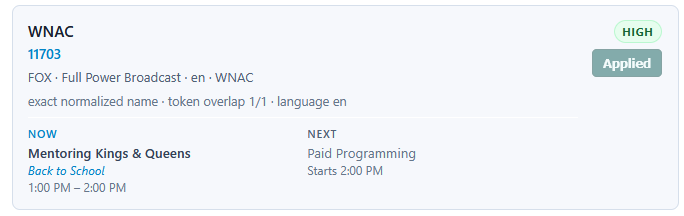
...
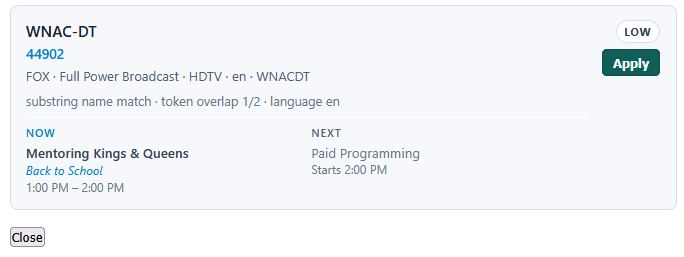
Confirmed!
As an aside, for this and pretty much any of these TVE stations, I've got more things you can use to get default Gracenote IDs. This is the default "all" station list for HENA:
Seen here is the tvc_guide_stationid that should be able to help make matches, except for local affiliates that need more info. I might be doing a flat spreadsheet version in the near future for some capabilities I'm adding to PLM, but this is ready now.
Per my previous notes, you should probably exclude the Subchannel_1/2 versions of Create, World, NHK World, and FNX because they are the exact same feeds as the national one. In these local markets on OTA they are sometimes cutting in other programs, but that is not reflected on what is transmitted on the web. The other locals that are unique are fine, though.
Am I going to have to remove my source to get this to work? Because it didn't auto-populate my existing Cox.
Agree.
I think I’m lost here. What do you guys want to see for these recordings? I’m trying to do my best for CDVR recordings.
Edit- at some point, i’m gonna have to pick something and stick with it so your record recordings stick. If I keep changing, CDVR gonna always be confused.
1 Like
For both SeriesID and ProgramID would like to see the fast provider name as the prefix instead of fastchannels/.
Example;
pluto/6a6a558f8a82c01510251277 instead of fastchannels/6a6a558f8a82c01510251277
Is that doable?
1 Like
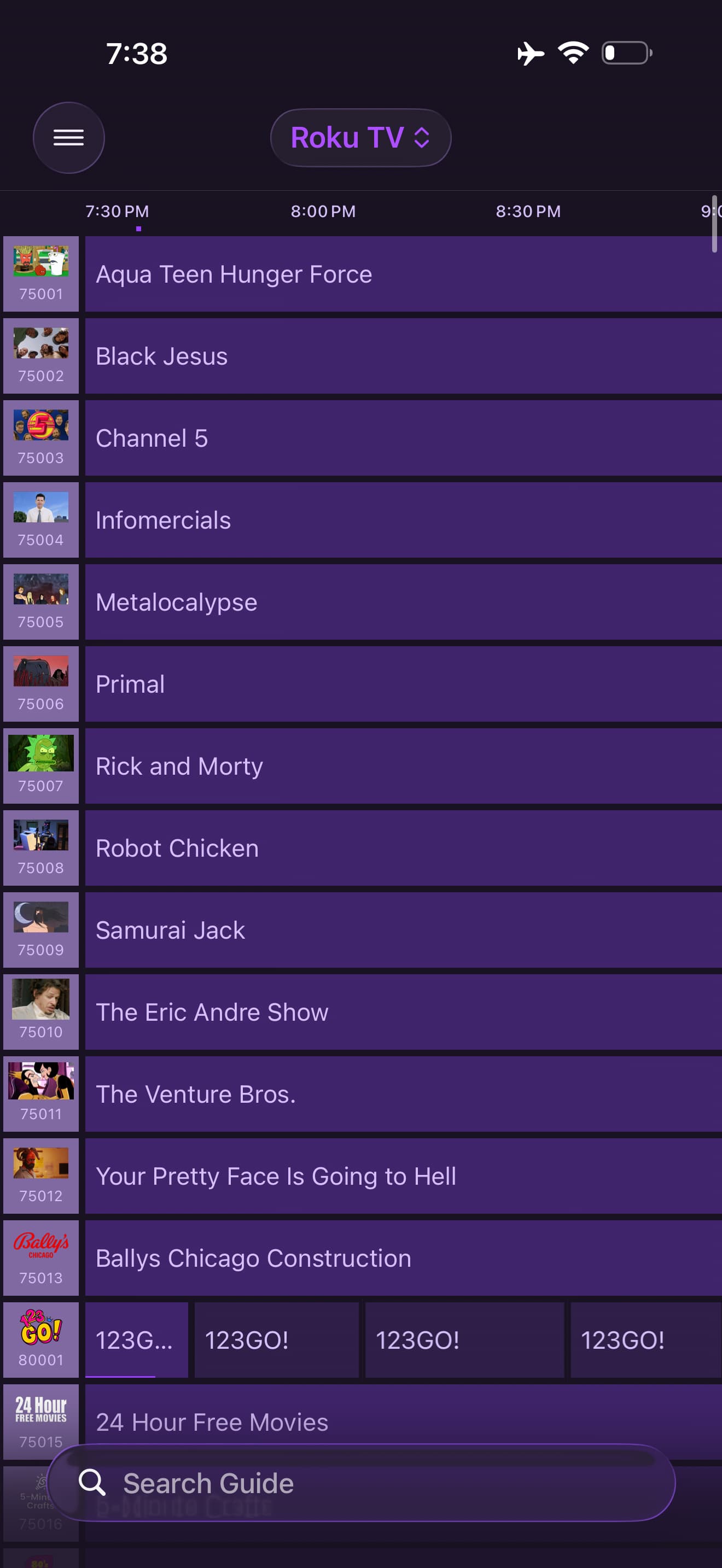
Yes, but very short timeline.
Set the source to refresh every 60 minutes.
And set Channels DVR to refresh the XMLTV every 60 minutes.
These are my FastChannel Source refresh times (Interval)
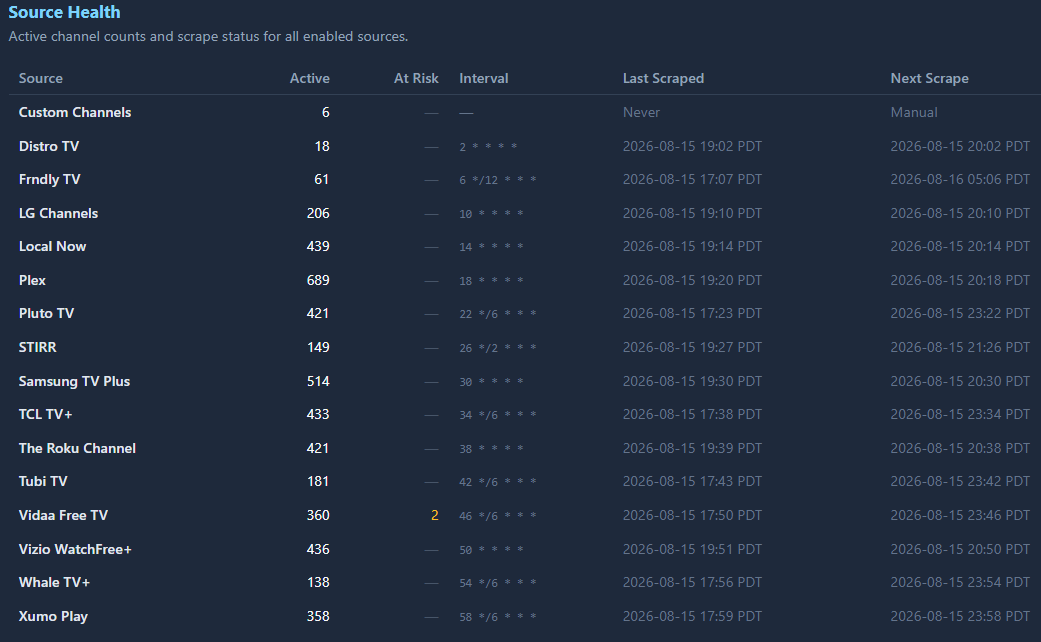
I have all my Channels DVR XMLTV sources set to refresh every hour.
Do you have the non grace note one?
1 Like
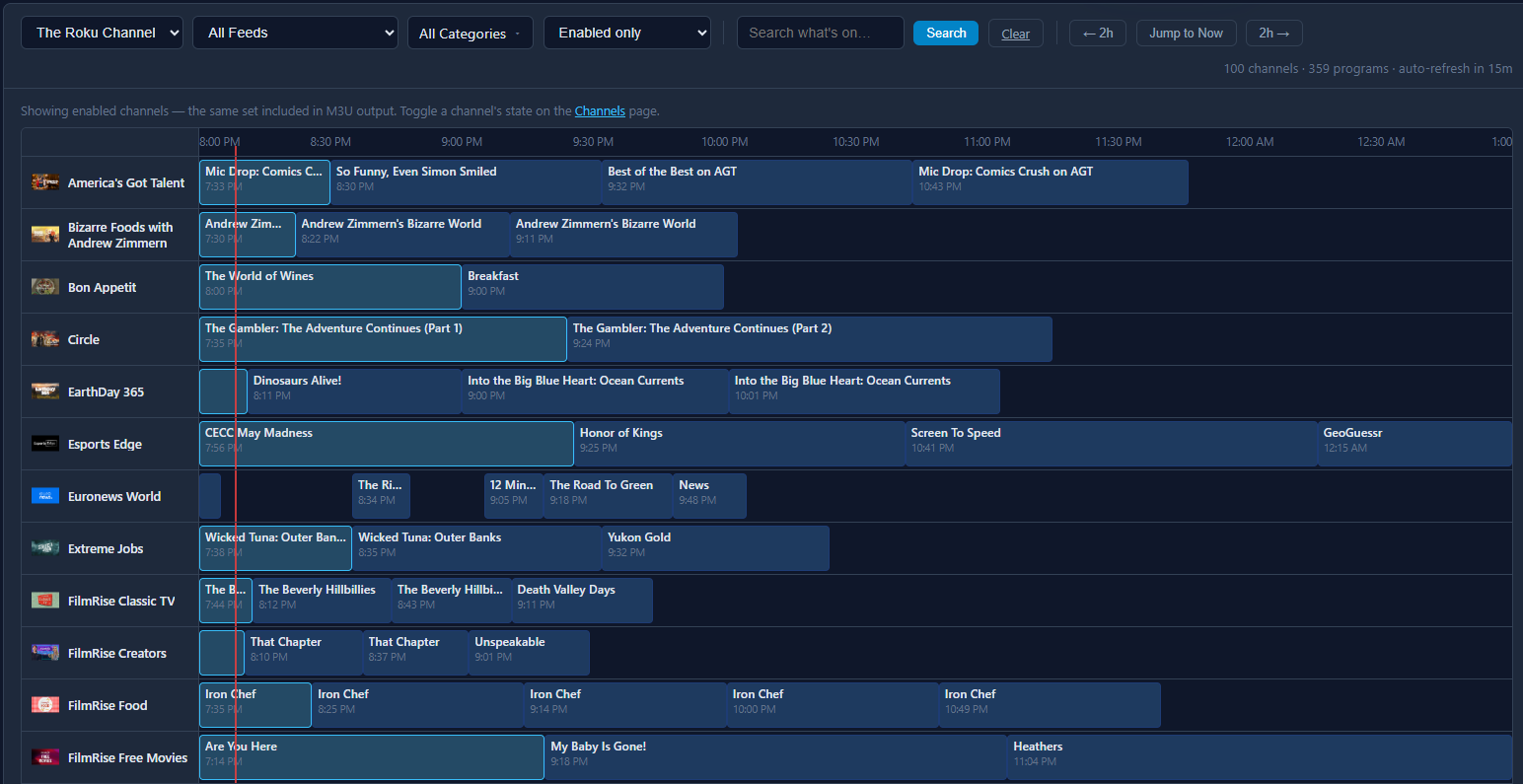
I have the non-gracenote Roku disabled in Channels DVR. Not enough guide data.
Here is the Roku scraped guide view from FastChannels.
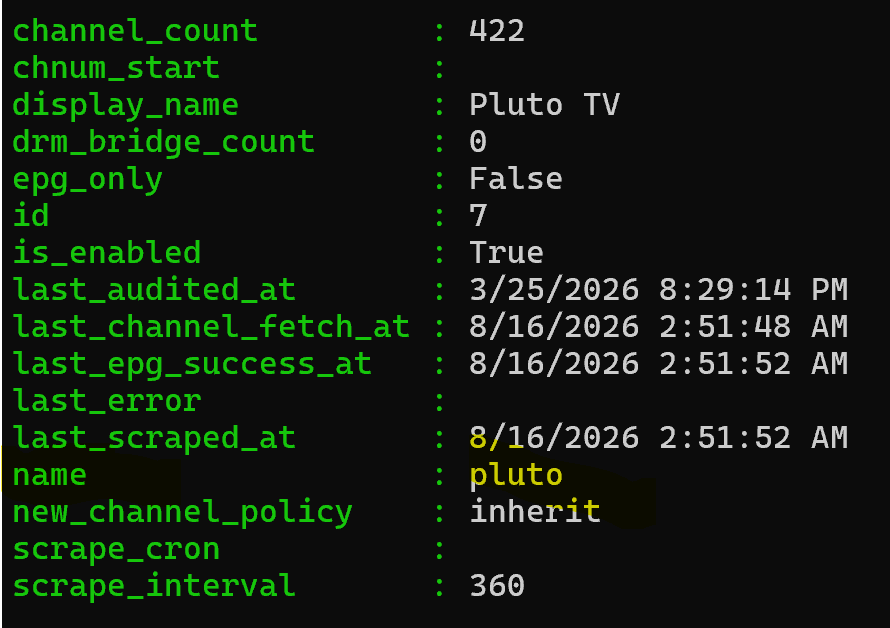
Specifically, it seems like the "name" property of the corresponding FC source object would be a good candidate to use as the prefix.
1 Like
Where does that view come from?
PowerShell. Invoke-RestMethod. The path part of the URI is "api/sources".