FastChannels - FAST Channels aggregator/manager

intersting wrinkle here... i think their commercials are clear-hls and main program are DRM. not sure how i'm going to handle this one.

so lets say u stream audit during a commerical break, you'll get wildly different outcome than if it was during the DRM time.

1 Like

?
TBS, TNT and TruTV work with Channels DVR TVE.

i'm saying some channels turn on DRM during the "main event" of a channel, but the commericals on that channel are NOT drm (just clear hls).

The player decoding just needs to be able to transition between DRM and non-drm content. Sounds challenging but being that the ads are targeted, that would be a challenge.
Not good.

luckily, it does it already.. my early experiment with Kodi failed hard on that.

my point about DRM vs non-DRM is during Stream Audit. if Stream Audit samples a channel during an ad-break, and ad-break is non-DRM, it could flag the channel improperly. i think i have an idea thou :slight_smile:

to be clear-- I don't officially support ADBTuner. I've never used it. There's some good ideas in here, but at this time focusing efforts on AH4C integration.

3 Likes

Just saw the feature requests on the repo and to be clear on my end, I was mostly making requests to @turtletank for things that I'd like to see ADBTuner do with its FastChannels integration, except where I specifically pinged you, in which case those were truly FC requests. Basically, those were:

  • Replicate what you are doing around ah4c with ADBTuner to get the base multiple streaming sticks
  • Host the single configuration file needed to use FCP with ADBTuner's Passthrough stations and push to ABDTuner (or push to have ADBTuner auto-pull, which it can already do)
  • Have a push to ADBTuner button for an appropriate feed

Everything else was either for ADBTuner to do, or is already being done by ADBTuner and/or PLM. No need to add any of that to your plate!

1 Like

How do you install this easily, all this is a bragging on what it may do, I dont see any instructions

See post #1 in this thread, under "Instructions - Docker"

2 Likes

What is Docker?

" Docker

If you're new to Docker, don't worry—it's easier than it looks. There are plenty of guides online, and your favorite chatbot can walk you through it.

No environment variables are required.

docker run -d \
  --name fastchannels \
  --restart unless-stopped \
  -p 5523:5523 \
  -v fastchannels_data:/data \
  ghcr.io/kineticman/fastchannels:latest
```"   


this tells me nothing

Docker is a commonly used method for open source projects to be made available, where the entire project can be delivered (including a lightweight Operating System) in a "container". This makes it much easier for enthusiast developers to offer projects they've created without requiring the coding and testing needed for the wide variety of Operating Systems (and versions) that different people use.

There are plenty of tutorials online describing Docker, and how it's used. If you'd like to take advantage of the many excellent Channels DVR extensions that are available, you likely need to have at least a working knowledge of Docker.

This is a community forum by the way, of users helping users with Channels DVR and related projects.

1 Like

well, its not very helpful

@KineticMan,

Using the single encoder mode, I noticed this behavior during some testing.

What's fine. When I'm watching a channel on one device and I go to another device, I can watch the same channel just fine. But if I change the channel on the 2nd device, it changes the channel on the 1st device.

My question is, is there a way to honor the first device as the priority or is this just the way it works with a single device (a firestick, in my case)?

You need to use ah4c in this scenario, that's how multiple virtual tuners are managed.

Thanks! I'll test this after the games are over today...

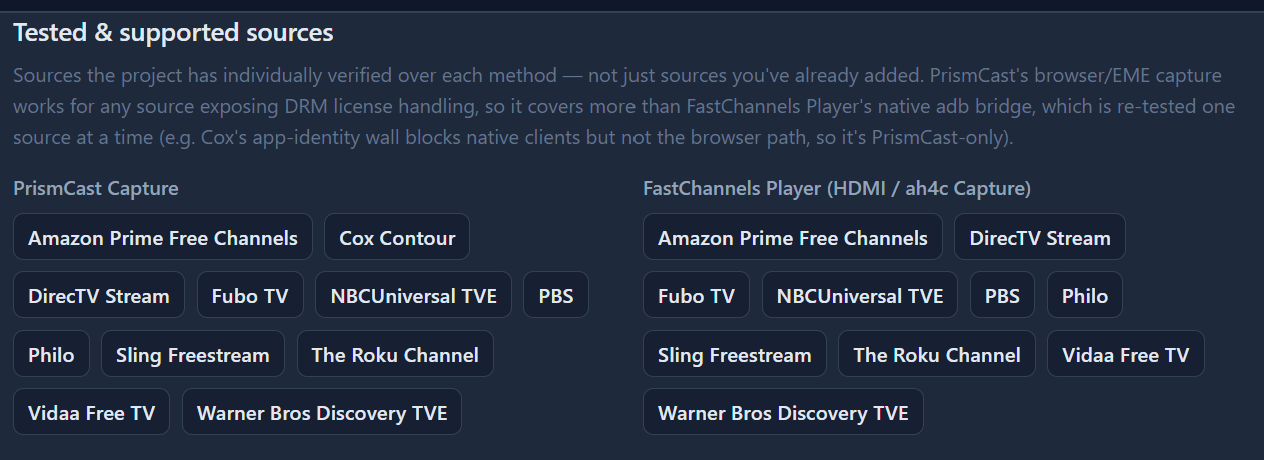
Is the Philo source only compatible if you use something like Prismacast?

here's todays support... getting real close on a xfinity/comcast support for the hdmi bridge :wink:

2 Likes

I've found Docker difficult to wrap my brain around as well - even for someone who had used and done light coding for 40+ years using CP/M, MSDOS, and now Windows - but have made some progress thanks to folks here and to my new best AI friend. I now have successfully installed & continue to use 2 containers: Fast Channels, and PBS VLC Bridge.

My first hurdle was just getting Docker set up on my Windows 11 machine in the first place, as there were a good many prerequisites I needed to install and configure first - few of which were straightforward. After numerous failures and backtracking (for example, how to enable WSL, which virtualizations to enable, which version of Linux should you set up on WSL - and does it matter?) I finally ended up turning to AI for help and eventually got it done, but not without much gnashing of teeth.

After that, I had to try to sort through the various ways of installing various Docker containers. Very few of the online tutorials I've found are very useful for people just trying to use containers developed by others; they seem oriented toward helping developers containerizing their creations. The installation methods I've heard about have been:

"Docker Run"
That has been the easiest to set up (once I had Docker itself working) because all I had to do was enter a supplied command. It did get more complicated when I needed to update a Docker container, because that involved several not-so-obvious steps. Fortunately, someone here had posted the list of commands that would do the job, and I have saved them in a batch file that I can run as needed.

"Docker Compose"
The instructions I've seen for these don't generally tell the whole story, and I've yet to manage to implement anything using it. Apparently you need to set up some files & folders -but instructions are not always complete on what and where. The actual command to run once you have those files & folders set up is usually just one line, but getting things set up to run that one line can be difficult. It appears that once you have something properly set up via Docker Compose, updating it is easier than if you set it up with Docker Run, but I have no idea if it's practical to try to convert from Run to Compose once everything's been set up.

"Portainer"
Many have described this as the easiest way to go, so I actually tried that first - then regretted it and doubt that I will ever use it again. I carefully followed the Portainer installation instructions, which included setting a password, which I recorded. Then I installed a container. The problem arose when I wanted to update the container, but I couldn't get into Portainer to do so. It rejected the password I had carefully recorded. In the end, I wiped out both Portainer and things I'd installed it with, and started over. I had a lot of trouble recovering my settings, even though I'd made backups, having switched from Portainer to Run.

It would be great to find a tutorial on how to set up Docker for those of us who just want to use the various containers that are on offer, but have yet to find anything that takes one from zero to 60 - they all seem to start around 50.

And it depends on what you're installing Docker on to run it.
For me on my Synology NAS, I just install their Docker package "Container Manager".
I started out using docker run, but am now using Portainer stacks (compose) to install and manage containers.

I learned docker the hard way (trial & error) Channels DVR on docker

1 Like

I worked a lot with NT back in the day...then of course DOS, Windows and a bit of C+. After retirement, I installed a NAS (QNAP) and repurposed an old WIN 11 PC with Linux. I used ChatGPT and Google AI to ask question when I had problems. I run Portainer on Linux and Channels and Prismcast on a Win 11 cheap box from Amazon. I have managed to get ABDTuner, AH4C, FastChannels, Plex, EplusTV all going in Portainer. I also run Home Assistant on the same Linux box in Portainer. The key is to go slow and ask questions both on this forum and AI. Make backups before changes and take it one step at a time. I was never a true IT professional but did work in broadcast technology. I would encourage you to keep trying. You will find your way.