
@KineticMan Re-classification request...
Dinos 24/7 is currently classified as Kids... sorry but it's a bit too scary for some of the younger kids...
Request it be re-classified or moved to the "Nature" Category.

U know you can override yourself, right? Just click on the category in admin/channels.
Override it
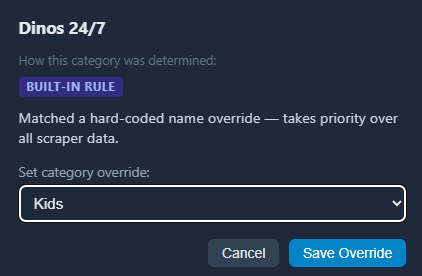
@KineticMan @chDVRuser OK, got it now... at first I was like huh? where?
but I see it now...
Thanks.
Thanks! Love this one.
Still catching up with your changes...
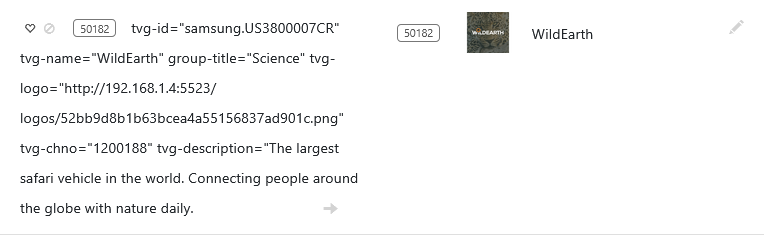
Dirty descriptions!
They need sanitized.
Some have embedded line feed characters in them.

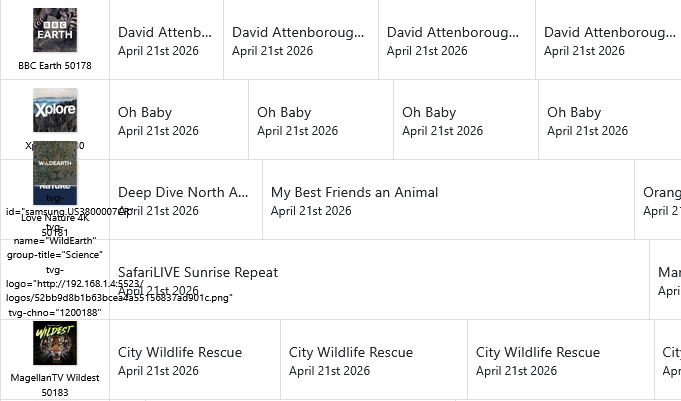


I was notified by @mjitkop Channel Lineup Changes
Notification
2026-04-20 11:05:22
Channels DVR server URL: http://192.168.1.4:8489
Channels DVR version: 2026.04.12.0247
------------------------------
PlexTV-Gracenote: 141 channels (=)
<--- Lineup changes (starting at 10001) --->
! 10052 : stunning and captivating tales - from ancient Egypt to (was History Hit)
<--- Channel changes --->
- History Hit (10052)
+ stunning and captivating tales - from ancient Egypt to (10052)
------------------------------
SamsungTVPlus: 205 channels (=)
(http://192.168.1.4:5523/feeds/samsungtvplus-all/m3u)
<--- Lineup changes (starting at 50002) --->
! 50182 : tvg-id="samsung.US3800007CR" tvg-name="WildEarth" group-title="Science" tvg-logo="http://192.168.1.4:5523/logos/52bb9d8b1b63bcea4a55156837ad901c.png" tvg-chno="1200188" tvg-description="The largest safari vehicle in the world. Connecting people around the globe with nature daily. (was WildEarth)
<--- Channel changes --->
- WildEarth (50182)
+ tvg-id="samsung.US3800007CR" tvg-name="WildEarth" group-title="Science" tvg-logo="http://192.168.1.4:5523/logos/52bb9d8b1b63bcea4a55156837ad901c.png" tvg-chno="1200188" tvg-description="The largest safari vehicle in the world. Connecting people around the globe with nature daily. (50182)
****************************************************
2026-04-20 23:05:23
Channels DVR server URL: http://192.168.1.4:8489
Channels DVR version: 2026.04.21.0418
------------------------------
SamsungTVPlus: 205 channels (=)
(http://192.168.1.4:5523/feeds/samsungtvplus-all/m3u)
<--- Lineup changes (starting at 50002) --->
! 50182 : tvg-id="samsung.US3800007CR" tvg-name="WildEarth" group-title="Science" tvg-logo="http://192.168.1.4:5523/logos/52bb9d8b1b63bcea4a55156837ad901c.png" tvg-chno="1200188" tvg-description="The largest safari vehicle in the world. Connecting people around the globe with nature daily. (was tvg-id)
<--- Channel changes --->
- tvg-id (50182)
+ tvg-id="samsung.US3800007CR" tvg-name="WildEarth" group-title="Science" tvg-logo="http://192.168.1.4:5523/logos/52bb9d8b1b63bcea4a55156837ad901c.png" tvg-chno="1200188" tvg-description="The largest safari vehicle in the world. Connecting people around the globe with nature daily. (50182)
****************************************************
I just wanted to post a congratulations on this project. It is awesome to be able to replace a bunch of containers with a single one. I am in the process of moving away from the other ones to this, and it is simply very well done and intuitive to configure and use.
4 Likes
you're a hard person to please you know that right 
1 Like
It's all my fault. I asked for channel descriptions!
Simply Awesome!
1 Like
@KineticMan Request: Let's say I'm on the admin/Channels tab.
Currently, based on how the sources are set up, I have 8 of the "BBC Earth" channels listed.
I click the preview icon for one of them and can watch it.
Once I close the Preview window, I return to the list of all the Channels.
Is there a way to highlight or make a color change to the channel previously selected for preview?
This way, if I look away or get distracted, when I look back at the screen, I can see the last channel I previewed...
1 Like
Well. I thought it was going to work, but alas it didn't. I started with Pluto and culled it to 25 channels and pressed add to Channels DVR (I have two Mac Minis and I am pretty sure I have the IP addresses correct as I am running Docker on one and Channels on the other).
I got all the Pluto channels I chose and when I went to play them, I got the correct picture icon and when I clicked WATCH it thought a second and then I get a server or network failure.
I'm going to try with Plex and Pluto next
I am not sure why, but everything works now......wonderful work done here.
I get the request, but I think that would have some negative side-effects. One thing you could consider if your that forgetful (like @chDVRuser) is click the check-mark on left side of channel before you do any auditing. It should stay clicked while you do audits, etc.
1 Like
New version out 3.3.0
- New: TCL TV+ scraper (428 channels - mostly repeats, but solid EPG coverage and good quality)
- New: Vidaa Free TV scraper (192 channels)
Bug fixes and improvements:
- Improved scrape/status UI with logo prewarm progress, per-source refresh polling, and a redesigned Sources page.
- Fixed xml-refresh zombie job issues that could block artifact builds or post-scrape refreshes.
- Fixed Xumo EPG gaps around the midnight-to-6am UTC window, and improved Xumo art work
- Fixed Pluto EPG art selection and improved movie title/date cleanup.
- Fixed several Stirr EPG issues, including null crashes and XML/date formatting problems.
- Sanitized EPG/channel/program text to remove mojibake, control characters, and embedded newlines.
3 Likes
OK, what did I forget to remind you about this time? 
Is the update auto or do I have to reinstall?
You'll have to upgrade yourself. Best practices are in a message above, but I personally like Portainer (if you installed via a stack).
Command line is pretty easy too! From your FastChannels directory, copy/paste this:
docker compose pull && docker compose up -d
You could use dockwatch or watchtower to update. I started using dockwatch recently due to the cool UI it has and I can get notifications about an update of an app instead of me auto updating it
Just a quick thank you, @KineticMan. This is fantastic and really well designed. The UI is intuitive and powerful, and the provided instructions are clear. Great job!