
@KineticMan This is a low priority request, but have you looked into accessing 1080p streams from the CNN TVE source? Even though the Android apps and TVE web player in Chrome max out at 720p, I've noticed that loading the TVE site from Safari on macOS gives "avc-sdr-1080p-60fps-10000kbps" segments and looks noticeably better.
Thank you for the quick summary, it helps me understand the traffic and for the most part aligns with my assumptions on what to split and not to split. Am I to assume if I add the ah4c or HDMI capture that could run on the same machine with the ChannelsDVR & FastChannels stack?
Again thank you for all your effort on this, it is great having a project like this that works so intuitively.
Thanks for this, today I use Portainer to manage my Linux stack but I certainly will take a look at this.
Also take a look at Tugtainer as it allows you to do selective automatic updates. It's very simple to use and setup yet lacks the visibility that Dockhand provides.
1 Like
Portainer with Watchtower is really all you need. Keep it simple. You can install any Channels-related extensions using Project One-Click (included in OliveTin-for-Channels), or use the Docker Composes published here in Portainer-Stacks:
1 Like
Sorry for the multiple posts in succession, but reading this also reminded me that CNN TVE has been funky for me with FC Player. Particularly coming back from ad breaks, I have not gotten more than 30 straight minutes of playback consistently without FC Player eventually crashing from CNN. I don't see anything in the logs to send, but in the Bridge dashboard after a crash I see "Recovery: 20 in the last hour · last: gave up 8 min ago"
took a quick peek-- It looks like its a Fairplay (Apple DRM) vs WideVine (Chrome/Android/FC) deal. It looks like they allow higher 1080p60 on FairPlay vs Widevine (720p60). Out of my control unfortunately.
2 Likes
for sure - that's how i run it. FC really is pretty lightweight - think of it (for the most part) as just a centralized DB of fresh stream links. CDVR does most of the heavy lifting - FC just points it in the right direction.
Used instructions for "FastChannels from Windows 11 without Docker Desktop" and it worked great. Only issue is with the Channels DVR Server URL - cannot connect with the normal IP address:8089. Also tried the http://172.17.0.1:8089. Any ideas?
Thanks
Interestingly, one of the major reasons to use Docker Desktop has always been for the mapping of container ports to the host, and access to the host's subnet. One would expect that Microsoft has accounted for those issues, but then again they don't support Docker Compose yet, or have a compatible API.
Did you happen to follow the whole document? Sorry it’s new to me too!
1 Like
I had the same issue, but you will need to open Channels DVR, go to the General tab and you will now notice that it is advertising on 2 networks. Use the 172.x.x.x network that it listed on your server...not what is listed in FastChannels help info.
@KineticMan, you may want to re-word that help info...
Yes, I did follow the complete instructions and everything went well. Oingofan, I checked my Channels DVR, as you indicated, but its only showing advertising on one network - that of the Channels DVR. The DVR and Fastchannels are both running on the same Windows box.
The firewall rule that was added, is in place and wslc ps shows 0.0.0.0:5523->5523/tcp.
I have FastChannels running in docker and working with Channels. One thing that I'm having issues with is cover images for the recordings coming from FastChannels are broken (see screenshot with FastChannels items under Recently Added Movies). I'm not sure if I overlooked a config setting or what might be going on. Has anyone run into this or have an suggestions?

Interesting...mine has two:
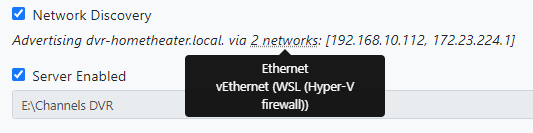
One note for me is that I did install the Docker Desktop method along with WSL with Ubuntu...and then I saw the method to avoid that, so I completely uninstalled it and then installed with the WSL method only from powershell.
OK. I see. Mine was a fresh install with WSL via powershell, but I am only seeing the local 192. network.
1 Like
Curious...does your machine have the Virtual Machine Platform and Windows Subsystem for Linux enabled?
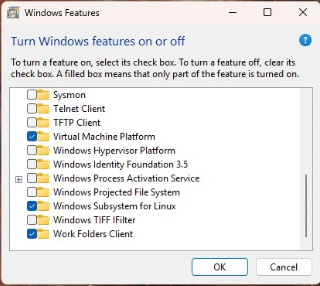
I am showing the Virtual Machine but not the subsystem.
Strange...you would think that the powershell (with admin) command: wsl --install --no-distribution
would install that subsystem. By the way, did you restart Windows AFTER that command? If not, you'll need to do it.
Yes, I did restart after running the command. I followed the instructions step by step. I do have a Linux Virtual drive showing under Networks.