
I've got scheduled scripts running and passes which include or exclude channels, so it will take me some time to replace my existing sources with FastChannels.
Exact same situation for me - Sorry @KineticMan on that
I reverted to 2.0.0 and my issues resolved
And to mirror what others are saying - this is just on a test server for me - not replacing my parents and mother in law server yet 
im reverting any name-based Gracenote coverage ... fix coming shortly.
i'll just allow users to select their own (outside the community sourced ones)
5 Likes
I've started dismantling and juggling my own collection of containers, and I'm getting acclimated to FastChannels. It's great, makes management of this content SO much easier. Thank you, @KineticMan!
One feature idea that would also make integration more functional and flexible, would be for its output to be exposed as a virtual HDHomeRun tuner, like other containers such as hdhriptv and Dispatcharr can. Thanks for the consideration and all the work you've put into this great software so far.
So. Yea. Loaded up most of the channels for my Mothers server.
And, some GN auto matches for Pluto channels just load up as "Channel Name Programing" with no actual show data.
That generic place holder like thing per hour.
Like Pluto TV Drama, More TV Drama
Either use the default scraped XMLTV data, or find the correct GN ID to key in for a channel.
At least you can enter a GN ID for a channel if you know it's correct.
Yea. I know. But one thing she does complain about, is that there is only like 6hrs of guide data. Unlike the TVE channels that are days.
So, if i can use GN for some channels, would like to.
However, there is alot more channels to go through on her dvr, than mine.
Will turn off the ones that are obvious bad, or have very lacking data...but the ones that do have valid data, not sure of it match the exact episode that is airing without having to watch each one for a while....might just let her do that. lol
EDIT: And, thanks to FAST de-dup. And being able to compare sources alot more, was able to slash things down to around 80 channels total, vs 106.
FastChannels 2.2.1 Update
Gracenote Auto-Matching — Important Change
Automatic cross-source Gracenote name matching has been reverted due to widespread guide mismatches.
- Scraper no longer auto-assigns IDs by channel name similarity
- On upgrade: community CSV IDs cleared; name-matched channels set to gracenote_mode=off
- Manually assigned IDs are untouched
New toggle in Settings: Gracenote Guide Data
- ON — scrapers auto-fill Gracenote IDs (default for existing installs)
- OFF — no automatic assignment; manual IDs preserved
- Turning OFF prompts: "Clear & Disable" (wipes all auto IDs) or "Disable Only" (stops new writes, keeps existing)
Stream Audit
- Stream Audit now opens a report modal showing dead / DRM / rate-limited channels
- Checks all channels, not just active/enabled ones
- "Recheck Rate-limited" button retests only 403/429 channels without a full re-run
- Inline re-enable button for dead channels
Bug Fixes
- KEYFORMAT=identity no longer falsely flagged as DRM
- gracenote_mode=off channels no longer routed to Gracenote feed even with a stored ID
- Gracenote popup shows ID source: native, manual, or community
- Poster proxy URLs are now hash-based — fixes Roku and strict XML parser compatibility
4 Likes
FYI on Gracenote-- I've disabled ALL community sourced Gracenote IDs for now (assuming you cleared them with new setting). If you re-enable it, it'll only use the Gracenote IDs found during scrapers (which is very limited but was the default before so safe to use).
I do want to add back at some point (with user approval setting/suggestions), and some sort of cloud based list.
3 Likes
Thanks for the Update!
I can now see which channels fail an audit
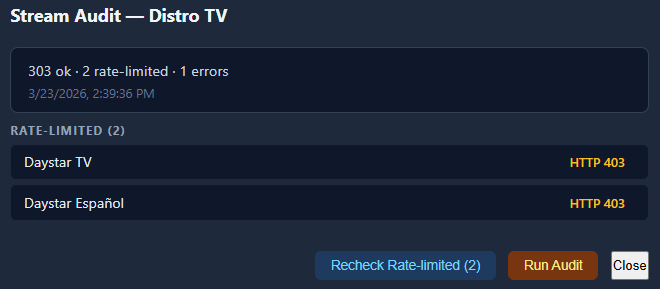
Doing a Recheck fails and so does an Inspect. Guess I'll make sure to disable them.
1 Like
Glad you like that. It limits itself from 403 errors (hitting their API too fast and self heals when that happens). It should auto disable those channels (marks ‘em dead).
I do have one more bug I wanna fix this week- I saw a scrape job freeze and the timeout was way too long. Easy fix at least.
It didn't
2026-03-23 14:37:46,637 INFO     app.worker: [audit] distro: 275/306 — checked=274 flagged=0 dead=0 errors=1 skipped_403=0
2026-03-23 14:37:50,265 WARNING  app.worker: [audit] distro rate-limited (403), backing off 30s…
2026-03-23 14:38:20,748 INFO     app.worker: [audit] Daystar TV still rate-limited (403) after backoff, skipping
2026-03-23 14:38:21,397 WARNING  app.worker: [audit] distro rate-limited (403), backing off 35s…
2026-03-23 14:38:56,675 INFO     app.worker: [audit] Daystar Español still rate-limited (403) after backoff, skipping
2026-03-23 14:39:30,877 INFO     app.worker: [audit] distro: 300/306 — checked=297 flagged=0 dead=0 errors=1 skipped_403=2
2026-03-23 14:39:36,693 INFO     app.worker: [audit] distro: done — total=306 checked=303 flagged=0 dead=0 errors=1 skipped_403=2
2026-03-23 14:48:48,772 INFO     app.routes.tasks: Enqueued stream audit recheck for distro (2 channels)
2026-03-23 14:48:48,785 INFO     app.worker: [audit-recheck] distro: starting recheck of 2 channel(s): [339, 340]
2026-03-23 14:49:51,273 INFO     app.worker: [audit-recheck] distro: done — rechecked=2 still_limited=2
Maybe those two aren't related to rate limit.
I get a 403 doing an inspect on them.
Anyways those channels stream on their website
https://www.distro.tv/live/daystar-tv/
https://www.distro.tv/live/daystar-espanol/
I just disabled them in FastChannels
Well I said it Should. Not that it would. 
Will check into it.
1 Like
This can go into its own thread or whatever data store someone wants to keep to try and confirm Gracenote IDs. But its relevant here, and I mainly got started with messing with GN id's thanks to FAST.
I mainly just used a few from jgomez docker data, the others, were channels that were auto matched by FAST in previous version.
These are just the channels i bothered with, wanted enabled and/or was part of my filtering process to setup feeds for my 2 CDVRs. Probably some more i dealt with in passing, but these the once i noted down.
Might be useful for someone here to know...
Note that, far as i have observed, most fast channels by the same name are the same feed across the various services, aside from different region version (CA, UK, etc) 99% of the time are different feed.
But, some channels even by the same name or very similar, are different feed, thus would have a different GN id depending on what source service you use.
Always check and verify guide data as you set a GN id on a channel.
Reload the m3u in CDVR and refresh Guide data is needed to show new data if you change the ID in FAST.
PLUTO
(local, which i think pulls us_east for me)
BAD GN data (not correct auto match)
MovieSphere by Lionsgate(local) 158131
Crime Up Close (CA) 169718
Crime & Justice (CA) 134160
The Outer limits (CA) 201212 (correct 139721)
Best of Dr. Phil (local) 141783/161356
Baywatch(local) none suggested accurate
Appear accurate
Crime Up Close(CA) 169718
HauntTV (CA) 133937
Little House On the Prairie (Local) 138449
Murder She Wrote (local) 138397
Law & Order (local) 189561
Doctor Who Classic (local) 120086
The First 48 by A&E (local) 181303
48 Hours (local) 160400
A&E Crime 360 (local) 155091
Storage Wars by A&E (local) 172207
ION (local) 122912
Lifetime Movie Favorites (local) 121308
The Judge Judy Channel (local) 201079
60 Minutes (local) 161735
Real Disaster Channel (local) 134159
Mythbusters (local) 180083
Homeful (local) 128544
Plex
Ice Road Truckers 123426
MythBusters 180083
Top Gear 126329
BBC Earth 151422 / 135387 seem same info
Other
Ghost Hunters LG 137994
My Little Pony Plex/Xumo 173954
1 Like
I have some GN ID's that I discovered. Any way to get them in your gist listing?
One of them I discovered because my pass for the Pilot episode of Dragnet found it using the test m3u I was using to match GN ID's. The other ones I've been using for recording some shows from Plex and Samsung channels.
Name      GNID   tvg-name Sources
INFAST    129479 INFAUS   Samsung
INWONDER  129477 INWONUS  Plex,Samsung
JLTV       60165 JLTV     Distro
I can’t hide anything from you - you’re sneaky.
Yea that’s the cloud idea (thanks @babsonnexus). Working on back-end first, then a way to keep that updated somehow with everyone suggestions.
2 Likes
It did for Samsung WeatherNation that got a 404.
app.worker: [audit] dead stream: WeatherNation (HTTP 404)
Not sure if I missed something in this thread but my channel list (currently only plex is enabled) has a mix of Auto and Off for gracenote IDs, even though I've never manually adjusted these. Shouldn't these all be Auto by default, and is there a way to change it en masse?

I said I wouldn't bring it up again but I now have guide information for BYUtv (Samsung TV).
Turn off GN ID for BYUtv and the guide information is correct.
There's only 5-6 hours of EPG but it is correct. Video is HD.
Unlike cable/sat BYUtv feeds, the Samsung feed has periodic ads.
I had to do a batch update to disable my erroneous name match - I'll think through how to fix that in next version.
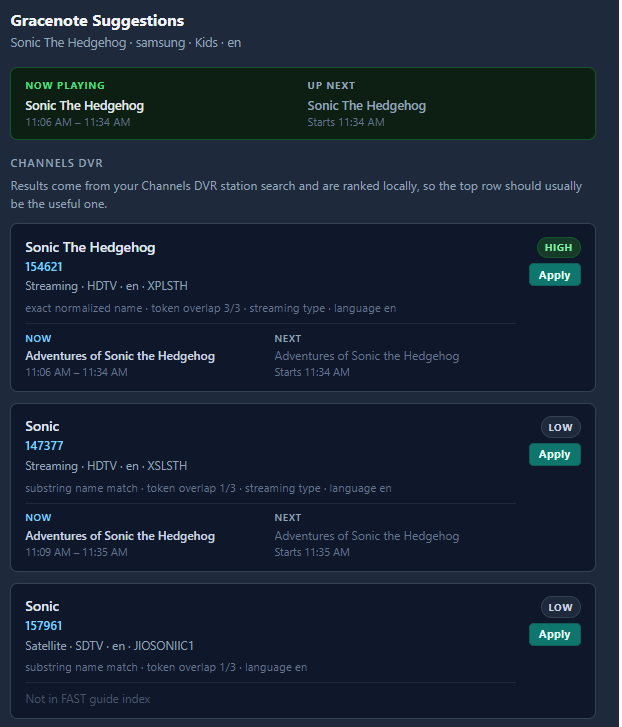
I think you guys will like my next update anyway. I found a site that we can reverse lookup Gracenote (not 100% but good data). So instead of just guessing what Gracenote station has on, you can self-audit even better.
As example: looking at channel "Sonic the Hedgehog" via Gracenote helper. The top line is what our built-in guide shows as now playing, then it looks up (via CDVR) a list of candidates for Gracenote. Then, the helper looks up (with the new API) what's playing on those Gracenote IDs. Then, you can use your human brain to decide if you want to use that new Gracenote ID.
4 Likes