Wonderful! Thank you again for doing this.
In the alphas and this beta, the installer places an extra "s" in the Start menu shortcut (FeralsHTPC.exe), but that is an easy manual fix for now.

Wonderful! Thank you again for doing this.
In the alphas and this beta, the installer places an extra "s" in the Start menu shortcut (FeralsHTPC.exe), but that is an easy manual fix for now.
Thank you. I had a typo in the installer. I will update the download in a few.
OK, I updated the 1.0.0 release with the fixed file. Thanks for the heads up. I did not change the version number but did update the download.
This might be bug. When I go to Live TV I see a scroll bar is initially rendered, but then the scroll bar goes away and is replaced by guide data. In the multiview UI, I am able to quickly move through the channels by dragging the scroll bar with the mouse. Did you intend to have a scroll bar in the live tv guide too?
I do have a feature request. I have two HDHR duel tuners. Would it be possible to deduplicate the channels? In the guide the channels from the two tuners are listed in pairs. In the multiview UI, all the channels for one tuner are listed, and then the channels are listed again for the second tuner. The same thing applies to TVE channels. I have DirecTV and Spectrum accounts set up with TVE.
Other than that, it looks great so far!
We are just ecstatic that someone was actually willing to take a swing at this!
I am going to add channel sorting in future releases. Right now it is a total work in progress. That was one of the things I really wanted to have sorted out, but I was chasing so many other things I just decided to mess with that when I actually decide on a proper way to implement channel sorting.
This beta version hides the Guide when playing a channel.
Was able to view and navigate the guide in the Alpha...i liked that.
Hope future option could include to show/hide that guide window while playing.
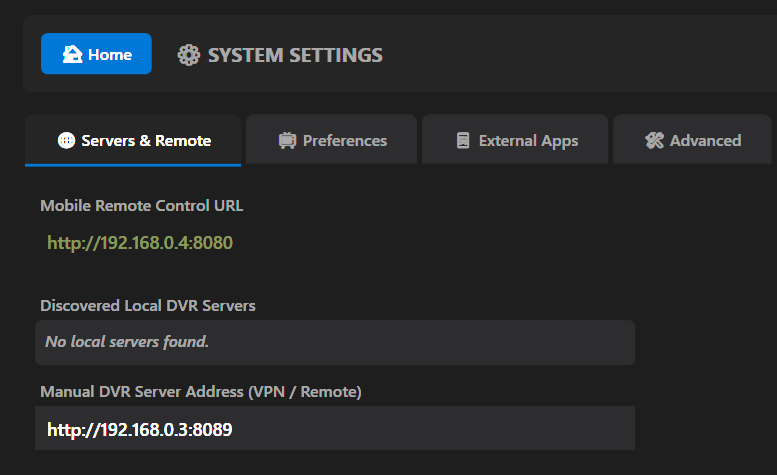
I still have to manually enter server IP address into the Live TV section every time i open the program as it says no servers found.
I do not have Network discovery enabled cause i have multiple servers on my network and had issues with that on clients.
I do have the ip address entered into the Manual Server Address box in settings, but that setting only seems to be for VPN/Remote servers?
Otherwise, works great so far.
You are saying when you enter the IP address manually in the settings and save it, it is not saving the server ip? As far as hiding the guide when the player opens, that will be an easy change to have as an option in the settings. It is literally hiding it.
It is saving it, in the settings page.
When i open the Live TV page it finds no servers and the dropdown menu has no ip in it.
I have to type in ip and click connect.
WOW!
This is great! Thank you.
Is this only keyboard and mouse for now? Or can you use a remote?
It comes with a remote app at your IP:12345. Some USB remote controls will also work.
I'll have both of those issues addressed in the next release. Thanks.
That was it. I forgot about my Microsoft remote. I first used my TV remote. Working great now with My MS remote.
Thank you.
You are a machine, Bobby. Time for a little vacation?
The scrollbars cause conflicts between the dpad controls and mouse controls. Instead of scrollbars, I will add nav buttons that will act as a page down on one click and as a auto scroll when held down. At least the is the plan.
RepeatButton controls on the Live TV Guide. Users can single-click to jump down the guide, or hold the button for rapid, continuous scrolling that perfectly respects D-pad navigation.I'm having an audio decode issue on at least one of my stations (FOX local.) Video is rock solid, so it doesn't appear to be reception related.
opening the stream directly in VLC doesnt seem to reproduce it.
Anything you need from me to look at it?
@blkpanthr Is the channel an ATSC-3 channel and what is the actual channel number? Go to Settings/Preferences and uncheck the Force AAC Audio Transcoding setting and save. See if that resolves the issue.
its not ATSC3 - all of m y ATSC3 channels are encrypted here so i cant view them.
its channel 25.1
Toggling the AAC passthrough had no effect; same issue.
Recording through Channels and playing back though Feral does not have it either. But that could be a result of channels post-processing.
If you would, go back to settings and enable debug logging under the Advanced tab. Tune the channel in again and exit the player. Open the feral debugging file on your desktop and paste the contents here. You will want to go back and disable debug logging after you are done as it will fill up fast. Thanks.