Horizontal separator missing before new day in Schedule

Description of issue: when viewing the DVR > Schedule page, there are no horizontal separators before a new day. It can easily be missed when scrolling. There are horizontal lines between programs but not before a new day.

I expected: some type of separator to clearly separate scheduled programs for a new day, probably something larger than the horizontal lines between programs.

What actually happened: no horizontal separator before a new day
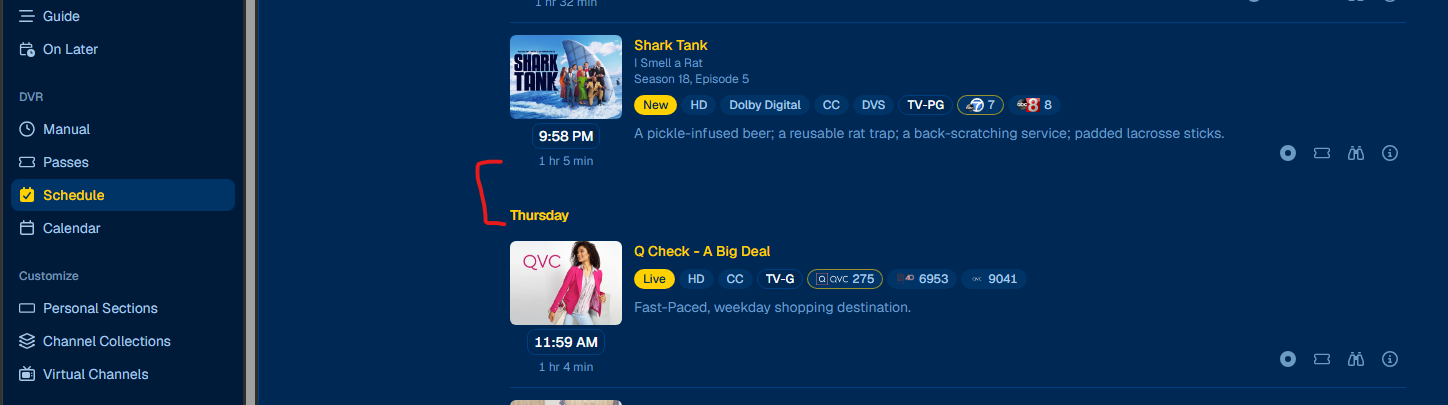
I think a slightly stronger separator would help, but maybe showing the date more prominently would be even better.

When you're scrolling through a long schedule, a line on its own is still pretty easy to miss.

I wonder if a small date heading between days would make things clearer without adding much visual clutter.

Nothing fancy really. Just enough to tell at a glance where one day ends and the next begins.

2 Likes

That's true. I was also thinking the same thing. :slightly_smiling_face:

This was resolved in the latest pre-release:

1 Like

I can see the difference with a bigger space before a new day. Thank you for the quick fix.