Latest server version incredibly broken!

I "upgraded" to the "latest pre-release" version as of this afternoon. Terrible mistake!

The underlying server functionality seems to behave like before, but the only web UI available is now the v2 interface, and that appears to be riddled with bugs. It seems impossible to get any page to updated or even display. Every click or tab open or whatever results in a blank page or a spinner with the page (maybe) eventually updating after ten minutes or so.
The reason I can't tell what version I have (or update to a , hopefully fixed, version) is that my attempt to open such a page is still giving me a blank page after an hour.
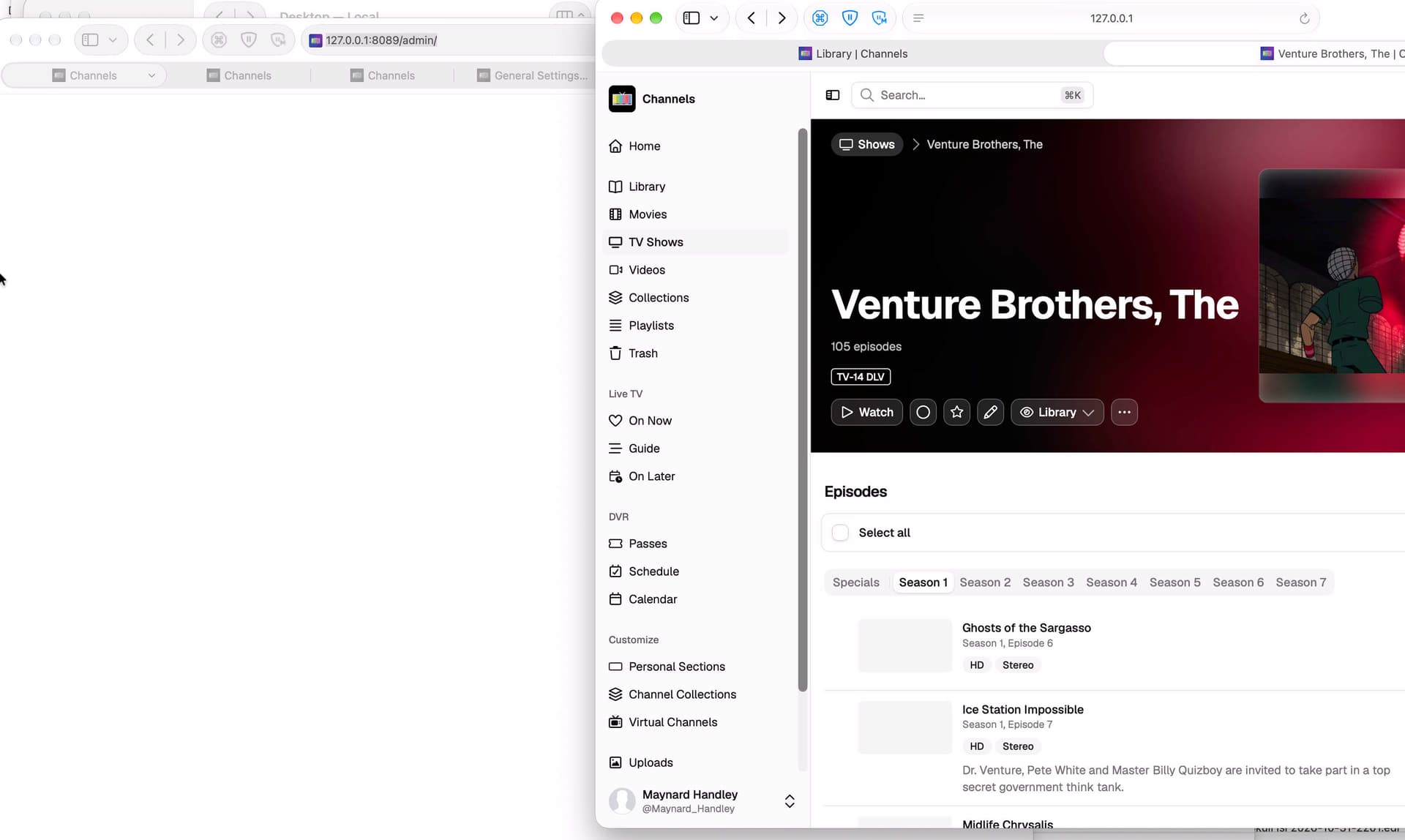
Here's what I have right now. Note how the main tab in the background is displaying nothing, and how the venture bros page, even after about four hours, still hasn't updated the per-episode posters.

This is not normal slowness. It feels like the webUI has some sort of giant lock that's constantly being held and, once every five minutes, it times out and one interaction manages to occur, then everything locks up again till the next time out.

I finally managed to get something that's usable (slow, but normal su-optimal webUI slow, not ususable slow) by closing every Safari window. Which seems to confirm that there's something broken in your locking.
FWIW my normal situation is to have some number (8 or so maybe?) Channels DVR Server tabs open because it's just easier to run things that way, to switch to each tab that's been setup for some purpose.
Right after upgrading to this version (2026.11.14.0337) I rebooted to install 27.2.1, and after that reboot things fell apart. I'm guessing something broken in having multiple tabs all simultaneously trying to update the Channels UI even as the server has not yet fully started up?

Might I suggest that, until the v2 UI is stable, you revert to the old UI as the default, with the v2 UI as a deliberately chosen choice?
1 Like

Thanks for the feedback!

It would be super helpful if you could formulate this more as a bug report. Something we could reproduce, and find where things are going wrong, so we could resolve it.

V2 has been in use by many people full time for over 6 weeks and this hasn't come up yet, so we'd love to try to reproduce it and figure out what's going on.

There's no plans to bring back the legacy web admin. The legacy web admin was available along side V2 during the last 6 weeks, but we're close to delivering it and they are not both going to be available together. You're currently using a pre-release, and that's what the pre-release is for, getting things hardened before they roll out to stable.

From what I can gather, with all your open windows, you are hitting a normal browser connection limit. The legacy web admin had the same exact limit.

V2 pauses connections when a tab is backgrounded, allowing for more than 6 or so tabs at a time. But with individual open windows, you'll hit that connection limit. The legacy web admin did not pause backgrounded tabs, so it actually performed worse here, limiting how many tabs could be open as well.

When you rebooted, Safari likely opened them all at once, so the last to load certainly hit and ran into the connection limit.

We'll look into what it would take to work around it, but while having more than 6 windows for the admin open at a time isn't wild, it's not quite common and the limitation has existed from our web admin for over a decade.

:+1: Yep. You're hitting the same limitations that the legacy web admin had.

No, I don't think so. Can you explain what you mean by this "normal browser connection limit. The legacy web admin had the same exact limit."?

After another day of experience, what I am seeing is that my experiences were not limited to just a failure at startup, some sort of server overload. When I open what I consider top be a reasonable number of windows into the server (different tabs in different windows) I hit a point where I encounter the same slowdown, everything just halts. Closing one tab reverts to the expected behavior.

Before we start arguing about who and what is at fault, or even trying to track down bugs, let's ask a more basic question (which feeds into my initial question about "normal browser connection limits").
Suppose I open some number (let's call it 8) of tabs into the channels DVR UI. What do you expect for this? Do you expect it to work but slightly slowly? Do you expect the channels UI to just freeze up in each page with no indication?
You talk as though this is usual behavior (and maybe it is if you use things like Google Docs?) but it is behavior unlike anything I have encountered in any other web app.
You say the v1 UI was worse in this respect, but I never saw this sort of UI lockup with the v1 UI.

Once I have an idea of what you consider to be expected behavior (and why) I can see if what I am seeing is within spec or not and can try to get you a decent bug report.

Most web pages and web apps don't maintain a connection with the server. This connection stays open to receive updates so the page can update in real time, vs refreshing or polling refreshes. Browsers limit the number of connections to a single host. This is what you're running into.

After looking into it, the legacy web admin actually disabled each connection when a tab was backgrounded on its own, then did a full refresh when the tab was visible again. So while multiple tabs would work, multiple windows would have hit this limitation as well.

We're deploying a new build now that uses a different kind of connection between your browser and the server that should manage your scenario much better. It should be up soon.

Try this version:

Curiosity killed the cat. :wink:

How about giving us users a choice between the new V2 and the legacy with the understanding that any issues or problems will not be fixed or addressed on the Legacy version.
I am perfectly fine with the Legacy version and I know how to navigate and it seems V2 is still having a few issues.
Please consider leaving this option open to us especially when a new Stable release is released include an option somewhere to opt for the Legacy web admin.
Thanks

my biggest issue is that when watching live tv or a recording, it looks so choppy, like 10 frames per second instead of the 30 (or is it 60) - in any case, i am at work, maybe a restart of my computer when i get home fixes everythintg, because i didnt change any settings, and i dont see any setting to change

my main HTPC has normal playback but my work laptop used to be spot on and is not so choppy as to be unusable

weird - I've been here with channels about 4.5 years

1 Like