Manual Recording Feature

this thread bump and explanation had me experimenting. I'd like to have a single 'show' for all the news. right now I'm doing 20min placeholders for reasons but may go to a more normal 30min. this way comskip can have little bite size chunks, and I'm hoping to have autoplay next episode. right now with the following the recording get grouped by hour ( MSNow @ #pm )
is the only way to assign the series id via curl?

#EXTINF:-1 channel-id="76530" tvg-id="76530" tvg-chno="76530" tvc-guide-placeholders="1200" tvc-guide-title="MS Now News" tvc-guide-description="MSNow News 20min" tvc-guide-art="https://tmsimg.fancybits.co/assets/GNLZZGG002H5PTL.png?w=360&h=270" tvc-guide-tags="ah4c, MSNow, Live" tvg-logo="https://tmsimg.fancybits.co/assets/GNLZZGG002H5PTL.png?w=360&h=270" tvg-name="MSNOW",MSNow
http://localhost:8089/devices/M3U-ah4c1DtvStream720/channels/356/stream.mpg?format=ts

I'd like to do something similar with local news, but trying it out with a single channel first.

There is no way to assign a SeriesID in an m3u since a SeriesID is associated with a show/series.
Using one hour placeholders on my channel 10706, the SeriesID is placeholder/channel/time
"SeriesID": "placeholder/10706/12AM"
"SeriesID": "placeholder/10706/1AM"
"SeriesID": "placeholder/10706/2AM"
"SeriesID": "placeholder/10706/3AM"
"SeriesID": "placeholder/10706/4AM"
"SeriesID": "placeholder/10706/5AM"
"SeriesID": "placeholder/10706/6AM"
"SeriesID": "placeholder/10706/7AM"
"SeriesID": "placeholder/10706/8AM"
"SeriesID": "placeholder/10706/9AM"
"SeriesID": "placeholder/10706/10AM"
"SeriesID": "placeholder/10706/11AM"
"SeriesID": "placeholder/10706/12PM"
"SeriesID": "placeholder/10706/1PM"
"SeriesID": "placeholder/10706/2PM"
"SeriesID": "placeholder/10706/3PM"
"SeriesID": "placeholder/10706/4PM"
"SeriesID": "placeholder/10706/5PM"
"SeriesID": "placeholder/10706/6PM"
"SeriesID": "placeholder/10706/7PM"
"SeriesID": "placeholder/10706/8PM"
"SeriesID": "placeholder/10706/9PM"
"SeriesID": "placeholder/10706/10PM"
"SeriesID": "placeholder/10706/11PM"

I'm sure the reason for that is so you can create a pass with SeriesID == placeholder/10706/6PM to record channel 10706 everyday from 6PM-7PM.

tvc-guide-placeholders-grouping="channel"

so it did use the channel title for the groups, but still separated them by hour.

I made a tool that does exactly that. It has a grid to specify the time slots to record, the channel number(s) to record, a test button which displays the json, and a list of programs that are affected with their recorded status, and a button to mark all currently recorded programs covered by the rule as recorded. It also has a service that periodically reads the rule and marks any recordings as not recorded.

Question: what is the relationship between the KeepNum and KeepOnly parameters?

The desired behavior for my specific goal is a special type of advanced rule (a "Record All" checkbox?) that guarantees that all shows meeting the criteria are recorded live, regardless of existing recordings. There are probably simpler ways to implement that on the server side than the convoluted process of finding and marking existing recordings as not recorded.

1 Like

Bring up the dev tools network inspector while you change settings in a pass so you can see how it affects the rules json keys and values.

Update; when i got home the server had settled in and everything was grouped properly. :slight_smile:

And glad you also added
tvc-guide-placeholders-grouping="title"
which changes airings SeriesID to placeholder/{tvc-guide-title}

So adding
tvc-guide-placeholders-grouping="title" tvc-guide-title="News Events"
groups the recordings under the title News Events
and can be used on multiple placeholder channels

1 Like

I tried 1 or 2 variations before moving on to other things, but did want to circle back and set up a collective news group. :slight_smile:

any chance we can get
tvc-guide-description="channel @ time" or "title @ hour)


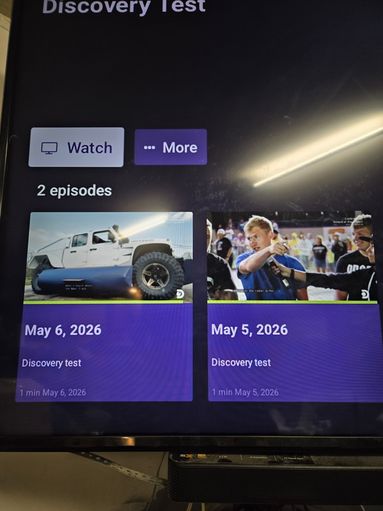
as you can see the current episode details are fine for a daily recording such as my source tests, but with multiple recordings in the same day you have to select each one individually to see the time recording started.

edit; or better yet, can we just get the Explore Show thumbnails to always show the recorded time?