
For just a few bucks more you can get the full mlb tv  and... be able to get the radio feed audio so you can actually stand to listen to their announcers lol. (Im a nats fan too)
If MASN+ streams don’t use DRM, then it could potentially be added as a provider in EPlusTV. I recommend reaching out in that thread ESPN+ & FOX Sports with Custom Channels via EPlusTV
1 Like
Ive having issues running mlbserver via docker involving ffmpeg hardware acceleration on my qnap ts-464. Whenever I try to manually enable ffmpeg_encoder env it gives me unknown encoder for the ones that are supposed to work. Otherwise it uses software decoding which is too slow for multiview. How do I go about fixing this?
On top of that after getting ffmpeg_encoder to h264_v4l2m2m and setting it up ffmpeg_path it poops out this error on my qnap when I try to run multiview
Input #3, hls, from 'http://127.0.0.1:9999/stream.m3u8?event=MLBN&resolution=504p':
Duration: N/A, start: 18357.898622, bitrate: N/A
Program 0
Metadata:
variant_bitrate : 1942884
Stream #3:0: Video: h264 (Main) ([27][0][0][0] / 0x001B), yuv420p, 896x504 [SAR 1:1 DAR 16:9], 29.97 fps, 29.97 tbr, 90k tbn
Metadata:
variant_bitrate : 1942884
Stream #3:1(und): Audio: aac (LC) ([15][0][0][0] / 0x000F), 48000 Hz, stereo, fltp
Metadata:
variant_bitrate : 1942884
Stream #3:2: Data: timed_id3 (ID3 / 0x20334449)
Metadata:
variant_bitrate : 1942884
Stream mapping:
Stream #0:0 (h264) -> setpts:default
Stream #1:0 (h264) -> setpts:default
Stream #2:0 (h264) -> setpts:default
Stream #3:0 (h264) -> setpts:default
xstack:default -> Stream #0:0 (h264_v4l2m2m)
Stream #0:1 -> #0:1 (copy)
Stream #1:1 -> #0:2 (copy)
Stream #2:1 -> #0:3 (copy)
Stream #3:1 -> #0:4 (copy)
Press [q] to stop, [?] for help
[h264_v4l2m2m @ 0x8885440] Could not find a valid device
[h264_v4l2m2m @ 0x8885440] can't configure encoder
[vost#0:0/h264_v4l2m2m @ 0x8af7bc0] Error while opening encoder - maybe incorrect parameters such as bit_rate, rate, width or height.
[fc#0 @ 0x843c1c0] Error sending frames to consumers: No such device or address
[fc#0 @ 0x843c1c0] Task finished with error code: -6 (No such device or address)
[vost#0:0/h264_v4l2m2m @ 0x8af7bc0] Could not open encoder before EOF
[vost#0:0/h264_v4l2m2m @ 0x8af7bc0] Task finished with error code: -22 (Invalid argument)
[vost#0:0/h264_v4l2m2m @ 0x8af7bc0] Terminating thread with return code -22 (Invalid argument)
[fc#0 @ 0x843c1c0] Terminating thread with return code -6 (No such device or address)
[out#0/hls @ 0x8af2380] Nothing was written into output file, because at least one of its streams received no packets.
frame= 0 fps=0.0 q=0.0 Lsize= 0KiB time=N/A bitrate=N/A speed=N/A
Conversion failed!
So i found you can buy it through mlb.tv and it just adds it as an enhancement - my previous...uh setup stopped working so i bought it and it seems to work great through this container
Awesome stuff
You should be able to add “&skip=pitches” to the end of the streams generated by the M3U. That triggers mlbserver to look up the pitch by pitch timestamps for that game, and drop any video segments that don’t correspond to actions pitches.
Of course, skipping anything implies more VOD or time shifting than live viewing. Depending on when you plan to watch, you may also want to add “&force_vod=on” if you want to start live games from the beginning, or “&date=yesterday” if you want to watch yesterday’s game. For example, the following URL will always stream yesterday's Jays game and skip non-action pitches:
http://IP.ADDRESS.OF.YOUR.COMPUTER:9999/stream.m3u8?team=TOR&resolution=best&skip=pitches&date=yesterday
Then it’s just a matter of adding that stream URL as an additional custom channel in Channels.
1 Like
hi Tony, thanks so much for this recommendation, my thoughts are once I get this working, I can set up a daily recording at 1am or something to record yesterday's game with the skip pitches setting, and then I can watch and resume it as my leisure using Channels!
but I can't get it working. I'm trying to add it as a Custom Channel via URL
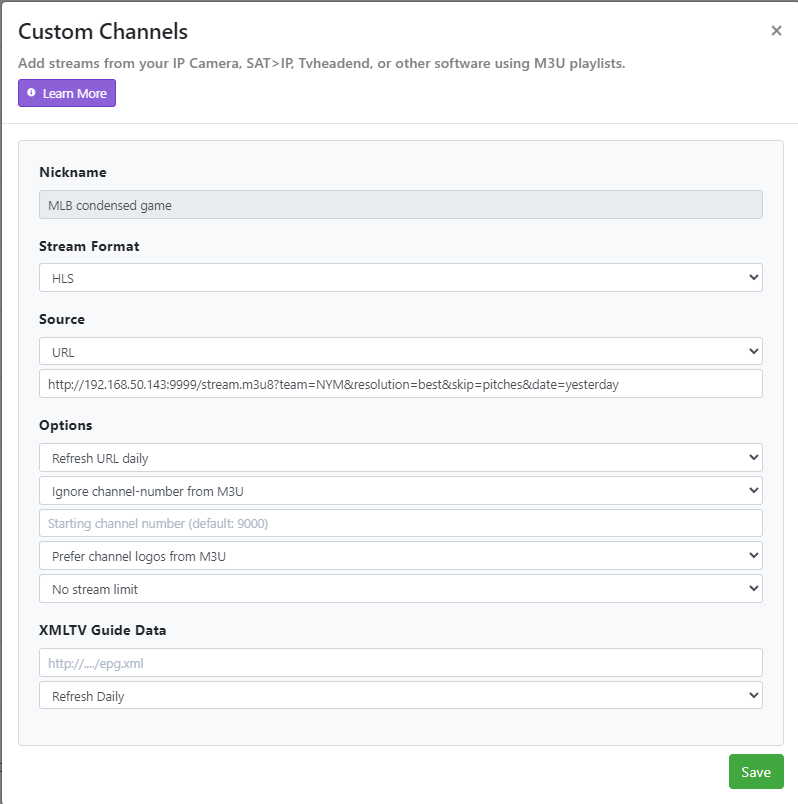
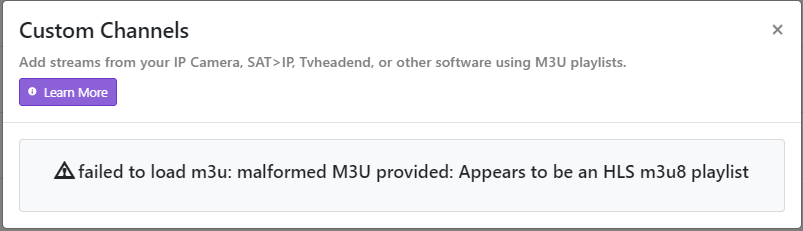
and I'm getting an error that says failed to load m3u: malformed M3U provided: Appears to be an HLS m3u8 playlist
next I tried entering it as Text using the following:
#EXTM3U

#EXTINF:-1 channel-id="My Mets Channel",My Mets Channel
http://192.168.50.143:9999/stream.m3u8?team=NYM&resolution=best&skip=pitches&date=yesterday
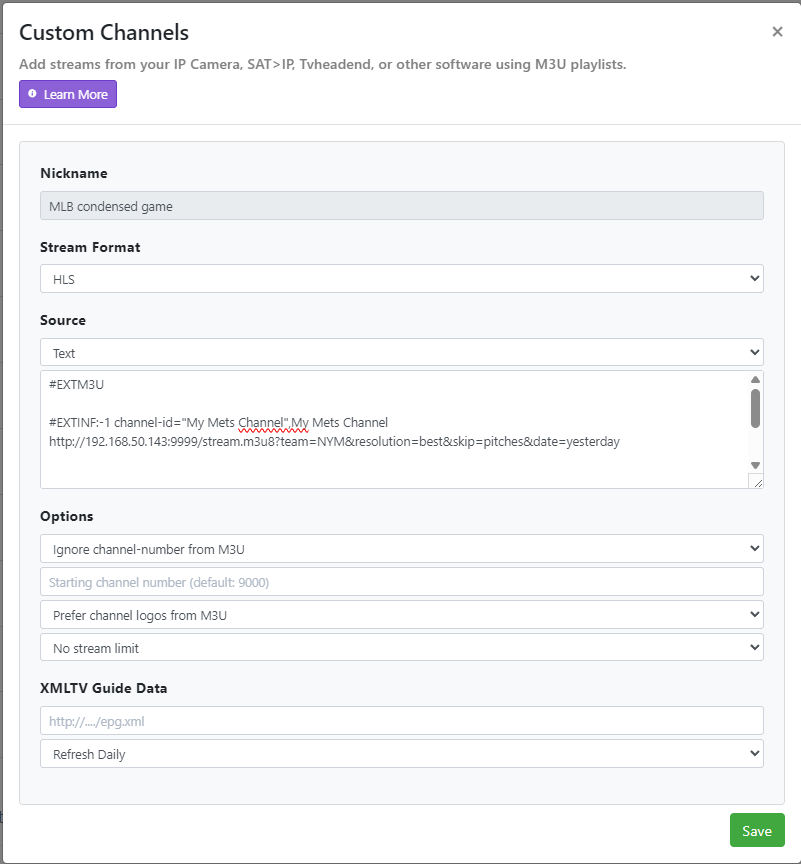
But it doesn't work when I try to view the stream using Channels.
Any advice?
The text source looks like it should work, but I don’t use Channels, so someone else might have to chime in to confirm.
The example URL I gave from mlbserver is the direct m3u8 stream link, rather than a m3u playlist link, so it’s understandable that trying to add it as an m3u URL in Channels would fail.
1 Like
@tonywagner This is great! I added it to the Channels server I have set up for my Mom but was wondering if it also picks up the AUSL games that are being broadcast this year? She's a big fan and that's a large part of why she got access to MLB.tv / Network as some of the games are exclusive to there. They're on a break again until Monday so wasn't sure if I'd be seeing them pop up on the guide or not.
Also, I seem to be experiencing something similar to what was mentioned here: Mlb.tv update - #256 by CubsWin
I added the Twins as a favorite team in mlbserver so that it would pick up Wichita Wind Surge games but even though they're playing at home right now and it's live via the MLB app, the channel on my guide indicates their next game as being on Tuesday. Any suggestions? Thanks in advance!
I don’t think so. I suspect AUSL games will just be special events in the MLB app/website, rather than games in a feed like MLB/MiLB games.
I will look into this. I think it works if your M3U URL uses the “includesTeams=MIN” parameter. But I too am not seeing Wichita otherwise.
Thanks, appreciate you looking into it. The team they're currently in a series with is a Dodgers affiliate and even though it's a Wind Surge home game, if I add the Dodgers as a favorite team I can see the game. Will go ahead and leave that in place for the time being for tomorrow's game.
This is fixed now in version 2025.7.5
2 Likes
I removed LAD as a favorite, re-deployed the updated stack with the latest image and can confirm I'm seeing the Wichita game on the guide after reloading the M3U and redownloading the XMLTV. Thanks again!
Hi all, after rolling along fine all season, I’m suddenly getting access denied (403) errors when I try to load the webpage. I’ve tried logging in on the web and it works just fine, even changed my password to see if that would help. Any ideas? Here’s my log:
7/11/2025, 6:32:06 PM stream.m3u8 request : /stream.m3u8?team=NYY&mediaType=Video&resolution=best&includeBlackouts=true from: ::ffff:192.168.5.185 using: Mozilla/5.0 (Macintosh; Intel Mac OS X 10_15_7) AppleWebKit/537.36 (KHTML, like Gecko) Chrome/106.0.0.0 Safari/537.36
http post failed : 403 - "\n<?xml version=\"1.0\" encoding=\"utf-8\"?>\n<!DOCTYPE html PUBLIC \"-//W3C//DTD XHTML 1.0 Strict//EN\"\n \"http://www.w3.org/TR/xhtml1/DTD/xhtml1-strict.dtd\">\n<html>\n  <head>\n    <title>403 Access Denied</title>\n  </head>\n  <body>\n    <h1>Error 403 Access Denied</h1>\n    <p>Access Denied</p>\n    <h3>Error 54113</h3>\n    <p>Details: cache-hhr-khhr2060024-HHR 1752280329 2241014353</p>\n    <hr>\n    <p>Varnish cache server</p>\n  </body>\n</html>\n"
{
  url: 'https://ids.mlb.com/oauth2/aus1m088yK07noBfh356/v1/token',

  headers: {
    'user-agent': 'Mozilla/5.0 (Macintosh; Intel Mac OS X 10_15_7) AppleWebKit/537.36 (KHTML, like Gecko) Chrome/133.0.0.0 Safari/537.36',
    'content-type': 'application/x-www-form-urlencoded'
  },

{
    username: 'email',
    password: 'password',
    grant_type: 'password',
    scope: 'openid offline_access',
    client_id: '0oa3e1nutA1HLzAKG356'
  },
  jar: RequestJar {
    _jar: CookieJar { enableLooseMode: true, store: [FileCookieStore] }
  }
}
Still working for me. Can you clear your session and cache? There's a link to do that at the bottom of the mlbserver web page, but if the page won't load, you can just delete the cache and data folders and restart your mlbserver container/process.
If the error persists, I'd suspect a location detection / network configuration issue.
1 Like
Yup nailed it! It was a vpn problem Thanks so much!
It's not the best news, but I was having the same problem. The workaround for me was to put the url in a .strm text file (just by itself) and then putting that in a folder that is scanned by the Personal Media section in sources.
Not ideal, but Channels doesn't seem to like non-live streams as custom channels (which makes sense).
Hope that helps!
Thanks for the idea, and it worked, sort of...
The game appeared in my library and played in Channels on Apple TV app and Android phone app, but not on my Shield app for some reason. I tried watching on my phone while outside of my home wifi network and it didn't work, probably because the stream is an internal 192.168.xxx, this was my goal though to get it to play on my phone where I watch most of my content.
Also, a weird observation, I watched about an hour of a game and then tried to resume it, I had to wait about a minute or so for the stream to download and catch up to where I was before it started playing. There was no option to restart it from the beginning either.
Obviously not an ideal setup. If anyone else can suggest a different creative way to get these mlbserver custom streams into Channels, that would be great
If you want to watch an on-demand stream on your phone, you can just bookmark your mlbserver home page and access it directly in your phone's browser.
If you want to access that outside your home network, you'll need to forward the port and/or set up a reverse proxy -- there's an example configuration for SWAG nginx proxy in the GitHub repo.
1 Like