
The artwork either comes from gracenote when you have a valid stationId in the playlist and get guide data from gracenote, or you have to supply it in the XMLTV guide data, or edit the artwork in the recording after you recorded them in CDVR. Don't know of any other way.
Thanks for that information!
I have not tested it myself but this is from chatGPT:
Yes, it is possible to include artwork in an XMLTV file for programs. You can use the
<icon>tag to specify images such as program logos¹². Here's a basic example of how you might include an image:
<programme start="20240101000000 +0000" stop="20240101010000 +0000" channel="example_channel">
  <title>Example Program</title>
  <desc>This is an example program description.</desc>
  <icon src="https://example.com/path_to_image.jpg" />
</programme>
Some platforms, like Emby, also support additional tags like
<image>for more specific types of artwork, such as posters and backdrops¹. Here's an example:
<programme start="20240101000000 +0000" stop="20240101010000 +0000" channel="example_channel">
  <title>Example Program</title>
  <desc>This is an example program description.</desc>
  <icon src="https://example.com/path_to_logo.jpg" />
  <image type="poster" src="https://example.com/path_to_poster.jpg" />
  <image type="backdrop" src="https://example.com/path_to_backdrop.jpg" />
</programme>
This way, you can enhance the visual experience of your TV guide by including relevant artwork.
Is there a specific platform or tool you're using to view the XMLTV file?
Source: Conversation with Copilot, 9/17/2024
(1) Enhancing XMLTV with TMDB Data: Specifying Posters and Backdrops. Enhancing XMLTV with TMDB Data: Specifying Posters and Backdrops - Live TV - Emby Community.
(2) Program images/icons/artwork in EPG - MediaPortal. Program images/icons/artwork in EPG | MediaPortal - An Open Source Windows Media Center for FREE!.
(3) GitHub - XMLTV/xmltv: Utilities to obtain, generate, and post-process .... GitHub - XMLTV/xmltv: Utilities to obtain, generate, and post-process TV listings data in XMLTV format.
(4) undefined. 50 minutes inside (TV Series) — The Movie Database (TMDB).
(5) undefined. https://example.com/url_to_program_logo.jpg.
(6) undefined. https://example.com/url_to_program_poster.jpg.
(7) undefined. https://example.com/url_to_program_backdrop.jpg.
(8) undefined. CVS Info for project xmltv.
(9) undefined. MediaPortal-1/TvEngine3/TVLibrary/TVDatabase/Program.cs at master · MediaPortal/MediaPortal-1 · GitHub.
(10) undefined. pvr.mediaportal.tvserver/src/pvrclient-mediaportal.cpp at master · kodi-pvr/pvr.mediaportal.tvserver · GitHub.
As always, the answer from an AI may not always be accurate but should get you closer to the final solution.
2 Likes
In the future, how are we going to know if your reply is A.I. , or you? 
1 Like
For real for real! 
Maybe a shared secret, secret handshake, or your IP address to confirm?
I am Not a Robot! 
What tag do I add to get it to pop up in my sports collection?
<programme start="20240925190000 -0500" stop="20240925220000 -0500" channel="Victory+">
  <title>Dallas Stars vs Minnesota Wild</title>
  <desc>Preseason game at American Airlines Center</desc>
  <category lang="en">Sports event</category>
  <category lang="en">Hockey</category>
  <genre>Live Sports</genre>
  <live>yes</live>
  <location>American Airlines Center</location>
  <icon src="https://www.americanairlinescenter.com/assets/img/2324_665x734__MIN-5816aa490b.jpg" />
</programme>
This is correct.
Does that airing appear in the Channels DVR grid guide?
Hockey should be the Genre, not a Category.
Not sure if that's making your collection miss it.
I think if you just leave the category Hockey alone and change the genre to Hockey, CDVR will pick up the genre.
<category lang="en">Sports event</category>
<category lang="en">Hockey</category>
<genre>Hockey</genre>
<live/>
Just verified it
"Categories": ["Sports event"],
"Genres": ["Hockey"],
"Tags": ["Live"],
1 Like
I played around a bit more and it seems as long as you have both of these
<category lang="en">Sports event</category>
<category lang="en">Hockey</category>
Channels DVR ignores the genre
<genre>Hockey</genre>
These all show as Live, Hockey, Sports event in Channels DVR
<?xml version='1.0' encoding='utf-8'?>
<!DOCTYPE tv SYSTEM "xmltv.dtd">
<tv xmlns:xsi="http://www.w3.org/2001/XMLSchema-instance" xsi:schemaLocation="resources/xmltv.xsd">
  <channel id="TestEPG">
    <display-name>TestEPG channel</display-name>
  </channel>
  <programme start="20240929170000 -0700" stop="20240929200000 -0700" channel="TestEPG">
    <title>Team1 vs. Team2</title>
    <desc>Live Hockey Sports event (Hockey)</desc>
    <category lang="en">Sports event</category>
    <category lang="en">Hockey</category>
    <genre>Hockey</genre>
    <live/>
  </programme>
  <programme start="20240930170000 -0700" stop="20240930200000 -0700" channel="TestEPG">
    <title>Team3 at Team4</title>
    <desc>Live Hockey Sports event (Baseball)</desc>
    <category lang="en">Sports event</category>
    <category lang="en">Hockey</category>
    <genre>Baseball</genre>
    <live/>
  </programme>
  <programme start="20241001170000 -0700" stop="20241001200000 -0700" channel="TestEPG">
    <title>Team5 vs. Team6</title>
    <desc>Live Hockey Sports event (Basketball)</desc>
    <category lang="en">Sports event</category>
    <category lang="en">Hockey</category>
    <genre>Basketball</genre>
    <live/>
  </programme>
  <programme start="20241002170000 -0700" stop="20241002200000 -0700" channel="TestEPG">
    <title>Team7 at Team8</title>
    <desc>Live Hockey Sports event (Football)</desc>
    <category lang="en">Sports event</category>
    <category lang="en">Hockey</category>
    <genre>Football</genre>
    <live/>
  </programme>
  <programme start="20241003170000 -0700" stop="20241003200000 -0700" channel="TestEPG">
    <title>Team9 vs. Team10</title>
    <desc>Live Hockey Sports event (Soccer)</desc>
    <category lang="en">Sports event</category>
    <category lang="en">Hockey</category>
    <genre>Soccer</genre>
    <live/>
  </programme>
  <programme start="20241004170000 -0700" stop="20241004200000 -0700" channel="TestEPG">
    <title>Team11 at Team12</title>
    <desc>Live Hockey Sports event (Tennis)</desc>
    <category lang="en">Sports event</category>
    <category lang="en">Hockey</category>
    <genre>Tennis</genre>
    <live/>
  </programme>
</tv>
Even the ones with these genres
<genre>Baseball</genre>
<genre>Basketball</genre>
<genre>Football</genre>
<genre>Soccer</genre>
<genre>Tennis</genre>
This is what I had my most recent game this afternoon and it's not showing up in my Sports Collection. But it is being categorized as a Sports event and genre is Hockey for when I go check the metadata. I am running on version 2024.09.10.2115 maybe I need to update to the latest pre-release.
<programme start="20240925190000 -0500" stop="20240925220000 -0500" channel="Victory+">
  <title>Dallas Stars vs Minnesota Wild</title>
  <desc>Preseason game at American Airlines Center</desc>
  <category lang="en">Sports event</category>
  <category lang="en">Hockey</category>
  <genre>Hockey</genre>
  <live>yes</live>
  <location>American Airlines Center</location>
  <icon src="https://www.americanairlinescenter.com/assets/img/2324_665x734__MIN-5816aa490b.jpg" />
</programme>
May be how you're creating your Sports Collection?
For sure, yeah I have had this sports collection working for the longest and every sports goes into that collection. When I had Fubo and Fubo Docker recording Bally Sports it would pop right into that collection but for some reason it is acting funky. Also, I tried to go edit my sports collection and for some reason I can't get it to go into Simple Mode it is greyed out.
Don't know if adding <category lang="en">Sports</category> did it, or adding this current airing
<programme start="20240929220000 -0700" stop="20240929233000 -0700" channel="TestEPG">
    <title>Team1 vs. Team2</title>
    <desc>Live Hockey Sports event (Hockey)</desc>
    <category lang="en">Sports</category>
    <category lang="en">Sports event</category>
    <category lang="en">Hockey</category>
    <genre>Hockey</genre>
    <live/>
  </programme>
I got a Collection to show it.

Of course (while testing) after every change I make to the XMLTV, I reload it and Delete and Recreate the guide Database.
Sorry, I guess I didn’t specify regular collection not channel collection.
Ahh, you mean a Library Collection?
I wouldn't even know how to create a Library Collection for those hockey games.
I think Library Collections are only for Movies or Shows.
For a Show, it would have to look at the Show metadata and not the Episode metadata.
Pretty sure your hockey games are recorded as single episode shows, and the metadata you have in the XMLTV gets applied to the episode, not show.
If you look at NHL Hockey, it's setup like a show with a Series ID and the games are like episodes.
To show you what I'm talking about, I redid the XMLTV so all games are episodes of the same show (My Live Hockey Games), like this
<?xml version='1.0' encoding='utf-8'?>
<tv xmlns:xsi="http://www.w3.org/2001/XMLSchema-instance" xsi:schemaLocation="resources/xmltv.xsd">
  <channel id="TestEPG">
    <display-name>TestEPG channel</display-name>
  </channel>
  <programme start="20240930140000 -0700" stop="20240930141000 -0700" channel="TestEPG">
    <title>My Live Hockey Games</title>
    <sub-title>Team1 vs. Team2</sub-title>
    <desc>Live Hockey Sports event 1</desc>
    <category>Sports</category>
    <category>Sports event</category>
    <category>Hockey</category>
    <genre>Hockey</genre>
    <live/>
  </programme>
  <programme start="20240930143000 -0700" stop="20240930144000 -0700" channel="TestEPG">
    <title>My Live Hockey Games</title>
    <sub-title>Team3 at Team4</sub-title>
    <desc>Live Hockey Sports event 2</desc>
    <category>Sports</category>
    <category>Sports event</category>
    <category>Hockey</category>
    <genre>Hockey</genre>
    <live/>
  </programme>
</tv>
Then recorded them. You'll notice the "Show" doesn't have Categories or Genres. Only the "Episodes" do.


I don't know if there's a way in the XMLTV to create those (Category, Genre) at the show level. With gracenote EPG it uses the Series ID and can be looked up.
Using my example you could edit metadata for the show, and it will work, but that's after one game (episode) has been recorded.
1 Like
For anyone wondering, here's the Custom M3U playlist I'm using (uses the Platypus Cam when viewed/recorded)
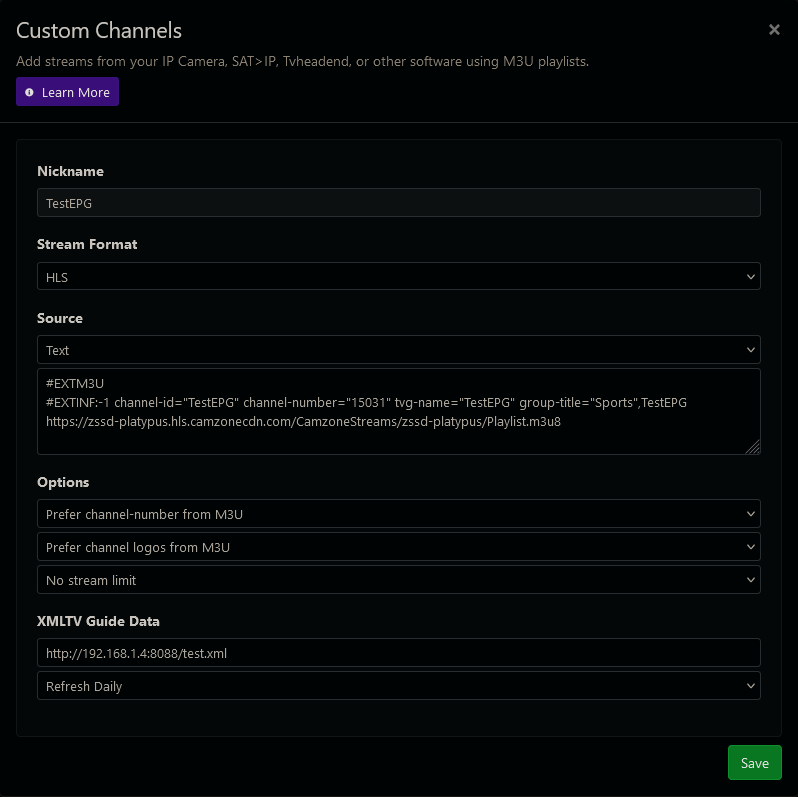


And the XMLTV source is the file text.xml on a static web server.
1 Like
Thanks again for thoroughly explaining all of this. I will update my xml file and report back.
This topic was automatically closed 365 days after the last reply. New replies are no longer allowed.