
I was able to duplicate that, thanks for reporting it. Fix pushed as :latest (2025.03.31).
This topic was automatically closed 30 days after the last reply. New replies are no longer allowed.
This is great. thank you!
1 Like
This is my last hope. I have been working at this for days. To say I have a rudimentary amount of knowledge of coding would be generous but I am really good at following directions and copy/paste.
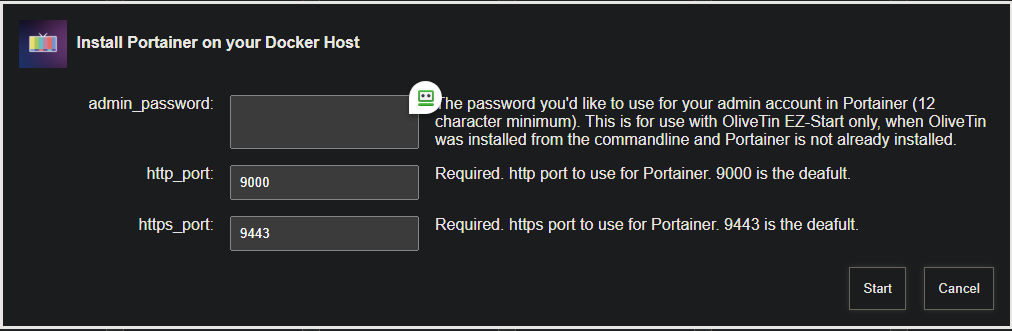
Below is what I get when I try to Install Portainer. However, it appears to be running in docker. Any thoughts?
Standard Output
b428af00343c181dcb02b7a1122b1c7f5e3ecae88ed77eaa659c3c1e27d7676c
Portainer container created successfully

Portainer token creation and environment initialization failed...
Standard Error
+ [[ -z '' ]]
+ portainerHost=127.0.0.1
+ portainerAdminPassword=xxxxxxxxxx
+ [[ 13 -lt 12 ]]
++ htpasswd -nbB admin xxxxxxxxxxxx
++ cut -d : -f 2
+ hashedPassword='$2y$05$04PwhWQFaVJ43VHuTaxMZOAVmhgk5HGOa5u2fh/D4lBtSJcUJQl5u'
+ portainerHttpPort=9000
+ portainerHttpsPort=9443
+ docker run -d -p 9000:9000 -p 9443:9443 --name portainer --restart always --pull always -v /var/run/docker.sock:/var/run/docker.sock -v portainer_data:/data portainer/portainer-ce:latest --admin-password '$2y$05$04PwhWQFaVJ43VHuTaxMZOAVmhgk5HGOa5u2fh/D4lBtSJcUJQl5u'
latest: Pulling from portainer/portainer-ce
4f4fb700ef54: Pulling fs layer
63c930229559: Pulling fs layer
d3b1c06ebf8c: Pulling fs layer
354e5ce52559: Pulling fs layer
8d59d73e40c6: Pulling fs layer
e811f1a0940a: Pulling fs layer
605b6f3b7115: Pulling fs layer
24f6f070c2a7: Pulling fs layer
60aae008ce70: Pulling fs layer
71eec8d28aa8: Pulling fs layer
4f4fb700ef54: Download complete
d3b1c06ebf8c: Download complete
63c930229559: Download complete
605b6f3b7115: Download complete
71eec8d28aa8: Download complete
d3b1c06ebf8c: Pull complete
63c930229559: Pull complete
60aae008ce70: Download complete
24f6f070c2a7: Download complete
354e5ce52559: Download complete
8d59d73e40c6: Download complete
354e5ce52559: Pull complete
e811f1a0940a: Download complete
8d59d73e40c6: Pull complete
605b6f3b7115: Pull complete
e811f1a0940a: Pull complete
24f6f070c2a7: Pull complete
4f4fb700ef54: Pull complete
71eec8d28aa8: Pull complete
60aae008ce70: Pull complete
Digest: sha256:224a378fbc5ae579dc9d570c5ca2e5e981a4a003c8d7c2c5b5e482af97c2f87c
Status: Downloaded newer image for portainer/portainer-ce:latest
+ echo 'Portainer container created successfully'
+ sleep 2
++ curl -s -X POST http://127.0.0.1:9000/api/auth -H 'Content-Type: application/json' -d '{"Username":"admin", "Password":"xxxxxxxx"}'
++ jq -r .jwt
+ jsonWebToken=
++ curl -s -X POST http://127.0.0.1:9000/api/users/1/tokens -H 'Authorization: Bearer ' -H 'Content-Type: application/json' -d '{"password": "xxxxxxxxx", "description": "olivetin"}'
++ jq -r .rawAPIKey
+ portainerToken=
++ curl -s -X POST http://127.0.0.1:9000/api/endpoints -H 'Authorization: Bearer ' -F Name=local -F EndpointCreationType=1
++ jq -r .Id
+ portainerEnv=
+ [[ -n '' ]]
+ echo -e '\nPortainer token creation and environment initialization failed...'
@bnhf
User is following up from his topic I cannot figure out Mac mini (M4), m3u playlist, and Docker
1 Like
Thanks and apologies for my lack of etiquette.
No issues, just letting him know you already created a topic, so he doesn't have to ask you questions you already answered there 
It looks like Portainer is already installed. Have you tried continuing on with the next step of running the OliveTin Environment Variables Generator/Tester Action?
Any chance you copied and stored your Portainer token from the first time you installed Portainer?
Anything is possible. I have installed and uninstalled (or tried anyway) so many times.
When I do the next step, I get this:
Standard Output
TAG=latest
DOMAIN=
HOST_PORT=1337
CHANNELS_DVR_HOST=127.0.0.1
CHANNELS_DVR_PORT=8089
CHANNELS_CLIENTS=
ALERT_SMTP_SERVER=
ALERT_EMAIL_FROM=
ALERT_EMAIL_PASS=
ALERT_EMAIL_TO=
UPDATE_YAMLS=true
UPDATE_SCRIPTS=true
TZ=America/New_York
HOST_DIR=/data
DVR_SHARE=
LOGS_SHARE=
TUBEARCHIVIST_SHARE=
DVR2_SHARE=
LOGS2_SHARE=
TUBEARCHIVIST2_SHARE=
DVR3_SHARE=
LOGS3_SHARE=
TUBEARCHIVIST3_SHARE=
HOST_SFS_PORT=8080
FOLDER=/web
PORTAINER_TOKEN=
PORTAINER_HOST=127.0.0.1
PORTAINER_PORT=9443
PORTAINER_ENV=13370
PERSISTENT_LOGS=false
Standard Error
Error: No such object: olivetin
cat: /config/olivetin.token: No such file or directory
Edit: I don't know if I have Portainer token from the first install but at some point, I did a new one and I have that info.
1 Like
The group of values is not correct. The most important one to fix now is the HOST_DIR value. When you're running on a Mac, Docker only allows you to access certain shares. Generally a value of /Users/<your username> is correct on a Mac, but make sure that directory exists first.
The other we can get when you run your first healthcheck from the full version of OliveTin.
Your PORTAINER_TOKEN value should be the first one you "stored in a safe place", but if you don't have it we can deal with that from the full OliveTin too. Your PORTAINER_ENV value is definitely wrong. It's probably 1, but we'll verify that in the healthcheck too.
So, correct what you can correct, generate a new list like the above and then run the Create an OliveTin Stack in Portainer Action (unless you've already done that too). Then you should be able to access OliveTin at port 1337 and run the Post-Install Healthcheck.
1 Like
The group of values is not correct. The most important one to fix now is the
HOST_DIRvalue. When you're running on a Mac, Docker only allows you to access certain shares. Generally a value of/Users/<your username>is correct on a Mac, but make sure that directory exists first.
I'm not sure how to fix the host_dir value other than just adding it to the box before I click start.
I see the olive-tin folder in /users/(my username). I changed the value when I ran it again and got this:
TAG=latest
DOMAIN=
HOST_PORT=1337
CHANNELS_DVR_HOST=127.0.0.1
CHANNELS_DVR_PORT=8089
CHANNELS_CLIENTS=
ALERT_SMTP_SERVER=
ALERT_EMAIL_FROM=
ALERT_EMAIL_PASS=
ALERT_EMAIL_TO=
UPDATE_YAMLS=true
UPDATE_SCRIPTS=true
TZ=America/New_York
HOST_DIR=/users/Layla
DVR_SHARE=
LOGS_SHARE=
TUBEARCHIVIST_SHARE=
DVR2_SHARE=
LOGS2_SHARE=
TUBEARCHIVIST2_SHARE=
DVR3_SHARE=
LOGS3_SHARE=
TUBEARCHIVIST3_SHARE=
HOST_SFS_PORT=8080
FOLDER=/web
PORTAINER_TOKEN=
PORTAINER_HOST=127.0.0.1
PORTAINER_PORT=9443
PORTAINER_ENV=13370
PERSISTENT_LOGS=false
Standard Error
Error: No such object: olivetin
cat: /config/olivetin.token: No such file or directory
edit:
This is when I ran creat an olive-tin stack
Standard Output
Run the OliveTin Environment Variables Generator/Tester Action first, and then come back here...
Standard Error
++ basename /config/olivetin-for-channels.sh
- extension=olivetin-for-channels.sh
- extension=olivetin-for-channels
- [[ -f /config/olivetin-for-channels.env ]]
- cp /config/olivetin-for-channels.env /tmp
- envFile=/tmp/olivetin-for-channels.env
- dirsFile=/tmp/olivetin-for-channels.dirs
- [[ -f /config/olivetin-for-channels.yaml ]]
- cp /config/olivetin-for-channels.yaml /tmp
- yamlCopied=true
- yamlFile=/tmp/olivetin-for-channels.yaml
++ grep PORTAINER_HOST= /tmp/olivetin-for-channels.env
++ awk -F= '{print $2}' - portainerHost=127.0.0.1
++ grep PORTAINER_TOKEN= /tmp/olivetin-for-channels.env
++ awk -FTOKEN= '{print $2}' - portainerToken=
++ grep PORTAINER_PORT= /tmp/olivetin-for-channels.env
++ awk -F= '{print $2}' - portainerPort=9443
- envVarsUpdated=true
- [[ ! -f /config/olivetin-for-channels.env ]]
- [[ true != \t\r\u\e ]]
- [[ -z '' ]]
- echo 'Run the OliveTin Environment Variables Generator/Tester Action first, and then come back here...'
- exit 0
On my Mac-Mini-M2, the virtual file share is /Users with a capital U. I'm not an everyday Mac user, but I believe capitalization matters on a Mac -- like it does on Linux. And yes, to fix the variables, replace what's showing in that field in the Action. Then click start, and you should see a corrected list.
I believe you're going to need to fix your token before you can spin-up the full OliveTin. Go into Portainer on port 9000, and where you see your username click on the dropdown to get to where you can see your existing tokens and create a new one. Delete the current OliveTin token, and copy-and-paste it into the above Action, just like for HOST_DIR. Change the PORTAINER_ENV value to 1 also.
Make sure all your values are looking good before your try to create your full OliveTin container.
1 Like
I may be a lost cause. I went to Portainer on port 9000 and it asks for username and password. I don't have either. If you're still game to try to help, I will figure out how to set that up and get back at this tomorrow. Thanks so much for your help!
Edit: If I need to sign up and pay $150 for Portainer, I think that I'm out.
2 Likes
Wow! Thank you.
I have no tokens displayed in "Access tokens".
Go ahead and create a token called OliveTin, and copy-and-paste it to a safe place. Then use that token along with the other fixes we talked about in the Genrator/Tester, and see if you can spin-up full OliveTin.
It seems to me you already had Portainer installed all along, which is why this process isn't working the way it should -- but that won't stop us.  We'll get it going...
I think I did the above and I got this:
Standard Output
(empty)
Standard Error
exit status 2
sh: 1: Bad substitution
I'm leaning towards clearing the decks and starting over. It's a quick and easy process when done correctly.
Can you go into Terminal, and post the output of docker ps so we can see where we are at?