
Yes, the icon turned green. config.yaml shows a new "date modified" time coinciding with the new action start time.
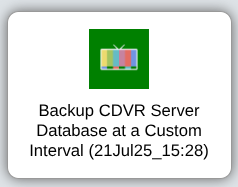

Looking again at that config.yaml file, what does the very first Action OliveTin Post-Install Healthcheck show for the dvr argument?
Mine:
      - name: dvr
        description: Channels DVR server to use.
        choices:
          - title: media-server8:8089
            value: media-server8:8089
          - title: utheater-pc:8089
            value: utheater-pc:8089
          #lastchoice
        default: media-server8:8089 #dvr default
1 Like
From my main system, which is having the problem:
- name: dvr
        type: very_dangerous_raw_string
        description: Channels DVR server to use. #healthcheck dvr description
        default: none #healthcheck dvr default
And from my backup system which runs an older version of Olivetin, seems to be ok.
- name: dvr
        type: very_dangerous_raw_string
        description: Channels DVR server to use. #healthcheck dvr description
        default: 192.168.1.25:8089 #healthcheck dvr default


One of the OliveTin actions I find very useful is: Mark a Movie or Episode for Re-Recording. I use this action A LOT!
Sometimes, I can't remember if I have previously marked a specific episode. Is there a record of episodes I have marked somewhere so that I can review a list of pending items? If I inadvertently mark something twice, will it re-record twice? 
Not currently, but a perpetual logfile could certainly be added.
It's a basic curl DELETE command, so I would think a second execution (before a re-record) would simply result in an error.
Your OliveTin Docker Compose will need to be updated if/when you update to Portainer 2.33.0 LTS, as described here:
2 Likes
Two questions;
- Is it enough to edit the existing compose with the new variables?
- If so, does the "EZ Start" need to be added if it wasn't used originally?
Thanks!
Much better to use the latest "standard" olivetin docker compose, then check the sample env vars to see if you should be tweaking anything there.
Since the olivetin docker compose does a lot more than the typical docker run command or compose yaml, the idea has been to have a single compose that requires no editing, so that only env vars in the Environment variables section of the Stacks Editor are different user to user.
Ok, thanks again!
Dang. I had run watchtower early this morning before I saw this post. When I did, this old problem resurfaced for me:
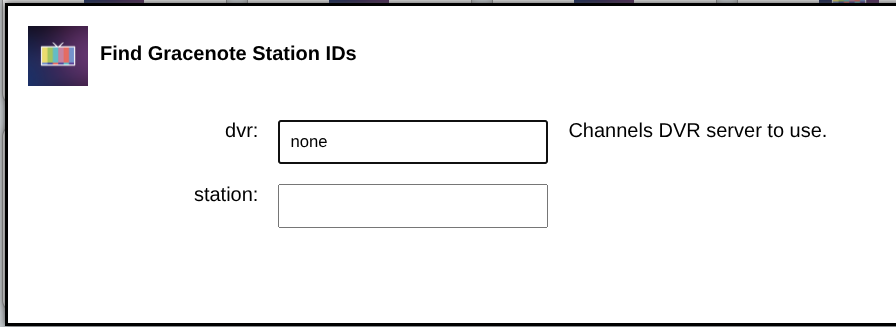
Since this morning's watchtower update, I have replaced the Olivetin Docker Compose in the Portainer stack. Updated the stack, re-pull/re-deploy. Same old problem.
Do you remember what you did to fix it in our remote session? I'd like to know so that I can fix it myself if/when it comes up again.
Is it possible you're attempting to use OliveTin before the container is done starting-up? It takes a little longer for the start-up when you have several recurring Actions configured.
I would suggest stopping the olivetin stack, then start it again followed by watching the olivetin container log in Portainer until you see it finish the boot process. Then check to see if this issue persists.
If it's still an issue, we'll probably need to coordinate on another remote connection, as something is keeping your config.yaml file from updating properly. It's nothing I've ever seen, or had anyone else report.
1 Like
I always wait at least until I see this:
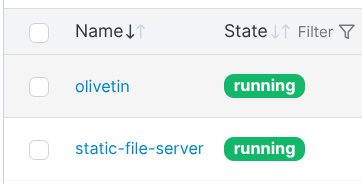
This time, I waited several minutes after starting the stack before I opened Olivetin. It opened without problem, and still show all of my recurring actions as running. (Green icons in boxes). When opening an action box, DVR: still shows "none"
Last time, you thought that:
That was strictly a theory of course, and I don't see how it could be the case here, as the only thing you did was update Portainer and OliveTin.
This is something I'd like to get to the bottom of, but have no way to duplicate it.
Heyyyy, me again, sorry! I'm stumped once more. I used Project One-Click to set up TubeArchivist, worked great! Now I'm trying to run the TubeArchivist CDVR Processor, but every time I get the following error:
Killing currently running script with PID 358
Traceback (most recent call last):
  File "/config/youtube-process.py", line 25, in <module>
    CONFIG = load_config(CONFIG_FILE)
  File "/config/youtube-process.py", line 14, in load_config
    with open(config_file, "r") as file:
         ~~~~^^^^^^^^^^^^^^^^^^
FileNotFoundError: [Errno 2] No such file or directory: 'config.txt'
Background Tube Archivist processor running for 192.168.1.160:8089
I'm not sure why it's failing to create config.txt? I can run other actions that create files without issue -- like Create Movies List in CSV. The file shows up, easy peasy. I've even tried manually creating a blank txt file called 'config.txt' and still get the same error. I tried using a docker volume instead of a mount for olivetin/config, same error.
Here's the results of healthcheck:
Checking your OliveTin-for-Channels installation...
(extended_check=false)

OliveTin Container Version 2025.08.25
OliveTin Docker Compose Version 2025.08.25

----------------------------------------

Checking that your selected Channels DVR server (192.168.1.160:8089) is reachable by URL:
HTTP Status: 200 indicates success...

  % Total    % Received % Xferd  Average Speed   Time    Time     Time  Current
                                 Dload  Upload   Total   Spent    Left  Speed

  0     0    0     0    0     0      0      0 --:--:-- --:--:-- --:--:--     0
100  1276  100  1276    0     0  70888      0 --:--:-- --:--:-- --:--:-- 70888
HTTP Status: 200
Effective URL: http://192.168.1.160:8089/

----------------------------------------

Checking that your selected Channels DVR server's data files (/mnt/192.168.1.160-8089) are accessible:
Folders with the names Database, Images, Imports, Logs, Movies, Streaming and TV should be visible...

total 4
drwxrwxrwx 1 1000 1000  512 Jul 28 18:49 .
drwxr-xr-x 1 root root 4096 Aug 31 12:26 ..
drwxrwxrwx 1 1000 1000  512 Aug 30 14:29 Database
drwxrwxrwx 1 1000 1000  512 Aug 30 14:11 Images
drwxrwxrwx 1 1000 1000  512 Jul 28 18:36 Imports
drwxrwxrwx 1 1000 1000  512 Jul 28 18:36 Logs
drwxrwxrwx 1 1000 1000  512 Aug 29 18:04 Movies
drwxrwxrwx 1 1000 1000  512 Jul 28 18:49 Streaming
drwxrwxrwx 1 1000 1000  512 Aug 29 14:47 TV

Docker reports your current DVR_SHARE setting as...
/mnt/c/Docker/channels/DVR

If the listed folders are NOT visible, AND you have your Channels DVR and Docker on the same system:

Channels reports this path as...
/shares/DVR

----------------------------------------

Checking that your selected Channels DVR server's log files (/mnt/192.168.1.160-8089_logs) are accessible:
Folders with the names data and latest should be visible...

total 4
drwxrwxrwx 1 1000 1000  512 Aug  1 13:56 .
drwxr-xr-x 1 root root 4096 Aug 31 12:26 ..
drwxr-xr-x 1 root root  512 Apr 19 21:03 2025.04.17.1651
drwxr-xr-x 1 root root  512 Jun  1 19:51 2025.06.01.2212
drwxr-xr-x 1 root root  512 Aug  1 13:56 2025.08.01.1845
drwxr-xr-x 1 root root  512 Aug 31 10:48 data
lrwxrwxrwx 1 root root   15 Aug  1 13:56 latest -> 2025.08.01.1845

Docker reports your current LOGS_SHARE setting as...
/mnt/c/Docker/channels/config

If the listed folders are NOT visible, AND you have your Channels DVR and Docker on the same system:

Channels reports this path as...
/channels-dvr

----------------------------------------

Checking if your Portainer token is working on ports 9000 and/or 9443:

Portainer http response on port 9000 reports version 2.33.1
Portainer Environment ID for local is 1
Portainer https response on port 9443 reports version 2.33.1
Portainer Environment ID for local is 1

----------------------------------------

Here's a list of your current OliveTin-related settings:

HOSTNAME=olivetin
CHANNELS_DVR=192.168.1.160:8089
CHANNELS_DVR_ALTERNATES=
CHANNELS_CLIENTS=
ALERT_SMTP_SERVER=
ALERT_EMAIL_FROM=[Redacted]@
ALERT_EMAIL_PASS=[Redacted]
ALERT_EMAIL_TO=[Redacted]@
UPDATE_YAMLS=true
UPDATE_SCRIPTS=true
PORTAINER_TOKEN=[Redacted]
PORTAINER_HOST=192.168.1.160
PORTAINER_PORT=9443
PORTAINER_ENV=1

----------------------------------------

Here's the contents of /etc/resolv.conf from inside the container:

# Generated by Docker Engine.
# This file can be edited; Docker Engine will not make further changes once it
# has been modified.

nameserver 127.0.0.11
search
options ndots:0

# Based on host file: '/etc/resolv.conf' (internal resolver)
# ExtServers: [host(192.168.65.7)]
# Overrides: [search]
# Option ndots from: internal

----------------------------------------

Here's the contents of /etc/hosts from inside the container:

127.0.0.1	localhost
::1	localhost ip6-localhost ip6-loopback
fe00::	ip6-localnet
ff00::	ip6-mcastprefix
ff02::1	ip6-allnodes
ff02::2	ip6-allrouters
172.18.0.2	olivetin
I'd be super appreciative if I could be pointed in the right direction to resolve this! I'm not even sure what else to try to pinpoint the issue. Thank you!!
Here's the full debug log from the processor:
/config/youtube-process.debug.log 2025-08-31 12:26:49

+ dvr=192.168.1.160:8089
++ echo 192.168.1.160:8089
++ awk -F: '{print $1}'
+ channelsHost=192.168.1.160
++ echo 192.168.1.160:8089
++ awk -F: '{print $2}'
+ channelsPort=8089
+ foregroundScript=youtube-process
+ backgroundScript=youtube-processor
+ firstChar=y
++ ps -ef
++ grep '[y]outube-processor.* 192.168.1.160:8089'
++ awk '{print $2}'
+ runningScriptPID=358
+ [[ -n 358 ]]
++ ps --ppid 358
++ grep sleep
++ awk '{print $1}'
+ runningSleepPID=403
+ greenIcon='"icons/channels.png"'
+ purpleIcon='"https://community-assets.getchannels.com/original/2X/5/55232547f7e8f243069080b6aec0c71872f0f537.png"'
+ logFile=/config/192.168.1.160-8089_youtube-processor_latest.log
+ [[ -f /config/192.168.1.160-8089_youtube-processor_latest.log ]]
+ rm /config/192.168.1.160-8089_youtube-processor_latest.log
+ configFile=/config/config.yaml
+ configTemp=/tmp/config.yaml
+ configTubeArchivist=/config/config.txt
+ trap finish EXIT
+ cp /config/config.yaml /tmp
+ frequency=12h
+ [[ 12h == \0 ]]
+ [[ 12h != \0 ]]
+ sed -i '/#youtube-process frequency default/s/default: .* #/default: 12h #/' /tmp/config.yaml
+ youtube_api_key=REDACTED
+ [[ REDACTED != \n\o\n\e ]]
+ sed -i '/#youtube-process youtube_api_key default/s/default: .* #/default: REDACTED #/' /tmp/config.yaml
+ apprise_url=none
+ [[ none != \n\o\n\e ]]
+ delete_after=none
+ [[ none != \n\o\n\e ]]
+ video_directory=media
+ [[ media != \t\u\b\e\a\r\c\h\i\v\i\s\t ]]
+ sed -i '/#youtube-process video_directory default/s/default: .* #/default: media #/' /tmp/config.yaml
+ channels_directory=processed
+ [[ processed != \I\m\p\o\r\t\s\/\V\i\d\e\o\s ]]
+ sed -i '/#youtube-process channels_directory default/s/default: .* #/default: processed #/' /tmp/config.yaml
+ backgroundArguments='192.168.1.160:8089 12h REDACTED none none media processed'
+ main
+ scriptRun
++ ps -ef
++ grep '[y]outube-processor.* 192.168.1.160:8089'
++ awk '{print $2}'
+ runningScriptPID=358
+ [[ -n 358 ]]
+ kill 358
+ echo 'Killing currently running script with PID 358'
++ date +%d%b%y_%H:%M
+ sed -i '/#youtube-process title/s/(.*) #/(31Aug25_12:26) #/' /tmp/config.yaml
+ sed -i '/#youtube-process icon/s|img src = .* width|img src = "icons/channels.png" width|' /tmp/config.yaml
+ runningScriptPID=436
+ nohup /config/youtube-processor.sh 192.168.1.160:8089 12h REDACTED none none media processed
+ echo 'youtube-process.sh 192.168.1.160:8089 12h REDACTED none none media processed'
+ grep -q '(.*) #youtube-process' /tmp/config.yaml
+ [[ 0 == \1 ]]
+ sleep 2
+ cat /config/192.168.1.160-8089_youtube-processor_latest.log
+ runningScripts
+ servers=($CHANNELS_DVR $CHANNELS_DVR_ALTERNATES)
+ for server in "${servers[@]}"
++ echo 192.168.1.160:8089
++ awk -F: '{print $1}'
+ serverHost=192.168.1.160
++ echo 192.168.1.160:8089
++ awk -F: '{print $2}'
+ serverPort=8089
++ ps -ef
++ awk '{print $2}'
++ grep '[y]outube-processor.* 192.168.1.160:8089'
+ activeProcess=436
+ [[ -n 436 ]]
+ echo 'Background Tube Archivist processor running for 192.168.1.160:8089'
+ finish
+ cp /tmp/config.yaml /config
What value are you using for HOST_DIR?
Also, if you look in /HOST_DIR/olivetin, do you see a directory called 192.168.1.160-8089_data? And if that directory exists, do you see any files in it? Like config.txt?
Daaaaang you're quick! Thanks for jumping into this. HOST_DIR=/mnt/c/Docker but I also tried it as just /data and get the same results. The directories in HOST_DIR/olivetin are custom_webgui and data. The data directory is empty. The generated files (like 192.168.1.160-8089_healthcheck-olivetin_latest.log) are added to HOST_DIR/olivetin.
Does that indicate an issue with the static file server not functioning properly? I did have to change the port to 8081 on the host side, since I have another app taking up 8080, but it looks from the healthcheck like that is correctly adjusted.
Looks like you may have found an oversight in the code. I was just looking at both scripts involved in this Action, and neither create the directory if it doesn't exist.
So, try creating a directory called 192.168.1.160-8089_data in HOST_DIR/olivetin, and I think things will start working. Let me know if this pans out out, and I'll tweak the scripts accordingly...
1 Like
Oh, awesome! I created it, re-ran the processor, and got this:
Killing currently running script with PID 436
Background Tube Archivist processor running for 192.168.1.160:8089
2 Likes
Works like a charm!!! THANK YOU! The processed files are showing up where they're supposed to!
2 Likes