
I tried to fix with random guid and uid being sent to Pluto but that didn't work. The next step is to add multiple accounts with round robin rotation and hope that works.
Pluto still plays on the old Google Live Channels app
1 Like
I have a Pluto account but I dont use Docker. Is there any way to get it working on Windows 11 Channels server?
2 Likes
You must have missed this earlier in the thread:
1 Like
Pluto Windows 4C version 1.0.5 has been released.
It features:
-
4 username/password fields to allow for viewing up to 4 feeds simultaneously.
-
Potential fix for proper selection of unused ports.
-
Added version number to dashboard
2 Likes
This appears to be working. Been streaming 4 channels for the last 5 min.
Can this be applied to your forked Docker?
If so, what would the resulting Docker Compose text be to implement the extra logins.
Also, one thing I have noticed with Pluto TV, they do not send any sort of Email verification to check if the email is valid.
Seemingly, you can enter any email address, and create an account on the Pluto TV website.
For now always, they require no email verification or login codes or links, like what other services do.
I'm going to hold off on messing with docker until I see that Pluto doesn't try blocking the application. I can still modify the device strings that are hard coded in it if they do and regain access. If they let it continue to work, then I'll jump on docker.
I'll be honest with you, my brain has been wrapped around C# the last two days and is totally overworked at this point. I will start thinking about Python and Docker when the dust settles some.
1 Like
No worries. I can manage on my own server with just one stream ability using the docker for now.
My elderly mother, been driving me insane since yesterday as she has nothing else to do but watch tv all day and night....Pluto is the main source for shows for her.
Thanks for your hard and timely work on the Windows.exe solution.
I am sure many users will appreciate it as well.
The Maddox docker worked for me easily.. Installed the docker onto my UnRaid, and referenced it in channels and it immediately worked.. Thanks!!
Worked perfect for me on my Beelink mini-pc running Windows 11 Pro! Thanks so much!
Question for you, I am in the US. What are the differences in choosing the different "Active Regions"?
For "All" I get 750 channels, but I believe that's a Channels limitation.
You are correct. Some people run their m3u's through a playlist manager that allows them to sort and breakup the large files into smaller chunks or select which channels they want from the larger list and create a custom m3u with only the ones they want. The same can be done by selecting just the streams you want and creating separate custom channels for them.
Working great now, thanks! The only remaining issue I see is that minimize to tray still leaves it in the taskbar. But that's a minor thing.
I use US East and get 407 channels. I'm curious, is it more lightweight to use this native exe or to run the docker container?
2 Likes
I haven't tested it, but it doesn't use a lot of resources. If you close the dashboard out in the browser, you can reopen it from the tray. The proxy server is running even when the dashboard is closed.
@speedingcheetah I did some work on the docker image. If you feel froggy and want to give it a spin, here is the link to it: Docker Test Version It still needs testing, but seems to do the trick.
I am not sure what I am doing wrong, I not use Docker compose much, but the first version worked fine.
I deleted it, and am trying to add the new one, but I get this error in Portainer.
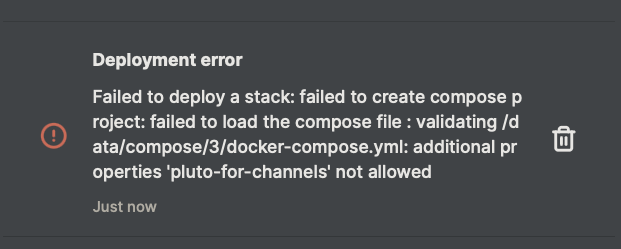
Do you have another image named pluto-for-docker? Honestly, I just load the yaml in a folder and run the docker compose up -d in terminal.
I did, but deleted it. and I changed the name in the compose to be different, that's what I did before. container_name: pluto-for-channelstest
1 Like