
Understood. Thank you for the clarification.
Appreciate the help, but it didn't like the one line at all. I tried changing my password to one that doesn't have any special characters but that didn't do anything either. I've deleted the container and the configuration I had in Channels and will try again. Is this working for others?
1 Like
Try changing the double quotes to single quotes? I think it's double quotes on Windows, single quotes on everything else.
Got further with the single quote marks, but I'm still getting the NLA on this device message.
The latest Windows version is crashing on my server (win11 25H2). It runs and you see the dashboard come up, then it crashes. Not in system tray or in task manager.
Try to download it again from GitHub. I just downloaded it on 2 different Windows PCs and it opened fine. I will double check the port configurations and see if I can find a bug.
It could be antivirus software trying to block it too.
Same thing, comes up with a spinning blue circle and crashes. Is it using 8080? I have nothing running on that port according to netstat.
I'm running stock Defender and told it to run anyway when it refused at start.
EDIT: nvm I figured it out, it's trying to bind to 7777 and I have the PBS docker running on that. Can you provide a port option?
It starts to look for 7777 if that is taken, it proceeds to the next one up until it finds an open port.
Figured it out. I was stopping and deleting the container, but not deleting the old image. When I deleted the 4 inactive images and followed Maddox's instructions, it went through the downloaded process. I guess it was just using the old image which I don't think could take login credentials.
I still immensely despise Docker. But I do appreciate those providing solutions and the community members helping others resolve issues. Thanks everyone!
I have logic designed to select the next one up and it must be flawed. I'll fix something up in a bit
Well it should do that, but it's crashing instead. Probably better to provide a cmdline arg, env etc.
Thank you, @Bobby_Vaughn.
As confirmed by others, adding username and password to the docker run command worked. The Pluto Nocords source had to be disabled because it seems that source is no longer going to work it anyway. Before disabling it, conflicting channel numbers were taking precedence over the docker source and the "no longer available" message was being displayed. For instance, Nocords (Dr. Who Classic) channel 870 overrode channel 870 from docker. All is well now.
I have it figured out, it is a race condition causing the crash. I have a working fix but I am away from a PC for the next little while. I'll update when I have some time.
Thanks for the developers jumping on this so quickly and giving us solutions! I was on the verge of panic lastnight when I saw that the previous solutions stopped working! I've got the Pluto-Windows_4C solution working well, but the EPG isn't showing at all. Is this something in develoment or should it be working?
thanks. Al
Right click the system tray icon and stop the server for the Pluto app and click the exe again and it will start to populate. I have that fixed in the latest build.
1 Like
Thanks, and thanks again for your work 
Thanks works great @Bobby_Vaughn
I suppose I need to add PlutoForChannels.exe to my startup executables upon PC Restart correct?
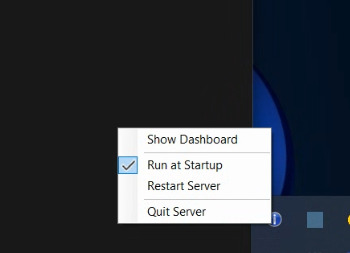
On the latest version 1.0.4, I added an option in the system tray icon to launch at startup. Just click it. If you are on a version that does not have the option, download the latest .exe.are run it after stoping the older one.
2 Likes
Got 1.0.4. How does one "unlock" multi-stream. I still only see one input area for credentials. Not seeing anything obvious to me to add / manage credentials.