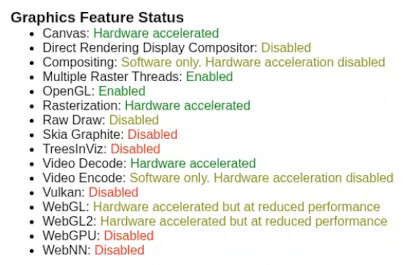
Thanks for the terrifc guide - I have this deployed in a ProxMox Container and it does work but I can't seem to get hardware encoding working, decode does work according to Chrome's GPU page.
For reference I am using a system with an i7-13700H. Encoding works for other containters (channels, scrypted & plex). Am I missing something or is it not possible? There is a lot of dated discussions saying it's not possible yet I see other people saying it works.
Both this LXC version, and the Docker version of cc4c support VNC, so once you have an active stream -- connect using a VNC client and enter your credentials.
@bnhf directed me to this thread after I tried rolling my own Proxmox LXC using the Dockerfile as a guide. Alas, I get the same result doing it this way as I did with own attempt. Specifically, the browser exits with the following whenever I attempt to start playback by connecting to http://hostname:5589/stream?url=...
cc4c doesn't use http:// for its scheme, it's chrome://, as shown in the first post:
None of what you posted here indicates an error, the [Info] message is just to give you a heads-up on why there's a restart of cc4c on the first run of a new installation:
The fact that you're running this command line, suggests you missed the post later on with additional detail on setting up the startup script and additional environment variables. Since that post contains refinements to the restart process, it's important:
Lastly, just to confirm no issues have crept into the process, I created a brand new LXC this morning and ran through the process myself. Here's the console output from a tune to a Sling channel, after the initial run and Sling login process via VNC:
cc4c3 login: root
Password:
Linux cc4c3 6.8.12-14-pve #1 SMP PREEMPT_DYNAMIC PMX 6.8.12-14 (2025-08-26T22:25Z) x86_64

The programs included with the Debian GNU/Linux system are free software;
the exact distribution terms for each program are described in the
individual files in /usr/share/doc/*/copyright.

Debian GNU/Linux comes with ABSOLUTELY NO WARRANTY, to the extent
permitted by applicable law.
Last login: Sat Dec 27 07:59:25 UTC 2025 on pts/1
Google Chrome 143.0.7499.169
Starting xvfb, x11vnc, and npm...
The VNC desktop is:      cc4c3:0
The VNC port is:         5900
[2025/12/27 01:12:43.678] Selected settings:
[2025/12/27 01:12:43.680] Video Bitrate: 9500000 bps (9.5Mbps)
[2025/12/27 01:12:43.680] Audio Bitrate: 256000 bps (256kbps)
[2025/12/27 01:12:43.680] Minimum Frame Rate: 60 fps
[2025/12/27 01:12:43.680] Port: 5589
[2025/12/27 01:12:43.680] Resolution: 1920x1080
[2025/12/27 01:12:43.686] Chrome Capture server listening on port 5589
[2025/12/27 01:20:02.640] Launching Browser, Opts {
  executablePath: '/usr/bin/google-chrome',
  pipe: true,
  headless: false,
  defaultViewport: null,
  userDataDir: '/opt/chrome-capture-for-channels/chromedata',
  args: [
    '--no-first-run',
    '--hide-crash-restore-bubble',
    '--allow-running-insecure-content',
    '--autoplay-policy=no-user-gesture-required',
    '--disable-blink-features=AutomationControlled',
    '--hide-scrollbars',
    '--window-size=1920,1080',
    '--disable-notifications',
    '--disable-background-networking',
    '--disable-background-timer-throttling',
    '--disable-background-media-suspend',
    '--disable-backgrounding-occluded-windows',
    '--auto-accept-this-tab-capture',
    '--allowlisted-extension-id=jjndjgheafjngoipoacpjgeicjeomjli',
    '--use-gl=angle',
    '--use-angle=gl-egl',
    '--enable-features=VaapiVideoDecoder,VaapiVideoEncoder',
    '--ignore-gpu-blocklist',
    '--enable-zero-copy',
    '--enable-drdc',
    '--no-sandbox'
  ],
  ignoreDefaultArgs: [
    '--enable-automation',
    '--disable-extensions',
    '--disable-default-apps',
    '--disable-component-update',
    '--disable-component-extensions-with-background-pages',
    '--enable-blink-features=IdleDetection',
    '--mute-audio'
  ],
  enableExtensions: [
    '/opt/chrome-capture-for-channels/node_modules/puppeteer-stream/extension'
  ]
}
[2025/12/27 01:20:02.797] New target page created: about:blank
[2025/12/27 01:20:02.808] Target page changed: chrome-extension://jjndjgheafjngoipoacpjgeicjeomjli/options.html#55200
[2025/12/27 01:20:02.808] New target page created: chrome-extension://jjndjgheafjngoipoacpjgeicjeomjli/background.js
[2025/12/27 01:20:03.812] Need to initialize stream capabilities
[2025/12/27 01:20:03.960] streaming https://watch.sling.com/1/channel/1a3c345b84b149918e0bad8f797df70a/watch
[2025/12/27 01:20:04.098] Target page changed: https://watch.sling.com/1/channel/1a3c345b84b149918e0bad8f797df70a/watch
[2025/12/27 01:20:04.112] URL contains watch.sling.com
[2025/12/27 01:20:05.203] Target page changed: https://watch.sling.com/dashboard/home
[2025/12/27 01:20:05.527] Target page changed: https://watch.sling.com/modal
[2025/12/27 01:20:30.720] Target page changed: https://watch.sling.com/dashboard/home
[2025/12/27 01:20:31.323] New target page created: blob:https://watch.sling.com/2638aa17-62cd-497c-a988-d44e7a824db8
[2025/12/27 01:20:31.422] Browser page closed: blob:https://watch.sling.com/2638aa17-62cd-497c-a988-d44e7a824db8
[2025/12/27 01:20:32.149] Target page changed: https://watch.sling.com/1/asset/69ef64da41ded9d9a9622bb1fcdebb57/watch
[2025/12/27 01:20:32.811] Browser page closed: chrome-extension://jjndjgheafjngoipoacpjgeicjeomjli/background.js
[2025/12/27 01:20:34.309] Set Sling to Full Screen and Volume to max
What is the difference between the 'chrome://' and 'http://' schemes? I have always used 'http://' with @tmm1's Docker image without issue, including the latest image for the last several weeks in my production use.
I do this because I normally use other software besides Channels DVR that doesn't understand the 'chrome://' scheme. I only use (and pay for) Channels DVR for evaluation and comparison purposes and to recommend to less tech savvy friends and acquaintances who want something similar to what I run.
I use mpv and sometimes vlc for testing and MythTV for production and development recording. I do that because I have been a MythTV dev for 22+ years and it has features I rely on that Channels DVR doesn't have. If and when MythTV becomes untenable and Channels is still around, I would probably switch to it but that time isn't now.
No, I saw it but chose to go in a different direction. My intent is to start CC4C from the command line for testing. After it is working that way, I will write a proper systemd unit file for it and contribute it back here. That will allow CC4C to be started and stopped like a normal service and not co-opt the SSH login.
[/quote]
I added some extra debugging, which was interesting but ultimately not helpful. I then decided to reboot the LXC, not just log out and back in, before proceeding.
Lo and behold, it all started working! Well, except for the video not going full screen issue. I will try to work on that soonish.
In addition, 1080 video was smooth in limited testing so far. I always had to drop down to 720 using the Docker images to get smooth video.
I will also try to work on the systemd unit file soonish and post it back here when ready.