Rant: Please fix the performance issues in the web administrative interface

I love Channels, but the web admin interface can be infuriatingly slow and laggy. I'm trying to edit some smart rules in a fairly standard personal section and my browser keeps hanging. I'm not on under powered hardware, either. 2.3 GHz 8-Core Intel Core i9, 16 GB of RAM. My browser should not hang anytime I access a page with a smart rule (which seems to be the worst offender) or the guide. I went to my playlists page and it completely crashed my browser.

I assume the interface is built using React and these performance issues are the result of re-renders? If so, maybe include some useMemo hooks or wrap the components in React.memo. It might help. All of us power users would thank you.
Also React Hook Form might help with the form fields. Editing any text field in the interface takes forever to catch up, assuming again due to the re-renders.

1 Like

You have a unique problem and there is no reason for rant before asking for help.

Have you tried a different web browser?

If that's not it, then try:
http://192.168.2.23:8089/speedtest
What speed did you get?

I also have the slow and laggy Web UI interface.
It's been that way for YEARS.!!
Win 11, Firefox. Also on Chrome browser.
I wonder if it s re-fetching ALL the Guide data every time it launches??

1 Like

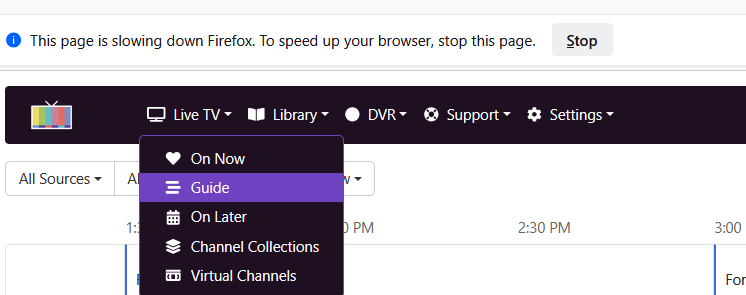
It shows this many times:"This page is slowing doen Firefox..."

Sorry, I’m going to be a bit of a dick here.

I’m a professional web developer who has experience with the framework they used to build the UI. The fact that I provided two suggestions on how to improve the performance should have clued you into that.

It’s an issue on at least Firefox and Chrome.

A speed test is irrelevant here. This is most likely a front end performance issue (although I suppose it is possible that the rendering is being blocked by hundreds of calls to an external API? Idk I didn’t look that close at the network calls).

Yeah, Guide is one of the worst areas if you are on "All Sources / All Channels", which is why Channel Collections are so important. Sayeth the Devs:

I only have 1380 station (including 750 placeholders for EPlusTV) and "All Sources / All Channels" will take 5-8 seconds to fully load. This is opposed to less than a second for any collection.

1 Like

I only have 824 channels (mostly Plex) and it’s still an issue.

As far as the personal sections go, the one I’m having an issue with is the standard TV Show template. I have issues with virtual channels as well. Maybe it’s because I have so much personal media?

Since we end users do not have access to the dev environment, there is no way to use the profiling tools to measure the number of re-renders, but the Components inspector provides a clue about what is happening.

I have a "Recently Aired Episodes" block that is displaying 6 episodes. But if I look at the props of the component, one of them is called "contentIds" and is an array of numbers. The array has 14,126 items! Why pass down 14,126 items when only 6 are displayed? Every time this component re-renders, it has to do calculations on every item in that array.

The next one is "Recordings" and that one passes down 2,059 items.

Also, looking at the network tab, when I refresh the Personal Sections page, there are some rather large queries:

I hope the developers don't take this as complaining. I'm just frustrated and want to help if I can.

1 Like

This takes about 1 second on my Windows box running Chrome. Firefox is a dog for the same. I have about 1,200 channels. Possibly the client running the browser makes a difference as I'm on an I9-1300k with 96-GB RAM. Possibly disk makes a difference as well.

I do use channel collections exclusively for every source I use.
I can prune or add-on certain channels from another source etc
I’m not sure of my exact channel count I’ve never counted that.
I do have a few sources I don't use often and I know when it comes to reloading the Guide that takes a bit.
And it loads the Guide for all sources even tho I’ve only requested an update on one Source.
None of this should make the loading of the web UI so slow IMHO, which is a very minor problem actually.

1 Like

You're right, you are being a dick.

Unless of course you have privately messaged the developers with the code needed to fix the simple issues you discovered, and they failed to implement them within an acceptable time frame.

Oh, you didn't, but instead chose to publicly share your frustrations? You're right, you are the dick.

(You are aware this is a community forum, so those reading your posts only know what you share, correct? You mention the desktop computer and its specs, but you have failed to mention the specs of your DVR server. As such an accomplished developer, I would have thought you would have shared those additional details, since that is where all the processing for the admin webUI occurs.)

3 Likes

@fashioncents Please submit diagnostics.

We're super aware of the absolute load that some of our UX puts on the browser. And have plans to get this resolved.

A lot of this is legacy scaling issues as much of the loading patterns were originally implemented with smaller libraries back when Channels was mostly a DVR full of simple recordings. But with the addition of Personal Media creating extremely large libraries, the deficiencies of these patterns are showing their faces.

7 Likes

"We're super aware of the absolute load that some of our UX puts on the browser. And have plans to get this resolved."
Thanks for that reply. :+1:

Your reply is incredibly hostile. The community forum is a valid support channel as far as I’m aware. It’s listed on the support page.

I didn’t put the developers on blast or anything. I was not a dick for posting this thread. I was a bit annoyed with the person I replied to.

Because it’s not relevant. The page locking up and the browser not responding is obviously a client side issue. If the problem was that the UI took a long time to load or failed to load something, possibly, but an API call itself is never going to cause the browser to literally run out of memory.

Done. e2444367-3fb9-447c-955a-3b57318067fe

It’s actually not as bad in Safari as it is in Chrome and Firefox. Discovered that last night.

If you behaved this way at work you would be called into HR for a talk.

Knock off the comments.
This is a Community Forum.
See FAQ - Channels Community

This is not an official support forum.

The op has submitted diagnostics to support.

Thanks. I honestly did not know that. Support stuff is posted here all of the time.

Edit: if someone would lock the thread, I’d appreciate it.