
OK. What is needed for the initial OS load, and getting onto my network? Does it default to DHCP?
1 Like
You just need a kbd monitor and usb stick with the ubuntu server installer. You can leave the nuc configured for dhcp, just reserve the address on your router. That way you dont have to mess with netplan to assign a static ip 
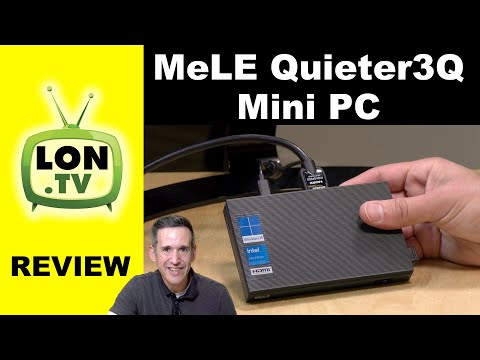
Well you did say small footprint cannot get any smaller than the one I posted above .... I got up to 3 Remote Connections ... it has Quicksync hardware transcoding.
1 Like
I didn't think about the Shield since we have two Apple TV 4K clients now, and I think of the shield as a client, but that is a possibility. It looks like it would have to be the Shield pro, and then an external drive.
I ordered a Raspi 4 in February…. Still waiting.
1 Like
I think of the shield as a client, but that is a possibility. It looks like it would have to be the Shield pro, and then an external drive.
I have an older 2019 one, non-pro but "flat" case, with a 2TB external USB drive. Seems to work fine.
1 Like
If I were in your position, I would buy the MeLE that Edwin linked to, hook it up to the TV via HDMI and velcro it to the back of the TV. I'd probably also add a 2TB Sammy nvme drive while I was at it, and a wireless keyboard/mouse combination (maybe even a small bluetooth thingy). The TV would be your monitor on the rare occasions that you would need to access the server directly, stow the keyboard and mouse when you aren't using them.
I would still be using the AppleTV 4k connected to the TV for the final client user interface to Channels DVR. I assume you have a router already and all of it would connect to that.
2 Likes
I would do it like @Kryptonyte posted above but with an intel nuc instead. Run Ubuntu desktop so you can use as a regular computer if you ever need to. For example it’s a lot easier to add pictures and videos when you have a desktop gui. Or run Ubuntu server if you know you will never use it that way. Nuc’s have a track record of being reliable, MeLE ??? You can also get vesa mounts for a nuc that will secure it behind the tv while you are bouncing around on road.
You dont have to do ubuntu desktop to have access to the imports directory. If you are not confident with cli and creating SMB shares, just install webmin and do it that way. It makes it really simple
1 Like
Both of these ideas sound good. I need to look at the space behind the main TV. In typical motorhome manufacturer fashion, they don't use a VESA mount. There are two vertical metal pieces with screw holes every inch or so and those line up with the mounting holes on the TV. I think there is room behind the TV for the MeLe, but a NUC may be too thick.
I did look at the cabinet above the main TV and is isn't big enough for the Synology, but it will fit behind the bedroom TV, which is on a hinged mount to give access to storage behind it. There is power back there, both 120VAC and 12VDC. At the moment that area is full, but I think some things can be moved.
1 Like
If you post some of your experiences, will definitely follow along! Sounds like a journey. In the event your forum username is based on the 1992 movie, try to avoid any place referred to as "St. Potato."
I think I'd prefer Ted's  And, our motorhome is named Wanderer.
Once we get on the road I will post!
A NUC or Pi is a good approach. But, you are thinking physical prescence. Why not be virtual? You said you would always have an internet connection; so, why not install the NAS at a family or friend`s house? I just tested streaming outside my home, it worked well! My Channels server also runs on a Synology. My neighbor came over and gave me "hot spot" internet link via his cell phone. I used an old Galaxy tablet & launched Channels. It took about 45 seconds to connect and buffer my recording. It played smoothly! You will have access to your familiar, local TV stations.
UPDATE 16SEP2022: My wife and I just took a short trip to Hilton Head, SC. I was hoping to catch up on Channels recordings while there. Unfortunately, it failed. I remoted into my home DVR and could see the list of recordings. When I tried to play one, I got a message that the host (a Synology DS218j with ARM CPU) did not have enough hardware processing power to compress the video. I was sorely disappointed.
If you look at the Channels Server requirements (Channels — Channels DVR Server), an Intel CPU with hardware transcoding support is needed. Intel calls that "Quick Sync" and is dedicated hardware in the Core i3/i5/i7/i9 and Pentium chips. This brings me back to recommendations from many users here: an Intel NUC. While a Raspberry Pi will work fine as a local device in your camper, neither the Pi or DS218 NAS will run Channels AND give you remote access.
I wanted to get this negative report out there before you headed off and tried to access your recordings from your NAS. A more powerful CPU will be needed to support remote access. In your camper, you can use a phone, tablet or Fire Stick for viewing.
I would love to hear of others experience with remote access. For example, Is the Pentium powerful enough for the Channels server remote access? Is a Core ix CPU needed?
2 Likes
The smallest and easiest set up is on Android TV with SSD. I have run the server on a Chromecast with Google TV, Tivo Stream 4k, and Sony TV with Android TV/Google TV. This is by far the smallest possible footprint as it is hidden behind the TV on the same device as the player. I have had issues with the CCGTV randomly resetting itself occasionally and other random issues like commercial skip not working all the time, TVE tuner issues.
I am not saying it is the best option, but I believe it is the smallest and easiest to set up.
Interesting idea! We've been accessing our home DVR remotely, so I can see where that would work. I'm not that our family would be up for that, but my neighbor would.
I think there are choices because "smallest footprint" does not always mean least expensive.
Least expensive does not always mean smallest footprint. Least expensive might also mean "what you already have", or least expensive to acquire right now.
The third leg is "adequately powerful" to fit your use-case.
I would love to have a NUC but I don't already own one and any of them are probably have a lot more horsepower than what my one or two viewers need. Plus a fully kitted out NUC with memory and storage might start around $500 and go up, well up, from there for the fancy ones.
Had a Pi4 and a Shield already sitting here under-used, and these work well for watching a few shows and recording a lot. And they're tiny and make no noise. Plus doing lots of other little things.
Yep. Sadly. The price gouging since the Cough began has been ridiculous. Prices are starting to come down but are still waaaaaaaay out of range from MSRPs.
I like the mini fanless N5105 boxes...a lot more versatile than a Pi4. For only a little more cash now.
I just bought one of these. Are you using it through Windows or is done with Linux?
I am using it with Windows want to familiarize myself with Windows 11.... it is my only windows 11 machine. Have it hooked up to my main entertainment center.
A quick follow up. We were able to find room in a cabinet behind the bedroom TV where the Synology will fit. There is also power there that is connected to the inverter so it will be available when we are not connected to shore power.
We officially hit the road next week, so we'll see how it goes.