Troubleshooting Errors

I ran Support/Troubleshooting from the UI and there were some problems.

DNS
Could not reach DNS server: lookup www.google.com: i/o timeout

Local Time
Could not connect to www.google.com: Get "http://www.google.com/": Timeout after 5 seconds

Anyone have any thoughts as to what these messages mean?

Thanks

Log Entries:

2026/01/28 08:40:10.803591 [TRS] DNS: ERROR: Could not reach DNS server: lookup www.google.com: i/o timeout
2026/01/28 08:40:11.140402 [TRS] Cloud Reachable: OK: Connected to community.getchannels.com
2026/01/28 08:40:16.142340 [TRS] Local Time: ERROR: Could not connect to www.google.com: Get "http://www.google.com/": Timeout after 5 seconds
2026/01/28 08:40:16.142500 [TRS] TV Everywhere: OK
2026/01/28 08:40:16.250266 [TRS] tve-dns: Resolved sp.auth.adobe.com: 13.219.31.29, 44.199.2.44, 35.153.17.128
2026/01/28 08:40:16.250315 [TRS] TV Everywhere DNS: OK: Resolved TVE authenticator via system DNS
2026/01/28 08:40:16.260405 [TRS] ad-dns: Resolved adservice.google.com: 142.251.34.130, 2607:f8b0:4008:808::2002
2026/01/28 08:40:16.269675 [TRS] ad-dns: Resolved googleads.g.doubleclick.net: 142.251.35.226, 2607:f8b0:4008:815::2002
2026/01/28 08:40:16.280006 [TRS] ad-dns: Resolved assets.adobedtm.com: 23.197.169.91, 2600:1403:9c00:d82::1e80, 2600:1403:9c00:d95::1e80
2026/01/28 08:40:16.289434 [TRS] ad-dns: Resolved d.adroll.com: 3.215.111.96, 52.0.91.186, 44.219.112.67, 52.6.23.9, 100.28.251.149, 44.221.127.202, 98.88.173.50, 3.224.238.103, 2600:1f18:61c0:2204:91c6:f6f9:d28c:749c, 2600:1f18:61c0:2204:1ff:6c7c:3578:d0ae, 2600:1f18:61c0:2206:1a22:84ec:d7b1:8c17, 2600:1f18:61c0:2205:18c:baa5:35c7:5c5f, 2600:1f18:61c0:2204:f8f6:489:52fa:f83f, 2600:1f18:61c0:2205:4bcc:2326:20a9:d923, 2600:1f18:61c0:2205:3df3:3706:d9e3:9ec0, 2600:1f18:61c0:2204:629b:adaf:2d27:9a89
2026/01/28 08:40:16.299044 [TRS] ad-dns: Resolved bat.bing.com: 150.171.27.10, 150.171.28.10, 2620:1ec:33::10, 2620:1ec:33:1::10
2026/01/28 08:40:16.309308 [TRS] ad-dns: Resolved pubads.g.doubleclick.net: 142.251.35.98, 2607:f8b0:4008:806::2002
2026/01/28 08:40:21.250308 [TRS] ad-dns: Could not query edge.api.brightcove.com: *net.DNSError: lookup edge.api.brightcove.com: i/o timeout
2026/01/28 08:40:21.250373 [TRS] ad-dns: Could not query medium.ngtv.io: *net.DNSError: lookup medium.ngtv.io: i/o timeout
2026/01/28 08:40:21.250390 [TRS] DNS Ad Blocking: OK
2026/01/28 08:40:21.402745 [TRS] Guide Provider: OK: Connected to guide provider
2026/01/28 08:40:21.453681 [TRS] Device Lineups: OK: All devices have guide data mapped
2026/01/28 08:40:21.472181 [TRS] Operating System: OK
2026/01/28 08:40:21.472543 [TRS] Network Interfaces: OK
2026/01/28 08:40:21.472734 [TRS] Remote Access: OK: Remote access not configured
2026/01/28 08:40:21.474459 [TRS] Recording Directory: OK
2026/01/28 08:40:21.544192 [TRS] Disk Permissions: OK
2026/01/28 08:40:21.544893 [TRS] Disk Space: OK: DVR directory '/volumes/IntelDVR' has 6.3T free
2026/01/28 08:40:21.723613 [TRS] DVR Version: OK: DVR is up to date
2026/01/28 08:40:21.723666 [TRS] DBG: Version info: &{2025.10.30.0047 https://cdn.channelsdvr.net/dvr false}
2026/01/28 08:40:21.723702 [TRS] DVR Status: OK: DVR is enabled
2026/01/28 08:40:21.723725 [TRS] macOS Rosetta: OK
2026/01/28 08:40:21.723762 [TRS] System Firewall: OK
2026/01/28 08:40:21.723773 [TRS] DBG: Could not query com.apple.alf state: open /Library/Preferences/com.apple.alf.plist: no such file or directory
2026/01/28 08:40:22.257808 [TRS] Third Party Firewall: OK
2026/01/28 08:40:22.789624 [TRS] Little Snitch: OK
2026/01/28 08:40:22.789814 [TRS] Power Management: OK
How long has this been going on?

What DNS provider are you using?

Are other computers on your network having trouble connecting to www.google.com?

Usually problems like this clear up quickly. If not, you have a DNS configuration issue

  • The message first appeared today.
  • Other computer (Mac mini m4) and the Intel Mac mini hosting ChannelsDVR Server don't have trouble connecting to www.google.com
  • I use DNS 8.8.8.8 & 8.8.4.4

Thanks

Sent DVR Diagnostic Log 19945712-61e2-47e6-88e1-89a3aa75caff

That's strange. I would expect Google DNS to know where www.google.com is.

The Channels DNS server should be using your ISP's DNS servers so that your connections to the content distribution servers for TVE are the closest ones. I don't think that's what is causing the messages. If you run the troubleshoot tool it will warn you about the DNS server. Things will still work. Have you restarted the server?

With only specific hosts failing DNS resolution, that points to either dns filtering or networking issues.
And the requests are timing out instead of returning unknown host.

[TRS] DNS: ERROR: Could not reach DNS server: lookup www.google.com: i/o timeout
[TRS] Local Time: ERROR: Could not connect to www.google.com: Get "http://www.google.com/": Timeout after 5 seconds
[TRS] ad-dns: Could not query edge.api.brightcove.com: *net.DNSError: lookup edge.api.brightcove.com: i/o timeout
[TRS] ad-dns: Could not query medium.ngtv.io: *net.DNSError: lookup medium.ngtv.io: i/o timeout

Good observation and a timeout is an indication of a network issue. U hope the server has a wired connection.

I have restarted the server. Also it is hard wired, about 3 FT from router.

Try a different cable and port

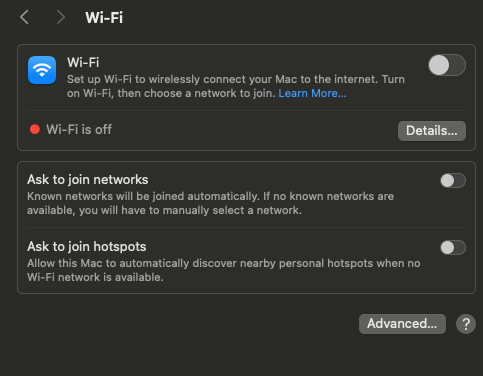
Sounds like channels may have bound to the wrong interface. Make sure wifi is disconnected and from terminal run ifconfig and paste the results.

Just disable IPv4 on the Wifi interface

tyrone@photosmike-intel ~ % sudo ifconfig

lo0: flags=8049<UP,LOOPBACK,RUNNING,MULTICAST> mtu 16384
	options=1203<RXCSUM,TXCSUM,TXSTATUS,SW_TIMESTAMP>
	inet 127.0.0.1 netmask 0xff000000
	inet6 ::1 prefixlen 128 
	inet6 fe80::1%lo0 prefixlen 64 scopeid 0x1 
	nd6 options=201<PERFORMNUD,DAD>
gif0: flags=8010<POINTOPOINT,MULTICAST> mtu 1280
stf0: flags=0<> mtu 1280
en0: flags=8822<BROADCAST,SMART,SIMPLEX,MULTICAST> mtu 1500
	options=50b<RXCSUM,TXCSUM,VLAN_HWTAGGING,AV,CHANNEL_IO>
	ether f0:18:98:f2:14:cb
	media: autoselect (none)
	status: inactive
en7: flags=8863<UP,BROADCAST,SMART,RUNNING,SIMPLEX,MULTICAST> mtu 16000
	ether ac:de:48:00:11:22
	inet6 fe80::aede:48ff:fe00:1122%en7 prefixlen 64 scopeid 0x6 
	nd6 options=201<PERFORMNUD,DAD>
	media: autoselect (100baseTX <full-duplex>)
	status: active
ap1: flags=8843<UP,BROADCAST,RUNNING,SIMPLEX,MULTICAST> mtu 1500
	options=6460<TSO4,TSO6,CHANNEL_IO,PARTIAL_CSUM,ZEROINVERT_CSUM>
	ether 6e:a1:1f:54:72:f1
	inet6 fe80::6ca1:1fff:fe54:72f1%ap1 prefixlen 64 scopeid 0x7 
	nd6 options=201<PERFORMNUD,DAD>
	media: autoselect
en1: flags=8863<UP,BROADCAST,SMART,RUNNING,SIMPLEX,MULTICAST> mtu 1500
	options=6460<TSO4,TSO6,CHANNEL_IO,PARTIAL_CSUM,ZEROINVERT_CSUM>
	ether fa:a2:fe:17:61:e6
	nd6 options=201<PERFORMNUD,DAD>
	media: autoselect
	status: inactive
awdl0: flags=8802<BROADCAST,SIMPLEX,MULTICAST> mtu 1500
	options=400<CHANNEL_IO>
	ether 2a:0b:1e:c7:f6:68
	media: autoselect
llw0: flags=8863<UP,BROADCAST,SMART,RUNNING,SIMPLEX,MULTICAST> mtu 1500
	options=400<CHANNEL_IO>
	ether 2a:0b:1e:c7:f6:68
	inet6 fe80::280b:1eff:fec7:f668%llw0 prefixlen 64 scopeid 0xa 
	nd6 options=201<PERFORMNUD,DAD>
	media: autoselect
	status: inactive
en4: flags=8963<UP,BROADCAST,SMART,RUNNING,PROMISC,SIMPLEX,MULTICAST> mtu 1500
	options=460<TSO4,TSO6,CHANNEL_IO>
	ether 82:4e:bb:83:60:05
	media: autoselect <full-duplex>
	status: inactive
en2: flags=8963<UP,BROADCAST,SMART,RUNNING,PROMISC,SIMPLEX,MULTICAST> mtu 1500
	options=460<TSO4,TSO6,CHANNEL_IO>
	ether 82:4e:bb:83:60:01
	media: autoselect <full-duplex>
	status: inactive
en3: flags=8963<UP,BROADCAST,SMART,RUNNING,PROMISC,SIMPLEX,MULTICAST> mtu 1500
	options=460<TSO4,TSO6,CHANNEL_IO>
	ether 82:4e:bb:83:60:00
	media: autoselect <full-duplex>
	status: inactive
en5: flags=8963<UP,BROADCAST,SMART,RUNNING,PROMISC,SIMPLEX,MULTICAST> mtu 1500
	options=460<TSO4,TSO6,CHANNEL_IO>
	ether 82:4e:bb:83:60:04
	media: autoselect <full-duplex>
	status: inactive
bridge0: flags=8863<UP,BROADCAST,SMART,RUNNING,SIMPLEX,MULTICAST> mtu 1500
	options=63<RXCSUM,TXCSUM,TSO4,TSO6>
	ether 82:4e:bb:83:60:01
	Configuration:
		id 0:0:0:0:0:0 priority 0 hellotime 0 fwddelay 0
		maxage 0 holdcnt 0 proto stp maxaddr 100 timeout 1200
		root id 0:0:0:0:0:0 priority 0 ifcost 0 port 0
		ipfilter disabled flags 0x0
	member: en2 flags=3<LEARNING,DISCOVER>
	        ifmaxaddr 0 port 12 priority 0 path cost 0
	member: en3 flags=3<LEARNING,DISCOVER>
	        ifmaxaddr 0 port 13 priority 0 path cost 0
	member: en4 flags=3<LEARNING,DISCOVER>
	        ifmaxaddr 0 port 11 priority 0 path cost 0
	member: en5 flags=3<LEARNING,DISCOVER>
	        ifmaxaddr 0 port 14 priority 0 path cost 0
	nd6 options=201<PERFORMNUD,DAD>
	media: <unknown type>
	status: inactive
utun0: flags=8051<UP,POINTOPOINT,RUNNING,MULTICAST> mtu 1500
	inet6 fe80::2d72:b0:5283:e8d4%utun0 prefixlen 64 scopeid 0x10 
	nd6 options=201<PERFORMNUD,DAD>
utun1: flags=8051<UP,POINTOPOINT,RUNNING,MULTICAST> mtu 1380
	inet6 fe80::93c4:b9c8:da45:7e8b%utun1 prefixlen 64 scopeid 0x11 
	nd6 options=201<PERFORMNUD,DAD>
utun2: flags=8051<UP,POINTOPOINT,RUNNING,MULTICAST> mtu 2000
	inet6 fe80::5246:7ece:7a5:4657%utun2 prefixlen 64 scopeid 0x12 
	nd6 options=201<PERFORMNUD,DAD>
utun3: flags=8051<UP,POINTOPOINT,RUNNING,MULTICAST> mtu 1000
	inet6 fe80::ce81:b1c:bd2c:69e%utun3 prefixlen 64 scopeid 0x13 
	nd6 options=201<PERFORMNUD,DAD>
utun4: flags=8051<UP,POINTOPOINT,RUNNING,MULTICAST> mtu 1420
	inet 10.5.0.2 --> 10.5.0.2 netmask 0xffff0000
utun5: flags=8051<UP,POINTOPOINT,RUNNING,MULTICAST> mtu 1380
	inet6 fe80::c337:6c26:cb3f:4991%utun5 prefixlen 64 scopeid 0x15 
	nd6 options=201<PERFORMNUD,DAD>
utun6: flags=8051<UP,POINTOPOINT,RUNNING,MULTICAST> mtu 1380
	inet6 fe80::352b:947c:eb26:c7a%utun6 prefixlen 64 scopeid 0x16 
	nd6 options=201<PERFORMNUD,DAD>
utun7: flags=8051<UP,POINTOPOINT,RUNNING,MULTICAST> mtu 1380
	inet6 fe80::380b:1674:b923:d540%utun7 prefixlen 64 scopeid 0x17 
	nd6 options=201<PERFORMNUD,DAD>
en10: flags=8863<UP,BROADCAST,SMART,RUNNING,SIMPLEX,MULTICAST> mtu 1500
	options=404<VLAN_MTU,CHANNEL_IO>
	ether 6c:1f:f7:20:cf:af
	inet 192.168.1.235 netmask 0xffffff00 broadcast 192.168.1.255
	nd6 options=201<PERFORMNUD,DAD>
	media: autoselect (5000Base-T <full-duplex>)
	status: active

Screenshot 2026-01-28 at 11.51.06 PM