
I found a work around since the GraceNote ID's are mostly right ... What I did was add a Tubi Gracenote M3U and another with everything .... I disable all the Channels on the one that has everything... so If I run across a show that has the Wrong GraceNote ID ... I simply disable it and enable in the M3u that has everything. This way all the Movie Channels are defined as movies and do not get picked up as TVShows.
That's not a bad idea. I'll try that, too. Hopefully, the channel which was being problematic for me will have the right guide data in the "everything" M3U.
Yeah I was trying to record NIKITA and La Femme NIKITA the grace note guide data was off the evrything on was ok and also had the Season and episodes correct.
GraceNote

Everything...

I hear ya, The channel I was having trouble with is "The Carol Burnett Show". I never could get the epg to match up. With this change, it matches perfectly. I also used the same method to fix the same problem with gracenote mis-matches in the Plex docker epg. 
Thanks I also just fixed Carol Burnett Show.
I am curious as to what EPG and Gracenote means? Which setup will work the best with a full guide and channels?

TUBI Gracenote Playlist will supply Gracenote guide data (same as what Channels DVR uses) for the channels that @joagomez has mapped to Gracenote stations id's.
TUBI EPG Only Playlist will supply guide data from Tubi for the channels that aren't mapped to Gracenote guide data in the TUBI Gracenote Playlist.
If you run the frndly TV docker, you're familiar with using two Channels DVR custom M3U sources. One for Gracenote guide data channels and the other for frndly TV guide data channels.
In any case, you would use the TUBI EPG (epg.xml ) or TUBI EPG GZ (epg.xml.gz) that supplies guide data for all channels from Tubi.
I find some channels in the TUBI Gracenote Playlist are mapped to the wrong station id, so the guide info doesn't match what is airing. So I have one source setup that uses the TUBI playlist.m3u and the TUBI EPG epg.xml.
3 Likes
One thing that TUBI XML none Gracenote is that it does not categorize movies ... so movie recordings go in the TV folder when recorded.
You just solved a great mystery for me. Thank you! 
Any idea why the epg from Tubi adds the email as Part of the episode and series ID... @tmm1 If I go to use the EPG from Channels in other APPS it barfs.
This is the original direct from the Docker ....
 <programme channel="400000071" start="20250318194158 +0000" stop="20250318203226 +0000">
    <title>La Femme Nikita</title>
    <sub-title>S04:E05 - Man in the Middle</sub-title>
    <episode-num system="onscreen">S04E05</episode-num>
    <desc>Michael and Nikita act as drug dealers to get close to an arms dealing playboy with connection to a terrorist group called Red Cell.</desc>
    <icon src="https://canvas-lb.tubitv.com/opts/JmLCCe0XUXckWQ==/a726a5af-c1a8-43e0-ad1d-4d9a06c410b2/CN4HEMcEOgUxLjEuNg==" />
  </programme>
This is when the M3U is extracted fron Channels DVR.
<programme start="20250318194158 +0000" stop="20250318203226 +0000" channel="4118">
<title>La Femme Nikita</title>
<sub-title>S04:E05 - Man in the Middle</sub-title>
<desc>Michael and Nikita act as drug dealers to get close to an arms dealing playboy with connection to a terrorist group called Red Cell.</desc>
<icon src="https://canvas-lb.tubitv.com/opts/JmLCCe0XUXckWQ==/a726a5af-c1a8-43e0-ad1d-4d9a06c410b2/CN4HEMcEOgUxLjEuNg=="/>
<series-id system="xmltv:[email protected]">La Femme Nikita</series-id>
<previously-shown/>
<episode-num system="xmltv:[email protected]">La Femme Nikita/S4E5</episode-num>
<episode-num system="onscreen">S4E5</episode-num>
<episode-num system="xmltv_ns">3.4.</episode-num>
</programme>
This is the only place that the EPG from Docker has the Email.
<?xml version='1.0' encoding='utf-8'?>
<!DOCTYPE tv SYSTEM "xmltv.dtd">
<tv generator-info-name="[email protected]" generated-ts="">
@tmm1 - I had set generator-info-name to the user login simply to track this information within the XML. Based on the finding above, should this be placed elsewhere, like generator-info-url or source-info-name ?
1 Like
We expect the source/generator info name to be the name of the software. I can update our side to ignore emails.
3 Likes
cool, I can omit that as didn't know it was being used in that manner
@tmm1
I am trying to clean up the EPG data a bit and noticed that the EpisodeTitle isn't always present like in the example below even though the raw data appear to be similar
HAS EPISODE TITLE
      {
        "Source": "xmltv:",
        "Channel": "9004",
        "Time": 1742414400,
        "Duration": 1800,
        "Title": "World's Funniest Videos Top 10 Countdown",
        "EpisodeTitle": "World’s Funniest Videos Top 10 Countdown",
        "Summary": "Humor has no international borders. We're bringing you the most hilarious moments across the globe.",
        "Image": "https://canvas-lb.tubitv.com/opts/XN-z3Emy4Q3MZw==/763ed9f1-e37b-4b90-a54f-1b5163611a17/CN4HEMcEOgUxLjEuNg==",
        "SeriesID": "World's Funniest Videos Top 10 Countdown",
        "ProgramID": "World's Funniest Videos Top 10 Countdown/S3E35",
        "SeasonNumber": 3,
        "EpisodeNumber": 35,
        "ContentRating": "TV-PG",
        "SearchScore": 0.0128343807778912,
        "Raw": {
          "xmltv": "\u003Ctv generator-info-name=\"\" generated-ts=\"\"\u003E\n\u003Cchannel id=\"653208\"\u003E\n    \u003Cdisplay-name\u003EAlways Funny\u003C/display-name\u003E\n    \u003Cicon src=\"https://canvas-lb.tubitv.com/opts/fx0OZHA-1_ZDwA==/e8f543f1-3086-4896-a76e-20e86b782bd3/CHgQeDoFMS4xLjZAAQ==\" /\u003E\n  \t\u003Clcn\u003E9004\u003C/lcn\u003E\n\u003C/channel\u003E\n\n\u003Cprogramme channel=\"653208\" start=\"20250319200000 +0000\" stop=\"20250319203000 +0000\"\u003E\n    \u003Ctitle\u003EWorld's Funniest Videos Top 10 Countdown\u003C/title\u003E\n    \u003Csub-title\u003EWorld’s Funniest Videos Top 10 Countdown\u003C/sub-title\u003E\n    \u003Cepisode-num system=\"onscreen\"\u003ES03E35\u003C/episode-num\u003E\n    \u003Cepisode-num system=\"xmltv_ns\"\u003E02.34\u003C/episode-num\u003E\n    \u003Cdesc\u003EHumor has no international borders. We're bringing you the most hilarious moments across the globe.\u003C/desc\u003E\n    \u003Crating\u003E\n      \u003Cvalue\u003ETV-PG\u003C/value\u003E\n    \u003C/rating\u003E\n    \u003Cicon src=\"https://canvas-lb.tubitv.com/opts/XN-z3Emy4Q3MZw==/763ed9f1-e37b-4b90-a54f-1b5163611a17/CN4HEMcEOgUxLjEuNg==\" /\u003E\n  \u003C/programme\u003E\u003C/tv\u003E"
        }
      },
NO EPISODE TITLE
      {
        "Source": "xmltv:",
        "Channel": "9004",
        "Time": 1742416200,
        "Duration": 1800,
        "Title": "World's Funniest Videos Top 10 Countdown",
        "Summary": "Humor has no international borders. We're bringing you the most hilarious moments across the globe.",
        "Image": "https://canvas-lb.tubitv.com/opts/AjMY9cL3ISjOOQ==/984fcda7-861f-4b83-8601-05e1f874b89a/CN4HEMcEOgUxLjEuNg==",
        "SeriesID": "World's Funniest Videos Top 10 Countdown",
        "ProgramID": "World's Funniest Videos Top 10 Countdown/S3E12",
        "SeasonNumber": 3,
        "EpisodeNumber": 12,
        "ContentRating": "TV-PG",
        "SearchScore": 0.010351623351559,
        "Raw": {
          "xmltv": "\u003Ctv generator-info-name=\"\" generated-ts=\"\"\u003E\n\u003Cchannel id=\"653208\"\u003E\n    \u003Cdisplay-name\u003EAlways Funny\u003C/display-name\u003E\n    \u003Cicon src=\"https://canvas-lb.tubitv.com/opts/fx0OZHA-1_ZDwA==/e8f543f1-3086-4896-a76e-20e86b782bd3/CHgQeDoFMS4xLjZAAQ==\" /\u003E\n  \t\u003Clcn\u003E9004\u003C/lcn\u003E\n\u003C/channel\u003E\n\n\u003Cprogramme channel=\"653208\" start=\"20250319203000 +0000\" stop=\"20250319210000 +0000\"\u003E\n    \u003Ctitle\u003EWorld's Funniest Videos Top 10 Countdown\u003C/title\u003E\n    \u003Csub-title\u003EWorld's Funniest Videos Top 10 Countdown\u003C/sub-title\u003E\n    \u003Cepisode-num system=\"onscreen\"\u003ES03E12\u003C/episode-num\u003E\n    \u003Cepisode-num system=\"xmltv_ns\"\u003E02.11\u003C/episode-num\u003E\n    \u003Cdesc\u003EHumor has no international borders. We're bringing you the most hilarious moments across the globe.\u003C/desc\u003E\n    \u003Crating\u003E\n      \u003Cvalue\u003ETV-PG\u003C/value\u003E\n    \u003C/rating\u003E\n    \u003Cicon src=\"https://canvas-lb.tubitv.com/opts/AjMY9cL3ISjOOQ==/984fcda7-861f-4b83-8601-05e1f874b89a/CN4HEMcEOgUxLjEuNg==\" /\u003E\n  \u003C/programme\u003E\u003C/tv\u003E"
        }
      },
This difference leads to the following
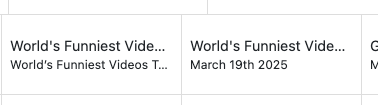
Is there something I'm not seeing
From XML
  <programme channel="653208" start="20250319200000 +0000" stop="20250319203000 +0000">
    <title>World's Funniest Videos Top 10 Countdown</title>
    <sub-title>World’s Funniest Videos Top 10 Countdown</sub-title>
    <episode-num system="onscreen">S03E35</episode-num>
    <episode-num system="xmltv_ns">02.34</episode-num>
    <desc>Humor has no international borders. We're bringing you the most hilarious moments across the globe.</desc>
    <rating>
      <value>TV-PG</value>
    </rating>
    <icon src="https://canvas-lb.tubitv.com/opts/XN-z3Emy4Q3MZw==/763ed9f1-e37b-4b90-a54f-1b5163611a17/CN4HEMcEOgUxLjEuNg==" />
  </programme>
  <programme channel="653208" start="20250319203000 +0000" stop="20250319210000 +0000">
    <title>World's Funniest Videos Top 10 Countdown</title>
    <sub-title>World's Funniest Videos Top 10 Countdown</sub-title>
    <episode-num system="onscreen">S03E12</episode-num>
    <episode-num system="xmltv_ns">02.11</episode-num>
    <desc>Humor has no international borders. We're bringing you the most hilarious moments across the globe.</desc>
    <rating>
      <value>TV-PG</value>
    </rating>
    <icon src="https://canvas-lb.tubitv.com/opts/AjMY9cL3ISjOOQ==/984fcda7-861f-4b83-8601-05e1f874b89a/CN4HEMcEOgUxLjEuNg==" />
  </programme>
1 Like
Hmm, I think we ignore sub-title when it's exactly the same as the title.
But the first xml entry uses a smart quote
good to know.
I've updated the code to do some checking for sub-title being equal to the title. Also added content rating and if the rating follows the mpaa the program gets classified as a movie. Also did some reoprding of steps to try and avoid the report issue of programs not updating after 4 hours
There seems to be a problem with the way this is formatted ...
<episode-num system="xmltv:">Nikita/S1E19</episode-num>
Getting this error ...
20-03-2025 01:14:50,383 <programme><episode-num system=xmltv:jgomez177 /> /> xmltv.programme.episode-num.system.showID_Value if its the showID
20-03-2025 01:14:50,384 <programme><episode-num system=xmltv:jgomez177 /> /> xmltv.programme.episode-num.system.showID_Value if its the showID
Extracted from Channels DVR
<tv source-info-name="channels-dvr">
<channel id="4118">
<lcn>4118</lcn>
<display-name>Nikita</display-name>
<icon src="https://canvas-lb.tubitv.com/opts/sH9BJ8h1eAqxMg==/bf6f69f6-4495-4bc2-94f9-fd91877e36f0/CHgQeDoFMS4xLjZAAQ=="/>
</channel>
<programme start="20250320145210 +0000" stop="20250320153654 +0000" channel="4118">
<title>Nikita</title>
<sub-title>S02:E06 - 343 Walnut Lane</sub-title>
<desc>Nikita and Michael locate her birth father (DAVID KEITH).</desc>
<icon src="https://canvas-lb.tubitv.com/opts/u-jU3cxc87usbQ==/eadcee90-9432-4a08-8a22-3a16cb34944d/CN4HEMcEOgUxLjEuNg=="/>
<series-id system="xmltv:">Nikita</series-id>
<previously-shown/>
<episode-num system="xmltv:">Nikita/S2E6</episode-num>
<episode-num system="onscreen">S2E6</episode-num>
<episode-num system="xmltv_ns">1.5.</episode-num>
<rating>
<value>TV-14</value>
</rating>
</programme>
Are you consistently seeing errors or only that single one for S1E19?
I am not seeing any errors with the instance I setup
This is the xml being generated for the episode you reference:
  <programme channel="400000071" start="20250320145210 +0000" stop="20250320153654 +0000">
    <title>Nikita</title>
    <sub-title>S02:E06 - 343 Walnut Lane</sub-title>
    <episode-num system="onscreen">S02E06</episode-num>
    <episode-num system="xmltv_ns">01.05</episode-num>
    <desc>Nikita and Michael locate her birth father (DAVID KEITH).</desc>
    <rating>
      <value>TV-14</value>
    </rating>
    <icon src="https://canvas-lb.tubitv.com/opts/u-jU3cxc87usbQ==/eadcee90-9432-4a08-8a22-3a16cb34944d/CN4HEMcEOgUxLjEuNg==" />
  </programme>
which as you can see I do not generate the <episode-num system="xmltv:"> tag
Below is what Channels creates based off the above
<programme start="20250320145210 +0000" stop="20250320153654 +0000" channel="9121">
<title>Nikita</title>
<sub-title>S02:E06 - 343 Walnut Lane</sub-title>
<desc>Nikita and Michael locate her birth father (DAVID KEITH).</desc>
<icon src="https://canvas-lb.tubitv.com/opts/u-jU3cxc87usbQ==/eadcee90-9432-4a08-8a22-3a16cb34944d/CN4HEMcEOgUxLjEuNg=="/>
<series-id system="xmltv:">Nikita</series-id>
<previously-shown/>
<episode-num system="xmltv:">Nikita/S2E6</episode-num>
<episode-num system="onscreen">S2E6</episode-num>
<episode-num system="xmltv_ns">1.5.</episode-num>
<rating>
<value>TV-14</value>
</rating>
</programme>
I do have leading zeros on the system="xmltv_ns" which may be impacting?
I am seeing errors for anything that does not use Gracenote. The problem is when I extract the EPG from Channels to feed the Another APP it Adds the Nikita to The Season and episode.
Again I don't generate that within the docker (which looking back you did note earlier in the thread). Perhaps @tmm1 may have insight how that is generated from within Channels