
I'm putting a channel pack together from this m3u and will have it uploaded soon. It will be directv_sat_la or something like that.
I don't understand what you're saying here. Did you not send me the M3U that was generated by the Project One-Click Action? That's the one I wanted.
Thanks Bobby_Vaughn!
@bnhf, to import it directly it needs to be in a json file and I don't know how to convert what you posted into one...yet. Google, here I come!
Yes, I generated the M3U from Project One-Click, but @Bobby_Vaughn asked for it to create the pack for this project. What I sent you was the result of that pack.
OK, just to be clear Project One-Click does not produce files (yet), that can be imported directly into Windows ADB Bridge. In Project One-Click you can produce output suitable for ADBTuner or for ah4c. It just so happens the ah4c M3U contains all the data needed, and can be easily converted (I assume) into a format this app uses.
@Bobby_Vaughn can you clarify this? Is the M3U posted previously by @daldana7296 (in two parts) something you produced? It sure looks like Project One-Click output.
EDIT: It's posted here:
and here:
He also mentions it being 82,000 lines, which would have been the size of original JSON from DTV, not the resulting M3U for ah4c.
Somebody's confused here, and maybe it's me, but I'd like to understand what went sideways, in case it's something I need to deal with in Project One-Click.
If anyone is confused, it's probably me. But I can say for certain that I used the same guide page and ah4c one-click action to generate the output. I copied the output from the open terminal window and pasted them in Notepad.
I don't know. The m3u file he emailed me is what I used to build the json file in my channel pack for DirecTV Los Angeles. I just checked through what he sent and what I put in the pack and they are the same. I just built a new channel pack from the one you just posted and the stationID's are different on about 200 or so channels.
It seems like the locals, at least some, are Colorado stations and not Los Angeles stations.
#EXTINF:-1 channel-id="4" channel-number="4" tvc-guide-stationid="21297",CBS-KCNC
http://{{ .IPADDRESS }}/play/tuner/KCNC~e8790c92-6a3c-bd4d-c140-a457641ce103
#EXTINF:-1 channel-id="9" channel-number="9" tvc-guide-stationid="21298",NBC-KUSA
http://{{ .IPADDRESS }}/play/tuner/KUSA~67ace820-74a7-f2ee-6312-f82b0405b0cd
I just put a new DirecTV SAT (Los Angeles) pack. Delete the existing DirecTV pack you have installed and append the new one. Let me know if they work. Be sure to download a backup before you start.
Yeah, something weird is definitely going on. I just used that channel pack and when I inspected it, the local channel callsigns are wrong.
So to go over the steps I used.
- Go to https://stream.directv.com/guide
- Open Developer Tools, refresh the page
- Find allchannels (orange color)
- Copy as cUrl (Bash)
- Open Project One-Click, click on Create an ah4c Directv M3U
- Paste cUrl (Bash) in Curl Command box, leave Url Style as Deeplinks
Are these the correct steps?
Did the original locals tune correctly? It appears the locals in the latest are from Colorado.
OK, standby -- let me look at all the source files that were used...
Yes, the original ones tuned correctly.
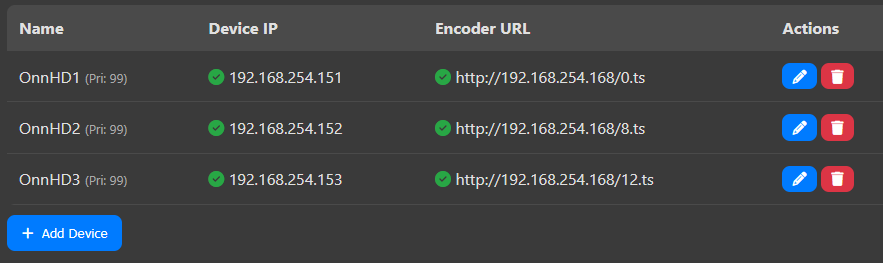
Over the past month or so, the Bridge seems to lose contact with (1) out of (3) of the Onn sticks. Once in a while it coincides with the Onn stick needing to give access to the Server PC (checkbox and allow), but most times it just loses contact with the Onn stick and I have to restart the PC running the Bridge. In the meantime, how do I stop the Bridge and restart it without rebooting the computer? I've had to start checking this every morning. The status never changes, it just loses contact with the Onn stick:
@daldana7296 @Bobby_Vaughn It looks like I used the wrong source JSON file. I'll produce a new one shortly. The one you created you can repurpose for DTV Stream in the Denver area.
I have not experienced this. Restarting the onn stick or clicking refresh on the dashboard does seem to fix it? What version are you on? I have done some updates on the connection end over the last few updates.
He is in the Los Angeles area.
I know, I was still using my test JSON file, rather than the one @daldana7296 sent. My fault. That test file was pulled this morning and is good for DTV Stream in the Denver area. I'm producing one from @daldana7296's JSON file now...
I haven't updated in a very long time, it's just been working up until about a month ago. Refreshing the status does nothing, rebooting the server PC resolves it. It's stuck in that mode right now where one Onn stick registers as fine on the Bridge status screen, but when I test a channel it just sits and spins and the Onn stick never leaves the home screen.
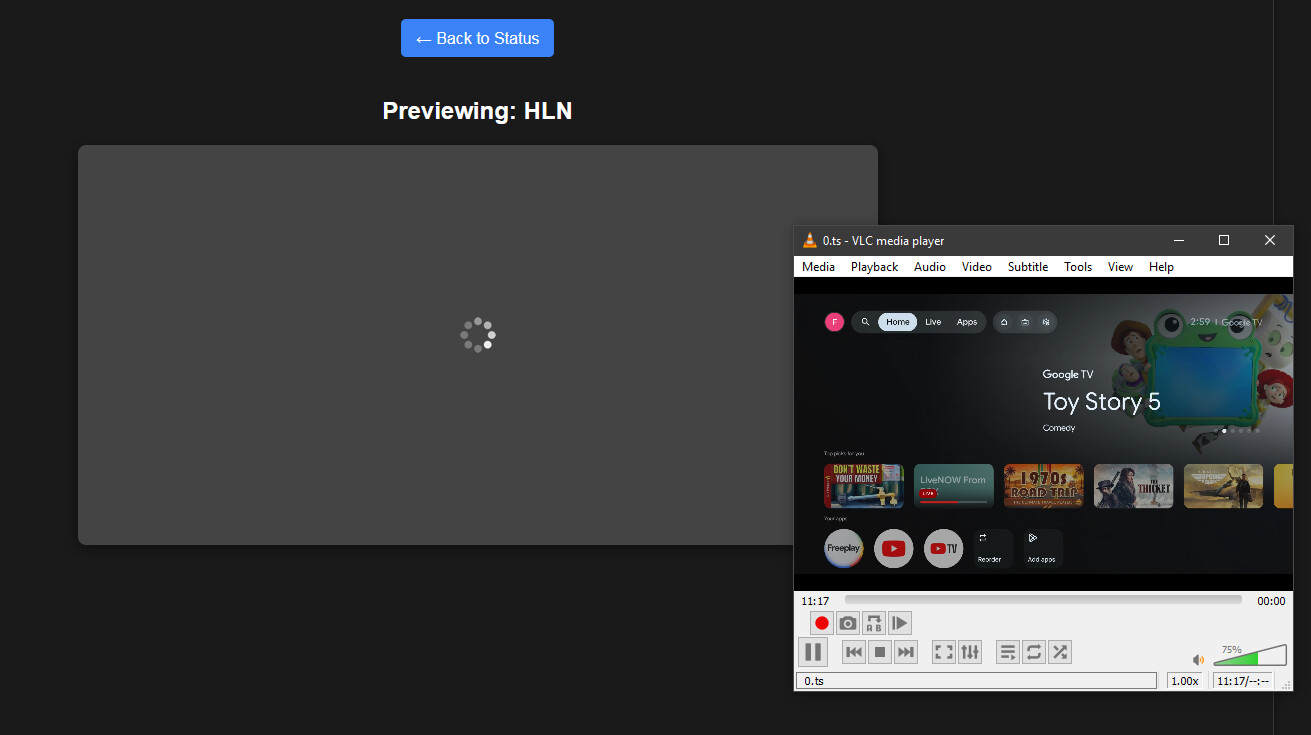
I don't know if this is by design, but I believe it's always the Onn stick that's listed first, however it's always used last in priority.
I understand. Sorry I am thick in the head some days.