
Using a container allows newer chrome versions.
https://getchannels.com/docs/channels-dvr-server/tv-everywhere/provider-help/#youtube-tv
Yes but not native install 
Correct. That's why they mention running in a container for Xfinity and YTTV
-
Xfinity authentication can frequently fail while running on a NAS system. Our suggestion is to run Channels DVR Server via Docker on these systems, or run your Channels DVR Server directly on a computer with Linux, macOS, or Windows.
-
YouTube TV authentication can frequently fail while running on a NAS system. Our suggestion is to run Channels DVR Server via Docker on these systems, or run your Channels DVR Server directly on a computer with Linux, macOS, or Windows.
I have one server using a container for Xfinity-TVE (Chrome v132) and another server using a container for YTTV-TVE (Chrome v148).
It did update to 129, thanks. It still does not work though. I will update it to a container. Thanks for all the assistance everyone!
Let us know how it turns out. Pretty sure using a container will work for you.
If it's any help to anyone, and I'm not saying don't use the FancyBits container, but the container I built reruns a CI monthly with the latest Chrome baked in, if that is helpful to anyone.
Even though it is built with Unraid in mind. It'll work anywhere, not just Unraid. And just don't expect official support from FancyBits because it's not an official container. That's just my disclaimer. It is not expected that they will support it, of course.
1 Like
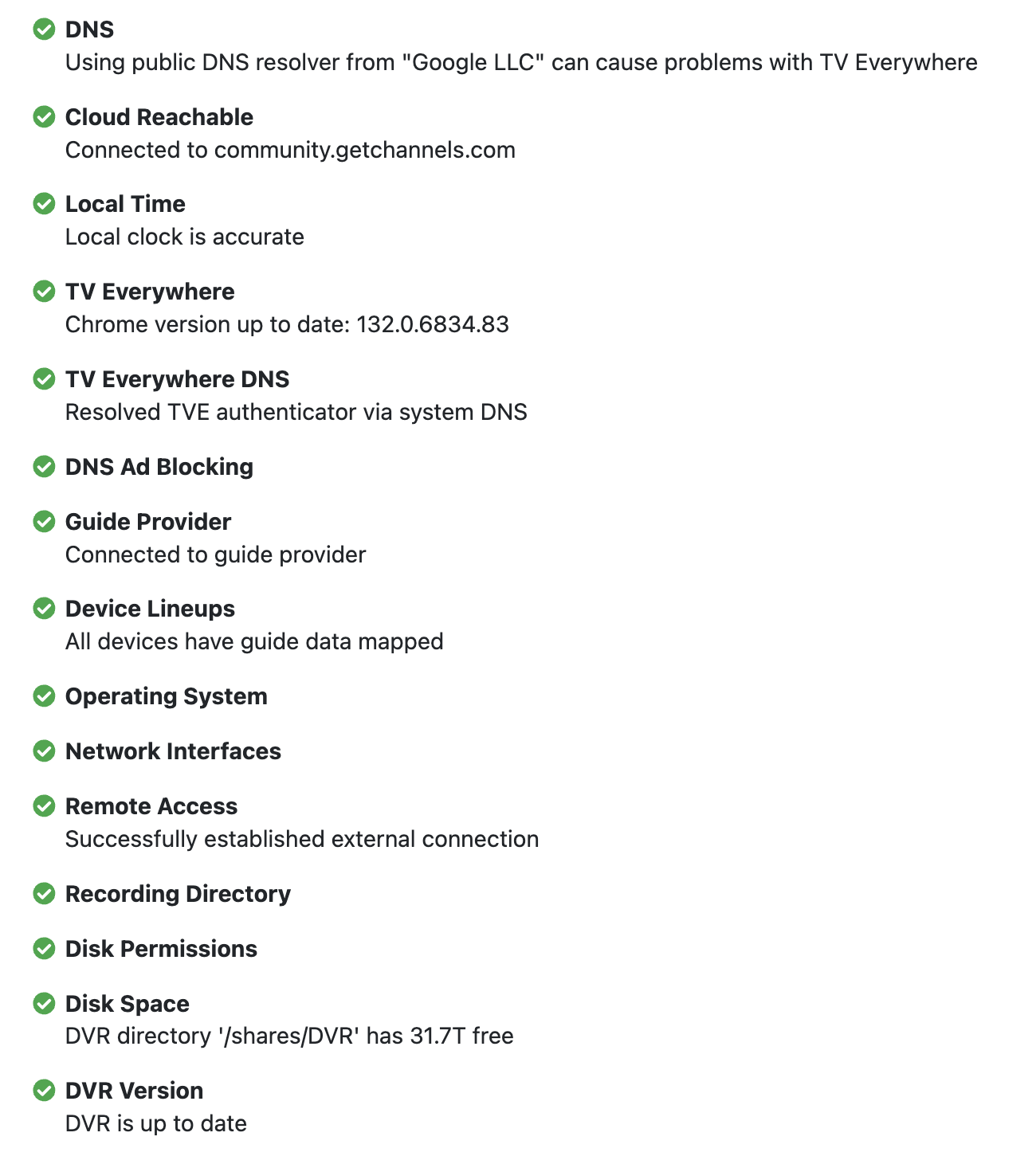
I am running it in a container now and have chrome version 132.0.6834.83, but now when i try to add YTTV I get this message: authn: POST: https://sp.auth.adobe.com/adobe-services/session: 401 Unauthorized: "Data not found"
By chance, are you using a Pi-hole or DNS ad blocker?
I do, but it is not enabled for the VLAN that it lives in. Unless Google DNS is causing the issue? It has worked for years with these settings.
1 Like
Are you running the latest beta by chance? Because I know there were issues on and off with TVE and various builds, and it tends to be fixed in the latest beta builds
I know the Devs here recommend using your ISP for DNS over google. Can't hurt to try.
1 Like
I agree. I was using Cloudflare DoH DNS and encountered strange issues. I'm now back to my ISP DNS.
2 Likes
Swapped DNS to ISP. Unfortunately, same error: authn: POST: https://sp.auth.adobe.com/adobe-services/session: 401 Unauthorized: "Data not found"
Thanks for all the help everyone. I really appreciate the support for such an active community. I have a CC4C server that is doing the heavy lifting on the channels I cannot get via YTTV for now, hopefully it is temporary. I will keep checking to see if it decides to work.
1 Like
Are you using Portainer?
What does the Channels DVR stack (compose) look like?
No, I am not using Portainer. I’m using Synology DSM Container Manager.
I did not deploy it from a Docker Compose stack. I created it through the Synology GUI using the fancybits/channels-dvr:tve image.
Equivalent compose would be roughly:
services:
  channels-dvr:
    image: fancybits/channels-dvr:tve
    container_name: channels-dvr
    network_mode: host
    restart: on-failure:10
    environment:
      - TZ=America/New_York
    volumes:
      - /volume1/docker/channels-dvr:/channels-dvr
      - /volume1/ChannelsDVR/dvr:/shares/DVR
      - /volume1/movies:/media/movies
      - /volume1/tv:/media/tv
      - /volume1/video/Home Movies:/media/homevideos
I think you should try deploying with portainer IMO. It seems like an issue with the Synology GUI. I haven't had any issues deploying Channels using portainer
Thank you for the suggestion and I do not disagree, I like Portainer much better as well. I just got everything else working and synced so I am just going to move forward without YTTV for now. Cheers!
Interestingly enough, on a whim I decided to try adding YTTV this morning to TVE and it worked as expected and I can successfully tune the channels again. I take the win! =)
Nice! It is always hard to troubleshoot something that did work now it doesn't with no change. Is it a policy change on the other end or did they break something and it takes a few days for them to fix it. Either way happy for you.
1 Like