[RELEASE] Watch YouTube, Twitch, Daily Motion, News Websites, and more inside your Channels DVR Client Internal Player!

Starting in v2025.03.18.1154 of Streaming Library Manager for Channels, you can now watch internet videos and live streams from places like YouTube, Twitch, Daily Motion, news websites, and perhaps thousands more right in your Channels DVR client internal players! Check out the release video here:

Full details are available on the Wiki:

See also this thread for a major update on functionality:

The reason I'm posting this in its own thread and not the Stream Link Manager and Playlist Manager ones is that these capabilities are tied together. Further, this is a major functionality release unto itself and is going to have all of its own questions, updates, and whatnot.

Otherwise, enjoy, and let everyone know how it's going!


IMPORTANT NOTE: While Streaming Stations will work anywhere, SLM Streams will only work on a client or in third-party tools like VLC (in other words, not in the web player directly). Further, there is currently a bug in the Apple TV client that is preventing SLM Streams from playing. The Devs have been alerted to the core issue and we are awaiting their resolution.


Special thanks to @Fofer for bringing the original idea helping me through testing and troubleshooting!

5 Likes

If the live streaming station/channel is actually an m3u which expires in a reasonably long time frame
can I type an m3u link in vs picking a live stream like NASA will this still work?

If you have a direct link to a stream, just use the "Custom" type as there is nothing to transform. If it lives on a webpage that assigns an expiration, then you'd want to try "Live Streams" as that option will pull the stream with new expiration tokens every time you play it, thus never requiring an update. No guarantee that it'll work for everything, but feedback could be useful to make modifications that might allow it.

Thanks

2 Likes

Hi thre,
Just setup Streaming station in PLM and it is working great.
I have a couple of URLS i want to see about supporting.
I want to play baseball game archives in plugin video mlb server
The link format looks like this.
http://192.168.0.42:5714/mlb/embed.html?mediaId=5080b728-e094-4ac5-8230-008b4e2d457a&type=video&start=none&skip=commercials
I tried thelink but got service unavailable.
If anyone can verify tings and let me know of a olution it would be great.
I just got Tubi to work.
I got tired of not seeing ads. I like the flow of ads plus it supports the website.]
I do have one service that would greatly benefit the community.
http://www.stremium.com.
I am trying to see if i can use Streaming stations URL to get it logged in and bring up streams so as to grab and map stations of interest.
I can add services from sling etc and use Stremium to get things going.
This is neat.

2 Likes

Nice....I can watch shows and movies that are available on YT on this. Cool

Is anyone getting anything to play with this? I just tried playing a video and I got the "Recording Not Found/Connection lost" error

I'm not having any issues this AM; are you seeing anything in the logs (Channels and SLM)?

I'll take a look in the Channels logs later in the week when I time but I see nothing in the SLM log.

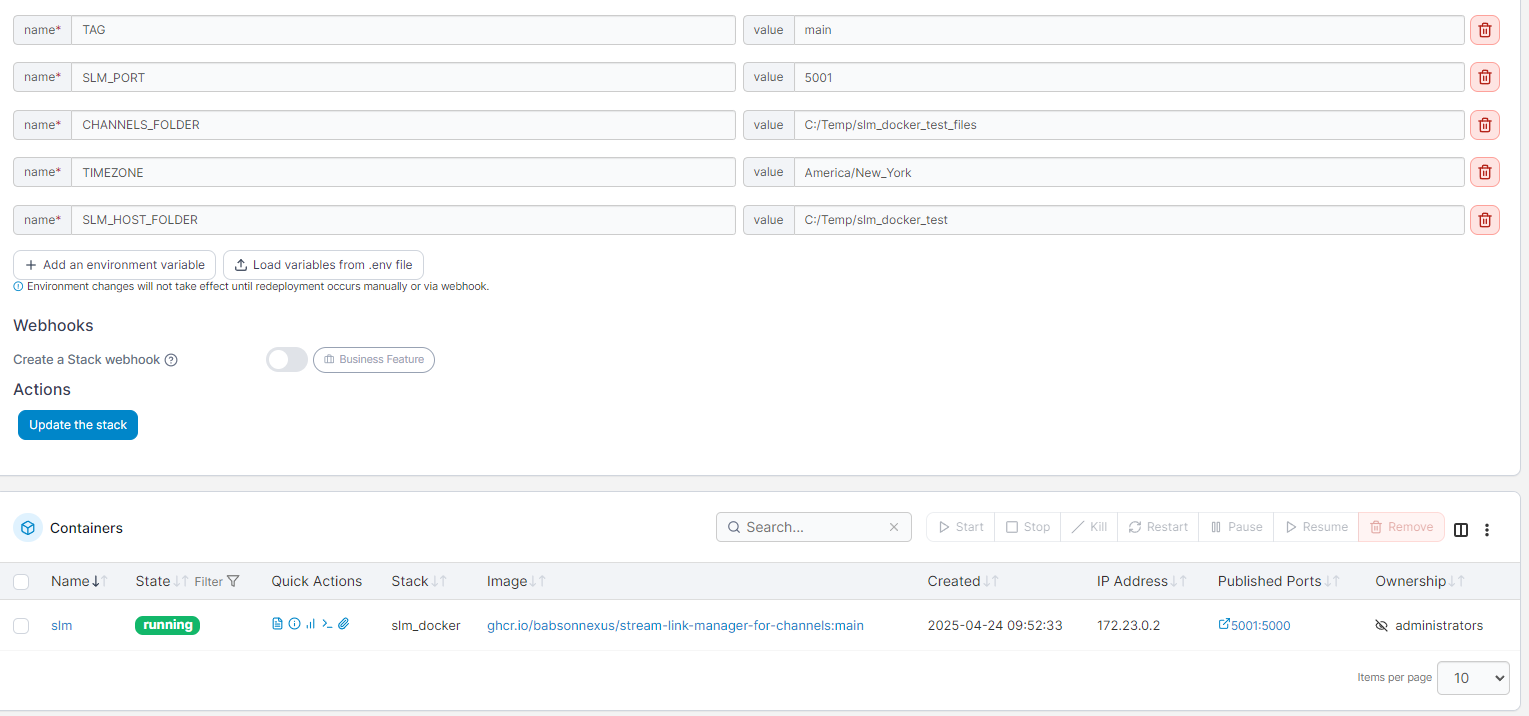
Ok, I found my problem. SLM was creating a STRM link that pointed to a docker ip instead of using the computer ip and that was causing issues as SLM is in bridge mode and Channels is in host mode so they can't see each other using that ip.

I think to remedy this in future versions, you should generate the urls with the computer ip which should usually be identified in the settings anyways when we put the Channels url but could be reinforced for those who don't use Channels, I guess

1 Like

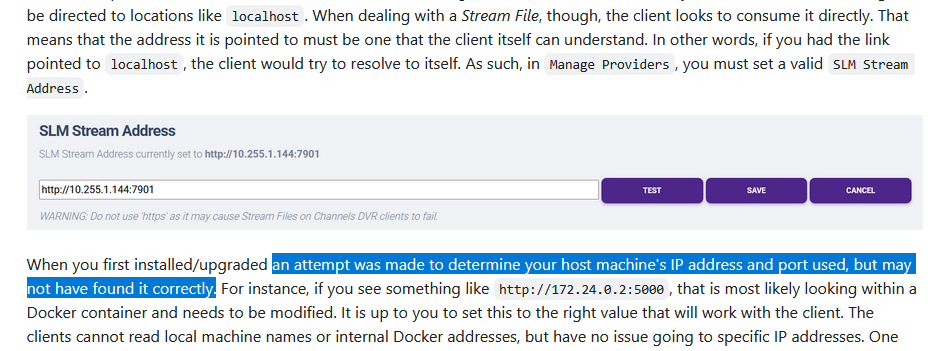
This is already attempted, from the documentation:

Unfortunately, getting to see the host machine IP address outside the Docker Container is unreliable, at best. The things that make your machine safe from the Containers also make bridging the gap between them quite difficult. Machine type, OS, install settings, and many other factors impact how successful this might be; too many to account for.

I also can't depend upon pinging the Channels URL for a multitude of reasons, not just for non-Channels users. For instance, in a new install, the process of discovering Channels is relatively the same, meaning it could end up in the same situation or finding nothing at all. Or if Channels is on a separate machine, getting that IP won't help. As such, I decided it was best to just make all possible attempts to get the right answer using a local scan, but fall back to manual fix when they fail.

Believe me, I wish it was more reliable, but after days of plugging away just on that one thing, I had to move on!

1 Like

Ok, then. Maybe there should be a setting inside slm to set the local ip to be used when generating inside slm. I would hate to go in each STRM link and modify each file. The only alternative of course is to run this on a host network instead

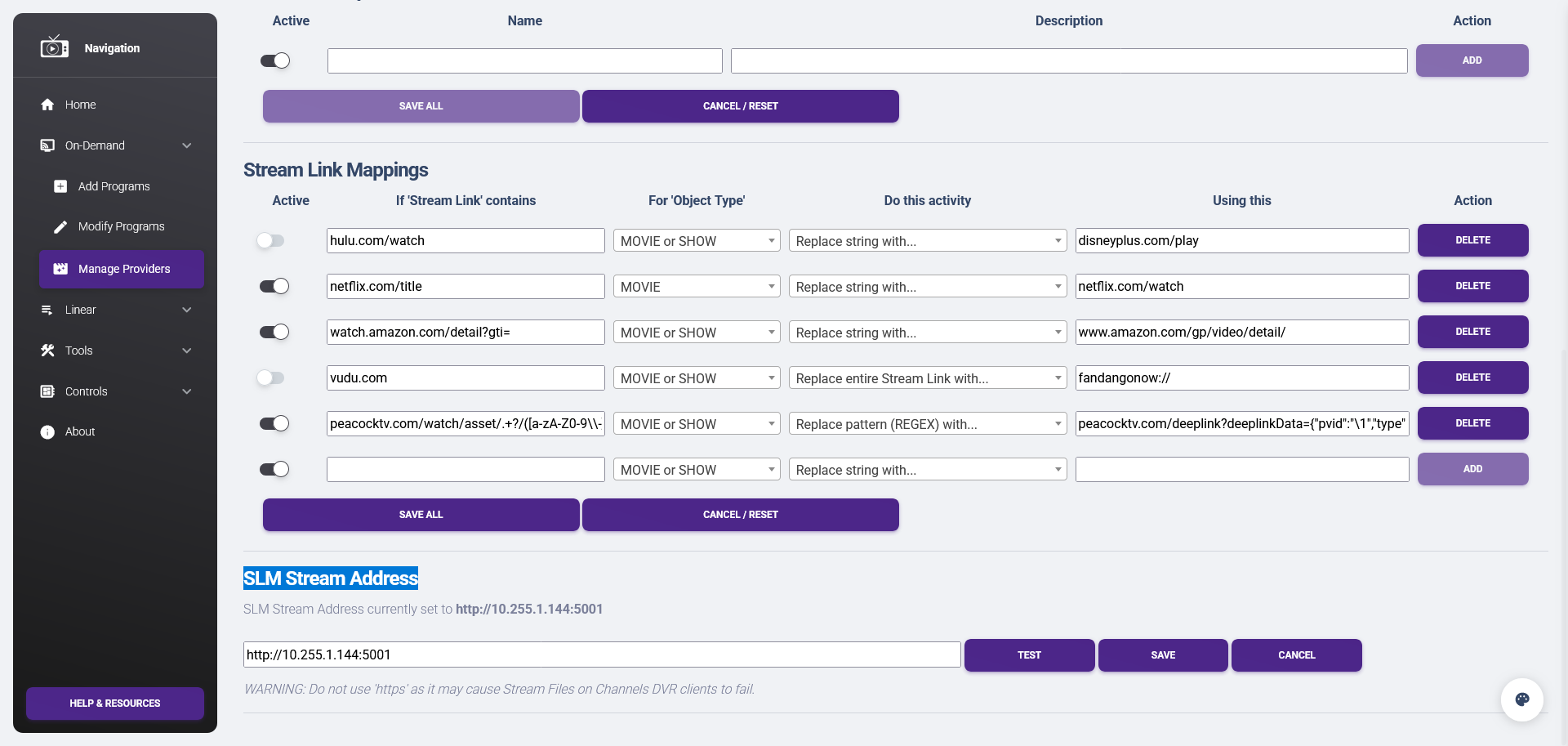
I'm confused; that is exactly what the SLM Stream Address setting is. You set that and it uses that address/port in all the STRM files. In my Docker test, all I had to do was change the default value to my host machine's IP address and the mapped port, and then everything worked. Am I missing something?

You've made me paranoid, so I just tested again, and all is well:


Docker environment variables and showing Docker internal IP Address


Setting the 'SLM Stream Address' to host machine IP and mapped port


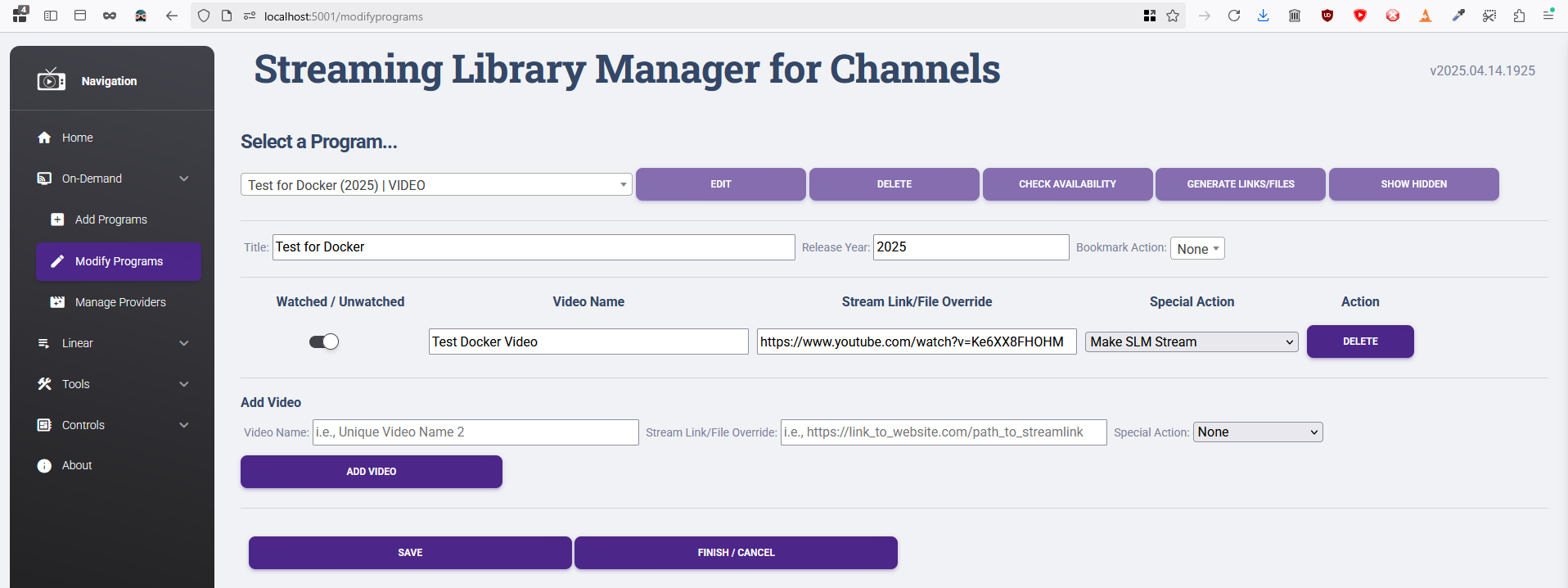
Creating a SLM Stream Video


Generated Stream File is using the SLM Stream Address


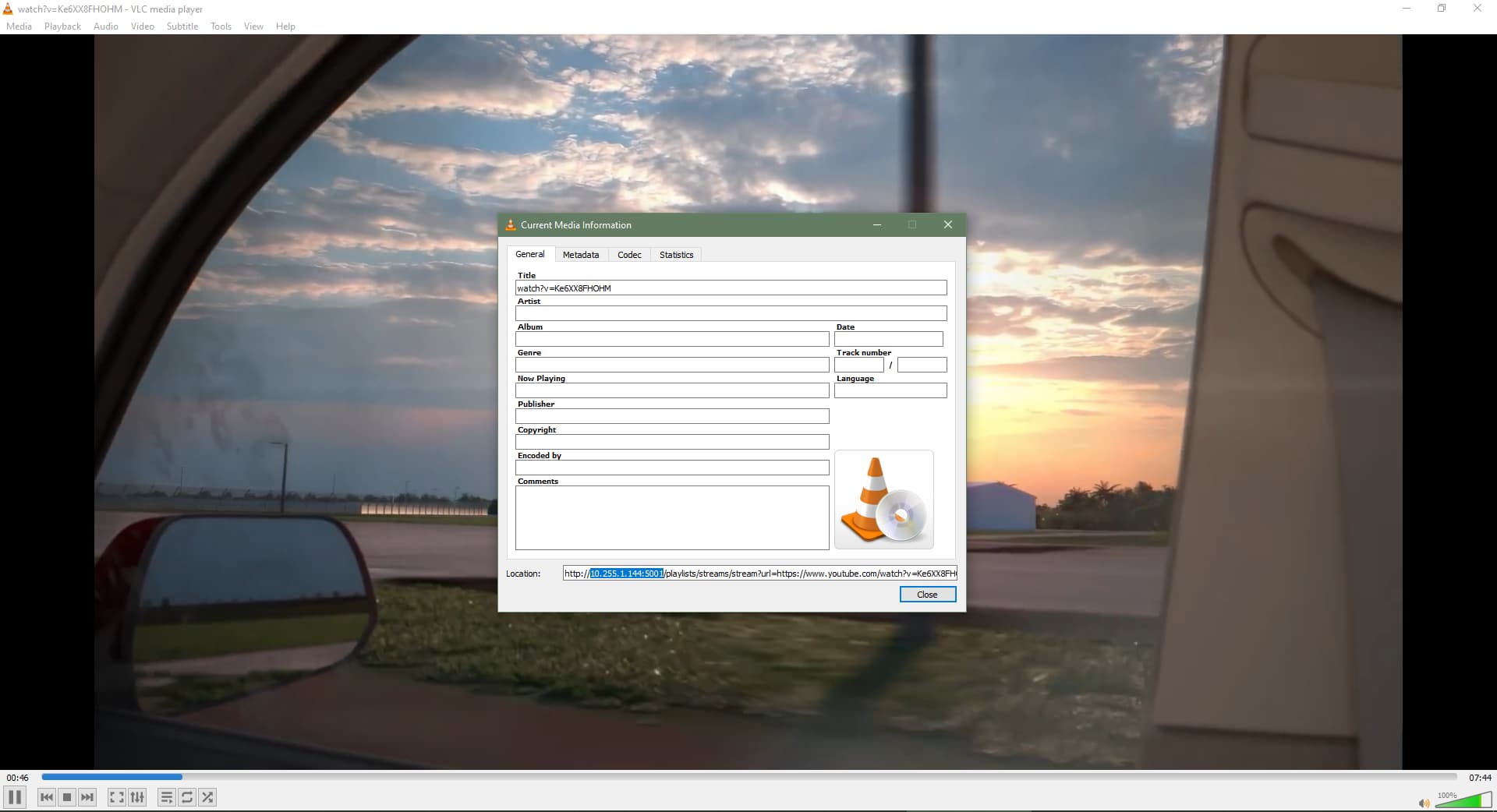
Video plays in Channels client and third-party tools like VLC

Client Logs

  04-24 10:01:36.582 13902 13902 I mpv     : command: loadfile http://10.255.1.144:5001/playlists/streams/stream?url=https://www.youtube.com/watch?v=Ke6XX8FHOHM replace start=none,pause=no,sid=no
  04-24 10:01:36.614 13902 13968 I mpv     : event: start-file
  04-24 10:01:36.616 13902 13968 D mpv     : [global] config path: 'watch_later' -> '/data/user/0/com.getchannels.dvr.app/files/mpv/watch_later'
  04-24 10:01:36.616 13902 13968 V mpv     : [cplayer] Setting option 'start' = 'none' (flags = 16)
  04-24 10:01:36.622 13902 13968 V mpv     : [cplayer] Setting option 'pause' = 'no' (flags = 16)
  04-24 10:01:36.622 13902 13968 V mpv     : [cplayer] Setting option 'sid' = 'no' (flags = 16)
  04-24 10:01:36.626 13902 13968 V mpv     : [ffmpeg] Opening http://10.255.1.144:5001/playlists/streams/stream?url=https://www.youtube.com/watch?v=Ke6XX8FHOHM
  04-24 10:01:36.636 13902 13983 I OpenGLRenderer: Davey! duration=1182ms; Flags=1, IntendedVsync=4249757671261539, Vsync=4249758638894853, OldestInputEvent=9223372036854775807, NewestInputEvent=0, HandleInputStart=4249758651512687, AnimationStart=4249758651544812, PerformTraversalsStart=4249758651871979, DrawStart=4249758847527187, SyncQueued=4249758847575646, SyncStart=4249758848035646, IssueDrawCommandsStart=4249758848140646, SwapBuffers=4249758852955812, FrameCompleted=4249758853989937, DequeueBufferDuration=185000, QueueBufferDuration=359000, 
  04-24 10:01:36.638 13902 13968 D mpv     : [ffmpeg] tcp: Starting connection attempt to 10.255.1.144 port 5001
  04-24 10:01:36.647 13902 13968 D mpv     : [ffmpeg] tcp: Successfully connected to 10.255.1.144 port 5001

SLM Logs

2025-04-24 10:11:53.539556:  INFO: Starting to retrieve manifest for https://www.youtube.com/watch?v=Ke6XX8FHOHM.
[debug] Encodings: locale UTF-8, fs utf-8, pref UTF-8, out missing (logger) (No ANSI), error utf-8 (No ANSI), screen missing (logger) (No ANSI)
[debug] yt-dlp version [email protected] from yt-dlp/yt-dlp [5e457af57] (pip) API
[debug] params: {'verbose': True, 'no_warnings': False, 'format': 'all', 'retries': 0, 'fragment_retries': 0, 'logger': <__main__.YTDLLogger object at 0x7f0390428590>, 'extractor_args': {'youtube': {'player_client': ['web_safari'], 'formats': ['missing_pot'], 'player_skip': ['configs', 'webpage', 'js'], 'skip': ['dash', 'translated_subs']}}, 'compat_opts': set(), 'http_headers': {'User-Agent': 'Mozilla/5.0 (Windows NT 10.0; Win64; x64) AppleWebKit/537.36 (KHTML, like Gecko) Chrome/91.0.4472.114 Safari/537.36', 'Accept': 'text/html,application/xhtml+xml,application/xml;q=0.9,*/*;q=0.8', 'Accept-Language': 'en-us,en;q=0.5', 'Sec-Fetch-Mode': 'navigate'}}
[debug] Python 3.12.10 (CPython x86_64 64bit) - Linux-5.15.146.1-microsoft-standard-WSL2-x86_64-with-glibc2.36 (OpenSSL 3.0.15 3 Sep 2024, glibc 2.36)
[debug] exe versions: none
[debug] Optional libraries: certifi-2025.01.31, requests-2.32.3, sqlite3-3.40.1, urllib3-2.3.0
[debug] Proxy map: {}
[debug] Request Handlers: urllib, requests
[debug] Plugin directories: none
[debug] Loaded 1850 extractors
2025-04-24 10:11:54.099140:  INFO: Extracting info from https://www.youtube.com/watch?v=Ke6XX8FHOHM...
[youtube] Extracting URL: https://www.youtube.com/watch?v=Ke6XX8FHOHM
[WARNING] [youtube] No GVS PO Token provided for web_safari client, which may be required for working web_safari formats. This client will be deprioritized
[youtube] Ke6XX8FHOHM: Downloading web safari player API JSON
[WARNING] [youtube] Ke6XX8FHOHM: Cannot decrypt nsig without player_url: Some formats may be missing
[youtube] Ke6XX8FHOHM: Downloading m3u8 information
[youtube] Ke6XX8FHOHM: Downloading initial data API JSON
2025-04-24 10:11:55.961970:  INFO: Extraction successful for https://www.youtube.com/watch?v=Ke6XX8FHOHM.
2025-04-24 10:11:55.962535:  INFO: Found 10 formats.
2025-04-24 10:11:55.963014:  INFO: Best format URL found using m3u8 protocol: https://manifest.googlevideo.com/api/manifest/hls_playlist/expire/1745525515/ei/q0YKaJe2E7OHkucPiv26mQE/ip/108.34.251.146/id/29ee975fc1473873/itag/96/source/youtube/requiressl/yes/ratebypass/yes/pfa/1/sgoap/clen%3D7519596%3Bdur%3D464.584%3Bgir%3Dyes%3Bitag%3D140%3Blmt%3D1739356584915052/sgovp/clen%3D76782351%3Bdur%3D464.533%3Bgir%3Dyes%3Bitag%3D137%3Blmt%3D1739360207622397/rqh/1/hls_chunk_host/rr6---sn-8xgp1vo-cvne.googlevideo.com/xpc/EgVo2aDSNQ%3D%3D/met/1745503915,/mh/Nq/mm/31,29/mn/sn-8xgp1vo-cvne,sn-8xgp1vo-ab5s/ms/au,rdu/mv/m/mvi/6/pl/17/rms/au,au/initcwndbps/5383750/bui/AccgBcPmZKxgmgYqyc7lPogACvZjKXJBQf7X2Suk1bvzyD2a_nnXC-cJy-pTUmc-QNtOhLWrLV-J-5s_/spc/_S3wKl46Dae1jjCmV8_TjXAWRP4yP-qm-aY9NIXm1rUSisLxSWgR54uTm9lyzRE0uJXqOz46ww/vprv/1/playlist_type/CLEAN/dover/11/txp/5532534/mt/1745503521/fvip/2/keepalive/yes/fexp/51355912/sparams/expire,ei,ip,id,itag,source,requiressl,ratebypass,pfa,sgoap,sgovp,rqh,xpc,bui,spc,vprv,playlist_type/sig/AJfQdSswRAIgVlY3QY6J7Fc4NrAoVKQQgsDc7NH72P0wgfxNP3YdFnQCIFULUoL3fv0jVNpIgWsDkZ5rc1Tbab8zNoTHw3TBIjqh/lsparams/hls_chunk_host,met,mh,mm,mn,ms,mv,mvi,pl,rms,initcwndbps/lsig/ACuhMU0wRQIgfg10YhULww-zvkhf6a2vOUcTEu1r4rOeXDhcCvOb_E0CIQC5DpmxpcZP1_nkEdHO5-ND1QbuN4hAW_4pX35vhEwJFA%3D%3D/playlist/index.m3u8
[INFO | 2025-04-24 10:11:55,988] - 172.23.0.1 - - [24/Apr/2025 10:11:55] "GET /playlists/streams/stream?url=https://www.youtube.com/watch?v=Ke6XX8FHOHM HTTP/1.1" 200 -
1 Like

That may be it. I missed a step or two :smiley:

1 Like

@babsonnexus I got a new problem. I'm trying to generate a SLM stream with a tubi url but when I try playing it, it didn't work. I know its not DRM'd so...I'm wondering whats going on

Heres the link

Unfortunately, according to the logs, it is:

2025-05-12 18:35:27.426441:  INFO: Extracting info from https://tubitv.com/movies/512448/new-jack-city...
[tubitv] Extracting URL: https://tubitv.com/movies/512448/new-jack-city
[tubitv] 512448: Downloading webpage
[ERROR] e[0;31mERROR:e[0m [tubitv] 512448: This video is DRM protected
...
2025-05-12 18:35:28.786972:  ERROR: While attempting to retrieve https://tubitv.com/movies/512448/new-jack-city, received e[0;31mERROR:e[0m [tubitv] 512448: This video is DRM protected.

I found another non-DRM one that didn't work tho

2025-05-12 19:29:08.089483:  INFO: Starting to retrieve manifest for http://192.168.1.72:5000/playlists/streams/stream?url=https://tubitv.com/tv-shows/366238/s01-e01-acceleration.

[debug] Encodings: locale UTF-8, fs utf-8, pref UTF-8, out missing (logger) (No ANSI), error utf-8 (No ANSI), screen missing (logger) (No ANSI)

[debug] yt-dlp version [email protected] from yt-dlp/yt-dlp [505b40079] (pip) API

[debug] params: {'verbose': True, 'no_warnings': False, 'format': 'all', 'retries': 0, 'fragment_retries': 0, 'logger': <__main__.YTDLLogger object at 0x7f4676a45490>, 'extractor_args': {'youtube': {'player_client': ['web_safari'], 'formats': ['missing_pot'], 'player_skip': ['configs', 'webpage', 'js'], 'skip': ['dash', 'translated_subs']}}, 'compat_opts': set(), 'http_headers': {'User-Agent': 'Mozilla/5.0 (Windows NT 10.0; Win64; x64) AppleWebKit/537.36 (KHTML, like Gecko) Chrome/96.0.4664.18 Safari/537.36', 'Accept': 'text/html,application/xhtml+xml,application/xml;q=0.9,*/*;q=0.8', 'Accept-Language': 'en-us,en;q=0.5', 'Sec-Fetch-Mode': 'navigate'}}

The next part in the logs is the most useful:

2025-05-13 08:56:17.464925:  INFO: Extraction successful for https://tubitv.com/tv-shows/366238/s01-e01-acceleration.
2025-05-13 08:56:17.464925:  INFO: Found 5 formats.
2025-05-13 08:56:17.464925:  WARNING: No suitable format found.

So when I extracted the formats (don't worry, this is commented out in the production version so you can't see it), I found none of them have an audio codec, which is why they are unsuitable. When I removed that criteria, the video did play, but lacked audio. Upon further investigation, I found the audio track is in its own standalone format.

I'm going to have to see if there is a way for me to combine the audio and video together into one output in situations like this, without breaking existing functionality. This... might take a minute...

EDIT: I believe I have a solution, just need to do more robust testing. See the issue link for details.

2 Likes

Okay, you can now play this program as of this version:

However, I did come across some other issues while getting this working that might cause some hangups. For instance, I couldn't fast forward on the client more than a minute, otherwise it would start spinning out. Also, I wasn't able to resume from the last spot (even though this works for YouTube and Twitch). More so, although this episode worked, a Tubi movie failed. Mind you, all of these are working in VLC without issue, so this is related to Channels Clients. I'll try to find if there is something I can do to make Channels happier, but we'll see:

However, because of the work I did for this, it opened up additional possibilities for future functionality:

In the meantime, let me know how this goes!

1 Like

Yep, that worked!! Thanks.