A new approach to making IPTV behave more like traditional tuners

I've been quietly experimenting with something over the past several months that I think may interest a lot of Channels DVR users.

The goal is simple: make IPTV behave more like a reliable tuner.

Many of us have run into the same challenges:

  • Random stream drops.
  • Channels that work perfectly one day and fail the next.
  • Shared upstream streams causing conflicts between multiple viewers or recordings.
  • Long recovery times when something silently breaks.
  • Having to manually restart, refresh, or intervene when live TV should just work.

Most IPTV tools do an excellent job organizing the pieces — playlists, guides, channel mapping, and metadata. The challenge starts after playback begins.

What happens when the live stream itself becomes unreliable?

I've been exploring a concept that adds a reliability layer between the IPTV source and the client. The idea is not to replace existing IPTV management workflows, but to make the delivery pipeline more resilient.

A few things I've been testing:

  • Detecting stalled streams automatically.
  • Recovering failed sessions without affecting other channels.
  • Keeping individual streams isolated so one failure doesn't cascade.
  • Improving channel startup behavior.
  • Handling unstable upstream behavior without requiring constant babysitting.
  • Using available hardware acceleration where it makes sense.

One area I've been particularly interested in is the "silent failure" problem.

A stream can look connected, but no longer actually be delivering usable data. The client doesn't always know whether the provider failed, the encoder stalled, or the connection simply stopped moving.

The concept I'm testing looks more like this:

Live stream active
↓
Upstream stops delivering data
↓
Pipeline detects the stall
↓
Failed session is isolated
↓
Stream is rebuilt automatically
↓
Service returns

A real-world example from testing:

15:17:47 Sports channel — upstream paused
15:18:33 No data detected — recovery initiated
15:18:37 Rebuilding stream pipeline
15:18:46 Upstream stream restored
15:18:48 Playback pipeline healthy again

The interesting challenge isn't detecting that something failed — it's recovering quickly enough that the viewer experience remains uninterrupted.

This is still private while I continue stress testing and refining things, but the results so far have been encouraging. The long-term goal is to make IPTV feel less like managing a fragile stream and more like using a dependable tuner.

More to come when it's ready.
3 Likes

Seems very interesting! I'm watching this thread for more updates.

I struggle with this also, things like .ts streams drop connection all the time in CHDVR
but work in VLC Tivimate etc.
Great if it can be as seamless as possible.

My code will also improve reliability for VLC, TiviMate, and other players by maintaining a continuous output stream. If the upstream feed goes offline, it displays a slate reading, "Service Outage — Attempting Upstream Recovery...", so viewers know the interruption is being actively managed instead of seeing the stream terminate unexpectedly.

Behind the scenes, the application continuously monitors the upstream feed using a last-write heartbeat and automatically reconnects the instant the source becomes available again. The result is a highly resilient streaming pipeline that delivers a level of continuity approaching that of enterprise broadcast systems while remaining practical for consumer-level deployments.

1 Like

Will this work as you describe within Channels DVR also?

Sounds very interesting

2 Likes

Thank you for the interest, @Flt505! The short answer is: Yes, absolutely.

Think of this code as a helpful middleman between your internet TV provider and Channels DVR. Channels DVR is a great piece of software, but it expects a perfect signal—just like a real TV antenna plugged right into your wall. Internet TV is rarely perfect. My code exists to fix that gap.

Here is the simple 4-step setup:

  1. Get Your TV Sources: You get your raw TV channels (M3U) and TV guide (XMLTV) from your provider.
  2. Organize Them: You use a tool like IPTVBoss to organize everything nicely. (Note: My code does NOT provide TV channels or guide data. You have to bring your own, which is why a tool like IPTVBoss is perfect for handling this step.)
  3. Feed My Code: You put those organized channels and guide data into my configuration code file (JSON).
  4. Connect to Channels DVR: My code creates new, optimized links. You just plug those into Channels DVR.

Once it's running, the code does all the hard work invisibly in the background:

  • Ring Buffer: It uses your computer's memory or ssd writes speed to catch internet hiccups. It successfully merges the video segments to maintain a continuous stream in case your connection steps away for a moment, ensuring you never see a stutter on your screen.
  • Fixes Broken Streams: If your TV provider's stream drops, my code instantly catches it and reconnects. Channels DVR just waits patiently instead of throwing an error, which saves your active recordings from failing.
  • Smooths Out Video: It automatically handles any heavy video processing so the stream plays flawlessly on your devices.

By the time the video gets to Channels DVR, all the messy internet problems are completely gone. Channels DVR just sees a clean, perfect feed, exactly like a reliable hardware tuner.

1 Like

Looking forward to seeing how the code works.
I have most of what is described in your post.
Thanks for the detailed information.

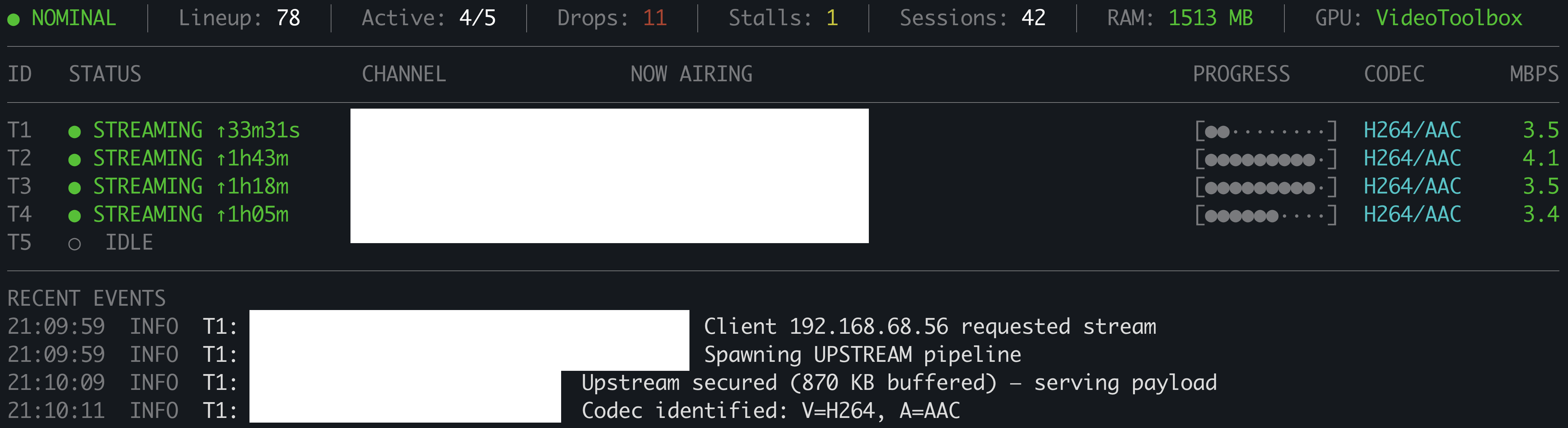
During 3 days of continuous uptime across 42 recording sessions, here is exactly how the code managed upstream turbulence:

  • 11 Drops: The system intercepted and recovered from 11 hard disconnects (outages lasting over 50 seconds). To prevent Channels DVR from throwing an error and failing a recording during the rebuild, the code keeps the pipeline alive—seamlessly transitioning from the live feed to an FFmpeg-generated "Service Outage" slate to guarantee a continuous, healthy stream.
  • 1 Stall: The source went dead (zero bytes for over 50 seconds) but bounced back moments later. Rather than prematurely dropping the axe on the FFmpeg session, the pipeline simply held the pipe open.

Because this pipe never closes—whether delivering the active broadcast or the recovery slate—Channels DVR receives a flawless, unbroken stream, completely blind to the upstream chaos. This is exactly the real-world scenario this solution was built for.

This is an outstanding goal, to correct for stream turbulence events. Right now I just attempt to record two different broadcasts (different time zones) so that we have a 50/50 chance of getting a complete capture.

Am also using two different sources, so praying one will work. Most of my interest is not LIVE TV events, so can recover via other ways that have the broadcast.

Thinking your way is definitely more robust. Have you ever looked at the DISPATCHARR application ? It takes various stream sources and supposedly will roll over from fail streams to functional. Please look at that to see if you are reinventing the wheel, so to speak.

1 Like

If you route Dispatcharr’s output through my solution, it effectively acts as a shock absorber between the source and the DVR. When a stream stalls or a source transition occurs, it keeps the connection alive and serves the DVR an outage slate instead. Dispatcharr gets the time it needs to complete the switch, the client never sees a broken socket, and your recordings remain protected.

If you don’t need multi-provider routing, it also works perfectly as a standalone, lightweight watchdog proxy.

Under the hood, the engine is built around a custom hardware-accelerated stream orchestration layer. Feed processing, slate generation, and management of the ring buffers for each virtual tuner are handled directly in RAM for maximum performance (and this is the preferred configuration). These workloads are offloaded to the GPU using AMD AMF, Intel Quick Sync, NVIDIA NVENC, or Apple VideoToolbox.

For systems without hardware acceleration, there is a software fallback using libx264, along with a direct-copy mode for raw MPEG-TS passthrough. These options are more limited, as they are primarily intended to maintain the stream connection and insert the slate. Hardware acceleration remains the ideal setup.

The GPU-based pipeline prevents CPU overload when multiple recording sessions are running and normalizes everything into a highly compatible stream format. The result is smoother playback, faster timeline seeking, and cleaner scrubbing across supported clients.

For full transparency, this is also being discussed in the Emby community, since the code will be fully compatible with any DVR platform that accepts M3U sources. (Sorry, not sorry, Plex.)

1 Like

Outstanding

1 Like

Very cool stuff, @PowerCC! :smiley:

One thing that's not clear to me is that if a live stream is broken for 50 seconds, when it resumes, aren't you still missing 50 seconds of live data? The live source is just spitting out data in real time so if the client misses it, it's gone. Not correct?

I can see it working for a VOD stream because I would think it would resume where it broke, but not with a live stream.

You are correct. I've been surprised how little it matters when I see a recording interrupted notification. Even when the log shows a loss of a minute. I guess it could happen at a critical time yet there is a lot more uncritical time.

1 Like

Unless maybe the live stream is buffered at the source and it's able to resume exactly where it broke.

Otherwise, you'll always see complete recordings in Channels DVR (no more "Interrupted" tags) but the content itself might be missing some parts.

I'm interested to see how it works out in the end.

1 Like

This solution is built around a simple principle: the playback session should outlive upstream failures.

Rather than acting as a traditional stream relay, the system owns a continuous playback timeline from program start through completion. The upstream source is only a producer of that timeline; if it stalls, fails, or recovers, the session remains intact.

Most streaming systems handle source failure in one of three ways:

  • Reconnect and hope.
  • Buffer until timeout.
  • End the session and let the client recover.

This architecture takes a different approach: a source failure is a timeline event, not a session failure.

When an upstream interruption is detected, the continuity engine immediately replaces missing content with a hardware-encoded SERVICE OUTAGE slate. The transport remains valid, timestamps remain controlled, and clients continue playback without reconnecting.

When the source recovers, the engine resynchronizes and seamlessly returns to live content. From the client's perspective, the session never ended.

Pipeline

              IPTV Source
        (IPTVBoss, m3u4u, etc.)
                   │
                   â–Ľ
        File Stabilization Guard
                   │
                   â–Ľ
             EPG Cache Engine
                   │
            Atomic Memory Swap
                   │
                   â–Ľ
          Cross-Platform RAM Disk
                   │
                   â–Ľ
        Hardware Transcoding Layer
 (VideoToolbox • QSV • NVENC • AMF • VA-API)
             │                    │
             â–Ľ                    â–Ľ
        Port 5004            Port 5005
      Stream Proxy      Dashboard / M3U / XMLTV

The proxy presents itself as a standard tuner source, allowing DVR platforms to handle channel surfing, manual or scheduled recordings, and intentional disconnects without platform-specific APIs. User-driven session changes are treated as normal lifecycle events, while continuity handling is reserved for actual upstream failures.

The design intentionally avoids HDHomeRun emulation layers and compatibility shims. By providing the tuner interface directly, the architecture avoids unnecessary device emulation, channel mapping complexity, and state synchronization overhead.

Continuity Model

LIVE
 │
 ├── upstream stall detected
 │
 â–Ľ
OUTAGE SLATE
 │
 ├── upstream recovered
 │
 â–Ľ
LIVE RESYNC
 │
 └── scheduled program complete
        â–Ľ
   CLEAN SHUTDOWN

Normal user actions follow a separate lifecycle:

LIVE
 │
 ├── channel change
 ├── recording stopped
 └── client disconnect
        â–Ľ
   EXPECTED SESSION END

The continuity engine owns the playback timeline; transport is simply an output format. Because the system controls the real-time media pipeline and GPU-accelerated transcoding layer, it can deliver either continuous MPEG-TS or HLS output from the same underlying timeline with identical outage handling and recovery behavior.

The result is a resilient live streaming architecture where temporary upstream failures no longer terminate playback. The stream continues, the viewer stays connected, and the program completes as intended.

1 Like

Thank you for the detailed explanation. :slight_smile:

What does this mean in simple English that I can understand? :laughing:
What is a service outage slate? (sorry, English is not my native language)

So you're saying that there will be missing content then and you put something else in its place? That's the part I'm not understanding. :face_with_diagonal_mouth:

2 Likes

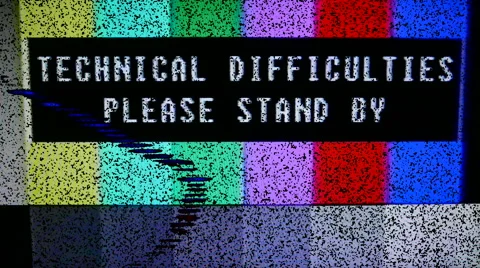
Think of the 1980s, when a TV station experienced technical issues and displayed, “Technical Difficulties — Please Stand By.” The same concept applies here: the goal is to keep the socket connection alive, because a dropped socket is typically when Channels DVR will terminate the session and end the recording.

With a reliable provider, this should rarely happen. If there is a brief interruption, the script can recover quickly. In the case of a true dead feed, the script will wait based on the user’s configured settings for the stream to return — this is when you would see the SERVICE OUTAGE slate. Once the feed comes back, within seconds, it automatically resumes sending the stream back to Channels DVR.

1 Like

Thank you, that makes sense.

At least, it will be clear where in the recording the interruption occurred.

How long does it know to keep the steam alive? I guess there script checks when recordings are scheduled.

That's a good observation. There is a difference between a technical stream interruption and something that is actually noticeable to the viewer. Losing a minute of a two-hour recording is usually harmless, but the same interruption at a critical moment (like missing the game-winning goal) is a different story.

One thing worth noting is that MPEG-TS itself is not unreliable—it is a very mature broadcast format. The difference is that a continuous MPEG-TS stream has fewer built-in recovery points when the delivery path is interrupted. HLS handles this differently by splitting the stream into segments, allowing clients to recover more gracefully.

Many IPTV providers still use MPEG-TS because it is simple, efficient, low-latency, and fits existing broadcast infrastructure. HLS adds additional packaging and processing requirements.

This is where the continuity approach helps: the goal is not to replace MPEG-TS, but to protect the playback session regardless of the delivery format.

2 Likes