
This is for future reference, because I have no immediate plan to upgrade unless I see a particular good deal. But for a Windows computer, is there a particular CPU benchmark that would be best to look at for being able to transcode for streaming at remote locations?
I had issues with the transcoding where I would get a number of family remote connections during a football game. I threw some hardware that I already had in the basement at it, an older quad core Windows machine, still couldn't handle it.
I paid $550 for this about a year ago and it's still one of the best computer purchases I ever made for a media server:
https://www.walmart.com/ip/Acer-Aspire-Desktop-11th-Gen-Intel-Core-i5-11400-6-Core-Processor-UHD-Graphics-730-8GB-DDR4-512GB-NVMe-M-2-SSD-Black-Windows-10-Home-XC-1660G-UW93/405376644
I have since added an internal 2TB Sammy 2.5" SSD, a 10TB 3.5" spinner, and 8 more gigs of memory. The only thing I didn't already have was the memory (oh, and a sata power splitter because this machine only has one free sata power connector coming off the motherboard). Because I don't want Microsoft making random updates, I also wiped the internal nvme drive and clean installed Windows 10 Enterprise LTSC (thanks to the mention of another Channels DVR forum user). There are no more issues with multiple remote connections. It idles all day and all night at 20 watts (no screen/monitor), and will ramp up to 140 watts (6 cores, 12 threads, @ 4.2Ghz) on the occasion that I want to encode a video with Handbrake for example. It lands somewhere in between there when remote connections are made. It also runs my SageTV server.
I have tried to get all my family client devices remotely connecting at the same bitrate, but folks who don't care about DVR servers don't understand the [odd Channels DVR] concept that if a football game is already recording, and you attempt to tune it fresh from the guide, it doesn't watch the recording, it re-tunes it and starts a brand new stream/transcode. I have come to the conclusion that I can't train all the members of my family to "think like the software." My hopes are that someday the software will come around in these regards.
1 Like
Why not enable tuner sharing? Or don't transcode at all?
It's for remote viewing, outside the house, and I don't want the 10 Mbps data transfer on a metered connection. (Oh, maybe you were responding to Kryptonyte.)
Thanks, if I can't find that exact CPU that will give me a CPU to compare to.
1 Like
I believe I tested that a little over a year ago, and even with tuner sharing on it used a second tuner on the HDHR. I guess we'll have to test this again.
If this resolves the issue, and just out of curiosity, what scenario exists where tuner sharing would be undesirable?
1 Like
It takes slightly more time to tune the channel since it goes through the server first instead of straight to the hdhr. But if there is a transcode happening there wouldn’t be any noticeable slow down. Also tuner sharing is client specific, so you can force the remote clients to tuner sharing while leaving your home clients non-tuner sharing for a quicker tune.
1 Like
If it's an incoming 15 MB/s HDHR OTA stream, as much as I would like to, I can't afford the upload bandwidth to omit transcoding for remote clients. I'll test tuner sharing to see if it resolves the issue, if not, I'll take this to another thread.
3 Likes
I think the going rate would be about 2000 passmark per transcode. Personally I would use 3000 because I like overkill. I use an i5-10400 and don’t have enough clients to max it (5).
1 Like
If you have limited tuners ... I recommend you use tuner sharing. Really there is not much difference between not sharing and sharing when tuning. The short amount of time longer it takes to tune when tuner sharing is well worth not using 2 tuners to tune 1 Channels on different Clients..
The only time tuner sharing does not work if you have multiple HDHR units and they are differently prioritized in the clients there is a setting to prevent this on the Web Server.


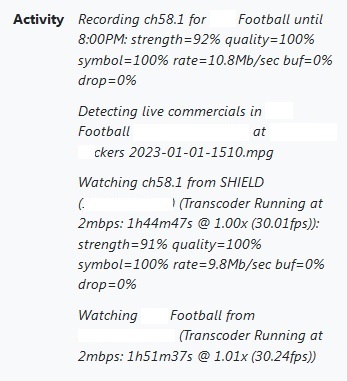
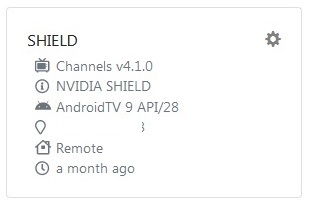
I went ahead and setup tuner sharing to yes as a forced option on my Channels DVR server. Both clients are connected remotely and watching the same football game on the same channel. It appears that one client is watching the season pass recording (I had to call them to verify what they were watching as multiple Football games were being recorded the status screen isn't specific enough to determine), and the other must have tuned it directly from the guide best I can tell. When I check the HDHomerun, it is just using one tuner, so tuner sharing appears to be working. Why does the transcoder have to run independently for each client at the same bitrate? Additionally, the Clients page suggests that the Shield hasn't connected in a month which seems strange doesn't it?
Tuner Sharing specifies if local clients should connect directly to local HDHRs or via the DVR to share the tuner connection.
Because all remote clients use the DVR, they are always sharing tuner connections and there is not option to disable it.
Because it was easier to implement that way based on how all of the code was originally written and improving it hasn’t become a high priority based on how specific the situation would be for it to improve the end-user experience.
Good to know.
Regarding the client issue I mentioned, even today it shows the Shield as connecting a month ago. When does that get refreshed?
This topic was automatically closed 365 days after the last reply. New replies are no longer allowed.