
Considering this, I may not be too eager to jump into testing this configuration right now. Perhaps it is better to wait until the idea is more refined. Besides, my wife and I have some health concerns which I currently need to focus upon.
Yeah, don't test anything related to it pressing enter, I'm actually deleting that. The actual tune config works just fine.
Pressing enter every hour is not working, but I don't really want to mess with that if turtletank says it's not going to be reliable anyway!
If it's easier I threw everything I've contributed on my website just to keep it all organized:
{
    "name": "DirecTV",
    "author": "David B.",
    "version": "1.0.0",
    "description": "Fast tuning for DirecTV.",
    "uuid": "3c7d5a19-6f2e-4b8a-9d3f-8e1c4b7a5f92",
    "global_options": {
        "wait_for_video_playback_detection": true,
        "use_fixed_delay": false,
        "fixed_delay_seconds": 0,
        "check_for_and_clear_whos_watching_prompts": false,
        "wait_after_post_playback_start_commands_seconds": 0
    },
    "pre_tune_commands": [
        "pkill -9 -f dtv.sh || true"
    ],
    "tune_commands": [
        "am start -W -n '||TARGET_PACKAGE_NAME||'/$(cmd package resolve-activity -a android.intent.action.MAIN '||TARGET_PACKAGE_NAME||' | awk -F= '/name=/{print $2; exit}') -a android.intent.action.VIEW -d '||TARGET_URL_OR_IDENTIFIER||'"
    ],
    "post_playback_start_commands": [
        "echo 'trap \"\" HUP; while true; do sleep 3600; input keyevent 66; done' > /data/local/tmp/dtv.sh && sh /data/local/tmp/dtv.sh </dev/null >/dev/null 2>&1 &"
    ],
    "post_tune_commands": [
        "pkill -9 -f dtv.sh || true",
        "rm -f /data/local/tmp/dtv.sh",
        "input keyevent KEYCODE_MEDIA_STOP",
        "input keyevent KEYCODE_HOME"
    ]
}
I tested this with input keyevent 86 to play/pause every 3 seconds. I was able to confirm that it worked and it did kill the process at completion and remove the file. Obviously, use at your own risk, but this should theoretically, since the other solution worked with the play/pause test, press the enter key, 66, every hour. Obviously your mileage may vary and until there's an official solution to run commands asynchronously or during viewing, this is really the only solution that I can think of. What I'm doing here is dynamically creating a shell script, saving it to a temporary location, executing it, and then in the post-tune commands, killing it and removing it from the temporary location. The idea is trap \"\" HUP should keep the script running until we execute the post tune commands which will kill and remove it. Since it's just pressing the enter key ever 3600 seconds it's pretty harmless but should hopefully help with the 4 hour popup. I hope!
I also tested thoroughly to ensure that it's running and that the script is killed.


After ending the stream.
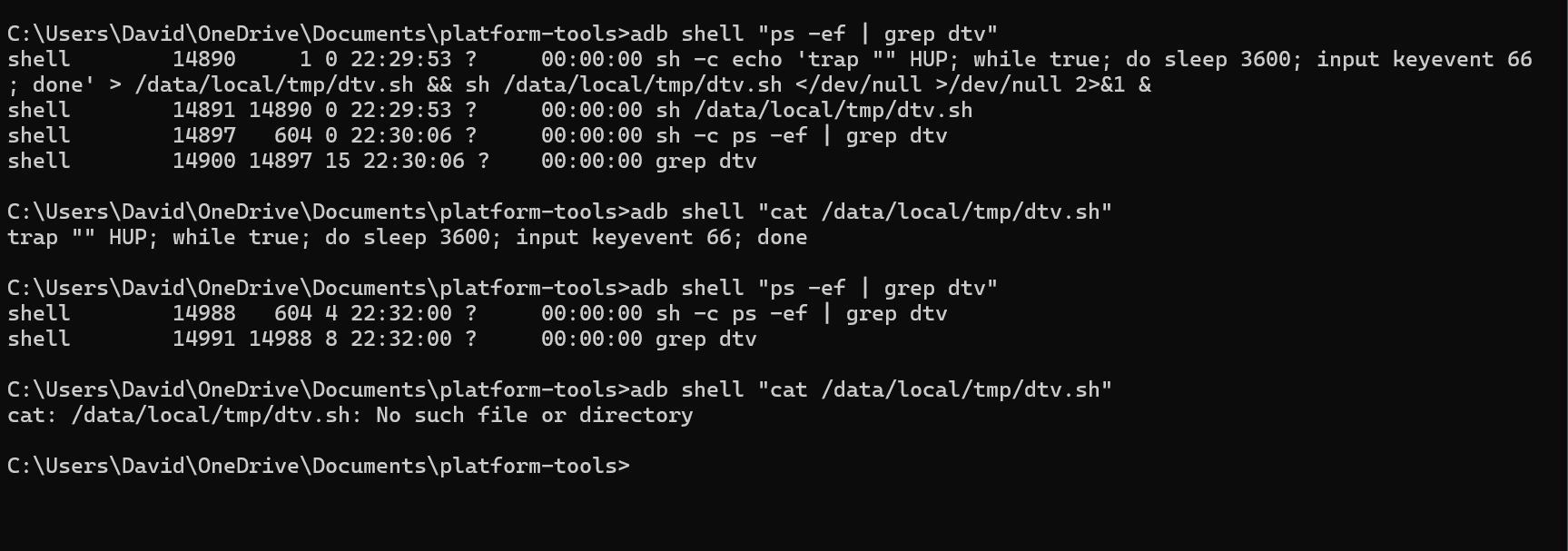
I'm not certain it executes perfectly every time, but it does seem to clean up every time. So far I only had it create the file and not start once from what I could tell. That could have been a fluke.
Edit: I found that really slowed down tuning by creating a file. I wrote a different version here that executes without creating a file. It seems to also do the same thing effectively. There's no file to now delete and it just kills the process at the end and then I confirmed over ADB that the process does get killed.
{
    "name": "DirecTV",
    "author": "David B.",
    "version": "1.0.0",
    "description": "Fast tuning for DirecTV.",
    "uuid": "3c7d5a19-6f2e-4b8a-9d3f-8e1c4b7a5f92",
    "global_options": {
        "wait_for_video_playback_detection": true,
        "use_fixed_delay": false,
        "fixed_delay_seconds": 0,
        "check_for_and_clear_whos_watching_prompts": false,
        "wait_after_post_playback_start_commands_seconds": 0
    },
    "pre_tune_commands": [
        "pkill -9 -f DTVKEEPALIVE || true"
    ],
    "tune_commands": [
        "am start -W -n '||TARGET_PACKAGE_NAME||'/$(cmd package resolve-activity -a android.intent.action.MAIN '||TARGET_PACKAGE_NAME||' | awk -F= '/name=/{print $2; exit}') -a android.intent.action.VIEW -d '||TARGET_URL_OR_IDENTIFIER||'"
    ],
    "post_playback_start_commands": [
        "(trap '' HUP; exec -a DTVKEEPALIVE sh -c 'while true; do sleep 3600; input keyevent 66; done') </dev/null >/dev/null 2>&1 &"
    ],
    "post_tune_commands": [
        "pkill -9 -f DTVKEEPALIVE || true",
        "input keyevent KEYCODE_MEDIA_STOP",
        "input keyevent KEYCODE_HOME"
    ]
}
That's a clever solution. Watch out though, if ADBTuner restarts, crashes, etc. while streaming there will be nothing to stop that background process from running on the android device.
2 Likes
Good point. The process name is consistent. I should probably add a pkill to the pre tune commands to ensure a fresh state.
Hello everyone. As was previously announced, it's time for a new stable release.
For lack of a better name I'm going to call this ADBTuner 2.0.
A new 2.0 tag was added this morning and the stable tag was updated to point to this release.
This is now the recommended version for day-to-day usage.
There are some significant backend changes in this build however everything should be automatically updated as needed on first load. There may be some issues for users that might have jumped back and forth between stable and other builds over the past couple of years. If you run into any please let me know.
Changes since the last stable release:
Switched to a dedicated proxy server that is always running instead of bringing one up for each stream and tearing it down afterwards. This enabled the following:
- Significantly improved control over tuner locking.
- Streams are now kept active for short while after a disconnect so clients can reconnect and continue watching without having to start over. This fixes issues with dodgy network connections and with client apps that retry if the stream doesn't start immediately (Kodi).
- Tuners will now be shared if more than one client app is streaming the same thing. Shared tuners will be locked until the last client disconnects.
Added experimental support for custom tuning configurations. These configurations can be used to define a set of custom ADB commands for applications that don't work with the default standard or compatibility mode options. A web interface for this is provided at /configurations. This feature is still experimental and may change in the future.
Added health check / status page at /up.
Improved playback detection.
Improved profile screen detection clearing (who's watching).
Added more detailed logging. Specifcally around locked tuners.
Added preview window with remote control buttons for each streaming endpoint in the web UI.
Enabled admin preview windows on mobile devices and tablets.
Improved keep alive functionality. This should now work with most applications.
Apps kept awake with the keep alive feature will no longer sit in the foreground. This is preferred as some apps always stream video when they are in the foreground.
By default, all video streams will now start after 20 seconds regardless of if the requested content has started playing. This allows for slow loading content that previously failed if the client connection timed out. The old behavior can be restored by selecting "Terminate Connection" for the "Slow / Failed Tuning Behavior" setting in the admin interface.
Added support for obtaining a deeplink url from a remote endpoint. This can be used by including "dynamic_url_json_key" parameter in the URL. The value should match the key that contains the URL in the json response. This is being used by ESPN+ with Custom Channels via ADBTuner.
Admin UI cleanup, improved navigation, dark mode support, improved mobile device support.
New REST API. Docs at /api/docs.
And finally, there have been many bug fixes since the last release. This version of ADBTuner should provide a better experience overall.
Thank you everyone for testing these builds and for all of your valuable feedback.
10 Likes
Along with ALL the other great improvements...I am very interested in the keep tuners alive for a short time part.
I am wondering if you could make this use a variable so we can SET the amount of time to keep the channel alive. I like to be able to jump back and forth between channels and don't want to have to tell channels to record the channels to keep them alive.
I currently keep my ah4c:appletv channels alive for 15 minutes using some custom scripts. I would love for this to work on my adbtuner/onn/philo channels also.
There is an environment variable (KNOWN_STREAM_DEFAULT_TIMEOUT) if you want to play around with that. The default (measured in seconds) is 3. Edit: There may be a hardcoded max of 40 seconds.
I actually just had the idea of using Tasker to simulate a play button press as that doesn't require any special permissions like enter does.
Just pressing play doesn't bring up anything in the UI, at least with DirecTV. But having it trigger every hour should hopefully make them think I'm still alive. I'm going to let a stream go for like five hours today and if I don't see anything come up I will be happy to share the XML config if anyone is interested in trying this. Tasker has been around a while and should be more durable than running random ADB commands.
The downside is it has to be sideloaded on Android TV. The developer makes the APK available and purchasing it on an Android phone entitles you to even the side-loaded version over Google Play services. It is also very difficult to navigate on Android TV, but importing a profile is not too bad. Creating one is very difficult though without a mouse.
This should also have the side effect of keeping the Android box always awake and ready to stream I would imagine.
Tested 2.0 Stable on my Onn 4K Plus and Osprey stacks. Both working as expected. Thanks again for all you do.
Looked at this some... took me a little while was not getting lastest build on repull...
Realized that I had my image set to ...image: turtletank99/adbtuner:latest
instead of image: turtletank99/adbtuner:stable
latest kept pulling an image from July... 

Then I wasn't sure if KNOWN_STREAM_DEFAULT_TIMEOUT was to go in the stack env variable or inside a custom configuration...
After trying both it looks like it should be a stack/compose env var...
Using
KNOWN_STREAM_DEFAULT_TIMEOUT=30 and/or
KNOWN_STREAM_DEFAULT_TIMEOUT=40
Realized when I started to test that one of my tuners had signed out of Philo at some point in the past...
So I have tried the defaults and a custom configuration and it seems like it might work the first time or two if I jump back and forth... but then it will shutdown one and then the other when switching and have to re-tune.
Almost looks like it is not reseting/restarting the timer if we go back into that tuner...So maybe the 3rd quick time of entering then leaving it reaches the total of 40sec and shuts it down...
After it shuts down a tuner it then goes into the shutting down the tuners EVERYTIME you switch between channels...
FWIW: I have been pulling the image adbtuner:beta so that I can help in testing new developmental versions/features. I'm currently running what I think is the latest version: 2.0-Beta-20251114-2
Reference to the :beta tag is made in this earlier post: ADBTuner: A "channel tuning" application for networked Google TV / Android TV devices - #2692 by turtletank
1 Like
Isn't the "play" button also "pause"?
I tested many of these button presses on the Roku version of DirecTV app. The only key presses I found which had no visible effect were "Enter" and "Backspace". As far as I know, the same may be true for Android. I just tested the Android app on my Onn 4k. On the physical remote, the Enter button works as a combo play/pause while viewing. It also brings up a shaded timeline/navigation overlay across the bottom of the screen.

So, keyevent 126 is "Play". The inverse of stop. There is also play/pause. I'm watching ADB and it does register.
Tasker doesn't work, but sending the key event using my shell script does. So I'm gonna watch On Patrol Live tonight and see if I get the prompt. That's a three hour show and I'm watching the pre-show before it.
{
    "name": "DirecTV",
    "author": "David B.",
    "version": "1.0.0",
    "description": "Fast tuning for DirecTV.",
    "uuid": "3c7d5a19-6f2e-4b8a-9d3f-8e1c4b7a5f92",
    "global_options": {
        "wait_for_video_playback_detection": true,
        "use_fixed_delay": false,
        "fixed_delay_seconds": 0,
        "check_for_and_clear_whos_watching_prompts": false,
        "wait_after_post_playback_start_commands_seconds": 0
    },
    "pre_tune_commands": [
        "pkill -9 -f DTVKEEPALIVE || true"
    ],
    "tune_commands": [
        "am start -W -n '||TARGET_PACKAGE_NAME||'/$(cmd package resolve-activity -a android.intent.action.MAIN '||TARGET_PACKAGE_NAME||' | awk -F= '/name=/{print $2; exit}') -a android.intent.action.VIEW -d '||TARGET_URL_OR_IDENTIFIER||'"
    ],
    "post_playback_start_commands": [
        "(trap '' HUP; exec -a DTVKEEPALIVE sh -c 'while true; do input keyevent 126; sleep 3600; done') </dev/null >/dev/null 2>&1 &"
    ],
    "post_tune_commands": [
        "pkill -9 -f DTVKEEPALIVE || true",
        "input keyevent KEYCODE_MEDIA_STOP",
        "input keyevent KEYCODE_HOME"
    ]
}
Try this one. It actually hits play, which is a media key, and should tell them we're alive, basically. That's what I'm thinking.
I can see it register in the command prompt.

Regardless, I just got cheap Osprey boxes on eBay instead of messing with this. Seems like they're just going to be way more reliable since they're purpose built. Hopefully this works for someone else though and I'll see in a few hours.
I had purchased some Osprey boxes, but returned them. I change providers often enough that I don't want to invest in provider specific hardware. The Onn 4k boxes for ADBTuner, and Roku 4k Streaming Sticks for the Roku Tuner Bridge, are multi-purpose hardware which hopefully will adapt as I go through different streaming services.
1 Like
Since I'm paying $140 a month for DirecTV, I want the best experience, so I just bought them.
I wasn't going to do it, but I ended up getting a great deal. It was like about $40 a box with sales tax. I couldn't pass the deal up because it's just gonna work and I don't have to tinker with anything.
1 Like
You can't go wrong for the price.
i went with my entertainment with hulu and HBO Max.
I have TVE plus 2 onn boxes for using channels. I use FRNDLY for the channels missing from directv Stream.
I'm just worried about long-term support, that's all.
It seems like they still sell them for satellite customers, so I would imagine they would still continue to update the firmware.
If I continued with DTV, then I would've gotten the Osprey Boxes but it's too rich for me and honestly I'd rather use ah4c and another HDMI encoder for that instead if I got it.
I'm moving on to Sling Blue + Disney bundle...
I've tried slong and it is missing way too much.
MyEntertainment with the bundled disneyplus and Hulu is a good buy for now.
I'm not a huge fan of hese bundles becuase they have stuff missing.
I want all my locals plus sports etc if i were to add any other genre packs might just as well get entertainment and or choice but MyEntertainment is a sweet spot with Directv.