ADBTuner: A "channel tuning" application for networked Google TV / Android TV devices

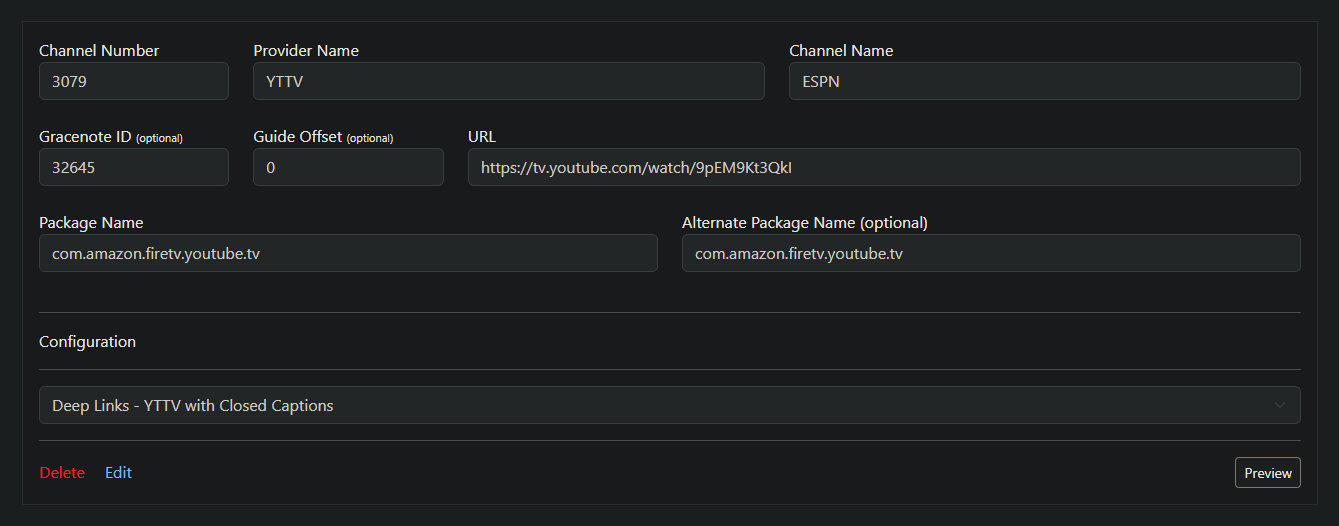
Here's an ADBTuner custom config for turning on Closed Captions (CC) when tuning to a channel in YouTube TV. For use with turtletank99/adbtuner:development

{
    "name": "Deep Links - YTTV with Closed Captions",
    "author": "bnhf",
    "version": "0",
    "description": "Turn on Closed Captions (CC) in the YTTV app 10 seconds after channel tuning",
    "uuid": "c7f31cd0-ead1-449d-ab90-2d926382c7db",
    "global_options": {
        "wait_for_video_playback_detection": true,
        "use_fixed_delay": false,
        "fixed_delay_seconds": 0,
        "check_for_and_clear_whos_watching_prompts": false,
        "wait_after_post_playback_start_commands_seconds": 10
    },
    "pre_tune_commands": [
        "input keyevent KEYCODE_MEDIA_STOP"
    ],
    "tune_commands": [
        "am start -W -a android.intent.action.VIEW -d '||TARGET_URL_OR_IDENTIFIER||' '||TARGET_PACKAGE_NAME||'"
    ],
    "post_playback_start_commands": [
        "input keyevent KEYCODE_DPAD_DOWN KEYCODE_DPAD_DOWN KEYCODE_DPAD_LEFT KEYCODE_DPAD_LEFT KEYCODE_DPAD_DOWN KEYCODE_DPAD_RIGHT KEYCODE_DPAD_CENTER"
    ],
    "post_tune_commands": [
        "input keyevent KEYCODE_MEDIA_STOP",
        "input keyevent KEYCODE_MEDIA_PAUSE"
    ]
}

This can be used in a few different ways:

Use the ADBTuner WebUI to change the Configuration just before tuning, if you only want CC occasionally.

Same thing if you want CC all the time for a given channel, with no need to change it back.

Or, if you don't want to use the WebUI at all after initial setup, you can create duplicate channels (one with and one without CC (e.g. ESPN and ESPN [CC])

2 Likes

Yeah...this will be useful. You don't want to use this for sporting events or news programs as the subs will be FAR behind the action anyways :smiley:

Maybe I'm missing your point? But, this turns subtitles on at the streaming stick that's being captured -- so they'll be shown just as they would if you're watching the event using the app on your local device. No difference in synchronization.

1 Like

Here's another ADBTuner custom config, this one will turn YTTV Stats for Nerds on and off (switching each time you tune). Be sure to leave it in the off state when your done with this one, or you'll end up with the stats overlay when you don't want it.

Very useful to see what the stream stats look like when it arrives at your streaming stick, before being changed in any way by your encoder or Channels DVR:

{
    "name": "Deep Links - YTTV with Stats for Nerds",
    "author": "bnhf",
    "version": "0",
    "description": "Turn on Stats for Nerds in the YTTV app 10 seconds after channel tuning",
    "uuid": "c7f31cd0-ead1-449d-ab90-2d926382c7db",
    "global_options": {
        "wait_for_video_playback_detection": true,
        "use_fixed_delay": false,
        "fixed_delay_seconds": 0,
        "check_for_and_clear_whos_watching_prompts": false,
        "wait_after_post_playback_start_commands_seconds": 10
    },
    "pre_tune_commands": [
        "input keyevent KEYCODE_MEDIA_STOP"
    ],
    "tune_commands": [
        "am start -W -a android.intent.action.VIEW -d '||TARGET_URL_OR_IDENTIFIER||' '||TARGET_PACKAGE_NAME||'"
    ],
    "post_playback_start_commands": [
        "input keyevent KEYCODE_DPAD_DOWN KEYCODE_DPAD_DOWN KEYCODE_DPAD_LEFT KEYCODE_DPAD_LEFT KEYCODE_DPAD_LEFT KEYCODE_DPAD_LEFT KEYCODE_DPAD_DOWN KEYCODE_DPAD_RIGHT KEYCODE_DPAD_RIGHT KEYCODE_DPAD_RIGHT KEYCODE_DPAD_RIGHT KEYCODE_DPAD_CENTER"
    ],
    "post_tune_commands": [
        "input keyevent KEYCODE_MEDIA_STOP",
        "input keyevent KEYCODE_MEDIA_PAUSE"
    ]
}

This is a custom config that seems to work with Fubo.
Mileage may vary.

{
    "name": "Deep Links Fubo",
    "author": "ADBTuner",
    "version": "0.1",
    "description": "Loads content via Fubo deep link URLs.",
    "uuid": "b7770777-0eb1-4411-8155-45acdbcb4c1b",
    "global_options": {
        "wait_for_video_playback_detection": true,
        "use_fixed_delay": true,
        "fixed_delay_seconds": 2,
        "check_for_and_clear_whos_watching_prompts": false,
        "wait_after_post_playback_start_commands_seconds": 1
    },
    "pre_tune_commands": [
        "input keyevent KEYCODE_MEDIA_STOP",
        "am force-stop '||TARGET_PACKAGE_NAME||'"
    ],
    "tune_commands": [
        "am start -W -a android.intent.action.VIEW -d '||TARGET_URL_OR_IDENTIFIER||' '||TARGET_PACKAGE_NAME||'",
        "sleep 2",
        "input keyevent KEYCODE_ENTER",
        "am start -W -a android.intent.action.VIEW -d '||TARGET_URL_OR_IDENTIFIER||' '||TARGET_PACKAGE_NAME||'"
    ],
    "post_playback_start_commands": [],
    "post_tune_commands": [
        "input keyevent KEYCODE_MEDIA_STOP",
        "am force-stop '||TARGET_PACKAGE_NAME||'",
        "input keyevent KEYCODE_HOME"
    ]
}
2 Likes

If anyone would like to help test some things I pushed a new build this morning at turtletank99/adbtuner:20250907-3. It is not linked to the development tag.

Edit: Changed build to: 20250907-3

The changes in this build are focused on including, by default, some things that people here have been doing in custom configurations. Perhaps it might improve compatibility across more apps, perhaps it won’t, but worth trying I think.

If you are testing this build, please focus your testing on the default, included, configurations.

This build, and only this build, includes the following changes:

  1. Applications are no longer left in the foreground. Keep alive and all of the default configurations will now return to the home screen.

  2. Keep alive was updated to use activity manager (shell am) to start applications. Some apps were not being started at all in earlier builds.

  3. The tune_commands will now run a second time if playback hasn’t started after 10 seconds. This is kind of a hail mary to fix some broken apps. I’d like to see if it’s effective without causing other issues. Custom configurations may need to be modified to ensure the commands specified in tune_commands are idempotent and can be run multiple times without any unintended side effects.

Thanks, as always, for your help in testing.

2 Likes

Will do! Thank you.

It's a good starting point. I setup YTTV last night in this project and used it as a base. There was a bit of tinkering after the fact to pair/match my locals, as well as the additional packages I subscribe to, but it got me most of the way there.

The Compatibility modes are working with Fubo so far.
Running the tune command a second time gets around the problem where it gets stuck on the home screen for me. I am running the "show tunning process" mode because it is faster and still does not show any actual tunning process. What remains to be seen is how it deals with the "Who is watching prompt".

Edit: One thing, the default mode will tune the channel on Fubo as I can see it playing through the Encoder, but it is not getting passed though from ADBTuner.

Thanks again!

1 Like

The new build using the Deep Links - default recommended mode, seems to have slayed one of our most difficult dragons - the DirecTV app using the older onn 4k boxes as tuners. I have successfully played and recorded dozens of channels and clips, including on-demand and scheduled DVR recordings. So far - so good! :crossed_fingers: I'll continue testing as my time allows.

This is really good news and fortunate timing for me personally. I just decided to take advantage of the new DirecTV streaming packages to save a little money. I have several Onn 4k pros connected to a LinkPi ENC5-V2. I have been following the work you and others have been doing to work around some of the quirks with the DTV app. That’s when I saw your mention of the Osprey DTV boxes and how stable they have been running for you with ah4c. Knowing how helpful the folks are that frequent these forums I decided to go with the Osprey boxes and spin up a new ah4c container. I have several Ospreys on order.

If I read this post right you are having success using DTV deep links to tune the Osprey box from ADBTuner. When you have some free time I would appreciate a short writeup on how to configure the Osprey for use with ADBTuner. I know how to enable USB debugging from the Developer Options but if you can think of any other settings to change please note them as well. A copy of your custom configuration and maybe an example of a URL if it is different from the Onn ones would be most welcome.

I’m rather new to this area of tech so sometimes I don’t see the obvious. I too like to tinker with things but until now I have mostly been playing with small embedded computers I.e. Arduino to make some home automation projects so I know how easy it is to lose hours chasing a bug.

I want to thank you, the community developers and all of the helpful people on the Channels forums for all of the work you do to make the most out of the Channels platform and the patience you all have answering questions.

3 Likes

You made the right choice with Osprey boxes. They are not anything special as a streaming device, aren’t terribly fast and have limited function outside of DirecTV. But what they do well is tune DirecTV channels, quickly, reliably and with good quality video.

I’ve had Osprey’s working with AH4C for just about two years, tuning by channel number. This is very reliable as channel numbers don’t change. No links to guess or expire, just works. This is a proven method and alternate to ADBTuner should you need.

My discovery of Deep Links working on Osprey inspired me do some AH4C testing, and I likely will at some point. I had an extra test ADBTuner docker setup, so I dropped in a few Ospreys just to play around. It’s worked so well I have just let it be. I’m still surprised how well it just works, faster than tuning by channel number. Granted it has been only a few days, and there are small quirks, but it has been 10% the effort (and fun) of testing the Onn Boxes on DirecTV.

I’ll write up a summary for you, export my test configs and channel list to get you started.

DODL (DirecTV Osprey Deep Link)

History

Wanted share a quick run down of my DODL test setup as it stands today. I realize some of this info is a repeat to very recent posts. Hope to save people some thread searches.

I use DirecTV and their branded hardware Osprey Android TV Boxes (now named Gemini). They work at tuning DTV channels, but really nothing else. I've been using Osprey boxes in AH4C for a few years, turning by channel number. I recently discovered Deep Links for DirecTV will respond on the Osprey box. Curious if it ADBTuner (ADBT) would work and if it was any better. The answer right now is maybe.

Summary

I've had good success with ADBT and Onn 4K Plus boxes the last few weeks using Deep Links. But tuning is pretty slow. The DTV App (com.att.tv) is picky, has to be in a fresh, "just opened" state to always accept deep links. My final ADBT config for Onn Boxes has actually proven reliable, but again slow to tune.

It occurred to me the Osprey Box launcher is essentially the DTV App. The DTV App is always running, ready to tune as that is the design of the device. I tested an Osprey with ADBT a week or so ago, and it didn't work. I shrugged it off at the time. I then went back to do more testing with just ADB Shell. Found the Osprey would open deep links if you target com.att.tv.openvideo, the unique app on the Osprey to tune channels. Huzzah! Tried on ADBT, but still not working. Seems ADBT does not like to tune to System Apps. Not that ADBT should, as it is designed for packages which are installed from Play Store.

The last thing I tried was to put a dummy app as Package Name, one that was already installed on the Osprey. In my case, it was the NBC App. ADBT started reserving a tuner. From there, I realized target app would not work, so I wrote custom configs to specifically target com.att.tv.openvideo. This is working today.

Prepping the Osprey

Assuming many in here know the basics, here is a very quick list of things I did to get the test Osprey devices to the state there are in today.

  • Fully update Osprey, dev options turned on
  • For multiple Ospreys, add spaces in between them, they get very warm.
  • Static IP on Ethernet
  • Removed all unnecessary apps (Hulu, HBO, etc).
  • Installed Dummy App - in my test the NBC App, but probably can be any from Play Store.
  • Set Osprey Preferences to always play live channel on power on, not go home
  • Set Osprey Preferences to not select profile on launch.
  • Turned off all Animation Options in Dev Options.
  • (OPTIONAL) Set the DTV app to ignore Doze via ADB: adb shell dumpsys deviceidle whitelist +com.att.tv.openvideo

DOZE: Not sure Doze Whitelist is even necessary on Osprey, but it is part of my test.

ADBTuner Checklist Config

Quick Rundown of ADBTuner Config, will provide samples below.

  • Set your Osprey devices up as Tuners
  • Import all your DTV Channels.
  • Type in a dummy app to Package Name (i.e. com.nbcuni.nbc.androidtv)
  • Configure Channels to use DODL custom Tuning Config.

Differences in Osprey Deep Links vs DirecTV App.

The Deep Link format is a little different for the Osprey. Here is what C-SPAN looks like.

DirecTV App
dtvnow://deeplink.directvnow.com/play/channel/CSP1/c167f6c4-9128-4043-d798-50a8df3f29de

Osprey
https://deeplink.directvnow.com/tune/live/channel/CSP1/c167f6c4-9128-4043-d798-50a8df3f29de

Custom Config for DODL

The tuning is quite simple. Wake devices, gives it a second to catch breath as Ospreys are older, send deep link, sleep when done. Everyone has different networks, so you may need to fine tune.

{
    "name": "DTV: Osprey Deep Link (DODL)",
    "author": "",
    "version": "0",
    "description": "Fast launch of Osprey Hardware.  Wake, Tune, Sleep.",
    "uuid": "670f0f68-6c1f-4258-b3c3-0b97fd0cb316",
    "global_options": {
        "wait_for_video_playback_detection": true,
        "use_fixed_delay": false,
        "fixed_delay_seconds": 0,
        "check_for_and_clear_whos_watching_prompts": false
    },
    "pre_tune_commands": [
        "input keyevent 224",
        "sleep 1"
    ],
    "tune_commands": [
        "am start -W -a android.intent.action.VIEW -d '||TARGET_URL_OR_IDENTIFIER||' com.att.tv.openvideo"
    ],
    "post_tune_commands": [
        "sleep 3",
        "input keyevent 26"
    ]
}

NOTE: I prefer to sleep Osprey boxes after tuning. You don't have to, but probably should.

Observations So Far

I have only been testing for a few days. The deep links have worked really well. Since the DTV App is always running, don't have to worry about refreshing it. Just wake the box and send the link. Some things to consider.

  • The tune time is about 10-13 from sleep, from wake to picture.
  • In the pre-tune I added a small sleep to give some of the boxes a touch more time to respond to wake command.
  • In the post tune, added a small sleep. Found the tuner would become available in ADBTuner very quickly, but the box was still "catching" up to commands. Ospreys are not fast.
  • Overnight, deep sleep, has been pretty good. I've had one slow tune. It eventually worked, but was very slow to wake up. Likely box being busy at the time. Again, Osprey performance.
  • I've always used multiple Osprey boxes, not for concurrent channel tuning, but redundancy, hunting for a box that is available if one fails.
  • Sleep after Tune. This is my preference, but for many it may be necessary. The Osprey boxes are reliable but they can get very warm when running for long periods. They should auto shut off after 4 Hours if you leave such setting active on Osprey

The Future

I will continue to test. I currently have a mix of Onn 4K Plus and Ospreys in my Channels DVR. The Onn boxes are fine for recording as I don't care if it takes longer to tune. Osprey boxes dedicated to live viewing due to faster tuning speeds.

EDIT: Grammar.

2 Likes

I just pushed another testing build at turtletank99/adbtuner:20250908-3. As before, this build is NOT linked to the "development" tag.

This build include the changes from the previous build and the following:

  1. The "Show Tuning Process" configuration now actually shows the full tuning process.

If needed, the old, broken "Show Tuning Process" behavior can be replicated with a custom configuration where "use_fixed_delay" is enabled with a delay of about 10 seconds (adjust this to your preferences).

  1. To avoid the 20 second timeout in Channels DVR, all configurations start streaming at the 19 second mark regardless of whether or not the channel has fully loaded.

I don't love the idea of ever really showing the tuning process, but I get it that it is frustrating to have tuning fail completely because it took 24 seconds instead of 20. If this change proves to be beneficial, I will make it optional and also add something to terminate any streams where the media never actually started playing.

On a side note: I do appreciate the value in saving electricity, but for the most consistent results, enabling "keep alive" (with or without an app specified) is recommended. It should work either way, that is entirely up to you.

Thanks again for your help, and if you are testing this build, please test with the default, included, configurations first.

The fire stick ended up too flaky here - wouldn't consistently come out of sleep and/or tune.

Bought an Onn 4K Pro. Basically perfect out of box. Let's hope this stays that way.

1 Like

ONN 4k box is working good here. Would love to get my hands on a onn 4k plus for the additional ram and speed.
The original onn 4k works good and the Fubo app is finally behaving.
I did get an error on ABC letting me know that my configuration wasn't permitted. I stopped and made it tune in again.

Small note. The Onn 4K Plus does not have more RAM than the 2023 Onn 4K. Both have 2GB. But the Plus does have 16GB Storage, WiFi 6 and is noticeably faster. I have both.

I'm not sure that I see any changes in the Compatibility - Show Tuning Process configuration (still version 1.0.1). I do, however, see a change in the regular Compatibility mode. (version 1.0.4)

If we do not specify an app for the Keep Alive feature to use, what does it do?

The configuration itself hasn't changed. The bug that stopped it from working as described was fixed.

It periodically sends a keyevent (KEYCODE_WAKEUP) to the device to keep it from sleeping. The exact timing varies per device, but keeping it from sleeping can reduce tuning time by 5-10 seconds which is significant if have a 20 seconds to finish tuning before the playback device times out.

1 Like

Those danged :beetle: :cockroach: :ant: :bug:!