
I have added this to my ever expanding list of ADBT configurations. Is this an improvement over your previously posted version "0"? I'd like to try testing this and prefer to not test an older, less effective version.
The intent is this will allow you to tune without having to force close the app. That should allow tuning to complete in 4-5 seconds instead of 10-12. The difference is how the deep link is passed to the app. It seems to allow it to recover from an incorrect deep link where the app would normally need to be forced to recover. I'd like some people to actually test this though in different environments before I actually say it works 100%, although from my initial testing it does seem to work.
I'll give it a try today. My tuners are the older onn 4k boxes. (not plus or pro) We have really struggled to find a way to get them to handle DTV tuning properly.
Is there any point to testing your version "0" config? That version looks to have some syntax issues somewhere.

No, there's really absolutely no point.
I think compatibility mode would basically do the same thing as the version 0 config in terms of tuning time. Although it worked for me, so I may have pasted something wrong, but you can just ignore that. Maybe try the new one and see if it's reliable for you.
If you have the app open in the background, it should tune pretty quickly.
It was me. I missed the closing bracket when copying...
1 Like
I just added the new Directv script posted and it seems to work really well.
my ONN 4k seems to be handing it with no problem.
Directv seems like a great solid solution.
1 Like
Yeah, I just added @mackid1993 's config to a few channels and tested. It works for me too! Compared to my Roku Bridge Tuner app which was tuning in about 10 seconds, ADBT is tuning the same DTV channels in closer to 6 seconds. 
 It looks like I may have to pull the extra onn 4k's back out of storage and put them back into the LinkPi side of my system.
EDIT: Now, the question of the day is: Will we come up against the dreaded "Are you still watching?" prompt when recording back to back programs over several hours? That was one of the main reasons I had jumped over to the Roku tuners...we needed to send a "keep alive" command every so often.
1 Like
IIRC, the "still watching" prompts are default to 4 hours in the DirecTV app for Android. For comparison, the Osprey boxes don't have this "feature".
Yup. I edited my previous celebratory comment regarding this concern. On the Roku Tuner we are sending a keypress "Enter" just short of every 4 hours. I don't think that we ever managed to get around this on ADBTuner.
I don't think there's a way to execute a script in perpetuity in ADBTuner. It'll eventually time out.
Maybe @turtletank can add a feature to execute commands on like a cron or something in the custom configurations. And we can specify a crontab to run a command.
Edit:
So I'm never gonna run into this issue with this four hour prompt, it's something just that probably won't happen to me.
I wonder if you could just push a bash script to /sdcard. Have the script run a loop that presses the Enter key. When we exit the stream and the post-tune commands run, run a command to kill the shell script.
I asked my buddy Claude and something like this might work.
#!/system/bin/sh

while true; do
    input keyevent 66
    sleep 600
done
And just have ADBTuner kick that off in the config. Every 10 minutes it will hit the enter key and in the config in the post tune commands just write a command to kill it. This might work, but someone who knows Android a little better than me might have a better idea. That way it kind of runs asynchronously from ADB Tuner and is just executed by it and killed by it.
I'll give it a try by adding this config to one of my DTV channels and scheduling some back to back recordings which exceed 4 hours total...
Yeah, it's not worth it. I'm playing around with it and it's not even going to the home screen when I put in that key code. I'm testing to see if I can get some sort of script to run asynchronously and I'll let you know if I succeed.
Just a general note: It's somewhat important to keep in mind that there is no guarantee that all the commands specified in a tuning configuration will execute. I don't even know if you can execute a script that way on the device via ADB, but if that does work, I wouldn't leave a script running with no guarantee that something will run to clean up.
I don't think you can send key commands that way from the CLI anyway and ADB usage from the local Android device is blocked for security reasons in newer Android versions.
I'm going to push the current beta build of ADBTuner to stable this weekend. Afterwards I will look into adding a configuration option to send a timed command (or set of commands) while a channel is currently being watched. I think that will be helpful with what you all are doing.
3 Likes
I got very close to getting this working, but I concur, it does not launch reliably each time.
Killing it is also a little risky and not always reliable.
I did have success at starting a process and backgrounding it, but getting it to die was a whole different challenge, and it doesn't seem like it's 100% consistent.
Thank you for considering this as an enhancement for the future. If there's any way to donate to you to support the project, please do let me know! 
Considering this, I may not be too eager to jump into testing this configuration right now. Perhaps it is better to wait until the idea is more refined. Besides, my wife and I have some health concerns which I currently need to focus upon.
Yeah, don't test anything related to it pressing enter, I'm actually deleting that. The actual tune config works just fine.
Pressing enter every hour is not working, but I don't really want to mess with that if turtletank says it's not going to be reliable anyway!
If it's easier I threw everything I've contributed on my website just to keep it all organized:
{
    "name": "DirecTV",
    "author": "David B.",
    "version": "1.0.0",
    "description": "Fast tuning for DirecTV.",
    "uuid": "3c7d5a19-6f2e-4b8a-9d3f-8e1c4b7a5f92",
    "global_options": {
        "wait_for_video_playback_detection": true,
        "use_fixed_delay": false,
        "fixed_delay_seconds": 0,
        "check_for_and_clear_whos_watching_prompts": false,
        "wait_after_post_playback_start_commands_seconds": 0
    },
    "pre_tune_commands": [
        "pkill -9 -f dtv.sh || true"
    ],
    "tune_commands": [
        "am start -W -n '||TARGET_PACKAGE_NAME||'/$(cmd package resolve-activity -a android.intent.action.MAIN '||TARGET_PACKAGE_NAME||' | awk -F= '/name=/{print $2; exit}') -a android.intent.action.VIEW -d '||TARGET_URL_OR_IDENTIFIER||'"
    ],
    "post_playback_start_commands": [
        "echo 'trap \"\" HUP; while true; do sleep 3600; input keyevent 66; done' > /data/local/tmp/dtv.sh && sh /data/local/tmp/dtv.sh </dev/null >/dev/null 2>&1 &"
    ],
    "post_tune_commands": [
        "pkill -9 -f dtv.sh || true",
        "rm -f /data/local/tmp/dtv.sh",
        "input keyevent KEYCODE_MEDIA_STOP",
        "input keyevent KEYCODE_HOME"
    ]
}
I tested this with input keyevent 86 to play/pause every 3 seconds. I was able to confirm that it worked and it did kill the process at completion and remove the file. Obviously, use at your own risk, but this should theoretically, since the other solution worked with the play/pause test, press the enter key, 66, every hour. Obviously your mileage may vary and until there's an official solution to run commands asynchronously or during viewing, this is really the only solution that I can think of. What I'm doing here is dynamically creating a shell script, saving it to a temporary location, executing it, and then in the post-tune commands, killing it and removing it from the temporary location. The idea is trap \"\" HUP should keep the script running until we execute the post tune commands which will kill and remove it. Since it's just pressing the enter key ever 3600 seconds it's pretty harmless but should hopefully help with the 4 hour popup. I hope!
I also tested thoroughly to ensure that it's running and that the script is killed.


After ending the stream.
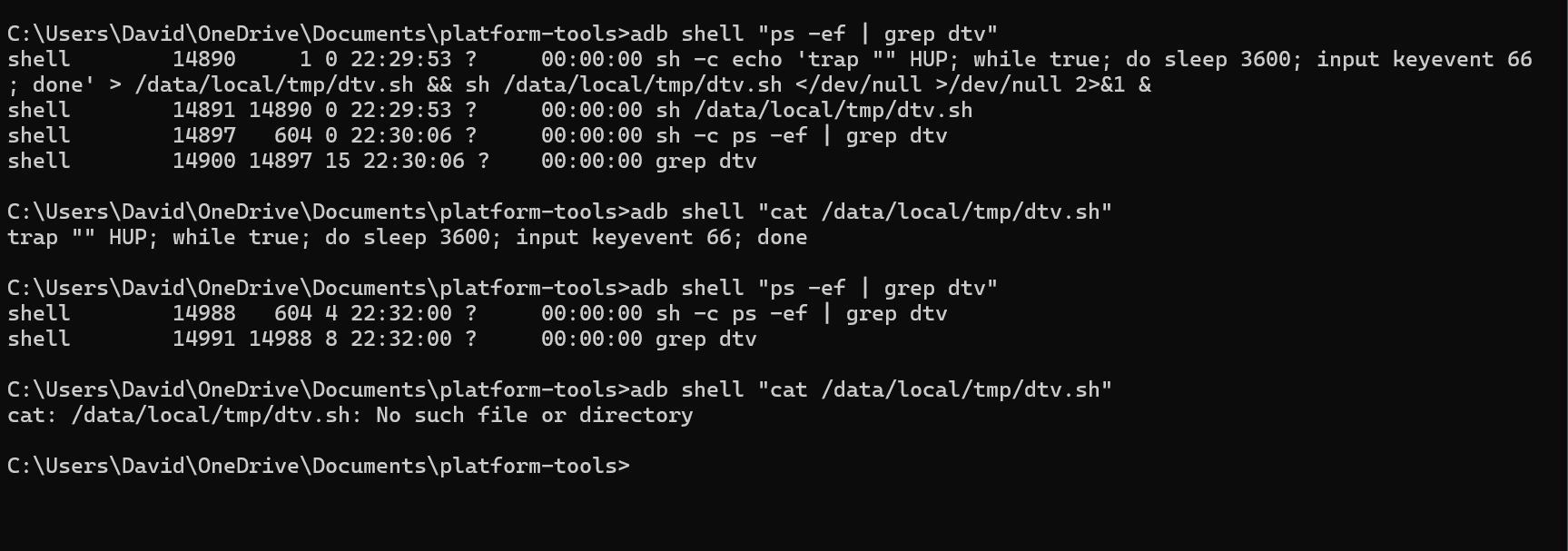
I'm not certain it executes perfectly every time, but it does seem to clean up every time. So far I only had it create the file and not start once from what I could tell. That could have been a fluke.
Edit: I found that really slowed down tuning by creating a file. I wrote a different version here that executes without creating a file. It seems to also do the same thing effectively. There's no file to now delete and it just kills the process at the end and then I confirmed over ADB that the process does get killed.
{
    "name": "DirecTV",
    "author": "David B.",
    "version": "1.0.0",
    "description": "Fast tuning for DirecTV.",
    "uuid": "3c7d5a19-6f2e-4b8a-9d3f-8e1c4b7a5f92",
    "global_options": {
        "wait_for_video_playback_detection": true,
        "use_fixed_delay": false,
        "fixed_delay_seconds": 0,
        "check_for_and_clear_whos_watching_prompts": false,
        "wait_after_post_playback_start_commands_seconds": 0
    },
    "pre_tune_commands": [
        "pkill -9 -f DTVKEEPALIVE || true"
    ],
    "tune_commands": [
        "am start -W -n '||TARGET_PACKAGE_NAME||'/$(cmd package resolve-activity -a android.intent.action.MAIN '||TARGET_PACKAGE_NAME||' | awk -F= '/name=/{print $2; exit}') -a android.intent.action.VIEW -d '||TARGET_URL_OR_IDENTIFIER||'"
    ],
    "post_playback_start_commands": [
        "(trap '' HUP; exec -a DTVKEEPALIVE sh -c 'while true; do sleep 3600; input keyevent 66; done') </dev/null >/dev/null 2>&1 &"
    ],
    "post_tune_commands": [
        "pkill -9 -f DTVKEEPALIVE || true",
        "input keyevent KEYCODE_MEDIA_STOP",
        "input keyevent KEYCODE_HOME"
    ]
}
That's a clever solution. Watch out though, if ADBTuner restarts, crashes, etc. while streaming there will be nothing to stop that background process from running on the android device.
2 Likes
Good point. The process name is consistent. I should probably add a pkill to the pre tune commands to ensure a fresh state.
Hello everyone. As was previously announced, it's time for a new stable release.
For lack of a better name I'm going to call this ADBTuner 2.0.
A new 2.0 tag was added this morning and the stable tag was updated to point to this release.
This is now the recommended version for day-to-day usage.
There are some significant backend changes in this build however everything should be automatically updated as needed on first load. There may be some issues for users that might have jumped back and forth between stable and other builds over the past couple of years. If you run into any please let me know.
Changes since the last stable release:
Switched to a dedicated proxy server that is always running instead of bringing one up for each stream and tearing it down afterwards. This enabled the following:
- Significantly improved control over tuner locking.
- Streams are now kept active for short while after a disconnect so clients can reconnect and continue watching without having to start over. This fixes issues with dodgy network connections and with client apps that retry if the stream doesn't start immediately (Kodi).
- Tuners will now be shared if more than one client app is streaming the same thing. Shared tuners will be locked until the last client disconnects.
Added experimental support for custom tuning configurations. These configurations can be used to define a set of custom ADB commands for applications that don't work with the default standard or compatibility mode options. A web interface for this is provided at /configurations. This feature is still experimental and may change in the future.
Added health check / status page at /up.
Improved playback detection.
Improved profile screen detection clearing (who's watching).
Added more detailed logging. Specifcally around locked tuners.
Added preview window with remote control buttons for each streaming endpoint in the web UI.
Enabled admin preview windows on mobile devices and tablets.
Improved keep alive functionality. This should now work with most applications.
Apps kept awake with the keep alive feature will no longer sit in the foreground. This is preferred as some apps always stream video when they are in the foreground.
By default, all video streams will now start after 20 seconds regardless of if the requested content has started playing. This allows for slow loading content that previously failed if the client connection timed out. The old behavior can be restored by selecting "Terminate Connection" for the "Slow / Failed Tuning Behavior" setting in the admin interface.
Added support for obtaining a deeplink url from a remote endpoint. This can be used by including "dynamic_url_json_key" parameter in the URL. The value should match the key that contains the URL in the json response. This is being used by ESPN+ with Custom Channels via ADBTuner.
Admin UI cleanup, improved navigation, dark mode support, improved mobile device support.
New REST API. Docs at /api/docs.
And finally, there have been many bug fixes since the last release. This version of ADBTuner should provide a better experience overall.
Thank you everyone for testing these builds and for all of your valuable feedback.
10 Likes