Advice Needed - ADBTuner or AH4C?

@uspino
I fixed the bmitunetest.sh to bmitune.sh...

The Spectrum App uses DeepLinks to go directly to the live stream for each channel tuned. I don't know your apps or whether they have deep links for the live stream or not. I currently don't know how you go about finding the deeplinks for the ATV. But...we should be able to tune them manually.

As far as the Tennis Channel and CNN Max app or any others.
I will assume 2 things.

  • The app is installed on the ATV that you are using as a tuner
  • You can step through the screens using the remote and play the content you are asking about.

Part 1: Using Portainer and ah4c stack Exec Console

  • Go to the ah4c Stack and log into the Exec Console again.
  • Type atvremote --storage-filename /root/.android/.pyatv.conf -s 10.10.11.42 app_list
  • Look through list and find the name of the app you want
  • In Spectrum's case it is called Spectrum TV
  • Remove any spaces in the name and try to launch it
  • Type atvremote --storage-filename /root/.android/.pyatv.conf -s 10.10.11.42 launch_app=spectrumTV:
  • You have to remove all spaces and it may not care about capitalizations. Don't forget the ":" at the end. On the ATV it may ask you if you are trying to launch a specific app the first time and you will have to confirm.

Ok now that you know how to lauch the app...

Part 2: Figure out the remote commands to move through App and start stream if needed...

  • Launch the App...then type in some of the following commands to figure out the correct sequence of commands to get to live stream while watching the ATV output.

atvremote --storage-filename /root/.android/.pyatv.conf -s 10.10.11.42 up
atvremote --storage-filename /root/.android/.pyatv.conf -s 10.10.11.42 down
atvremote --storage-filename /root/.android/.pyatv.conf -s 10.10.11.42 right
atvremote --storage-filename /root/.android/.pyatv.conf -s 10.10.11.42 left
atvremote --storage-filename /root/.android/.pyatv.conf -s 10.10.11.42 select

  • Create a command combining the required commands with any needed delays to make sure it works everytime...

Example: atvremote --storage-filename /root/.android/.pyatv.conf -s 10.10.11.42 up delay=100 up delay=200 right right delay=400 select

Part 3: Use "Case" in bmitune.sh script to launch specific channel

Possible m3u file

#EXTM3U
#EXTINF:-1 channel-id="1001" channel-number="1001" tvg-name="Tennis" tvc-guide-stationid=" ",Tennis_Channel
http://{{ .IPADDRESS }}/play/tuner/1001
#EXTINF:-1 channel-id="1002" channel-number="1002" tvg-name="CNN_Live" tvc-guide-stationid=" ",CNN_Live
http://{{ .IPADDRESS }}/play/tuner/1002

Possible bmitune.sh

/bin/bash

channelID="$1"
streamerIP="$2"

case $channelID in

  1001)
    atvremote --storage-filename /root/.android/.pyatv.conf -s $streamerIP launch_app=TennisTV:
    atvremote --storage-filename /root/.android/.pyatv.conf -s $streamerIP up delay=100 up delay=200 right right delay=400 select
    ;;

  1002)
    atvremote --storage-filename /root/.android/.pyatv.conf -s $streamerIP launch_app=MaxCNN:
    atvremote --storage-filename /root/.android/.pyatv.conf -s $streamerIP up delay=100 up delay=200 right right delay=400 select
    ;;

  *)
    #run this line if nothing matched earlier
    ;;
esac

Let me know how it all works.

Everything is up and running. I had to play with the delay and sleep options to avoid some hiccups. I also added a turn_on command to wake up the ATV before launching the app. Do you also do that? Here's how it looks. First the m3u file (Is there a way to force a specific channel number in CDVR guide? They seem to appear with random numbers in my guide):

#EXTM3U

#EXTINF:-1 channel-id="Tennis Channel" channel-number="8888",TENISHD
http://{{ .IPADDRESS }}/play/tuner/8888

#EXTINF:-1 channel-id="CNN" channel-number="8889",CNNHD
http://{{ .IPADDRESS }}/play/tuner/8889

And here is bmitune.sh:

#!/bin/bash

channelID="$1"
streamerIP="$2"

case $channelID in

  8888)
        atvremote --storage-filename /root/.android/.pyatv.conf -s $streamerIP turn_on
        sleep 2
        atvremote --storage-filename /root/.android/.pyatv.conf -s $streamerIP launch_app=com.tennischannel.tceverywhere
        sleep 8
        atvremote --storage-filename /root/.android/.pyatv.conf -s $streamerIP menu delay=200 down delay=200 down delay=200 down delay=200 down delay=200 down delay=200 select 
        ;;
  8889)
        atvremote --storage-filename /root/.android/.pyatv.conf -s $streamerIP turn_on
        sleep 2
        atvremote --storage-filename /root/.android/.pyatv.conf -s $streamerIP launch_app=com.wbd.stream
        sleep 5
        atvremote --storage-filename /root/.android/.pyatv.conf -s $streamerIP select delay=4000 up delay=200 right delay=200 right delay=200 right delay=200 right delay=200 right delay=400 down delay=400 select
         ;;
  *)
            #run this line if nothing matched earlier
        ;;
esac

It's very smart to force-quit the app via stopbmitun.sh when streaming is done.

Ands that's it, hope this thread helps somebody else with Apple TV. Let me know what you think, thanks!

Great to hear everything is working...

I disabled sleep instead.

Did you set it to "Prefer channel-number from M3U" when adding it to CDVR...as long as the numbers don't conflict with something already there I believe it will use your m3u numbers.

I actually changed a handful of settings on the AppleTV...

Sleep After: Never
TV Button: Home Screen
Automatically Update Apps: Off
Automatically Install Apps: Off
Offload Unused Apps: Off
Software Updates:Automatic Updates:Off
Siri:Off

Some apps don't always start up right on app_launch if it is already running and since you are using button presses to navigate it gives you a consistant starting point at channel launch... :slightly_smiling_face: :+1:

Definitely a better option, don't think ATV power consumption in Main Menu is relevant.

Is there deep-linking to different channels in Sling TV app (in the form of launch_app=spectrumTV://watch.spectrum.net/livetv/$channelID)? There seems to be conflicting info on this...

Sling TV Tuning with AppleTV and ah4c

I did a little experimenting with the Sling TV app on the AppleTV...
Looks like they do have deep linking working on it right now.

I don't have a Sling TV subscription so this was done with a few freestream channels and they were able to load and play multiple shows in a row for over 2 hours so it appears that the way I did it is pointing to the "channel" not the individual show.

Start by installing Sling TV on Apple TV tuner
Test starting up Sling TV using atvremote command...

atvremote -s 10.10.11.42 launch_app=slingtv:

First time you may have to confirm that you want to launch the Sling TV app.

Using a computer go to
https://watch.sling.com/dashboard/grid_guide/grid_guide_all

Find a channel you want and select it so it starts to play. After it starts playing right click on playing video and select the option "Create QR code for this page"
Copy the link they show and attach it after the launch_app=slingtv: removing the http: so it starts with the //

Here are 3 samples that should launch...

Alien Nation Channel
atvremote -s 10.10.11.42 launch_app=slingtv://watch.sling.com/1/asset/51f52123df99dc6d97e5887fdf23e6c3/watch

CBS 24/7 News Channel
atvremote -s 10.10.11.42 launch_app=slingtv://watch.sling.com/1/asset/0bf0d288245ed13cb11b9c87a4bc62ba/watch

Alf TV Channel
atvremote -s 10.10.11.42 launch_app=slingtv://watch.sling.com/1/asset/bf658731eeb0d9d4ab7023803cf0caff/watch

Depending on the channels you add you may be able to find guide data inside Channels but I have not tried.
Good Luck

1 Like

It absolutely works! For those using Safari, no QR code creation option, but the same channel id appears in the address bar while watching a channel. I hope this id number does not change often. Again, thanks a lot for taking the time to check this!

1 Like

Update: well, it only took a few days for Sling to change the stream IDs, so I guess I'll have to forget about deep-linking and go back to remote commands. Was really smooth while it worked, but after a few days I got into the "This content is not available".

@uspino

Did you spot check one of the id's for a channel or two to see if they really did change?

I believe Sling is known to not always be the most reliable streaming service.

You sure Sling isn't down/having issues???
If they take to long to tune it will error out.
I am getting lots of errors trying to watch directly from website right now.
Taking LONG time to either load a channel or say error can't play right now. :man_shrugging:

Yes. And when I copy/paste the new channel ID's to the bmitune.sh file it starts working fine again, and tuning straight into the channel stream. I'll see how often this happens...

@uspino

Sorry to here that.
I think some people have figured out how to run something that can scrape a website and maybe pull the information out then auto put it in a m3u. But that is currently beyond my humble skills by about 2 miles... :rofl: I may have to do some research at some point and see if I can figure it out.
FYI...The AppleTv's demanded I update the apps this morning or would not work. So far this seems to happen every 6 months or so...but I still prefer to leave the automatic updates off. I may have to revisit this at some point.

Also in case you haven't seen it some updates have been made to the apple:test* images and everything seems to be working good.

I have already updated mine this morning and am having no issues with it.

I have been happily using ADBTuner with YouTube TV (YTTV) for about two years. Recently, YTTV lost some channels that are important to me, so I began exploring other tuner options and stumbled upon this thread.

First, I want to thank @bnhf and @ChannelSam for making this possible.

I followed the instructions and successfully set up a fully functional Apple TV-Spectrum tuner. However, I encountered a minor issue.

I frequently record from the Tennis Channel, and during testing, I discovered that after four hours, the Spectrum app shows a "Are you still there?" notice. If no action is taken, the app shuts down.

I attempted to set the KEEP_WATCHING environment variable to various values, but it seems that this feature is not enabled in the current version of the project.

After some experimentation, I found that using atvremote via the CLI on Portiner to send a ‘select’ command to the Apple TV eliminates the "Still there" message. Additionally, sending the ‘select’ command during normal video playback does not affect the video stream.

My plan was to resolve the issue by adding the command atvremote --storage-filename /root/.android/.pyatv.conf -s $TUNER1_IP select as a cron job every two hours. However, I have had difficulty setting this up, and I am also concerned that it may not persist after an update.

Any assistance would be greatly appreciated.

:slightly_smiling_face: I feel your pain...Been there tried that.
At some point @bnhf explained to me that cron jobs do not really work in docker containers ...

Solution...
Go into the spectrum app on your "Atv Tuner" and change the timer from 4 hours to 12 hours... You can select I think between 4,8,12.
You should check this even if you have set it in the past in case after an update it was changed back to 4 hours.

Side Note...
At least in the image: bnhf/ah4c:appletv
@bnhf added a USER_SCRIPT=${USER_SCRIPT} enviroment variable that runs when you start the container. If you eventually need/want to run something over and over you can have this start a script that runs forever with a 2 hour repeating timer... In your example it could see what tuners are playing content and send the select command to those Atv's.
BUT this should NOT be needed in your case...just change the setting on the Atvs.
Just as an example for how I use this... My scripts actually set a bit when I stop playing a channel instead of immediatly killing it. Then every 15 minutes it will look at these bits and kill that stream. If I tune a new channel on that tuner it clears the bit when tuning. This allows me to go back and forth between 2 channels very fast without having to wait to retune each time. Does add some complication to the scripts. This can also be accomplished by telling CDVR to record the shows on the tuners while having Tuner Sharing enabled on CDVR (at least until the show finishes recording).
This works well for me with my current 2 atv tuner setup because it is either or...with more tuners it could still tune using a different tuner. I have thought for a while about trying to make a script that would allow tracking which tuner is still on which channel and tell ah4c to tune THAT tuner again but have never spent time to figure out how.

Well, this is embarrassing. I guess I should have looked for that setting a little harder. Thank you!

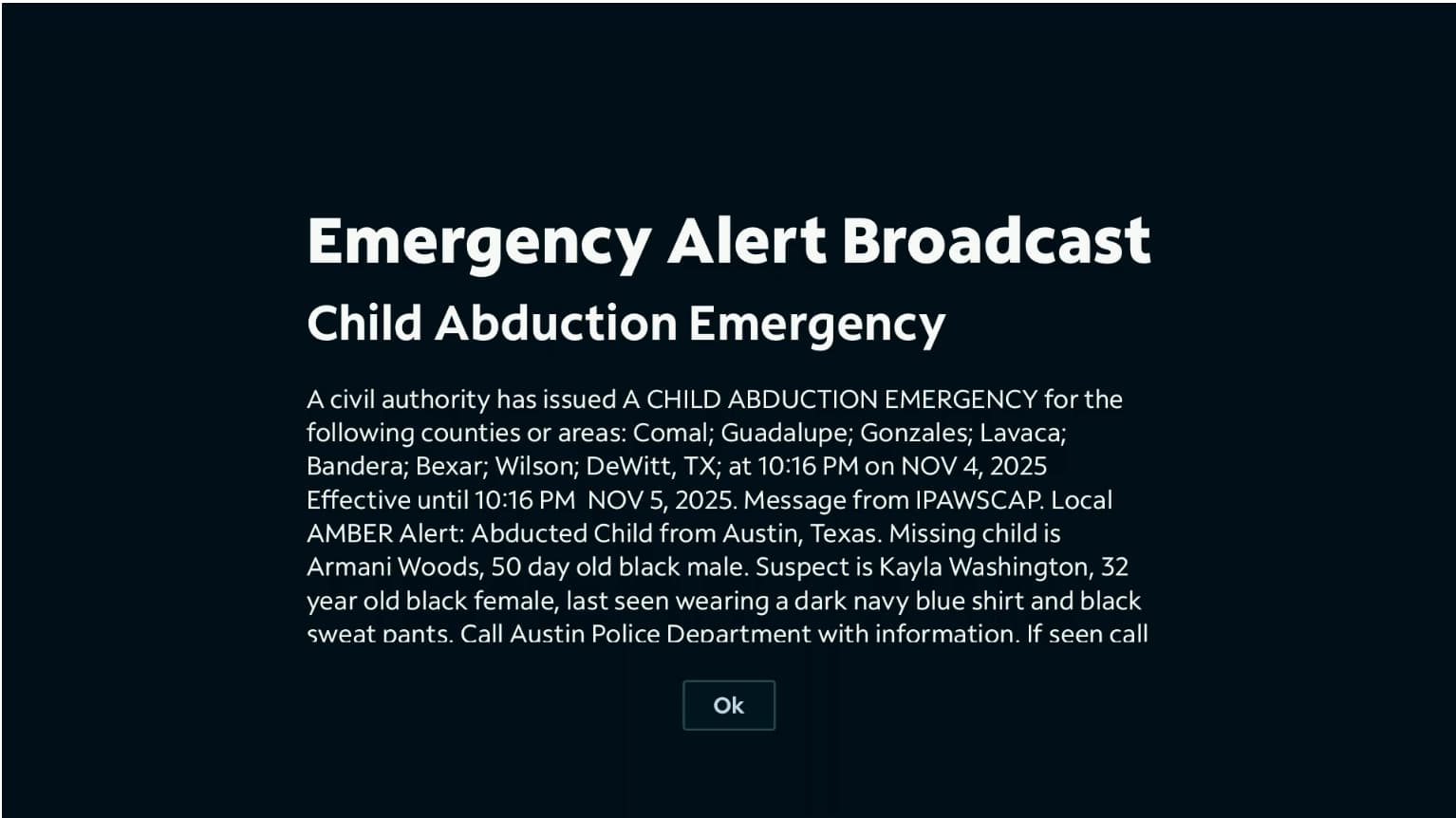
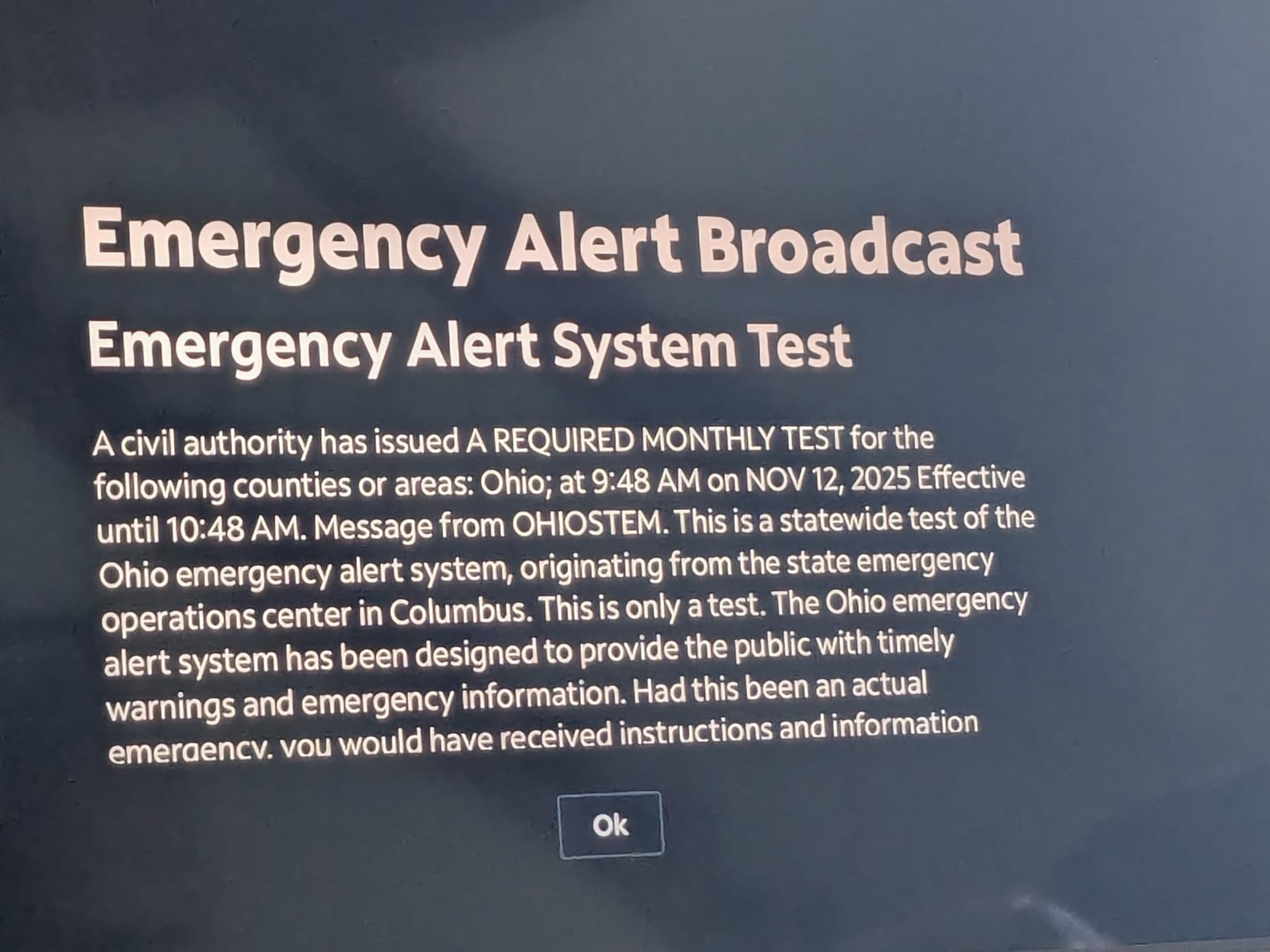
Do you by chance have a fix for the Emergency Alert Broadcast announcements? They never seem to go away like they do when using the cable box.

This is very interesting. I usually use the recording approach when following more than one college football game.

Not sure. Could you post a picture of what you're actually getting on your screen?...

I would start by going and deleting any app you don't actually need on the Apple TV tuner devices.

Then I would go into the Apple TV settings notifications and disable all notifications for all apps individually....

Also, check in the specific spectrum app and see if there's something about notifications/emergency notifications that can be shut off in its settings. If I get a chance sometime tomorrow I'll do some searching through the menus.

You might want to also log into your spectrum account from a computer and see if there's some notification settings available on there or if you have a spectrum box that might actually be global settings...

I don't believe I have seen any of these on my devices...:man_shrugging:

If you are using an Apple TV also as you're viewing client it now has multi-view available but only for Apple TV app AND it only allows live TV. :man_shrugging:

Glad to hear, I hope it stays that way. Thank you for your help and advice, I'll go over all the settings on all the involved devices/services.

@Pasker17

A little more info. I spent some time and checked my ATV's for what versions are on them and I went ahead and updated them where needed...

So both tuner ATVs were running the current Spectrum 3.35 (4.22....) version which appears to be the newest.
They were both still running tvOS 18.3 (22K557) but I went ahead and updated them to tvOS 26.1 (23J582). During this update I also saw that inside the ATV "Remotes and Devices"/"Remote App and Devices" settings there was multiple "pyatv" devices listed. I deleted all of them and as expected I had to rerun enabling the Docker to communicate with them and get new codes.
I have also turned back on auto updates for Apps but have left it off for tvOS.

Everything continues to work on my end. I will keep an eye out for the Emergency alerts.

I did find this...
It looks like it was/is a known issue for some Texas users at least.
Spectrum Emergency Alert Issue

That was with Spectrum App Ver 3.30 it says so maybe it has been fixed with Ver 3.35. :man_shrugging:
I live in a less populated area in Ohio so maybe you get a lot more alerts than I do. But I haven't seen any messages come up that won't go away.

I just had the issue...

I waited 10+ minutes and it never went away. Had to re-tune channel a couple times then it went away.
Since I had not seen this "lock up" before the update it looks like it is something that happens with tvOS 26.1 but not tvOS 18.3.
I believe this because it DID NOT happen before the updates AND I was already running the newest versions of Spectrum App before I did these updates.
I guess this is why I disable updates and don't do them ... :joy: :joy: :joy:

Same exact behavior as mine—hopefully we won’t see them often. Also, don’t feel bad about updating; mine did it on tvOS 18.3.

On better news, I’m happy to report that I have 3 ATV tuners up and running. I found your atvpair.sh script in another thread, and that made the configuration even easier—thank you!

While trying to “clean up” the ATV as much as possible, I discovered that AirPlay must be on for the atvremote operations to work.

Also, I’m closely watching @turtletank’s ADBTuner thread. Apparently there’s a chance that a future release will let us run ATV tuners. I’m a big fan of ADBTuner’s tuner management and streaming functionality.

Glad to hear it is all working for you.

I may post in the spectrum forum I linked to see if they have come up with a solution for the msg not going away yet.
Just to keep it in their conversation. Don't have a lot of hope though because it will need Spectrum to fix their app I would guess. When I was originally working on setting this up 2 years ago I tried to use Roku devices but Spectrum never supported deeplinks on those devices. As far as I know they still don't. :man_shrugging:
That is how I ended up with the ATVs for tuning.

LOL...I also saw the AirPlay must be on when I was turning things on/off to see what would happen on mine also.

I also follow the ADBTuner threads. I run ADBTuner with 2 Onn 4k Google Tv dongles for other channels/services. I think it is encouraging what I am seeing there as far as the ATV being mentioned...In the past they didn't seem interested in supporting anything but android ADB and making the biggest streaming apps work without fail. Which I can't argue with...AS they say don ONE Thing and do it WELL. :slight_smile: