
Yes, and that's what I outlined for you. I probably should have specifically asked you to do it the way I described, as that's the current implementation for multi-app support -- and I'd appreciate additional testers. The way you did it is fine, but is not the way I'd recommend for people to approach this.
I'm leaning towards merging the PR#20 (our current :beta4) into main today. Last call for any show-stopper issues! Anyone?
This is now done. New bnhf/ah4c:latest incorporates all of the WebUI and Closed Captions work done by @mackid1993. Congratulations to him for an impressive update to ah4c!
Please consider the :appletv tag now deprecated, with :latest now a unified project. Be sure to use the latest Docker Compose going forward:
services:
  # 2026.08.20
  # GitHub home for this project with setup instructions: https://github.com/sullrich/ah4c
  # Docker Hub home for this project: https://hub.docker.com/repository/docker/bnhf/ah4c
  ah4c:
    image: bnhf/ah4c:${TAG:-latest}
    container_name: ah4c
    hostname: ah4c
    dns_search: ${DOMAIN:-localdomain} # Specify the name of your LAN's domain, usually local or localdomain
    runtime: ${DOCKER_RUNTIME:-runc} # Closed captions only. Set DOCKER_RUNTIME=nvidia for an NVIDIA GPU with the CUDA engine build. Requires the NVIDIA container toolkit
    devices:
      - ${GPU_DEVICE:-/dev/null} # Closed captions only. Set GPU_DEVICE=/dev/dri to let the Vulkan engine build use an Intel or AMD GPU. Left at the default it passes /dev/null, which always exists and does nothing
    ports:
      - ${HOST_PORT:-7654}:7654 # Port used by this ah4c proxy
    environment:
      - IPADDRESS=${IPADDRESS} # Hostname or IP address of this ah4c extension to be used in M3U file (also add port number if not in M3U)
      - NUMBER_TUNERS=${NUMBER_TUNERS} # Number of tuners you'd like defined - add a matching TUNERn_IP and ENCODERn_URL line below for each beyond 9
      - TUNER1_IP=${TUNER1_IP} # Streaming device #1 with adb port in the form hostname:port or ip:port
      - TUNER2_IP=${TUNER2_IP} # Streaming device #2 with adb port in the form hostname:port or ip:port
      - TUNER3_IP=${TUNER3_IP} # Streaming device #3 with adb port in the form hostname:port or ip:port
      - TUNER4_IP=${TUNER4_IP} # Streaming device #4 with adb port in the form hostname:port or ip:port
      - TUNER5_IP=${TUNER5_IP} # Streaming device #5 with adb port in the form hostname:port or ip:port
      - TUNER6_IP=${TUNER6_IP} # Streaming device #6 with adb port in the form hostname:port or ip:port
      - TUNER7_IP=${TUNER7_IP} # Streaming device #7 with adb port in the form hostname:port or ip:port
      - TUNER8_IP=${TUNER8_IP} # Streaming device #8 with adb port in the form hostname:port or ip:port
      - TUNER9_IP=${TUNER9_IP} # Streaming device #9 with adb port in the form hostname:port or ip:port
      - ENCODER1_URL=${ENCODER1_URL} # Full URL for tuner #1 in the form http://hostname/stream or http://ip/stream
      - ENCODER2_URL=${ENCODER2_URL} # Full URL for tuner #2 in the form http://hostname/stream or http://ip/stream
      - ENCODER3_URL=${ENCODER3_URL} # Full URL for tuner #3 in the form http://hostname/stream or http://ip/stream
      - ENCODER4_URL=${ENCODER4_URL} # Full URL for tuner #4 in the form http://hostname/stream or http://ip/stream
      - ENCODER5_URL=${ENCODER5_URL} # Full URL for tuner #5 in the form http://hostname/stream or http://ip/stream
      - ENCODER6_URL=${ENCODER6_URL} # Full URL for tuner #6 in the form http://hostname/stream or http://ip/stream
      - ENCODER7_URL=${ENCODER7_URL} # Full URL for tuner #7 in the form http://hostname/stream or http://ip/stream
      - ENCODER8_URL=${ENCODER8_URL} # Full URL for tuner #8 in the form http://hostname/stream or http://ip/stream
      - ENCODER9_URL=${ENCODER9_URL} # Full URL for tuner #9 in the form http://hostname/stream or http://ip/stream
      - STREAMER_APP=${STREAMER_APP} # Streaming device name and streaming app you're using in the form scripts/streamer/app (use lowercase with slashes between as shown)
      - PYATV=${PYATV:-false} # Set to TRUE to run docker-start-pyatv.sh at container start for Apple TV tuners via pyatv, instead of the default docker-start.sh used for adb-based tuners. Case-insensitive; anything else runs the default.
      - CHANNELSIP=${CHANNELSIP} # Hostname or IP address of the Channels DVR server itself
      - ALERT_SMTP_SERVER=${ALERT_SMTP_SERVER} # The domainname:port of the SMTP server you'll be using like smtp.gmail.com:587. This is for sending ah4c alerts if tuning fails.
      - ALERT_AUTH_SERVER=${ALERT_AUTH_SERVER} # The auth server for the e-mail you'll be using like smtp.gmail.com
      - ALERT_EMAIL_FROM=${ALERT_EMAIL_FROM} # The e-mail address you'd like your ah4c failure alert e-mails to show as being from.
      - ALERT_EMAIL_PASS=${ALERT_EMAIL_PASS} # Gmail and Yahoo both support the creation of app-specific e-mail passwords, and this is the way to go! It's NOT recommended to use your everyday e-mail password.
      - ALERT_EMAIL_TO=${ALERT_EMAIL_TO} # The e-mail address you'd like your alert e-mails sent to.
      - ALERT_WEBHOOK_URL=${ALERT_WEBHOOK_URL} # URL to GET when an alert fires (same failures that trigger the e-mail); put $reason in the URL and it's replaced with the URL-encoded message. Blank disables it.
      - LIVETV_ATTEMPTS=${LIVETV_ATTEMPTS} # For FireTV Live Guide tuning only, set maximum number of attempts at finding the desired channel
      - CREATE_M3US=${CREATE_M3US:-false} # Set to true to create device-specific M3Us for use with Amazon Prime Premium channels -- requires a FireTV device
      - UPDATE_SCRIPTS=${UPDATE_SCRIPTS:-true} # Set to true if you'd like the sample scripts and STREAMER_APP scripts updated whether they exist or not
      - UPDATE_M3US=${UPDATE_M3US:-true} # Set to true if you'd like the sample m3us updated whether they exist or not
      - TZ=${TZ} # Your local timezone in Linux "tz" format
      - SPEED_MODE=${SPEED_MODE:-false} # Set to false if you'd like the target streaming app to be closed after each tuning cycle (limited script support).
      - KEEP_WATCHING=${KEEP_WATCHING} # In supported scripts, set the delay before resending a tuning deeplink to prevent "Are you still watching?" type messages. Examples: Use 4h for 4 hours or 240m for 240 minutes.
      - AUTOCROP_CHANNELS=${AUTOCROP_CHANNELS} # Space separated list of channels (by number) with black borders on 4 sides to autocrop while maintaining aspect ratio. Requires LinkPi Encoder!
      - LINKPI_HOSTNAME=${LINKPI_HOSTNAME} # Hostname or IP of the LinkPi Encoder's web API. Required for AUTOCROP_CHANNELS.
      - LINKPI_USERNAME=${LINKPI_USERNAME} # Username for the LinkPi Encoder's web API. Required for AUTOCROP_CHANNELS.
      - LINKPI_PASSWORD=${LINKPI_PASSWORD} # Password for the LinkPi Encoder's web API. Required for AUTOCROP_CHANNELS; not currently read by the bundled scripts, which log in with the LinkPi default password instead.
      - USER_SCRIPT=${USER_SCRIPT} # Path to a custom script to run alongside ah4c at container startup. Blank runs nothing extra.
      - NULL_FRAME_INSERTION=${NULL_FRAME_INSERTION:-false} # Set to TRUE to fill encoder stalls with MPEG-TS NULL packets (PID 0x1FFF) so the DVR never sees a zero-byte gap mid-recording. Case-insensitive (true/True/TRUE all work); anything else, including 1/yes, leaves the feature off.
      - PLAYBACK_DETECTION=${PLAYBACK_DETECTION:-false} # Set to TRUE to hold the stream until the device reports media audio playing and the picture is actually moving, then start on a keyframe, so a recording begins on the program rather than on the app's loading screen. Requires adb access to the tuner; network tuners only. Case-insensitive (true/True/TRUE all work); anything else, including 1/yes, leaves the feature off.
      - PLAYBACK_DELAY=${PLAYBACK_DELAY} # Set to a whole number of seconds to skip the start of each tune, so a recording begins on the program rather than on the app's loading screen. Piped through the bundled ffmpeg with -ss and stream copy; no re-encoding, and the skip starts on the next keyframe so it can run slightly past the configured value. The value is the total tune time, scripts included. Supported range is 2 to 30, since the DVR allows a tune about 30 seconds; values outside the range are clamped and logged. Ignored when PLAYBACK_DETECTION is TRUE; network tuners only. 0 or unset leaves the feature off.
      - PLAYBACK_STATIC_TIMEOUT=${PLAYBACK_STATIC_TIMEOUT} # Only used with PLAYBACK_DETECTION=TRUE. How many seconds the box may keep the exact player and media session it already had before the check stops watching adb and gates on motion alone. The default is 2, which suits Ospreys; apps that hold one player across channel changes, like the DirecTV app, need more. 0 or unset uses the default.
      - HEARTBEAT_INTERVAL=${HEARTBEAT_INTERVAL:-0} # In supported scripts (currently osprey), seconds between keepalive keyevents sent during playback to stop the app's UI inactivity timer from resetting the stream. Set to 0 to disable.
      - NVIDIA_VISIBLE_DEVICES=${NVIDIA_VISIBLE_DEVICES} # Closed captions only. Set to all alongside DOCKER_RUNTIME=nvidia to expose an NVIDIA GPU. Empty means no GPU and is the default
      - NVIDIA_DRIVER_CAPABILITIES=${NVIDIA_DRIVER_CAPABILITIES} # Closed captions only. Set to compute,utility when using an NVIDIA GPU, so the driver the CUDA engine build needs is passed in
    volumes:
      - ${HOST_DIR}/ah4c/scripts:/opt/scripts # pre/stop/bmitune.sh scripts will be stored in this bound host directory under streamer/app
      - ${HOST_DIR}/ah4c/m3u:/opt/m3u # m3u files will be stored here and hosted at http://<hostname or ip>:7654/m3u for use in Channels DVR - Custom Channels settings
      - ${HOST_DIR}/ah4c/adb:/root/.android # Persistent data directory for adb keys
      - ${HOST_DIR}/ah4c/captions:/opt/captions # Closed caption settings, and the speech model, engine and any GPU driver downloaded from the Closed Captions page. Stays empty unless you turn captions on
    restart: unless-stopped
And here's a set of sample env var overrides:
TAG=latest
CONTAINER_NAME=ah4c
HOSTNAME=ah4c
DOMAIN=localdomain tailxxxxx.ts.net
DOCKER_RUNTIME=runc
GPU_DEVICE=/dev/dri
HOST_PORT=7654
IPADDRESS=docker6:7654
NUMBER_TUNERS=5
TUNER1_IP=firestick-desk1:5555
ENCODER1_URL=http://linkpi-encoder2:8090/stream0
TUNER2_IP=firestick-desk2:5555
ENCODER2_URL=http://linkpi-encoder2:8090/stream1
TUNER3_IP=firestick-desk3:5555
ENCODER3_URL=http://linkpi-encoder2:8090/stream2
TUNER4_IP=firestick-desk4:5555
ENCODER4_URL=http://linkpi-encoder2:8090/stream3
TUNER5_IP=firestick-desk5:5555
ENCODER5_URL=http://linkpi-encoder2:8090/stream4
STREAMER_APP=scripts/firetv/dtvstreamdeeplinks
PYATV=false
CHANNELSIP=media-server10
ALERT_SMTP_SERVER=smtp.gmail.com:587
ALERT_AUTH_SERVER=smtp.gmail.com
[email protected]
ALERT_EMAIL_PASS=xxxxxxxxxxxxxxxx
[email protected]
ALERT_WEBHOOK_URL=
LIVETV_ATTEMPTS=
CREATE_M3US=false
UPDATE_SCRIPTS=true
UPDATE_M3US=true
TZ=America/Denver
SPEED_MODE=false
KEEP_WATCHING=235m
AUTOCROP_CHANNELS=
LINKPI_HOSTNAME=
LINKPI_USERNAME=
LINKPI_PASSWORD=
USER_SCRIPT=
NULL_FRAME_INSERTION=false
PLAYBACK_DETECTION=true
PLAYBACK_STATIC_TIMEOUT=12
PLAYBACK_DELAY=
HEARTBEAT_INTERVAL=
NVIDIA_VISIBLE_DEVICES=
NVIDIA_DRIVER_CAPABILITIES=
HOST_DIR=/data
2 Likes
I fixed the CalVer issue, so you should be able to rebuild if you want to. And it should stamp the build with the current date and time in UTC. There was also an issue where it was putting the version bump script in the scripts directory. That was a mistake.
Thank you for merging my work, by the way!!
I echo this
Just updated here to latest tag, and looking great so far.
Congrats to BOTH of you!!!
1 Like


perfect timing! I fixed my NanoA1bios 
Great work guys! now that i can use the interface a bit more I really like having all/most of what I need in 1 place. 
does not work for me, but i'm using HOST_DIR=/mnt/c/data
simply redeploying after portainer automatically removes the bad variable works fine. able to download drivers and use captions with GPU and they survive a Re-pull without the env variable.
also CDVR_M3U_NAME=dtv.m3u was missing from your sample but works 
which leads us to the GUI not having a way to create or import a m3u, you can only edit the ones provided.
maybe you could/should include mine
As you probably know, Docker Desktop for Windows does not support hardware acceleration via an iGPU for any container.
A reasonable suggestion to support M3U import. However, any custom M3Us that you have in the correct folder, should show-up and can be edited.
One of mine is called up-and-away:
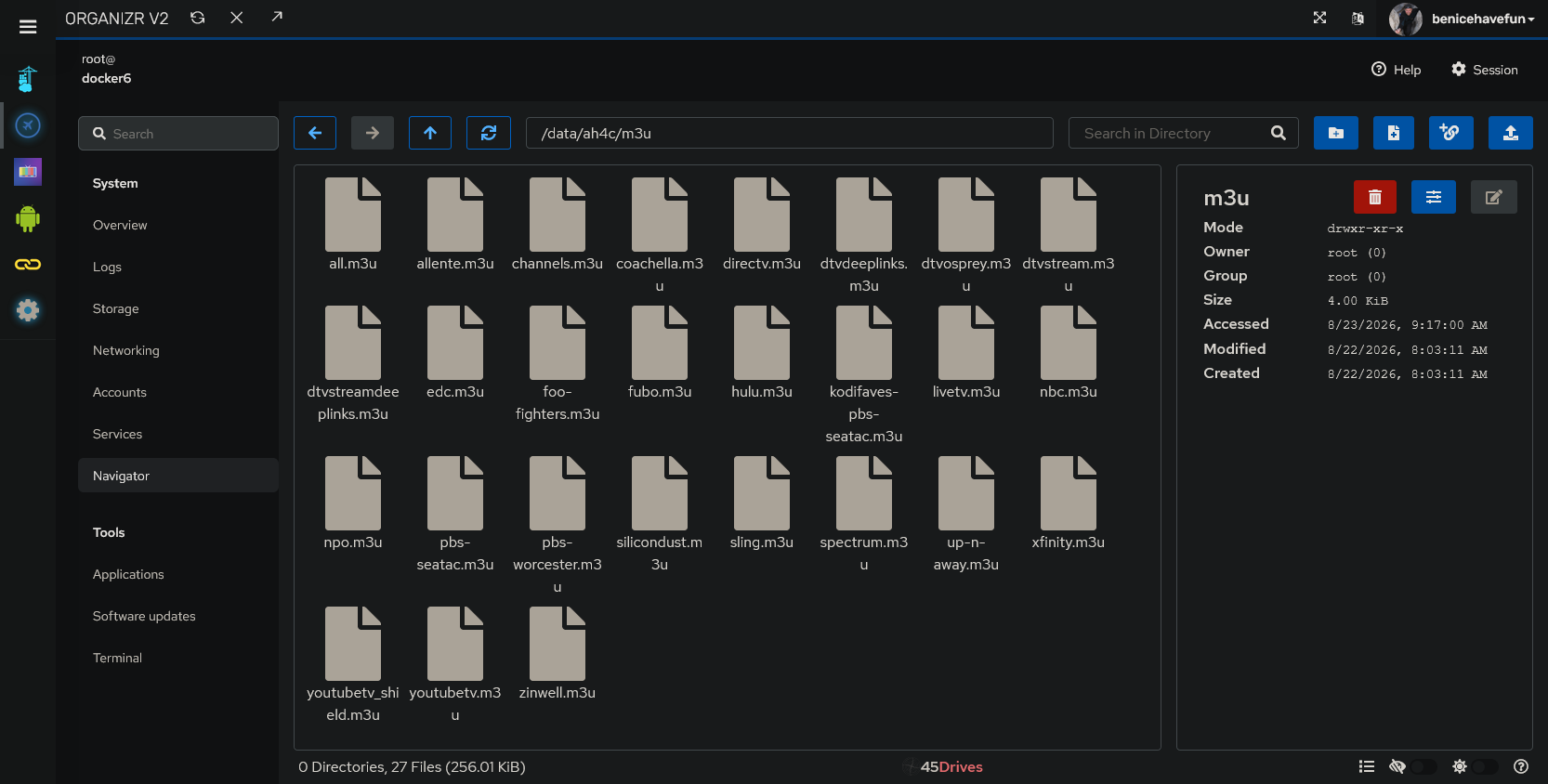
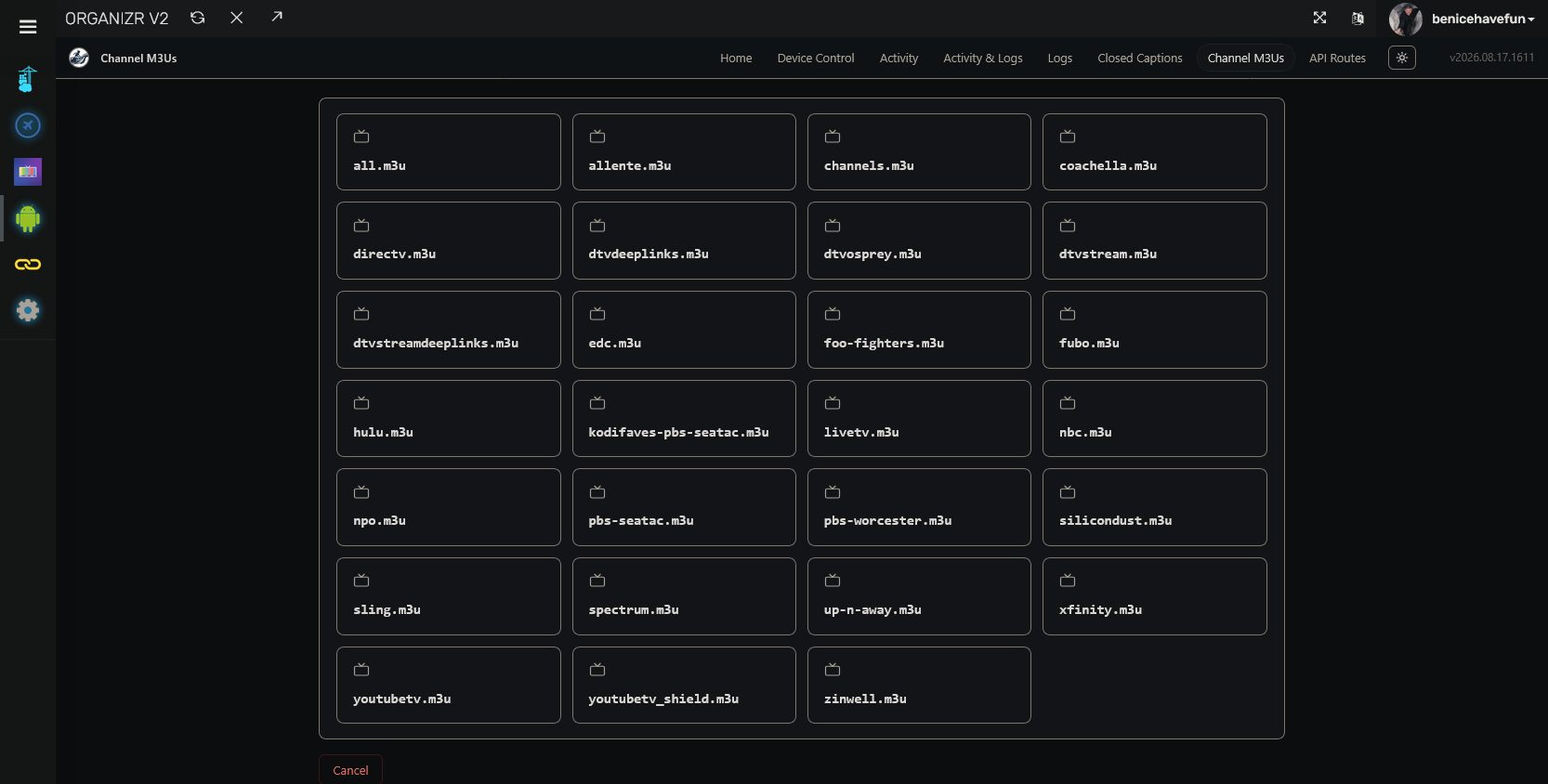
CDVR_M3U_NAME is only used by Project One-Click to create your ah4c CDVR Custom Channels Source, and is not required after that. No harm in having it in the overrides, but if you look in the YAML it's not defined there, which means it's ignored.
I think the only think I may be against is a script editor. Scripts should be deliberately created I think and there's too much of an XSS risk that can bite with a bash script. Maybe we can look into a safe importer though that will ingest a set of scripts chmod them and place them in the bind mount. That could be a nice usability upgrade.
I have the Ultimate package so maybe mine would have more coverage with my NYC locals removed for cleanliness.
i do now... lol I thought that, but somehow it didn't let me turn on cc until i downloaded them (i think a tuner in use was my hangup.)
anyway it does make a fella think it is working when automatic is checked. 

vs.

Yes, it won't do anything unless it's idle. (to prevent tuning issues)
so another edge case, for us with cheap pc's but many encoders. 
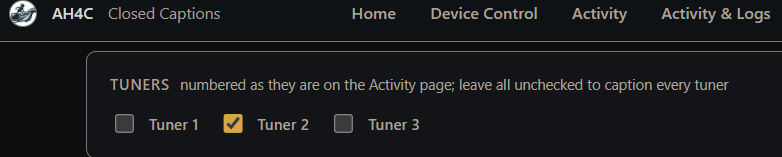
any way we could tackle isolating or prioritizing channels to certain tuners for CC?
that's why I included a small AI model. this isn't an edge case, one shouldn't do local AI on a potato with a lot of tuners. what model are you using?
I just started seeing what it can do so only the default, I downloaded the 110M, but haven't switched yet. I got a little too excited about my bios fixes when I saw the hardware acceleration light up.. 
i record news all day on 1 channel, and am perfectly fine with CC burned in as they get deleted in 6hrs anyway, but I'd like to use your CC implementation for other recordings.
or do I run another container as i've done in the past
1 Like
Try the TDT model. It might run better on your hardware.
gotta admit both parakeet on 2 line roll-up do as good or better than whatever HBOmax (app) uses on some shows
TDT seems to be a better option than burn in
1 Like
I'm glad it's working well. And yeah the TDT option should be better for your hardware.
A couple of questions for you:
The remote provider I use, Xfinity, takes longer to tune -- such that Channels gives up and tries the next tuner when I have PLAYBACK_DETECTION=true. In this situation, should I set NULL_FRAME_INSERTION=true, and would you expect that to keep CDVR from giving up on the stream so quickly?
The other question I have is, if there's a way to force Closed Captions on -- such that they could be used with Channels Multiview? If so, it seems like it could be a superior approach to turning on captions locally on the source streaming device.
I haven't tried that with a null-frame insertion, but it's worth a shot.
It's generally when the encoder's not sending a stream, not when the tuner's not sending a stream to the encoder.
Maybe we can cook something up for providers that take a really long time to tune using the same mechanism.
When I get a chance, I'll take a look and see if I can get my robot to do something for that.
Also, closed captions are turned on through the channels client, so it's whatever the client supports.
Like when I turn closed captions on, I go into the top shade and options and then turn captioning on.
So if channels doesn't support closed captions in multi-view, I don't see how we could.
Haven’t updated yet but was curious if I need to create any new folders on my Synology NAS.