
I am just the teeniest bit burnt out right now, so I might have to take a little bit of a breather and then look at it another time. I also have not set this up yet, so I would have to maybe look into setting up a test Channels server. I do not want to keep interrupting people while I test various things related to Channels, so it would probably be best if I take my spare LinkPis that I have lying around and look into setting up a spare Channels/ah4c server with those extra encoders at some point.
No problem. I'll see if I can make any inroads on either issue tomorrow. View & control seem the most pressing, so I'll look at that first.
1 Like
That's exactly my thought as well!
looks like everything worked good for me this last week unsupervised. 

i'll wait till another day to try any updates.
this does make since, and i'm capable of opting out.
I was worried about that and hesitated even saying something, i think its fine if everything starts at zero, just wanted the env and gui to match. 
So you got my curiosity going and I tried ah4c outside of FC and tune time was around 20 seconds to the video actually starting. I tried tuning to Fail Army to make sure it wasn't a network subscription thing. Below is the ah4c log file;
2026/09/08 14:13:31 [EXECUTE] Stderr: '+ streamerIP=192.168.88.113:5555

+ streamerNoPort=192.168.88.113

+ adbTarget='adb -s 192.168.88.113:5555'

+ packageName=com.att.tv

+ mkdir -p 192.168.88.113

+ trap finish EXIT

+ main

+ adbConnect

+ adb connect 192.168.88.113:5555

+ local -i adbMaxRetries=2

+ local -i adbCounter=0

+ true

+ adb -s 192.168.88.113:5555 shell input keyevent KEYCODE_WAKEUP

+ local adbEventSuccess=0

+ [[ 0 -eq 0 ]]

+ break

+ forceStopApp

+ adb -s 192.168.88.113:5555 shell am force-stop com.att.tv

+ finish

+ echo 'prebmitune.sh is exiting for 192.168.88.113:5555 with exit code 0'

'

2026/09/08 14:13:31 [EXECUTE] Finished running ./scripts/firetv/dtvstreamdeeplinks/prebmitune.sh in 2.195112575s

2026/09/08 14:13:31 [EXECUTE] Running [./scripts/firetv/dtvstreamdeeplinks/bmitune.sh FLARMY~5b2cc61c-32c8-42db-8c2e-ec527e55f1fa 192.168.88.113:5555]

2026/09/08 14:13:31 [EXECUTE] Stdout: 'Current PID for this script is 281

Starting: Intent { act=android.intent.action.VIEW (has data) cmp=com.att.tv/com.clientapp.MainActivity }

bmitune.sh is exiting for 192.168.88.113:5555 with exit code 0

'

2026/09/08 14:13:31 [EXECUTE] Stderr: '++ echo FLARMY~5b2cc61c-32c8-42db-8c2e-ec527e55f1fa

++ awk -F~ '{print $2}'

+ channelID=5b2cc61c-32c8-42db-8c2e-ec527e55f1fa

++ echo FLARMY~5b2cc61c-32c8-42db-8c2e-ec527e55f1fa

++ awk -F~ '{print $1}'

+ channelName=FLARMY

+ streamerIP=192.168.88.113:5555

+ streamerNoPort=192.168.88.113

+ adbTarget='adb -s 192.168.88.113:5555'

+ packageName=com.att.tv

+ packageAction=com.clientapp.MainActivity

+ trap finish EXIT

+ main

+ updateReferenceFiles

+ mkdir -p 192.168.88.113

+ [[ -f 192.168.88.113/stream_stopped ]]

+ [[ -f 192.168.88.113/last_channel ]]

+ echo 281

+ echo 'Current PID for this script is 281'

+ tuneChannel

+ adb -s 192.168.88.113:5555 shell am start -n com.att.tv/com.clientapp.MainActivity dtvnow://deeplink.directvnow.com/play/channel/FLARMY/5b2cc61c-32c8-42db-8c2e-ec527e55f1fa

+ finish

+ echo 'bmitune.sh is exiting for 192.168.88.113:5555 with exit code 0'

'

2026/09/08 14:13:31 [EXECUTE] Finished running ./scripts/firetv/dtvstreamdeeplinks/bmitune.sh in 433.260841ms

2026/09/08 14:14:02 Tuner 0 is active - skipping

2026/09/08 14:14:02 [ERR] Failed to tune device(s) not available

2026/09/08 14:14:02 [GIN-debug] Request: 172.27.0.1 GET /play/tuner/FLARMY~5b2cc61c-32c8-42db-8c2e-ec527e55f1fa, latency: 314.372µs, status: 500

2026/09/08 14:14:02 [IO] io.Copy: write tcp 172.27.0.2:7654->172.27.0.1:49982: write: broken pipe

2026/09/08 14:14:02 [IOINFO] Successfully copied 25697752 bytes

2026/09/08 14:14:02 [IOINFO] Transfer speed: 6.555588450881878 Mbits/second

2026/09/08 14:14:02 Performing Close() for 192.168.88.113:5555

2026/09/08 14:14:02 [EXECUTE] Running [./scripts/firetv/dtvstreamdeeplinks/stopbmitune.sh 192.168.88.113:5555 FLARMY~5b2cc61c-32c8-42db-8c2e-ec527e55f1fa]

2026/09/08 14:14:09 [EXECUTE] Stdout: 'Streaming stopped for 192.168.88.113:5555

Sleep initiated for 192.168.88.113:5555

192.168.88.113/stream_stopped written with epoch stop time

'

2026/09/08 14:14:09 [EXECUTE] Stderr: '+ streamerIP=192.168.88.113:5555

+ streamerNoPort=192.168.88.113

+ adbTarget='adb -s 192.168.88.113:5555'

+ packageName=com.att.tv

+ main

+ bmituneDone

+ bmitunePID=281

+ ps -p 281

+ adbStop

+ stop='input keyevent KEYCODE_BACK; input keyevent KEYCODE_HOME'

+ adb -s 192.168.88.113:5555 shell input keyevent 'KEYCODE_BACK;' input keyevent KEYCODE_HOME

+ sleep 2

+ echo 'Streaming stopped for 192.168.88.113:5555'

+ adbSleep

+ sleep='input keyevent KEYCODE_SLEEP'

+ adb -s 192.168.88.113:5555 shell input keyevent KEYCODE_SLEEP

+ echo 'Sleep initiated for 192.168.88.113:5555'

+ date +%s

+ echo '192.168.88.113/stream_stopped written with epoch stop time'

'

2026/09/08 14:14:09 [EXECUTE] Finished running ./scripts/firetv/dtvstreamdeeplinks/stopbmitune.sh in 6.894563499s

2026/09/08 14:14:09 [GIN-debug] Request: 172.27.0.1 GET /play/tuner/FLARMY~5b2cc61c-32c8-42db-8c2e-ec527e55f1fa, latency: 40.464696268s, status: 200
FastChannels/ah4c integration is working really, really well. If your provider is DTV, Sling or Philo it'd be well worth your time to migrate over (not including those with Ospreys). Here's are few recent screenshots and details:
I'll take my two remaining Onn 4K boxes that I didn't give to my mom and set those up with the bridge.
I do have 3 ENC1-V3's just lying around now  .
.
Where do I get the APK for this, by the way?
1 Like
When you setup the FastChannels ah4c bridge, you'll see there's a button to install the FC Player. It's all pretty easy.
EDIT: You don't need to bother with downloading scripts/firetv/fastchannels from FastChannels. Those same script will be installed automatically in ah4c when you use that as a STREAMER_APP value. Also, don't forget to set the new FASTCHANNELS_URL env var.
1 Like
May have made a discovery with DirecTV and the Osprey issues related to the HEARTBEAT_INTERVAL. It may no longer be needed more than once. I believe that it could be useful to prevent the box from shutting off after 4 hours if you have the energy saver turned on. So, therefore, it's optional. Therefore, maybe set it to like 3 hours or something like that. But I am testing it now with just sending that key code once in the script.
It's been working so far flawlessly. But if I don't have it in there, it does retune with the blue screen.
The other thing I noticed is the readiness gate that I added is very complex, and seemingly I've been able to also use that key code in place of the readiness gate, and it seems to work as a blocker to prevent the tune from executing too quickly. So I'm going to test that over the weekend, and if it works, I'll submit a PR to update the scripts.
Could also be useful for the Osprey ADB Tuner configs.
not sure it's the latest pushed, but using ah4c v2026.08.28.1306 since released and have had no problems (no heartbeat, only cc) but caught this messup today. (the 356 did not take and cdvr recorded 30mins of accuweather)
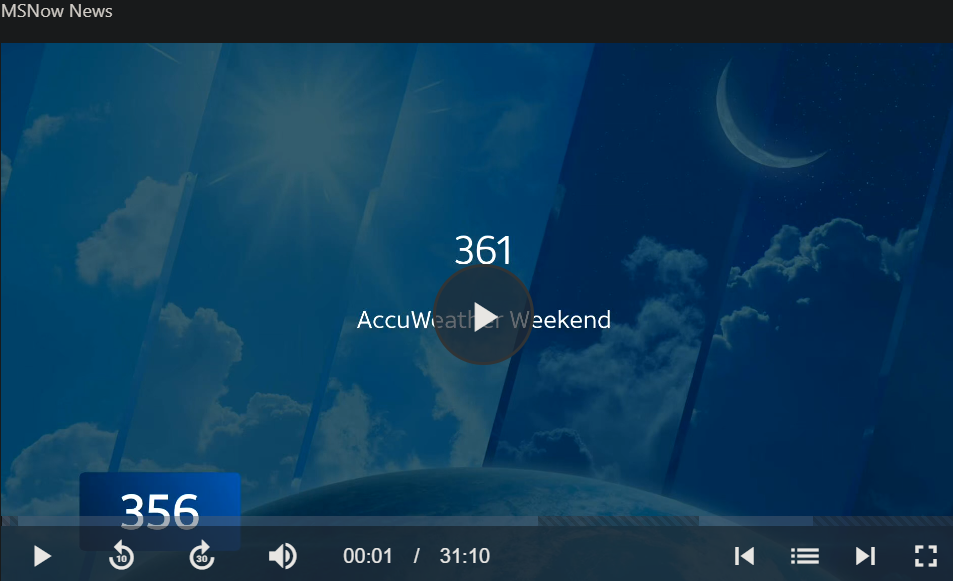
I have 2 identical passes with different padding and channel #'s so the tuner is switched every half hour. the only thing ah4c has been recording all day is ch# 356, I actually have not tuned to 361 for weeks. I'm not sure how the osprey got set on 361, and my logs only seem to go back 1.5hr.
edit. closest thing I can think of is the 2 channels in my m3u are 60.356 and 61.356 and this was the 61.356 . that is the only way I can see how a 61 got in there. still doesn't make sense, but 

Are you on my latest scripts?
Because this is just the Ospreys wigging out. They are. They have been really buggy lately. And there have been reports on Reddit as well. It's not just us.
I've actually like escalated through the ranks of direct TV because I'm pissed off. Not mentioning anything related to channels or anything like that, just the fact that these issues are occurring with the Ospreys and we pay so much for TV service.
There are multiple reports on Reddit of random weird issues like this. I also just found a bug with AH4C if your boxes are asleep and null frame insertion is off. I'm hacking away at a solution, but it's not a simple one.
whatever came with 08.28.
no wigging out. just something told the box to tune to 361 apparently right before trying to tune to 356.
I'm guessing this (blindly) as I also have insertion off
USER_SCRIPT=
NULL_FRAME_INSERTION=false
PLAYBACK_DETECTION=false
PLAYBACK_STATIC_TIMEOUT=
PLAYBACK_DELAY=
PREROLL_FILE=
ENCODER_CODEC=h265
HEARTBEAT_INTERVAL=0
NVIDIA_VISIBLE_DEVICES=
NVIDIA_DRIVER_CAPABILITIES=
HOST_DIR=/data
also for what it's worth I found a mistake in my m3u (but it's been there 2 weeks and no other issues)
was
tvc-guide-tags="MSNow, News",MSNOW60
now
tvc-guide-tags="MSNow News",MSNOW60
edit2 according to Channels Support - Add Custom Channels with M3U Playlists tvc-guide-tags: guide item tags. comma delimited. example: "HDTV, Live"
so I had it right, but ah4c was misreading somehow
Do you let your boxes sleep?
when tuning is done they sleep
Do you have closed captioning completely disabled?
I believe the regression I found only invokes itself when closed captioning has been enabled.
1 Like
no, I'm using and really liking the CC now that I have my n100 running at an appropriate wattage thanks again! game changer, and this winter I will be marking all my recordings prior to sept to not recorded so they can be replaced with embeded cc 
Then I don't know why I'm hitting this race condition and you aren't. That's super weird.
Regardless, it was happening consistently, so it is definitely an edge case.
I think it is that it's a literal race condition and somewhat hardware dependent. I'm running on a faster chip, so I think that could be why I'm having the issue, and it's also closed caption related.
So, this was a me problem. I did something dumb and broke the HDMI handshaking on my boxes. I had to revert something that I did.
This is actually a situation where Raycast came in clutch. It has a really, really long history with the clipboard manager, and I was able to figure out what commands I ran by just kind of digging through my clipboard manager and reversing them essentially.
Now everything is working as it should! Basically spent two days chasing nothing. my own tail!
I did, however, find a bug with the playback delay feature where it kind of drains too quickly and everything goes into high speed mode as soon as the show starts playing. I have a PR open to fix that. so, hopefully, that gets merged soon and that feature will work properly for most people.
2 Likes
been there! 
I went back in my stack logs and could find no reason for my box getting on 261  it's toggling between both usb captures on 2 C71KW-200's every half hour 16hrs a day so I do kinda expect a hiccup now and again, just be nice if i could see the ospreys' logs
I just got my linkpi and tested a lot of deep links I don't have access to directv login only my logged in acct on Android fromy ex most channels I found on this server load deep links. I also have uverse apk I have modded to run on Ethernet and work on other android devices ..it also has deep link functionality . There is so many setup options I am totally lost. Can anyone help me if I pay for some support? I can venmo