What is the best set of scripts to use with Onn boxes and DirecTV? For now, I took the Osprey deep link scripts and modified them slightly, and they're working. I'm just curious if there's something that's already pre-configured that I don't have to modify.
The Fire TV scripts look pretty specific to Amazon's config. Since the modified Osprey scripts are working for me, I can always PR them back as like a Google TV variant if anyone else is willing to test what I came up with. It was just a URL scheme change, a slight change to the ADB command, and changing the package name.
I am using the following after generating the directv m3u with olive tin. Some of it of course doesn't apply given the capture device you are using. Excuse the redundant commands where you see them. I just have not bothered to clean up.
bimtune.sh:
#!/bin/bash

callSign=$(echo $1 | awk -F~ '{print $1}')
contentID=$(echo $1 | awk -F~ '{print $2}')
tunerIP="$2"

# Map tuner IP to Magewell input
case "$tunerIP" in
    "192.168.1.130") streamPath="stream/0-1" ;;
    "192.168.1.131") streamPath="stream/0-2" ;;
    "192.168.1.132") streamPath="stream/0-3" ;;
    "192.168.1.133") streamPath="stream/0-4" ;;
    *) streamPath="stream/0-1" ;;
esac

encoderURL="http://192.168.1.188:6502/$streamPath"

adb -s $tunerIP shell am start -S -W \
  -a android.intent.action.VIEW \
  -d "dtvnow://deeplink.directvnow.com/play/channel/$callSign/$contentID"

# Wait until Magewell is receiving signal
sleep 8
too much winning i guess.. lol
I have a 2x2 setup. identical except for the lower frame rate on my usb's.
I favorite movie and other 4k channels with the 2xHdmi set and I favorite the news and low res retroTv to the lower framerate 2xusb
I've actually been considering splitting them all out individually, but I bet it'd be a network disaster.
Oh, that would be best if I could add another tuner.
My whole thing is I have two ENC5s, or at least one on the way, so I wanted to run 10 Ospreys, and I realized it was maxing out at nine.
If you need help drafting a PR, let me know if I can be of any assistance. I have a long weekend right now!
pretty sure when we were doing this, mlb was doing a freeview and I got all the mlb.tv team channels in my m3u. I have basic mlb with tmobile, but since I'm a twins fan living in iowa, I can never watch them. at some point I plan on subscribing to the team, but kinda waiting for new ownership, or at-least a lucky mix hot streak. regardless, I'd like to keep them in the m3u. (posting for other's reference)
I just got ah4c setup (through olivetin) a couple days ago and it is largely working well.
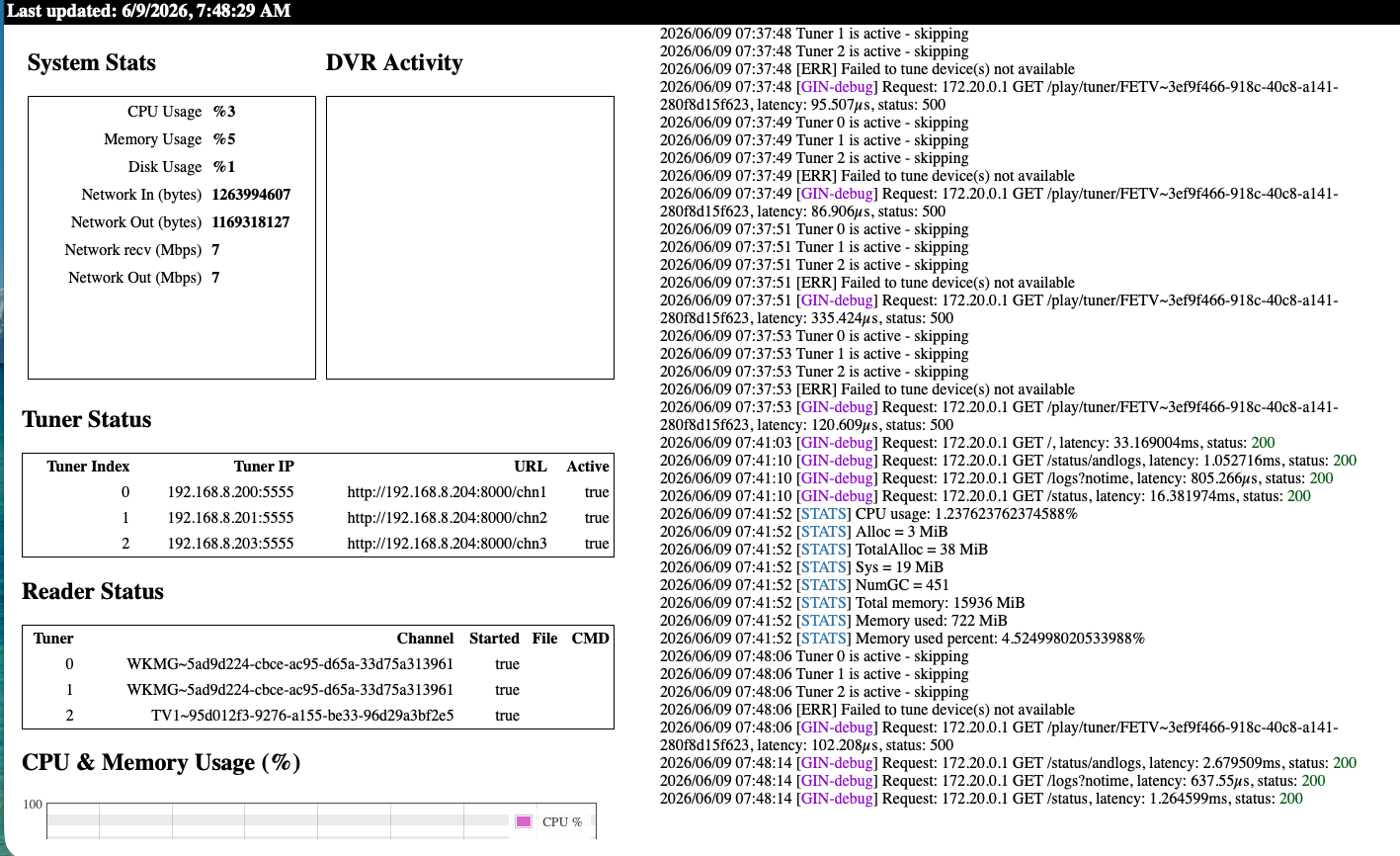
I'm seeing an issue where ah4c thinks tuners are still in use after channelsdvr releases them. Right now, only one tuner is being used, but ah4c believes all 3 are in use, resulting in tuning requests failing. The 2 that should be idle were released over an hour ago.
Let's start by taking a look a one complete tuning cycle for a single channel. This data is best grabbed from Portainer-Logs (change the number of lines to 10000 and turn off Auto-refresh to grab them). Here's an example of such a cycle from one of my setups:
I think there are a couple tuning actions here, but I think it also may catch the problem, as I now show 2 tuners in use for COZI when in fact, none are actually being used by ChannelsDVR.
Attempting network tune for device http://192.168.8.204:8000/chn1 192.168.8.200:5555 WKMG~5ad9d224-cbce-ac95-d65a-33d75a313961

[EXECUTE] Running [./scripts/osprey/dtvospreydeeplinks/prebmitune.sh 192.168.8.200:5555 WKMG~5ad9d224-cbce-ac95-d65a-33d75a313961]

[EXECUTE] Stdout: 'already connected to 192.168.8.200:5555

Waking 192.168.8.200:5555

prebmitune.sh is exiting for 192.168.8.200:5555 with exit code 0

'

[EXECUTE] Stderr: '+ streamerIP=192.168.8.200:5555

+ streamerNoPort=192.168.8.200

+ adbTarget='adb -s 192.168.8.200:5555'

+ mkdir -p 192.168.8.200

+ trap finish EXIT

+ main

 + adbConnect

+ adb connect 192.168.8.200:5555

+ local -i adbMaxRetries=3

+ local -i adbCounter=0

+ true

+ adb -s 192.168.8.200:5555 shell input keyevent KEYCODE_WAKEUP

+ local adbEventSuccess=0

+ [[ 0 -eq 0 ]]

+ break


e

+ adb -s 192.168.8.200:5555 shell input keyevent KEYCODE_WAKEUP

+ echo 'Waking 192.168.8.200:5555'

+ touch 192.168.8.200/adbAppRunning

+ finish

+ echo 'prebmitune.sh is exiting for 192.168.8.200:5555 with exit code 0'

'

[EXECUTE] Finished running ./scripts/osprey/dtvospreydeeplinks/prebmitune.sh in 164.026029ms

[EXECUTE] Running [./scripts/osprey/dtvospreydeeplinks/bmitune.sh WKMG~5ad9d224-cbce-ac95-d65a-33d75a313961 192.168.8.200:5555]

[Tue Jun 9 09:44:26 EDT 2026] Keep-alive started for 192.168.8.200:5555 (interval: 4h)

[IO] io.Copy: write tcp 172.20.0.2:7654->172.20.0.1:60800: write: broken pipe

[IOINFO] Successfully copied 6084492 bytes

[IOINFO] Transfer speed: 6.494723514549132 Mbits/second

Performing Close() for 192.168.8.200:5555

[EXECUTE] Running [./scripts/osprey/dtvospreydeeplinks/stopbmitune.sh 192.168.8.200:5555 WKMG~5ad9d224-cbce-ac95-d65a-33d75a313961]

[EXECUTE] Stdout: 'Starting: Intent { act=android.intent.action.VIEW dat=https://deeplink.directvnow.com/... pkg=com.att.tv.openvideo }

bmitune.sh is exiting for 192.168.8.200:5555 with exit code 0

'

[EXECUTE] Stderr: '++ echo WKMG~5ad9d224-cbce-ac95-d65a-33d75a313961

++ awk -F~ '{print $2}'

+ channelID=5ad9d224-cbce-ac95-d65a-33d75a313961

++ echo WKMG~5ad9d224-cbce-ac95-d65a-33d75a313961

++ awk -F~ '{print $1}'

+ channelName=WKMG

+ specialID=WKMG

+ streamerIP=192.168.8.200:5555

+ streamerNoPort=192.168.8.200

+ adbTarget='adb -s 192.168.8.200:5555'

+ [[ false == '' ]]

+ speedMode=false

+ mkdir -p 192.168.8.200

+ echo 133

+ trap finish EXIT

+ main

+ tuneChannel

+ adb -s 192.168.8.200:5555 shell 'am start -a android.intent.action.VIEW -d '\''https://deeplink.directvnow.com/tune/live/channel/WKMG/5ad9d224-cbce-ac95-d65a-33d75a313961'\'' com.att.tv.openvideo'

Warning: Activity not started, intent has been delivered to currently running top-most instance.

+ echo -e '#!/bin/bash\n\necho "[$(date)] Keep-alive started for 192.168.8.200:5555 (interval: 4h)" > /proc/1/fd/1\nwhile true; do sleep 4h; echo "[$(date)] Keep-alive sent to 192.168.8.200:5555" > /proc/1/fd/1; adb -s 192.168.8.200:5555 shell input keyevent KEYCODE_MEDIA_PLAY; done'

+ chmod +x ./192.168.8.200/keep_watching.sh

+ finish

+ echo 'bmitune.sh is exiting for 192.168.8.200:5555 with exit code 0'

+ [[ -n 4h ]]

+ nohup ./192.168.8.200/keep_watching.sh

Terminated

'

[EXECUTE] Finished running ./scripts/osprey/dtvospreydeeplinks/bmitune.sh in 7.519640999s

[EXECUTE] Stdout: 'Sleep initiated for 192.168.8.200:5555

192.168.8.200/stream_stopped written with epoch stop time

'

[EXECUTE] Stderr: '+ streamerIP=192.168.8.200:5555

+ streamerNoPort=192.168.8.200

+ adbTarget='adb -s 192.168.8.200:5555'

+ main

+ bmituneDone

+ bmitunePID=133

++ pgrep -f 192.168.8.200/keep_watching.sh

+ keepWatchingPID=145

++ ps -o ppid= -p 145

+ keepWatchingPPID=' 144'

++ pgrep -P 145

+ keepWatchingCPID=147

+ ps -p 133

+ [[ -n 4h ]]

+ pkill -P 144

+ kill 147

+ rm ./192.168.8.200/keep_watching.sh

+ adbSleep

+ sleep='input keyevent KEYCODE_SLEEP'

+ adb -s 192.168.8.200:5555 shell input keyevent KEYCODE_SLEEP

+ echo 'Sleep initiated for 192.168.8.200:5555'

+ date +%s

+ echo '192.168.8.200/stream_stopped written with epoch stop time'

'

[EXECUTE] Finished running ./scripts/osprey/dtvospreydeeplinks/stopbmitune.sh in 239.069896ms

[GIN-debug] Request: 172.20.0.1 GET /play/tuner/WKMG~5ad9d224-cbce-ac95-d65a-33d75a313961, latency: 7.970209818s, status: 200
Attempting network tune for device http://192.168.8.204:8000/chn1 192.168.8.200:5555 COZI~9fd00aad-1cc7-cf23-ba3e-bae853bd6165

[EXECUTE] Running [./scripts/osprey/dtvospreydeeplinks/prebmitune.sh 192.168.8.200:5555 COZI~9fd00aad-1cc7-cf23-ba3e-bae853bd6165]

[EXECUTE] Stdout: 'already connected to 192.168.8.200:5555

Waking 192.168.8.200:5555

prebmitune.sh is exiting for 192.168.8.200:5555 with exit code 0

'

[EXECUTE] Stderr: '+ streamerIP=192.168.8.200:5555

+ streamerNoPort=192.168.8.200

+ adbTarget='adb -s 192.168.8.200:5555'

+ mkdir -p 192.168.8.200

+ trap finish EXIT

+ main

 + adbConnect

+ adb connect 192.168.8.200:5555

+ local -i adbMaxRetries=3

+ local -i adbCounter=0

+ true

+ adb -s 192.168.8.200:5555 shell input keyevent KEYCODE_WAKEUP

+ local adbEventSuccess=0

+ [[ 0 -eq 0 ]]

+ break


e

+ adb -s 192.168.8.200:5555 shell input keyevent KEYCODE_WAKEUP

+ echo 'Waking 192.168.8.200:5555'

+ touch 192.168.8.200/adbAppRunning

+ finish

+ echo 'prebmitune.sh is exiting for 192.168.8.200:5555 with exit code 0'

'

[EXECUTE] Finished running ./scripts/osprey/dtvospreydeeplinks/prebmitune.sh in 452.310845ms

[EXECUTE] Running [./scripts/osprey/dtvospreydeeplinks/bmitune.sh COZI~9fd00aad-1cc7-cf23-ba3e-bae853bd6165 192.168.8.200:5555]

[Tue Jun 9 09:46:06 EDT 2026] Keep-alive started for 192.168.8.200:5555 (interval: 4h)

[GIN-debug] Loaded HTML Templates (30):

- silicondust.m3u

- coachella.m3u

- foo-fighters.m3u

- fubo.m3u

- livetv.m3u

-

- dtv407deeplinks.m3u

- spectrum.m3u

- allente.m3u

- channels.m3u

- dtvstreamdeeplinks.m3u

- kodifaves-pbs-seatac.m3u

- pbs-seatac.m3u

- xfinity.m3u

- directv-old.m3u

- npo.m3u

 - sling.m3u

- youtubetv.m3u

- directv-orlando.m3u

- dtvdeeplinks.m3u

- dtvstream.m3u

- nbc.m3u

- youtubetv_shield.m3u

- directvdeeplinks.m3u

- zinwell.m3u

- edc.m3u

- dtvosprey.m3u

- pbs-worcester.m3u

- directv.m3u

- hulu.m3u

[GIN-debug] Loaded HTML Templates (11):

- stream.html

- config.html

- editm3u.html

- index.html

- routes.html

-

 - edit.html

 - logs.html

 - m3us.html

- status.html

- status_and_logs.html

[GIN-debug] Request: 172.20.0.1 GET /m3u/dtv407deeplinks.m3u, latency: 34.776194ms, status: 200

Tuner 0 is active - skipping

Attempting network tune for device http://192.168.8.204:8000/chn2 192.168.8.201:5555 COZI~9fd00aad-1cc7-cf23-ba3e-bae853bd6165

[EXECUTE] Running [./scripts/osprey/dtvospreydeeplinks/prebmitune.sh 192.168.8.201:5555 COZI~9fd00aad-1cc7-cf23-ba3e-bae853bd6165]

[EXECUTE] Stdout: 'already connected to 192.168.8.201:5555

Waking 192.168.8.201:5555

prebmitune.sh is exiting for 192.168.8.201:5555 with exit code 0

'

[EXECUTE] Stderr: '+ streamerIP=192.168.8.201:5555

+ streamerNoPort=192.168.8.201

+ adbTarget='adb -s 192.168.8.201:5555'

+ mkdir -p 192.168.8.201

+ trap finish EXIT

+ main

 + adbConnect

+ adb connect 192.168.8.201:5555

+ local -i adbMaxRetries=3

+ local -i adbCounter=0

+ true

+ adb -s 192.168.8.201:5555 shell input keyevent KEYCODE_WAKEUP

+ local adbEventSuccess=0

+ [[ 0 -eq 0 ]]

+ break


e

+ adb -s 192.168.8.201:5555 shell input keyevent KEYCODE_WAKEUP

+ echo 'Waking 192.168.8.201:5555'

+ touch 192.168.8.201/adbAppRunning

+ finish

+ echo 'prebmitune.sh is exiting for 192.168.8.201:5555 with exit code 0'

'

[EXECUTE] Finished running ./scripts/osprey/dtvospreydeeplinks/prebmitune.sh in 530.510722ms

[EXECUTE] Running [./scripts/osprey/dtvospreydeeplinks/bmitune.sh COZI~9fd00aad-1cc7-cf23-ba3e-bae853bd6165 192.168.8.201:5555]

[Tue Jun 9 09:48:07 EDT 2026] Keep-alive started for 192.168.8.201:5555 (interval: 4h)
[START] ah4c is ready
[GIN-debug] Listening and serving HTTP on :7654
> [email protected] start
> node ./index.js
Listening on:
	http://ah4c1:8000/ http://localhost:8000/
	http://127.0.0.1:8000/ http://172.20.0.2:8000/
	http://[::1]:8000/
Attempting network tune for device http://192.168.8.204:8000/chn1 192.168.8.200:5555 ESPNHD~dede9246-d012-a0b5-3a0d-47e1dab9aad8
[EXECUTE] Running [./scripts/osprey/dtvospreydeeplinks/prebmitune.sh 192.168.8.200:5555 ESPNHD~dede9246-d012-a0b5-3a0d-47e1dab9aad8]
[EXECUTE] Stdout: 'already connected to 192.168.8.200:5555
Waking 192.168.8.200:5555
prebmitune.sh is exiting for 192.168.8.200:5555 with exit code 0
'
[EXECUTE] Stderr: '+ streamerIP=192.168.8.200:5555
+ streamerNoPort=192.168.8.200
+ adbTarget='adb -s 192.168.8.200:5555'
+ mkdir -p 192.168.8.200
+ trap finish EXIT
+ main

+ adbConnect
+ adb connect 192.168.8.200:5555
+ local -i adbMaxRetries=3
+ local -i adbCounter=0
+ true
+ adb -s 192.168.8.200:5555 shell input keyevent KEYCODE_WAKEUP
+ local adbEventSuccess=0
+ [[ 0 -eq 0 ]]
+ break

e
+ adb -s 192.168.8.200:5555 shell input keyevent KEYCODE_WAKEUP
+ echo 'Waking 192.168.8.200:5555'
+ touch 192.168.8.200/adbAppRunning
+ finish
+ echo 'prebmitune.sh is exiting for 192.168.8.200:5555 with exit code 0'
'
[EXECUTE] Finished running ./scripts/osprey/dtvospreydeeplinks/prebmitune.sh in 446.704291ms
[EXECUTE] Running [./scripts/osprey/dtvospreydeeplinks/bmitune.sh ESPNHD~dede9246-d012-a0b5-3a0d-47e1dab9aad8 192.168.8.200:5555]
[Tue Jun  9 10:26:27 EDT 2026] Keep-alive started for 192.168.8.200:5555 (interval: 4h)
Tuner 0 is active - skipping
Attempting network tune for device http://192.168.8.204:8000/chn2 192.168.8.201:5555 ESPNHD~dede9246-d012-a0b5-3a0d-47e1dab9aad8
[EXECUTE] Running [./scripts/osprey/dtvospreydeeplinks/prebmitune.sh 192.168.8.201:5555 ESPNHD~dede9246-d012-a0b5-3a0d-47e1dab9aad8]
[EXECUTE] Stdout: 'already connected to 192.168.8.201:5555
Waking 192.168.8.201:5555
prebmitune.sh is exiting for 192.168.8.201:5555 with exit code 0
'
[EXECUTE] Stderr: '+ streamerIP=192.168.8.201:5555
+ streamerNoPort=192.168.8.201
+ adbTarget='adb -s 192.168.8.201:5555'
+ mkdir -p 192.168.8.201
+ trap finish EXIT
+ main

+ adbConnect
+ adb connect 192.168.8.201:5555
+ local -i adbMaxRetries=3
+ local -i adbCounter=0
+ true
+ adb -s 192.168.8.201:5555 shell input keyevent KEYCODE_WAKEUP
+ local adbEventSuccess=0
+ [[ 0 -eq 0 ]]
+ break

e
+ adb -s 192.168.8.201:5555 shell input keyevent KEYCODE_WAKEUP
+ echo 'Waking 192.168.8.201:5555'
+ touch 192.168.8.201/adbAppRunning
+ finish
+ echo 'prebmitune.sh is exiting for 192.168.8.201:5555 with exit code 0'
'
[EXECUTE] Finished running ./scripts/osprey/dtvospreydeeplinks/prebmitune.sh in 382.810105ms
[EXECUTE] Running [./scripts/osprey/dtvospreydeeplinks/bmitune.sh ESPNHD~dede9246-d012-a0b5-3a0d-47e1dab9aad8 192.168.8.201:5555]
[Tue Jun  9 10:28:27 EDT 2026] Keep-alive started for 192.168.8.201:5555 (interval: 4h)
[IO] io.Copy: write tcp 172.20.0.2:7654->172.20.0.1:34626: write: broken pipe
[IOINFO] Successfully copied 17337296 bytes
[IOINFO] Transfer speed: 6.444878585537081 Mbits/second
Performing Close() for 192.168.8.201:5555
[EXECUTE] Running [./scripts/osprey/dtvospreydeeplinks/stopbmitune.sh 192.168.8.201:5555 ESPNHD~dede9246-d012-a0b5-3a0d-47e1dab9aad8]
[EXECUTE] Stdout: 'Starting: Intent { act=android.intent.action.VIEW dat=https://deeplink.directvnow.com/... pkg=com.att.tv.openvideo }
bmitune.sh is exiting for 192.168.8.201:5555 with exit code 0
'
[EXECUTE] Stderr: '++ echo ESPNHD~dede9246-d012-a0b5-3a0d-47e1dab9aad8
++ awk -F~ '{print $2}'
+ channelID=dede9246-d012-a0b5-3a0d-47e1dab9aad8
++ echo ESPNHD~dede9246-d012-a0b5-3a0d-47e1dab9aad8
++ awk -F~ '{print $1}'
+ channelName=ESPNHD
+ specialID=ESPNHD
+ streamerIP=192.168.8.201:5555
+ streamerNoPort=192.168.8.201
+ adbTarget='adb -s 192.168.8.201:5555'
+ [[ false == '' ]]
+ speedMode=false
+ mkdir -p 192.168.8.201
+ echo 178
+ trap finish EXIT
+ main
+ tuneChannel
+ adb -s 192.168.8.201:5555 shell 'am start -a android.intent.action.VIEW -d '\''https://deeplink.directvnow.com/tune/live/channel/ESPNHD/dede9246-d012-a0b5-3a0d-47e1dab9aad8'\'' com.att.tv.openvideo'
Warning: Activity not started, intent has been delivered to currently running top-most instance.
+ echo -e '#!/bin/bash\n\necho "[$(date)] Keep-alive started for 192.168.8.201:5555 (interval: 4h)" > /proc/1/fd/1\nwhile true; do sleep 4h; echo "[$(date)] Keep-alive sent to 192.168.8.201:5555" > /proc/1/fd/1; adb -s 192.168.8.201:5555 shell input keyevent KEYCODE_MEDIA_PLAY; done'
+ chmod +x ./192.168.8.201/keep_watching.sh
+ finish
+ [[ -n 4h ]]
+ echo 'bmitune.sh is exiting for 192.168.8.201:5555 with exit code 0'
+ nohup ./192.168.8.201/keep_watching.sh
Terminated
'
[EXECUTE] Finished running ./scripts/osprey/dtvospreydeeplinks/bmitune.sh in 21.639728757s
[EXECUTE] Stdout: 'Sleep initiated for 192.168.8.201:5555
192.168.8.201/stream_stopped written with epoch stop time
'
[EXECUTE] Stderr: '+ streamerIP=192.168.8.201:5555
+ streamerNoPort=192.168.8.201
+ adbTarget='adb -s 192.168.8.201:5555'
+ main
+ bmituneDone
+ bmitunePID=178
++ pgrep -f 192.168.8.201/keep_watching.sh
+ keepWatchingPID=190
++ ps -o ppid= -p 190
+ keepWatchingPPID='  189'
++ pgrep -P 190
+ keepWatchingCPID=192
+ ps -p 178
+ [[ -n 4h ]]
+ pkill -P 189
+ kill 192
+ rm ./192.168.8.201/keep_watching.sh
+ adbSleep
+ sleep='input keyevent KEYCODE_SLEEP'
+ adb -s 192.168.8.201:5555 shell input keyevent KEYCODE_SLEEP
+ echo 'Sleep initiated for 192.168.8.201:5555'
+ date +%s
+ echo '192.168.8.201/stream_stopped written with epoch stop time'
'
[EXECUTE] Finished running ./scripts/osprey/dtvospreydeeplinks/stopbmitune.sh in 247.62053ms
[GIN-debug] Request: 172.20.0.1 GET /play/tuner/ESPNHD~dede9246-d012-a0b5-3a0d-47e1dab9aad8, latency: 22.20984483s, status: 200
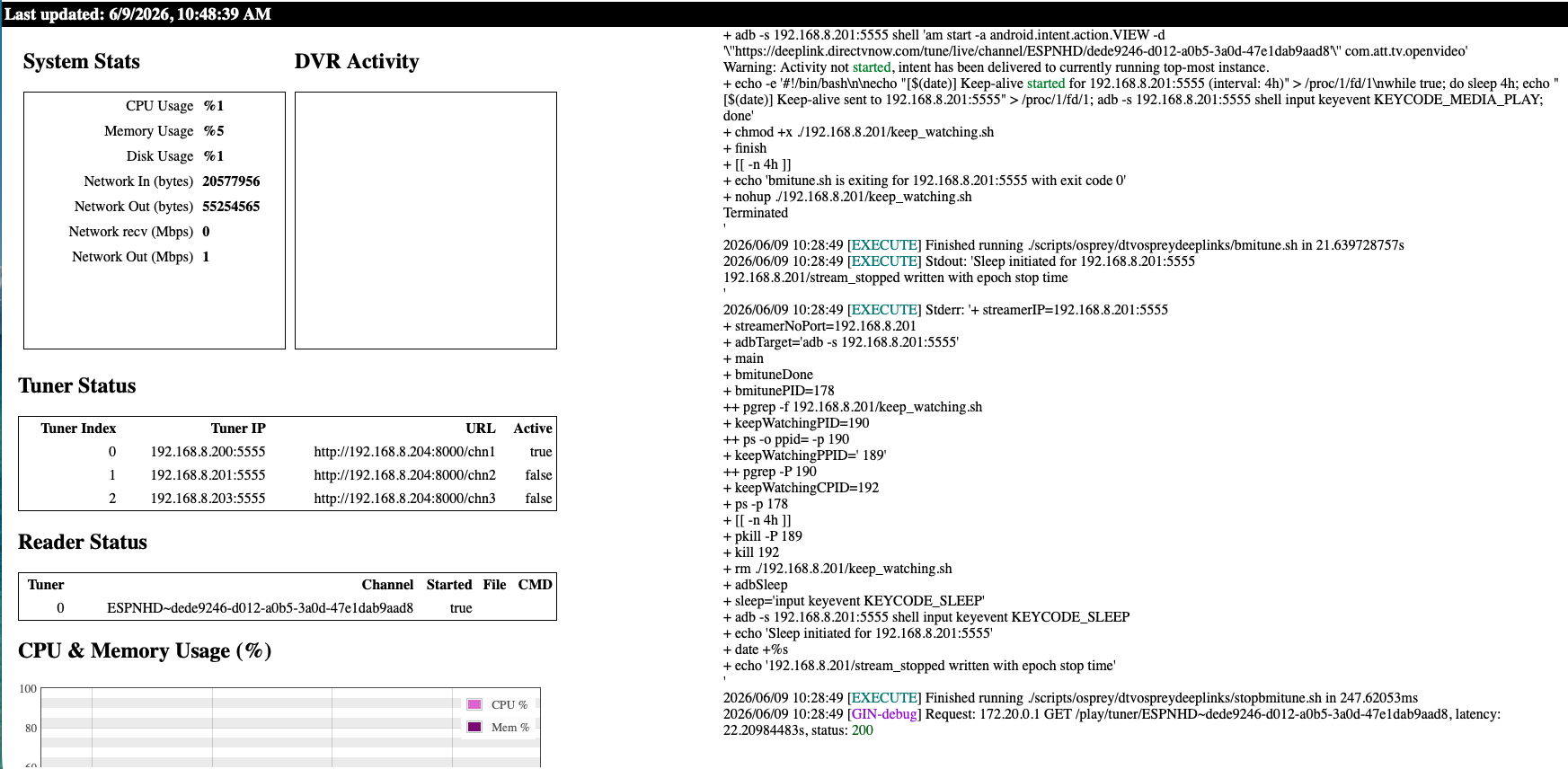
Here is what I got after restarting the container and tuning to ESPN. This tuning attempt took exceptionally long and based on the ah4c status, it used 2 tuners leaving one showing in use. This is what I suspect is happening, as some tuning attempts are quick and others take a minute.
The status over 15 min later still showing the first tuner in use. When the channel was playing on my phone, the first 2 tuners both showed ESPN. This tuning was after a restart of the container, when no tuners were in use.
I see that second tune happening, which I can't explain yet -- that's something I've never seen before.
However, I do want to see the entire log from container start, and yours is missing everything from before the container is ready. I'm looking for this part too:
127.0.0.1	localhost
::1	localhost ip6-localhost ip6-loopback
fe00::	ip6-localnet
ff00::	ip6-mcastprefix
ff02::1	ip6-allnodes
ff02::2	ip6-allrouters
172.20.0.2	ah4c
* daemon not running; starting now at tcp:5037
* daemon started successfully
List of devices attached
connected to 192.168.1.93:5555
connected to 192.168.1.201:5555
Existing ./scripts/firetv/directv/prebmitune.sh found, and will be preserved
Existing ./scripts/firetv/xfinity/prebmitune.sh found, and will be preserved
Existing ./scripts/firetv/directv/bmitune.sh found, and will be preserved
Existing ./scripts/firetv/xfinity/bmitune.sh found, and will be preserved
Existing ./scripts/firetv/directv/stopbmitune.sh found, and will be preserved
Existing ./scripts/firetv/xfinity/stopbmitune.sh found, and will be preserved
Existing allente.m3u found, and will be preserved
Existing channels.m3u found, and will be preserved
Existing coachella.m3u found, and will be preserved
Existing directv.m3u found, and will be preserved
Existing dtvdeeplinks.m3u found, and will be preserved
Existing dtvosprey.m3u found, and will be preserved
Existing dtvstream.m3u found, and will be preserved
Existing dtvstreamdeeplinks.m3u found, and will be preserved
Existing edc.m3u found, and will be preserved
Existing foo-fighters.m3u found, and will be preserved
Existing fubo.m3u found, and will be preserved
Existing hulu.m3u found, and will be preserved
Existing kodifaves-pbs-seatac.m3u found, and will be preserved
Existing livetv.m3u found, and will be preserved
Existing nbc.m3u found, and will be preserved
Existing npo.m3u found, and will be preserved
Existing pbs-seatac.m3u found, and will be preserved
Existing pbs-worcester.m3u found, and will be preserved
Existing silicondust.m3u found, and will be preserved
Existing sling.m3u found, and will be preserved
Existing spectrum.m3u found, and will be preserved
Existing xfinity.m3u found, and will be preserved
Existing youtubetv_shield.m3u found, and will be preserved
Existing youtubetv.m3u found, and will be preserved
Existing zinwell.m3u found, and will be preserved
[START] ah4c is starting
[ENV] Not loading env
[ENV] IPADDRESS                  channels0:7654
[ENV] ALERT_SMTP_SERVER          smtp.gmail.com:587
[ENV] ALERT_AUTH_SERVER          smtp.gmail.com
[ENV] ALERT_EMAIL_FROM           [Redacted]@gmail.com
[ENV] ALERT_EMAIL_PASS           [Redacted]
[ENV] ALERT_EMAIL_TO             [Redacted]@gmail.com
[ENV] ALERT_WEBHOOK_URL
[ENV] ALLOW_DEBUG_VIDEO_PREVIEW
[ENV] Creating tuner             1
[ENV] ENCODER1_URL               http://192.168.1.52:8090/stream0
[ENV] TUNER1_IP                  192.168.1.93:5555
[ENV] CMD1
[ENV] TEECMD1
[ENV] PRE SCRIPT                 ./scripts/firetv/xfinity/prebmitune.sh
[ENV] START SCRIPT               ./scripts/firetv/xfinity/bmitune.sh
[ENV] STOP SCRIPT                ./scripts/firetv/xfinity/stopbmitune.sh
[ENV] REBOOT SCRIPT              ./scripts/firetv/xfinity/reboot.sh
[ENV] Creating tuner             2
[ENV] ENCODER2_URL               http://192.168.1.52:8090/stream2
[ENV] TUNER2_IP                  192.168.1.201:5555
[ENV] CMD2
[ENV] TEECMD2
[ENV] PRE SCRIPT                 ./scripts/firetv/xfinity/prebmitune.sh
[ENV] START SCRIPT               ./scripts/firetv/xfinity/bmitune.sh
[ENV] STOP SCRIPT                ./scripts/firetv/xfinity/stopbmitune.sh
[ENV] REBOOT SCRIPT              ./scripts/firetv/xfinity/reboot.sh
[GIN-debug] [WARNING] Running in "debug" mode. Switch to "release" mode in production.
 - using env:	export GIN_MODE=release
 - using code:	gin.SetMode(gin.ReleaseMode)
[GIN-debug] GET    /favicon.ico              --> main.run.(*RouterGroup).StaticFile.func24 (2 handlers)
[GIN-debug] HEAD   /favicon.ico              --> main.run.(*RouterGroup).StaticFile.func24 (2 handlers)
[GIN-debug] Loaded HTML Templates (11):
	- index.html

	- logs.html

	- m3us.html
	- routes.html
	- stream.html
	- config.html
	- status.html
	- status_and_logs.html
	-

	- edit.html
	- editm3u.html
[GIN-debug] GET    /static/*filepath         --> github.com/gin-gonic/gin.(*RouterGroup).createStaticHandler.func1 (2 handlers)
[GIN-debug] HEAD   /static/*filepath         --> github.com/gin-gonic/gin.(*RouterGroup).createStaticHandler.func1 (2 handlers)
[GIN-debug] GET    /                         --> main.run.func1 (2 handlers)
[GIN-debug] GET    /routes                   --> main.run.func2 (2 handlers)
[GIN-debug] GET    /play/tuner:tuner/:channel --> main.run.func3 (2 handlers)
[GIN-debug] GET    /m3u/:channel             --> main.run.func4 (2 handlers)
[GIN-debug] GET    /env                      --> main.run.func5 (2 handlers)
[GIN-debug] GET    /logs/text                --> main.run.func6 (2 handlers)
[GIN-debug] GET    /logs                     --> main.run.func7 (2 handlers)
[GIN-debug] GET    /status/andlogs           --> main.run.func8 (2 handlers)
[GIN-debug] GET    /logs/json                --> main.run.func9 (2 handlers)
[GIN-debug] GET    /video                    --> main.run.func10 (2 handlers)
[GIN-debug] GET    /status                   --> main.statusPageHandler (2 handlers)
[GIN-debug] GET    /api/status               --> main.apiStatusHandler (2 handlers)
[GIN-debug] GET    /stream                   --> main.run.func11 (2 handlers)
[GIN-debug] GET    /test/webhook             --> main.run.func12 (2 handlers)
[GIN-debug] GET    /test/email               --> main.run.func13 (2 handlers)
[GIN-debug] GET    /status/channelsactivity  --> main.run.func14 (2 handlers)
[GIN-debug] GET    /edit                     --> main.run.func15 (2 handlers)
[GIN-debug] POST   /save                     --> main.run.func16 (2 handlers)
[GIN-debug] POST   /m3usave/:file            --> main.run.func17 (2 handlers)
[GIN-debug] GET    /m3us                     --> main.run.func18 (2 handlers)
[GIN-debug] GET    /editm3u/:file            --> main.run.func19 (2 handlers)
[GIN-debug] GET    /config                   --> main.run.func20 (2 handlers)
[GIN-debug] POST   /configsave               --> main.run.func21 (2 handlers)
[START] ah4c is ready
[GIN-debug] Listening and serving HTTP on :7654
> [email protected] start
> node ./index.js
Listening on:
	http://ah4c:8000/ http://localhost:8000/
	http://127.0.0.1:8000/ http://172.20.0.2:8000/
	http://[::1]:8000/


 I have basic mlb with tmobile, but since I'm a twins fan living in iowa, I can never watch them. at some point I plan on subscribing to the team, but kinda waiting for new ownership, or at-least a lucky mix hot streak. regardless, I'd like to keep them in the m3u. (posting for other's reference)